1
Serv-U File Server User’s Manual
Domain Name & Description
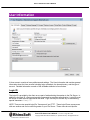
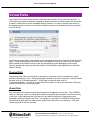
Each Domain must be uniquely identified with a Domain Name. If a name is provided that is not
unique, an error message is shown indicating that a unique name is required for each Domain. The
Domain Name is used purely for administrative purposes and is not visible or accessible to Users.
In addition, each Domain can have additional descriptive information associated with it through the
Description. Like the Domain Name, the Description text is also only available to users with
administrative access. This field is useful for describing the purpose of the domain or summarizing
the resources made available by the Domain's existence on the File Server.
Domains can be temporarily disabled by unchecking the Enable domain checkbox. While disabled,
the Domain is completely inaccessible to all Users. The Domain still exists on the File Server, all
settings are preserved, and it can still be administered while it is disabled. To make the Domain
accessible to Users again, check the Enable domain checkbox.
After making changes to any of the above Domain settings, click the Save button to apply the
changes.
Domain Home Directory
System Administrators can limit the disk space available to a Domain by configuring a home directory
for the Domain and specifying a maximum size. The Domain's home directory does not affect User
directory access rules, nor does it restrict the paths that are available to a User in any way. However,
in order to calculate the amount of disk space in use by a Domain, Serv-U must know the root
directory under which it expects all Domain files to be stored.
To specify the Domain home directory, enter a path in the field labeled Domain Home Directory. The
Browse button can also be used to select a path. When creating a Domain Administrator account for
this Domain, it is suggested that their home directory be the same, which ensures that all Users of the
Domain are placed in a subdirectory of the Domain's home directory. Enter the amount of disk space,
Serv-U File Server User’s Manual – v11.1.0.5 – Page 25 of 105
Copyright 1995-2012 Rhino Software, Inc. (RhinoSoft.com) – All Rights Reserved