1
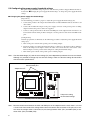
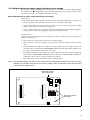
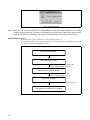
Figure 10 Dialog display
Note : When the user system is turned on, the “USER POWER” LED on the adapter board lights up. If it does
not light up when the power is turned on, immediately turn off the power supply of the entire system,
check for any incorrect connections and resolve the problem before turning on the system again.
■ Shutdown sequence
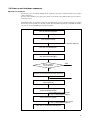
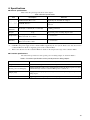
To shut down the system, follow the procedure shown in Figure 11.
To turn off the emulator, press and release the power switch on the back of the emulator. This returns
the depressed switch to the OFF (raised) state.
Exit “Emulator debugger”
Turn off the user system
The USER POWER LED on the pseudo
power-on debug adapter goes out
Turn off the power to the
pseudo power-on debug adapter
The POWER LED on the pseudo
power-on debug adapter goes out
Turn off the emulator
The POWER LED on the emulator goes out
Turn off the host computer (as needed)
Figure 11 Shutdown procedure
12