1
Owner’s Manual
volume control until “IR CODE” appears in the
display.
2.
Press “OK” and “DEFAULT” will appear in the
display.
3.
To change the RC-5 system codes, rotate the
volume control to scroll through the available sets
of RC-5 compatible codes: “SYS11”, “SYS14”,
“SYS15”, and “SYS19”.
4.
5.
Once you’ve decided on one, Press “OK” and
“SAVED” will appear briefly in the display followed
by “IR CODE”.
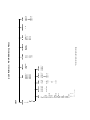
From this point you can (i) exit from the Setup
procedure by pressing the “Setup” button again
and “EXITING” will appear in the display or (iii)
continue with the Setup procedure by disabling the
infrared remote sensor, changing the IR codes,
resetting the 600i back to factory default status
(see the following example), configure the 12 Volt
Trigger Output or configure more inputs (examples
on previous pages).
1.
You may either continue were we left off in the
previous example by turning the volume control
until “RESET” appears in the display OR enter into
the “Setup” mode from the beginning by pressing
the “Setup” button and then rotating the volume
control until “RESET” appears in the display.
2.
Press “OK” and “RESET N” will appear in the display.
3.
Rotate the volume control until “RESET Y” appears
in the display.
4.
Press “OK” and “SURE ? N” will appear in the display.
5.
Rotate the volume control until “SURE ? Y” appears
in the display.
6.
Press “OK” and “SAVED” will briefly appear in the
display followed by “RESET”.
7.
Press the “Setup” button again and “EXITING” will
appear in the display.
Reset the MOON 600i software settings back to their
factory defaults:
13