1
Owner’s Manual
Backlight Function
Your FRM-3 features a backlight capability that allows
you to effortlessly operate this remote control in a
darkened environment. Since battery lifespan is
substantially reduced when the backlighting feature is
activated, the FRM-3 includes 3 different operational
modes to help preserve battery life:
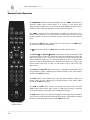
Default Mode (#1): The backlight is triggered on by
either moving the remote control (via an internal
motion detector) or by pressing any button on the
remote’s keypad; The backlight will remain illuminated
for a full five (5) seconds after the last event (motion or
pressed button). To activate the “Default Mode”, press
and hold the “CD” button for three (3) seconds. The
backlight will illuminate once, very briefly for
confirmation.
Button Mode (#2): The backlight is triggered ONLY by
pressing any button on the remote’s keypad - the
internal motion detector is deactivated; The backlight
will remain illuminated for a full five (5) seconds after
the last button is pressed. To activate the “Button
Mode”, press and hold the “AMP” button for three (3)
seconds. The backlight will illuminate twice, very briefly
for confirmation.
Off Mode (#3): The backlight feature is completely
disabled. To activate the “Off Mode”, press and hold the
“DAC” button for three (3) seconds. The backlight will
illuminate three times, very briefly for confirmation.
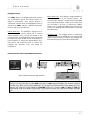
Remote operation with multiple MOON components
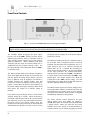
Figure 4: Remote Operation with SimLink™
In figure 4 we have a 180 MiND Music Streamer connected to a 750D DAC via their respective SimLink™ ports
(using a 1/8” mini-jack cable), and the 750D connected to a 700i Integrated Amplifier also via their respective
SimLink™ ports. When you launch the MiND App o on your Apple smart device (full list on the MiND page of our
website) and select this system’s ZONE, the 180 MiND will turn on, as will the 750D and 700i; The 700i will
automatically switch to its “MiND” assigned input. To shut down the system, press “Off” for this ZONE in the MiND
app.
17