1
PainShield® – Instruction for use
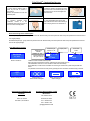
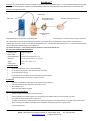
1. Ensure that the treatment area is
2. Place the ultrasonic transducer (the metal
3.
4. Press the ON/OFF button at the upper
clean, dry and free of wounds or
other lesions.
Remove the protective liner from the
treatment patch.
part in the center of the treatment patch) over
the pain source or next to it and tighten the
patch to the skin.
Following treatment patch
placement, connect it to the
PainShield device using the snaps at
the end of the connecting cable.
ON /OFF
side of the device for about 2 seconds till you
hear a beeping sound to turn the device on.
Removal and storage of the treatment patch
Reusable patch (A) – gently remove the patch from the skin. Moist the sticky area of the patch with water and put the protective liner back and store it
in its original package.
Reusable facial patch (B) – gently remove the patch from the skin. Moist the sticky area of the patch with water and put the protective liner back and
store it in its original package.
Pain Shield driver screens
Treatment cycle
number: C1- C6
Battery level
indicator
number: C1- C6
PainShield
Time of treatment in
the cycle: 0-30 min
Ver: 30.03
Device is turned On
C1
Output power
0. 4 W
29 min
IDLE mode
screen
C1
0W
IDLE
Treatment screen indicates treatment phase.
Each cycle has an active period of 30 min. followed by an IDLE period of 30 min.
The PainShield is active for 6.5 hours and then it shuts down automatically.
During treatment, a screen server is activated. For returning to normal screen, press shortly the ON/ OFF
button.
It is possible to turn the device off at any time by pressing the ON / OFF button and hold it during 2 seconds.
-- Off --
-3-
Device is turning Off
Treatment patch is
disconnected or damaged
Battery discharged and
requires charging
Approvals and compliance with
Regulatory Representative in USA
standards
MedicSence
291 Hiliside Avenue
FDA 510 K cleared
Somerset, MA 02726
IEC 60601-1; IEC-60601-2
Tel.: 1-508-479-6116
Fax: 1-508-677-1418
[email protected]
Charging in progress