1
3.1
Introduction
This chapter describes basic features and procedures for using the
panel PC. Topics covered include the floppy drive, CD-ROM drive,
I/O ports, touchscreen, and so on.
3.2
Floppy Drive
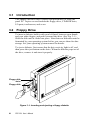
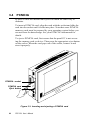
To insert a diskette, hold it with your left hand, between your thumb
and your other fingers, and push it toward the drive. (See Fig. 3-1.)
Slide the disk until it clicks into place. Note that new diskettes must be
formatted by your operating system before you can use them for data
storage. See your operating system manual for details.
To eject a diskette, first ensure that the drive activity light is off, and
then press the eject button on the drive. When the diskette pops out of
the drive, remove it and store it properly.
Floppy disk
drive
Floppy disk
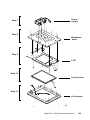
Figure 3-1: Inserting and ejecting a floppy diskette
22
PPC-123 User's Manual