1
A
B
C
D
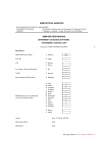
1- Choose the type of operation you need to carry out by clicking on the icon "A".
2- Select the vectors to be used to generate the new vector by clicking on the icons " B"
and "C".
3- If a number is used to generate the new vector, write its value after "Number". By
default, this number is set to 10.
4- Select the vector of results by clicking on the icon "D".
Denote vector 1 by S1(i) and vector 2 by S2(i). The following table then presents the type
of operations available and their results.
Type of operation
Series 1 + Series 2
Series 1 - Series 2
Series 1 * Series 2
Series 1 / Series 2
Series 1 + Number
Series 1 - Number
Series 1 * Number
Series 1 / Number
Exp (Series 1)
Log (Series 1)
Series 1 = Series 2
Series 1 = Number
Series 1 ≥ Series 2
Series 1 ≥ Number
Series 1 ≤ Series 2
Series 1 ≤ Number
Results
S1(i) + S2(i)
S1(i) - S2(i)
S1(i) * S2(i)
S1(i) / S2(i)
S1(i) + Number
S1(i) - Number
S1(i) * Number
S1(i) / Number
Exp(S1(i))
Log(S1(i))
1 :if S1(i) = S2(i), otherwise 0
1 :if S1(i) = S2(i), otherwise 0
1 :if S1(i) ≥ S2(i), otherwise 0
1 :if S1(i) ≥ S2(i), otherwise 0
1 :if S1(i) ≤ S2(i), otherwise 0
1 :if S1(i) ≤ S2(i), otherwise 0
5- Finally, click on the button "Execution" to generate the new vector.
14