1
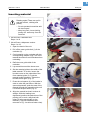
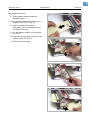
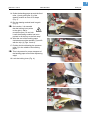
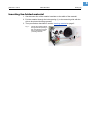
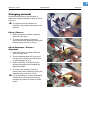
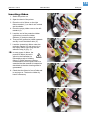
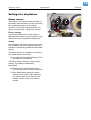
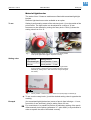
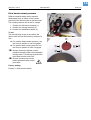
5 05/04 Rev. 3.00-01 USER MANUAL Setting Up 64-xx – 64-xx dispenser Inserting material 1 CAUTION! Rotating axles! These can pull in and tear off hair, clothing and jewelry. – Do not operate the machine with the hood open! – Keep long hair, loose clothing, jewelry etc. well away from the machine! • 64-xx/Chess x standard unit: Steps 1 to 8 • 64-xx/Chess x dispenser version: Steps 1 to 18 2 1. Open the hood of the unit. 2. Pull off the outer guide disk (1) of the unwinder (2). 3. Creel material on the unwinder with the corresponding adapter rings. The roll of material should turn anti-clockwise when unwinding. 4. Refit the outer guide disk of the unwinder. 3 5. Lay material around the dancer arm. 6. Set the material guide to the width of the label material. To do this, loosen the knurled screw on the underside of the front material guide (3). Push the material guide sideways. Tighten the knurled screw again (Fig. 2). 7. Press the red opener (4) of the intake in order to raise the pad rollers. With the opener depressed, push the start of the material through the material guide until it is below the print head (Fig. 3). 8. Align the material so that it is taken in straight. With the loading lever depressed, position the pad rollers of the printing unit in such a way that both rollers (5) sit symmetrically on the material. (The print head has been removed in Fig. 4 to allow a better view). 4