1
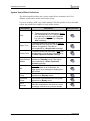
Operating Instructions Utilities Screen Elements Figure 4-8 presents the Utilities screen. The numbered tags in the illustration correspond to the following numbered explanations and definitions of the screens elements: System Information Box: 1. Software Version: displays the version of the software package currently installed in your eTwo/eMatrix system. 2. Sublative RF Applicator Pulses: this open-ended counter displays the accumulated number of pulses emitted by the Sublative RF applicator. This count value will be displayed only when the applicator is connected to the system. 3. Sublime Applicator Pulses: this open-ended counter displays the accumulated number of pulses emitted by the Sublime applicator. This count value will be displayed only when the applicator is connected to the system. Figure 4-8: Utilities Screen Elements Maintenance Box: 4. Change Password: press this button; a virtual keypad screen (similar to the Login screen) will appear. Follow the on-screen instructions above the keypad to change the password: • Enter the old (current) password and press OK (). • Enter the new password and press OK (). • Enter the new password again for confirmation and press OK (). 4-12 PB75531EN