1
i
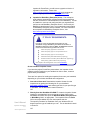
TO USE YOUR
SHOWMATE:
1. Ensure that the Impatica
Viewer and/or the
Impatica Screen
Projector /Impatica
Connector software has
been installed on your
handheld.
2. If projecting PowerPoint
presentations, on your
PC, convert and load your
presentation using
Impatica for PowerPoint
BlackBerry or Mobile
Edition.
3. Have ready:
• Your ShowMate power
adapter;
• A projector or monitor
with its VGA cable.
This section will explain
these steps.
SECTION 1: OVERVIEW
Introduction
Impatica ShowMate is a sleek, compact electronic accessory that allows
you to connect your BlackBerry, Palm, Sony Ericsson or Windows Mobile
handheld to a projector or other display in order to present slide shows
created in Microsoft PowerPoint. For BlackBerry and Windows Mobile
devices, the handheld screen can also be projected. This alleviates the
need to carry a heavy, awkward laptop computer for the purposes of giving
presentations and provides a convenient, easy-to-use way to project your
handheld screen for training and demonstration sessions.
This User’s Manual explains everything you need to know about using
Impatica ShowMate. It is not intended to teach you how to use PowerPoint.
We presume that you already have adequate knowledge in that area.
Inside the Package
The Impatica ShowMate package includes everything you need to become
a mobile presenter. It is specifically designed to make your user
experience as easy and intuitive as possible. We recommend that you
download the latest versions of all software and firmware from the Impatica
website; links are provided throughout this guide.
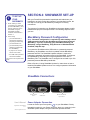
Impatica ShowMate
Impatica ShowMate is a simple, compact device. It acts as an interface
between your handheld and the projector or display to allow presentation
of full-fidelity presentations without the need for a computer.
International Power Adapter
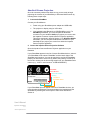
An international power adapter is provided with interchangeable plugs for
North America, United Kingdom, Europe and Australia. Please note that
the same plug may be used for North America and Australia simply by
twisting or rotating the individual tines by 45 degrees.
See Knowledgebase article:
https://www.impaticize.com/impkb/questions/83/
USB Cable
A USB cable is provided. When projecting a presentation, it is used for
connecting your ShowMate to the international power adapter provided.
User’s Manual
Impatica ShowMate
V 2.4
It is also used to connect your BlackBerry handheld to your Windows PC
for transferring PowerPoint presentations to the handheld. For users of all
other handhelds, you must use the USB cable that was provided with your
handheld.
The USB cable may also be used for a wired connection between a
BlackBerry handheld and the ShowMate. However, users of 7700 series
must use the USB cable supplied with your BlackBerry if you wish to make
www.impatica.com
5