1
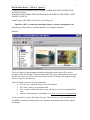
The SMMS application has a multifunctional help system. It allows you to ask for the SMMS
definition of a field or the FGDC definition. The FGDC version is more in depth and can also
include examples. These examples are helpful since most of the FGDC structure was written for
the advanced metadata user. The examples help translate this federal code into a more userfriendly verbiage. It also provides useful examples from other metadata sets.
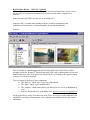
A typical entry text box visually truncates data until the user clicks on the text box. Double
clicking on a typical entry text box will bring up a larger text box that is expanded for easier text
editing and entry. A single click places the cursor in the text box and then displays the up and
down scrolling arrows for the user use in navigating the text box..
RTSe tech support has responded to each email that has have sent before the close of business
that day. They are proactive and want to help. They are professional and useful.
When an updated version of SMMS is released you have to uninstall the current version on your
computer before you can install the upgrade. The MS Access database is not deleted during the
uninstall process. Once you install the upgrade then you have to run your current database
through a database upgrade utility that comes with each SMMS upgrade. The database upgrade
utility does convert databases from the last 3 versions into the current version. This becomes
important if you decide not to upgrade right away. Your database may not be upgradeable after a
while. There has never been a cost for any of the 4 upgrades that were released during this
project.
11