1
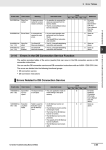
3 Error Tables 3-1-5 Errors in the EtherCAT Master Function Module Built-in EtherCAT Master in CPU Unit Event name Assumed cause 04400000 hex Communications Controller Failure An error was detected in the hardware test at startup. • The CPU Unit has failed. S NJ-series CPU Unit Built-in EtherCAT Port User’s Manual (Cat. No. W505) 14400000 hex MAC Address Error The MAC address is incorrect. • The CPU Unit has failed. S Same as above. 44010000 hex EtherCAT Fault A fatal error was detected in the EtherCAT Master Function Module. • Software is corrupted. S Same as above. 84200000 hex Link OFF Error A Link OFF state occurred. • The Ethernet cable is broken between the master and slaves. S Same as above. Maj Prt Min Obs Info Reference 3 3-1-5 Errors in the EtherCAT Master Function Module • The Ethernet cable connector is disconnected. • The Ethernet cable is not connected. 24200000 hex Slave Node Address Duplicated The same slave address is used for two nodes. • The same node address is set for more than one slave. S Same as above. 34400000 hex Network Configuration Information Error There is an error in the network configuration information. • The power supply to the Controller was interrupted or communications with the Sysmac Studio were disconnected while downloading the network configuration information. S Same as above. 50010000 hex (Ver. 1.02) Controller Insufficient Memory Warning The amount of data for the EtherCAT slave configuration, network-published information, or other data exceeds the value that is specified for the CPU Unit. You may not be able to perform online editing or other operations. • The amount of data for the EtherCAT slave configuration, network-published information, or other data exceeds the value that is specified for the CPU Unit. S Same as above. 84210000 hex Network Configuration Error The EtherCAT network configuration is incorrect. • Slave output ports are connected to each other. S Same as above. NJ-series Troubleshooting Manual (W503) 3-1 Errors by Source Meaning Level Event code • The master and slave are connected with the slave output port. • The number of connected slaves exceeded the maximum number of slaves, 192 nodes, for the EtherCAT master. 3-85 3 Error Tables Event code Event name Meaning Assumed cause 84220000 hex Network Configuration Verification Error A slave that is in the network configuration information is not connected. Or, a slave that is not in the network configuration information is connected. • A slave that is in the network configuration information is not connected. Level Maj Prt Min Obs Info Reference S NJ-series CPU Unit Built-in EtherCAT Port User’s Manual (Cat. No. W505) S Same as above. • There is a node address mismatch. • A different slave from the one that is specified in the network configuration information is connected. • A slave that is not in the network configuration information is connected. • The hardware switches for the slave node address were changed to a value other than 0 after the Write Slave Node Address operation was performed from the Sysmac Studio. • The Ethernet physical layer is broken between two slaves. 84230000 hex Slave Initialization Error Slave initialization failed. • An error occurred in EtherCAT master processing. • An initialization error occurred in the EtherCAT slave. • An initialization error occurred in the EtherCAT Coupler Unit. • A major fault level Controller error occurred. • The Ethernet cable is broken or the specified cable is not being used. • A connector on the Ethernet cable is disconnected, the contact is faulty, or parts are faulty. • A general-purpose Ethernet hub is connected. • The master failed. • The slave failed. • Noise. 84280000 hex Slave Application Error An error occurred in the slave application. • An error was detected in the slave’s application layer status register. S Same as above. 84290000 hex Process Data Transmission Error Sending process data failed. • It was not possible to send the EtherCAT frame during the EtherCAT communications period. S Same as above. • The frame transmission jitter exceeded the limit. 3-86 NJ-series Troubleshooting Manual (W503) 3 Error Tables Event code Event name Meaning Assumed cause 842B0000 hex Process Data Reception Timeout Process data reception timed out. • The Ethernet cable is broken or the specified cable is not being used. Level Maj Prt Min Obs Info Reference NJ-series CPU Unit Built-in EtherCAT Port User’s Manual (Cat. No. W505) S Same as above. • A connector on the Ethernet cable is disconnected, the contact is faulty, or parts are faulty. • A general-purpose Ethernet hub is connected. • The master failed. • The slave failed. • The Ethernet cable is too long. • The CPU Unit task period is too short. 3-1 Errors by Source S • Noise 842C0000 hex Process Data Communications Error An error occurred in process data communications. • A slave left the network even though the disconnection operation was not performed. 3 3-1-5 Errors in the EtherCAT Master Function Module • The Ethernet cable is broken or the specified cable is not being used. • A connector on the Ethernet cable is disconnected, the contact is faulty, or parts are faulty. • The slave failed. 102F 0000 hex (Ver. 1.03) EtherCAT Slave Backup Failed The backup operation for an EtherCAT slave ended in an error. • There is no connection between the EtherCAT master and the slave (Link OFF). S Same as above. • An error caused an incorrect EtherCAT master status. • The EtherCAT network configuration information does not agree with the physical network configuration. • The request to the EtherCAT slave failed. • The EtherCAT master was temporarily unable to perform the processing because it was executing other processing. • Initialization of the EtherCAT slave failed. • It was not possible to read the backup parameters from the EtherCAT slave. • Communications with an OMRON Communications Coupler Unit or NX Unit failed. NJ-series Troubleshooting Manual (W503) 3-87 3 Error Tables Event code 10300000 hex (Ver. 1.03) Event name EtherCAT Slave Restore Operation Failed Meaning The restore operation for an EtherCAT slave ended in an error. Assumed cause • There is no connection between the EtherCAT master and the slave (Link OFF). Level Maj Prt Min Obs Info Reference S NJ-series CPU Unit Built-in EtherCAT Port User’s Manual (Cat. No. W505) • An error caused an incorrect EtherCAT master status. • The EtherCAT network configuration information does not agree with the physical network configuration. • The request to the EtherCAT slave failed. • The EtherCAT master was temporarily unable to perform the processing because it was executing other processing. • Initialization of the EtherCAT slave failed. • It was not possible to write the backup parameters to the MX2/RX Series Inverter. • It was not possible to write the backup parameters to the EtherCAT slave. • Incorrect backup data was detected. • The EtherCAT network configuration in the backup data does not agree with the physical network configuration. • An error occurred at an OMRON Communications Coupler Unit. The following causes are possible. • Reading a backup file failed at the Communications Coupler Unit (when attached information 4 is 1). • Communications with the Communications Coupler Unit or NX Unit failed (when attached information 4 is 2). • The Unit Configuration of the NX Units in the Communications Coupler Unit when data was backed up did not agree with the actual configuration of NX Units (when attached information 4 is 3). 64200000 hex Emergency Message Detected An emergency message was detected. • An emergency message was received from a slave. S Same as above. 842D 0000 hex EtherCAT Message Error An error occurred in a message communications with the slave. • Refer to the attached information to check the error. S Same as above. 94400000 hex Slave Disconnected A slave was disconnected for a disconnection command. • An operation to disconnect the slave was executed from the Sysmac Studio. S Same as above. • The EC_DisconnectSlave instruction was executed. 3-88 NJ-series Troubleshooting Manual (W503) 3 Error Tables Event code 94410000 hex Event name Slave Connected Meaning A slave was reconnected for a reconnection command. Assumed cause Level Maj Prt Min Obs • An operation to reconnect the slave was executed from the Sysmac Studio. Info NJ-series CPU Unit Built-in EtherCAT Port User’s Manual (Cat. No. W505) Errors Reset A command was received to reset errors. • An error reset operation was performed from the Sysmac Studio. S Same as above. • The ResetECError instruction was executed. 94440000 hex (Ver. 1.04) Slave Disabled The EtherCAT Slave was disabled. • The EC_ChangeEnableSetting instruction was executed. S Same as above. 94450000 hex (Ver. 1.04) Slave Enabled The EtherCAT Slave was enabled. • The EC_ChangeEnableSetting instruction was executed. S Same as above. 3 Errors in the DB Connection Service Function The section provides tables of the errors (events) that can occur in the DB connection service or DB connection instructions. You can use the DB connection service and DB connection instructions with an NJ501-120 CPU Unit. The errors are divided into the following functional groups. • DB connection service • DB connection instructions Errors Related to DB Connection Service Event code Event name Meaning Assumed cause Level Maj Prt Min 14D00000 hex (Ver. 1.05) Spool Memory Corrupted The Spool memory is corrupted. • The user application made an invalid writing to the Spool memory. S 14D20000 hex (Ver. 1.05) Execution Log Save Failed Failed to save the Execution Log to the SD Memory Card. • An SD Memory Card is not inserted. S Obs Info Reference NJ-series Database Connection CPU Units User’s Manual (Cat. No. W527) U Same as above. • The SD Memory Card is not the correct type of card. • The format of the SD Memory Card is not correct. • The SD Memory Card is writeprotected. • The capacity of the SD Memory Card is insufficient. • The SD Memory Card is damaged. NJ-series Troubleshooting Manual (W503) 3-89 3-1-6 Errors in the DB Connection Service Function 3-1-6 3-1 Errors by Source S • The EC_ConnectSlave instruction was executed. 94430000 hex Reference