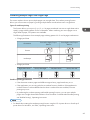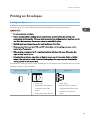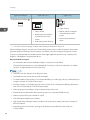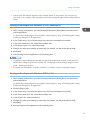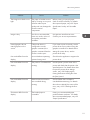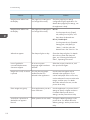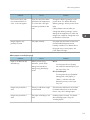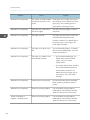
1
User Guide
Getting Started
Printing
Troubleshooting
Replenishing and Replacing Consumables
For information not in this manual, refer to
the HTML/PDF files on the supplied
CD-ROM.
Read this manual carefully before you use this machine and keep
it handy for future reference. For safe and correct use, be sure to
read the Safety Information in "Read This First" before using the
machine.
TABLE OF CONTENTS
1. Getting Started
Before You Start..................................................................................................................................................5
How to Read the Manuals.............................................................................................................................5
List of Options.................................................................................................................................................6
Printer Types....................................................................................................................................................7
Model-Specific Information...........................................................................................................................8
Guide to Names and Functions of Components............................................................................................10
Guide to Components.................................................................................................................................10
Guide to the Names and Functions of the Printer's Control Panel...........................................................13
Using the Screen on the Control Panel...........................................................................................................16
How to Use the [Home] Screen..................................................................................................................16
How to Use the Screens on the Control Panel...........................................................................................18
Switching Screen Patterns...........................................................................................................................20
Adding Icons to the [Home] Screen...........................................................................................................21
Logging in the Printer........................................................................................................................................23
User Code Authentication Using the Control Panel..................................................................................23
User Code Authentication Using a Printer Driver......................................................................................23
Logging In Using the Control Panel............................................................................................................23
Logging Out Using the Control Panel.........................................................................................................24
Logging In Using a Printer Driver................................................................................................................24
Logging In Using Web Image Monitor......................................................................................................25
Logging Out Using Web Image Monitor...................................................................................................26
Turning On/Off the Power..............................................................................................................................27
Turning On the Power..................................................................................................................................27
Turning Off the Power..................................................................................................................................27
Saving Energy..............................................................................................................................................28
Displaying the Printer Configuration Screens.................................................................................................30
Displaying the Printer Driver Properties with Windows.............................................................................30
Displaying the Printer Driver Properties with Mac OS X...........................................................................32
2. Printing
Paper Specification..........................................................................................................................................33
Supported Paper for Each Input Tray.........................................................................................................33
Supported Paper for Each Output Tray.....................................................................................................39
1
Notes about Paper Thickness......................................................................................................................46
Print Area......................................................................................................................................................47
Loading Paper..................................................................................................................................................49
Precautions for Loading Paper....................................................................................................................49
Unusable Paper............................................................................................................................................49
Paper Storage..............................................................................................................................................50
Loading Paper into Paper Trays..................................................................................................................51
Loading Paper into the Bypass Tray...........................................................................................................53
Loading Paper into Tray 3 (LCT).................................................................................................................54
Loading Paper into the Large Capacity Tray (LCT)...................................................................................56
Loading Orientation-Fixed Paper or Two-Sided Paper............................................................................57
Standard Printing..............................................................................................................................................59
Printing with Windows (PCL 6/PostScript 3).............................................................................................59
Printing with Windows (PCL 5c/5e)..........................................................................................................60
Printing with Mac OS X...............................................................................................................................61
Printing on Both Sides of Sheets..................................................................................................................62
Combining Multiple Pages into Single Page.............................................................................................63
Printing on Envelopes.......................................................................................................................................65
Loading Envelopes.......................................................................................................................................65
Printing on Envelopes with Windows (PCL 6/PostScript 3).....................................................................67
Printing on Envelopes with Windows (PCL 5c/5e)...................................................................................67
Printing on Envelopes with Mac OS X........................................................................................................68
Storing a Document.........................................................................................................................................69
Storing a Document with Windows............................................................................................................69
Storing a Document with Mac OS X..........................................................................................................70
3. Troubleshooting
When Indicators Are Displayed......................................................................................................................73
When a Panel Tone Beeps..............................................................................................................................74
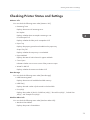
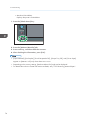
Checking Printer Status and Settings..............................................................................................................75
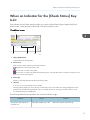
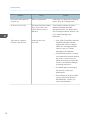
When an Indicator for the [Check Status] Key Is Lit......................................................................................77
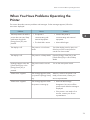
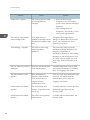
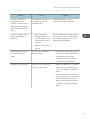
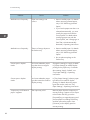
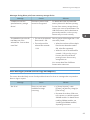
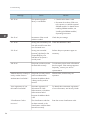
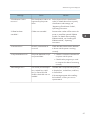
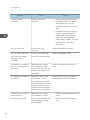
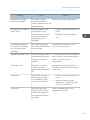
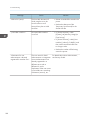
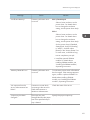
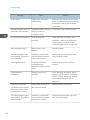
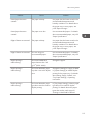
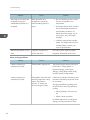
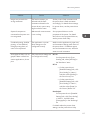
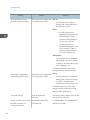
When You Have Problems Operating the Printer..........................................................................................79
When the Color Registration Shifts.................................................................................................................85
When the Printed Color Changes...................................................................................................................86
2
Setting the Gradation Correction Value....................................................................................................86
Gradation Correction Sheet.......................................................................................................................87
Resetting the Gradation Correction Value to the Default Value..............................................................89
If USB Connection Fails...................................................................................................................................90
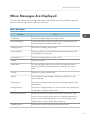
When Messages Are Displayed.....................................................................................................................91
Status Messages..........................................................................................................................................91
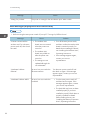
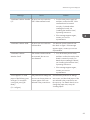
Alert Messages (Displayed on the Control Panel)....................................................................................92
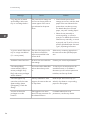
Alert Messages (Printed on Error Logs and Reports)................................................................................95
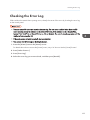
Checking the Error Log..................................................................................................................................105
When You Cannot Print.................................................................................................................................106
When the Data In Indicator Does Not Light Up or Flash.......................................................................108
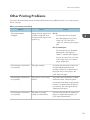
Other Printing Problems.................................................................................................................................109
When PictBridge Printing Does Not Work...................................................................................................121
Removing Jammed Paper..............................................................................................................................122
Locating Jammed Paper............................................................................................................................123
When R1–R4 Is Displayed for the 2000-sheet Booklet Finisher...........................................................124
When R5–R7 Is Displayed for the 2000-sheet Booklet Finisher...........................................................125
When R8–R12 Is Displayed for the 2000-sheet Booklet Finisher........................................................126
When R1–R4 Is Displayed for the 3000-sheet finisher.........................................................................127
When R5 - R8 Is Displayed for the 3000-sheet finisher........................................................................128
Removing Jammed Staples...........................................................................................................................129
2000-sheet Booklet Finisher.....................................................................................................................130
2000-sheet Booklet Finisher (Saddle Stitch)...........................................................................................131
3000-sheet Finisher..................................................................................................................................132
Removing Punch Waste.................................................................................................................................133
4. Replenishing and Replacing Consumables
Adding Toner.................................................................................................................................................135
Replacing Other Consumables.....................................................................................................................138
Adding Staples...............................................................................................................................................140
Trademarks.....................................................................................................................................................141
3
4
1. Getting Started
This section describes the symbols used in the manuals supplied with the printer, available options,
names and functions of components, and setup procedures.
Before You Start
How to Read the Manuals
Symbols used in the manuals
This manual uses the following symbols:
Indicates points to pay attention to when using the machine, and explanations of likely causes of paper
misfeeds, damage to originals, or loss of data. Be sure to read these explanations.
Indicates supplementary explanations of the machine's functions, and instructions on resolving user
errors.
This symbol is located at the end of sections. It indicates where you can find further relevant information.
[]
Indicates the names of keys on the machine's display or control panels.
(mainly Europe and Asia)
(mainly North America)
Differences in the functions of Region A and Region B models are indicated by two symbols. Read the
information indicated by the symbol that corresponds to the region of the model you are using. For
details about which symbol corresponds to the model you are using, see p.8 "Model-Specific
Information".
Disclaimer
Contents of this manual are subject to change without prior notice.
To the maximum extent permitted by applicable laws, in no event will the manufacturer be liable for any
damages whatsoever arising out of failures of this machine, losses of the registered data, or the use of
this product and operation manuals provided with it.
5
1. Getting Started
Make sure that you always copy or have backups of the data registered in this machine. Documents or
data might be erased due to your operational errors or malfunctions of the machine.
In no event will the manufacturer be responsible for any documents created by you using this machine or
any results from the data executed by you.
Notes
The manufacturer shall not be responsible for any damage or expense that might result from the use of
parts other than genuine parts from the manufacturer with your office products.
For good output quality, the manufacturer recommends that you use genuine toner from the
manufacturer.
Some illustrations in this manual might be slightly different from the machine.
About IP address
In this manual, "IP address" covers both IPv4 and IPv6 environments. Read the instructions that are
relevant to the environment you are using.
List of Options
This section provides a list of options for this printer and the names commonly used in this manual.
The Type 2 model comes equipped with a hard disk. For information about different models, see .p.7
"Printer Types"
Option name
6
Description
Paper Feed Unit PB3120
500-sheet paper feed unit
Paper Feed Unit PB3130
1000-sheet paper feed unit
LCIT PB3140
2000-sheet paper feed unit
LCIT RT3020
1200-sheet paper feed unit
Mail Box CS3000
Mailbox
Bridge Unit BU3060
Bridge unit
Booklet Finisher SR3110
2000-sheet booklet finisher
Finisher SR3120
3000-sheet finisher
Before You Start
Option name
Description
Punch Unit PU 3030 NA
Punch Unit PU 3030 EU
Punch unit
Punch Unit PU 3030 SC
Output Jogger Unit Type 9002A
Memory Unit Type J 512MB
Memory Unit Type O 1GB
Hard Disk Drive Option Type C830 *1
Gigabit Ethernet Board Type B
Output jogger unit
SDRAM module
Hard disk
Gigabit Ethernet board
Gigabit Ethernet Board Type D
IEEE802.11a/g Interface Unit Type M
IEEE802.11 Interface Unit Type P
Wireless LAN interface board
IEEE802.11a/g Interface Unit Type L
IEEE 1284 Interface Board Type A
IEEE 1284 interface board
Camera Direct Print Card Type J
Camera direct print card
SD card for NetWare printing Type O
NetWare card
VM Card Type U
VM card
*1 Available for the Type 1 model only.
Printer Types
This printer comes in two models that have different printing speeds.
When describing procedures that are model-specific, this manual refers to the different printer models as
Type 1 or Type 2. The following table describes the model types.
7
1. Getting Started
Model types
Printing speed
Hard disk
Type 1
Maximum 45 pages per minute (A4 )
Optional
Type 2
Maximum 55 pages per minute (A4 )
Standard
Certain types might not be available in some countries. For details, please contact your local dealer.
Certain options might not be available in some countries. For details, please contact your local dealer.
Depending on which country you are in, certain units may be optional. For details, please contact your
local dealer.
Model-Specific Information
This section explains how to identify the region to which your printer belongs.
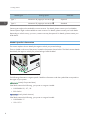
There is a label on the rear of the printer, located in the position shown below. The label contains details
that identify the region to which your printer belongs. Read the label.
CQT651
The following information is region-specific. Read the information under the symbol that corresponds to
the region of your printer.
(mainly Europe and Asia)
If the label contains the following, your printer is a region A model:
• CODE XXXX -22, -27, -29
• 220–240 V
(mainly North America)
If the label contains the following, your printer is a region B model:
• CODE XXXX -17
• 120–127 V
8
Before You Start
• Dimensions in this manual are given in two units of measure: metric and inch. If your printer is a
Region A model, refer to the metric units. If your printer is a Region B model, refer to the inch units.
9
1. Getting Started
Guide to Names and Functions of Components
Guide to Components
• Do not obstruct the ventilation holes by placing objects near or against them. If the printer
overheats, a malfunction might occur.
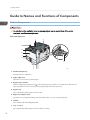
Front and right view
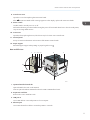
1
2
12
11
10
9
8
4
7
6 5
3
CQT003
1. Standard output tray
Printed pages are output here.
2. Upper right cover
Open this cover to remove jammed paper.
3. Bypass tray extension
When loading paper larger than A4 , pull out the bypass tray extension. For details about the sizes and
types of paper that can be used, see p.33 "Supported Paper for Each Input Tray".
4. Bypass tray
Up to 100 sheets of plain paper can be loaded.
5. Right cover (Duplex unit)
Open this cover to replace the fusing unit and transfer roller, or to remove jammed paper.
6. Handle
Pull out this handle when lifting the printer.
7. Tray 1, Tray 2
Up to 550 sheets of plain paper can be loaded in each tray.
10
Guide to Names and Functions of Components
8. Front lower cover
Open this cover when replacing the waste toner bottle.
If the "
Waste Toner Bottle is full." message appears on the display, replace the waste toner bottle.
9. Power switch
Use this switch to turn the power on or off.
Perform the shutdown procedure before turning the power off. For details about how to shut down the printer,
see p.27 "Turning Off the Power".
10. Front cover
Open this when replacing the toner, black drum unit/color drum units or transfer unit.
11. Control panel
See p.13 "Guide to the Names and Functions of the Printer's Control Panel".
12. Paper support
Extend the paper support when printing on paper larger than A3 .
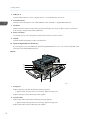
Rear and left view
1
2 3 4 5
6
7
10
9
8
CQT001
1. Optional interface board slot
Optional interface boards can be inserted.
Insert an optional wireless LAN interface board or IEEE 1284 interface board.
2. Expansion card slots
Remove the cover to install SD cards.
3. USB port B
Use a USB cable to connect the printer to a host computer.
4. Ethernet port
Use a network interface cable to connect the printer to a network.
11
1. Getting Started
5. USB port A
Connect external devices such as a digital camera, a card authentication device, etc.
6. Controller board
Slide this out to install options such as the SDRAM module, hard disk, or Gigabit Ethernet board.
7. Ventilator
Releases heat from internal components to prevent overheating. Do not place objects against or near these
holes. Doing so might result in printer malfunction.
8. Power connector
Connect the power cord to the printer. Insert the other end into an electrical outlet.
9. Handle
Hold this handle when pulling out the controller board.
10. Optional Gigabit Ethernet board port
By removing this cover and installing the optional Gigabit Ethernet board, you can connect an Ethernet cable
to the port on the Gigabit Ethernet board.
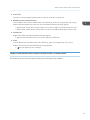
Interior
1
6
5
4
3
2
CQT004
1. Fusing unit
Replace the fusing unit when the following message appears:
• "Replacement of Fusing Unit is now necessary. Replace Fusing Unit."
Replace the fusing unit and the transfer roller together.
2. Transfer roller
Replace the transfer roller when the following message appears:
• "Replacement of Fusing Unit is now necessary. Replace Fusing Unit."
Replace the transfer roller and the fusing unit together.
12
Guide to Names and Functions of Components
3. Inner cover
Open this cover when replacing the black drum unit/color drum units or transfer unit.
4. Black drum unit / Color drum units
From the left, the drum units are installed in the order of black (K), yellow (Y), magenta (M), and cyan (C).
Replace the relevant black drum unit/color drum units when the following message appears:
• "Replacement of Color Photoconductor Unit is now necessary. Replace Color Photoconductor Unit."
• "Replacement of Black Photoconductor Unit is now necessary. Replace Black Photoconductor Unit."
5. Transfer unit
Replace the transfer unit when the following message appears:
• "Replacement of Transfer Unit is now necessary. Replace Transfer Unit."
6. Toner
From the left, the toner is installed in the order of black (K), yellow (Y), magenta (M), and cyan (C).
Replace the relevant toner when the following message appears:
• "
No toner. Replace Toner Cartridge."
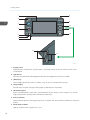
Guide to the Names and Functions of the Printer's Control Panel
This illustration shows the control panel of the printer with options fully installed.
13
1. Getting Started
1
8
2
9
3
10
4
11
12
5
6
7
13
14
CQT135
1. Display panel
Displays keys for each function, operation status, or messages. See p.18 "How to Use the Screens on the
Control Panel".
2. Light Sensor
The sensor that detects the ambient light level when the ECO Night Sensor function is enabled.
3. [Home] key
Press to display the [Home] screen. For details, see p.16 "How to Use the [Home] Screen".
4. [Suspend] key
Press this key to suspend a print job. The key lights up while the job is suspended.
5. [Check Status] key
Press to check the printer's system status, operational status of each function, and current jobs. You can also
display the job history and the printer's maintenance information.
6. Data In indicator
Flashes when the printer is receiving print jobs from a computer. The data in indicator is lit if there is data to be
printed.
7. Check Status indicator
Lights up or flashes when a printer error occurs.
14
Guide to Names and Functions of Components
Steady red: printing is not possible.
Flashing yellow: the printer will soon require maintenance or a replacement consumable such as a print
cartridge. Printing is possible, but print quality cannot be ensured.
Follow the instructions that appear on the display.
8. Power indicator
Remains lit while the power is on. It is unlit when the power is off or while the printer is in energy saver mode.
9. [Energy Saver] key
Press to switch to and from Sleep mode. See p.28 "Saving Energy". When the printer is in Sleep mode, the
[Energy Saver] key flashes slowly.
10. [Login/Logout] key
Press to log in or log out.
11. [User Tools] key
Press to change the default settings to meet your requirements. See "Displaying the Printer Configuration
Screens Using the Control Panel", Operating Instructions.
12. [Simple Screen] key
Press to switch to the simple screen. See p.20 "Switching Screen Patterns".
13. Media access lamp
Lights up when a memory storage device is inserted in the media slot or accessed.
14. Media slots
Use to insert an SD card or a USB flash memory device.
15
1. Getting Started
Using the Screen on the Control Panel
This section describes how to use the screen on the control panel.
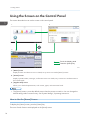
1
3
2
Touch the display panel
Press the [Home] key
CQT660
1. [Home] screen
Displays function and shortcut icons. For details, see p.16 "How to Use the [Home] Screen".
2. [Printer] screen
Displays operation status, messages, and function menus. For details, see p.18 "How to Use the Screens on
the Control Panel".
3. [Supplies Info] screen
Allows you to check the printer status, such as toner, paper, and waste toner levels.
• The [Home] screen is set as the default screen when the printer is turned on. You can change this
default setting under Function Priority. See "System Settings", Operating Instructions.
How to Use the [Home] Screen
To display the [Home] screen, press the [Home] key.
The icons of each function are displayed on the [Home] screen.
16
Using the Screen on the Control Panel
You can add shortcuts to frequently used embedded software applications to the [Home] screen. The
icons of added shortcuts appear on the [Home] screen. The embedded software applications can be
recalled easily by pressing the shortcut icons.
• Do not apply strong impact or force to the screen. Otherwise, it may be damaged. Maximum force
allowable is approx. 30 N (approx. 3 kgf). (N = Newton, kgf = Kilogram force. 1 kgf = 9.8 N.)
4
1
2
5
3
CQT658
1. Supply Information icon
Press to display the [Supplies Info] screen to check toner, paper, and waste toner levels.
2. [Printer]
Press to display the [Printer] screen.
3. Shortcut icon area
You can add shortcuts to embedded software applications to the [Home] screen. For details about how to
register shortcuts, see "Adding icons to the [Home] screen", Operating Instructions.
4. Home screen image
You can display an image such as a corporate logo on the [Home] screen. To change the image, see
"Displaying the image on the [Home] screen", Operating Instructions.
5.
/
Press to switch pages when the icons are not displayed on one page.
• When an embedded software application is installed, a function icon for the application is
displayed on the [Home] screen.
• You can change the order of icons. For details, see "Changing the order of icons on the [Home]
screen", Operating Instructions.
System Reset
After finishing a job, the printer waits a specified length of time and then restores its settings to the default
values specified under Function Priority. This function is called "System Reset". For the procedure for
specifying default settings under Function Priority, see "System Settings", Operating Instructions.
17
1. Getting Started
To change the length of time that the printer waits before restoring its settings to their default values, use
the System Auto Reset Timer setting. See "System Settings", Operating Instructions.
How to Use the Screens on the Control Panel
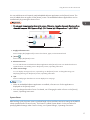
The display panel shows the operation status, messages, and function menus.
The function items displayed serve as selector keys. You can select or specify an item by lightly pressing
them.
When you select or specify an item on the display panel, it is highlighted such as
appearing as
cannot be used.
. Keys
• Do not apply strong impact or force to the screen. Otherwise, it may be damaged. Maximum force
allowable is approx. 30N (approx. 3 kgf). (N = Newton, kgf = Kilogram force. 1 kgf = 9.8N.)
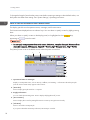
The [Home] screen is set as the default screen when the printer is turned on.
1
2
3
4
5
6
7
8
QCT662
1. Operational status or messages
Displays current printer status, such as "Ready", "Offline", and "Printing...". Information about the print job
(user ID and document name) appears in this section.
2. [Print Jobs]
Press to display print jobs sent from a computer.
3. Supply Information
You can check the remaining toner. Press to display the [Supplies Info] screen.
4. [Prt. From Dev.]
Press to display the screen for printing files stored on memory storage devices directly.
5. [Job Reset]
Press to cancel the current print job.
If you press it when the Hex Dump is selected, Hex Dump is canceled.
18
Using the Screen on the Control Panel
6. [Job Operation]
Press to suspend a job being processed.
7. [Form Feed]
Press to print all the data left in the printer's input buffer.
8. [Other Functns.]
Press to display the error logs and status of spooled jobs.
How to use the [Information] screen
To improve user’s environmental consciousness, you can configure the printer to notify users how much
they have conserved paper usage by utilizing various paper conserving function of the printer.
The color utilization ratio is also displayed on the [Information] screen.
When user authentication is enabled, the screen is displayed when you log in to the printer. When user
authentication is not enabled, the screen is displayed after returning from Sleep mode or after a system
reset. The [Information] screen appears when the power is turned on, regardless of the authentication
settings.
5
1
2
6
3
4
CQT200
1. Message
A message from the administrator is displayed.
2. Total Print Pages
Total number of pages printed in the current count period and the previous count period are displayed.
3. Eco-friendly Indicator
• Paper Reduction:
Shows the amount of paper saved by using the duplex and combine printing functions. The value
indicates the percentage of paper saved from the total of all the paper used. As the percentage
increases, the stack of paper decreases and the flower grows. When the ratio is 76% or more, the
flower starts to bloom.
• 2 sided Utilization:
The ratio of 2-sided prints to the total number of prints is displayed.
19
1. Getting Started
• Combine Utilization:
The ratio of combined prints to the total number of prints is displayed.
4. Count periods
The current and previous count periods are displayed.
5. [Exit]
Press this to close the [Information] screen and return to operation.
6. Color Utilization
The ratio of color prints to the total number of prints is displayed.
• Depending on the printer settings, the [Information] screen may not be displayed. For details, see
Security Guide.
• You can also use Web Image Monitor to check the usage status. For details about how to check
them, see Web Image Monitor Help.
• Under [Eco-friendly Counter Period/Administrator Message] in [System Settings], you can check
"Count Period", "Administrator Message", "Display Information Screen", and "Display Time". Only
the administrator can change the settings. For details, see Security Guide.
Switching Screen Patterns
This section explains how to switch to the simple screen and the keys that are displayed.
When you press the [Simple Screen] key, the screen changes from the initial display to the simple
screen.
Only the main functions are presented on the simple screen.
Letters and keys are displayed at a larger size, making operations easier.
1. Press the [Simple Screen] key.
CQT663
This illustration shows the simple display of the [Printer] screen.
20
Using the Screen on the Control Panel
To increase the screen contrast, press the [Simple Screen] key again.
• To return to the initial display from the high contrast screen, press the [Simple Screen] key again.
• Certain keys do not appear on the simple screen.
Adding Icons to the [Home] Screen
You can also review icons of functions and embedded software applications that you deleted from the
[Home] screen.
• Shortcut names of up to 32 characters can be displayed in a standard screen. If the name of the
shortcut is longer than 32 characters, the 32nd character is replaced with "...". Only 30 characters
can be displayed in a simple screen. If the name of the shortcut is longer than 30 characters, the
30th character is replaced with "...".
• You can register up to 72 function and shortcut icons. Delete unused icons if the limit is reached. For
details see "Deleting an icon on the [Home] screen", Operating Instructions.
• You can change the position of icons. For details, see "Changing the order of icons on the [Home]
screen", Operating Instructions.
In the following procedure, a shortcut to an embedded software application is registered to the [Home]
screen.
For using Web Image Monitor
1. Log in to Web Image Monitor as an administrator.
For details, see "Displaying the Printer Configuration Screens Using a Web Browser", Operating
Instructions.
2. Point to [Device Management], and then click [Device Home Management].
3. Click [Edit Icons].
4. Point to [ Icon can be added.] of the position that you want to add, and then click [
Add].
5. Select the function or shortcut icon you want to add.
21
1. Getting Started
6. Click [OK] four times.
For using User Tools
1. Press [Add Icon] in the [Edit Home] screen.
For details about how to access the [Edit Home] screen, see "Displaying the Printer Configuration
Screens Using the Control Panel", Operating Instructions.
2. Press [Select Icon to Add].
3. Press [Application].
4. Select the application you want to add.
5. Press [Select Destination].
6. Specify the position where [Blank] is displayed.
7. Press [Exit].
8. Press the [User Tools] key.
• Press [ ] on the upper-right corner of the [Select Destination] screen to check the position on the
simple screen.
22
Logging in the Printer
Logging in the Printer
This section describes how to log in to the printer.
If Basic Authentication, Windows Authentication, LDAP Authentication, or Integration Server
Authentication is enabled, the authentication screen appears on the display. The printer only becomes
operable after entering your own Login User Name and Login Password. If User Code Authentication is
enabled, you cannot use the printer until you enter the User Code.
If you can use the printer, you are logged in. When you exit the operable state, you are logged out. Be
sure to log out to prevent unauthorized usage.
• Ask the user administrator for the Login User Name, Login Password, and User Code. For details
about user authentication, see Security Guide.
User Code Authentication Using the Control Panel
This section explains the procedure for logging in to the printer using the control panel while User Code
Authentication is enabled.
If User Code Authentication is enabled, a screen prompting you to enter a User Code appears.
1. Enter a User Code (up to eight digits), and then press [OK].
• To log out, press the [Energy Saver] key after jobs are completed.
User Code Authentication Using a Printer Driver
This section explains the procedure for logging in to the printer using a printer driver while User Code
Authentication is enabled.
If User Code Authentication is enabled., specify the User Code in the printer properties of the printer
driver. For details, see the printer driver Help.
• The PCL printer driver supports User Code Authentication.
• When logged in using User Code Authentication, you do not have to log out.
Logging In Using the Control Panel
This section explains the procedure for logging in when Basic Authentication, Windows Authentication,
LDAP Authentication, or Integration Server Authentication is enabled.
23
1. Getting Started
1. Press [Login].
2. Enter a Login User Name, and then press [OK].
3. Enter a Login Password, and then press [OK].
When the user is authenticated, the screen for the function you are using appears.
Logging Out Using the Control Panel
This section explains the procedure for logging out when Basic Authentication, Windows Authentication,
LDAP Authentication, or Integration Server Authentication is enabled.
• To prevent use of the printer by unauthorized persons, always log out when you have finished
using the printer.
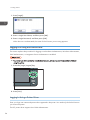
1. Press the [Login/Logout] key.
CQT599
2. Press [Yes].
Logging In Using a Printer Driver
Enter your login user name and password as registered in the printer. You need only do this the first time
you access the printer.
The PCL printer driver supports User Code Authentication.
24
Logging in the Printer
The procedure is explained using Windows 7 as an example.
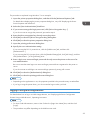
1. Open the printer properties dialog box, and then click the [Advanced Options] tab.
For details about displaying the printer properties dialog box, see p.30 "Displaying the Printer
Driver Properties with Windows".
2. Select the [User Authentication] check box.
3. If you want to encrypt the login password, click [Driver Encryption Key...].
If you do not want to encrypt the password, proceed to step 6.
4. Enter the driver encryption key already set on the printer.
5. Click [OK] to close the [Driver Encryption Key] dialog box.
6. Click [OK] to close the printer properties dialog box.
7. Open the printing preferences dialog box.
8. Specify the user authentication setting.
If you are using the PCL 5c printer driver, click the [Valid Access] tab, and then click
[Authentications...].
If you are using the PCL 6 printer driver, click the [Detailed Settings] tab, click [Job Setup], and then
click [Authentication...] in the [Job Setup] area.
9. Enter a login user name and login password already set on the printer or the server for
user authentication.
Be sure to enter the same login user name and login password that is registered on the printer or
server.
If you do not enter a valid login user name and login password, printing will not start.
10. Click [OK] to close the [Authentication] dialog box.
11. Click [OK] to close the printing preferences dialog box.
• Depending on the application in use, the properties specified in this procedure may not take effect.
• If you log in using the printer driver, you do not need to log out when you finish.
Logging In Using Web Image Monitor
For details about how to log in via Web Image Monitor, see "Displaying the Printer Configuration
Screens Using a Web Browser", Operating Instructions.
• For User Code Authentication, enter a User Code in the [Login User Name] box, and then click
[Login].
• The procedure may differ depending on the Web browser used.
25
1. Getting Started
Logging Out Using Web Image Monitor
This section explains the procedure for logging out via Web Image Monitor.
1. Click [Logout] to log out.
• Delete the cache memory of the Web browser after logging out.
26
Turning On/Off the Power
Turning On/Off the Power
This section describes how to turn on/off the printer.
• This printer automatically enters Sleep mode if you do not use it for a while. To specify the time that
the printer waits before it enters Sleep mode, configure the Sleep Mode Timer setting. See "Timer
Settings", Operating Instructions.
Turning On the Power
• Do not turn off the power switch immediately after turning it on. Doing so may result in damage to
the hard disk or memory, leading to malfunctions.
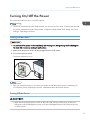
1. Make sure the power cord is firmly plugged into the wall outlet.
2. Turn on the power switch.
The power indicator turns on.
CQT108
• After you switch the power on, a screen may appear to indicate that the printer is initializing. Do
not switch the power off during this process. Initialization takes about three minutes.
Turning Off the Power
• When disconnecting the power cord from the wall outlet, always pull the plug, not the cord.
Pulling the cord can damage the power cord. Use of damaged power cords could result in fire
or electric shock.
27
1. Getting Started
• After turning the printer's power off, wait at least a few seconds before turning it back on. If the
message "Turn main Power Switch off" appears, turn the printer's power off, wait 10 seconds or
more, and then turn it back on again. Never turn the power back on immediately after turning it off.
• Before unplugging the power cord plug, turn off the power switch and make sure the power switch
indicator turns off. Not doing so may result in damage to the hard disk or memory, leading to
malfunctions.
• Do not turn off the power while the printer is in operation.
1. Turn off the power switch.
The power indicator goes out.
Saving Energy
This printer has the following energy saving functions.
Low Power mode
If you do not use the printer for a certain period after an operation, the display will turn off and the
printer goes into Low Power mode. The printer uses less electricity in Low Power mode.
You can change the amount of time that the printer waits before switching to Low Power mode
under [Low Power Mode Timer]. For details, see "Timer Settings", Operating Instructions.
You can change the printer's settings to enter Low Power mode when you press the [Energy Saver]
key. For details, see "Administrator Tools", Operating Instructions.
To exit Low Power mode, do one of the following:
• Touch the display panel or press one of the keys on the control panel.
• Load paper in the bypass tray.
• Pull out the paper trays.
Sleep mode
If the printer remains inactive for a specified period after entering Low Power mode, it enters Sleep
mode to further reduce power consumption. The printer also enters Sleep mode under the following
conditions:
• When the [Energy Saver] key is pressed
• The time the printer waits before entering Sleep mode is set in [Sleep Mode Timer]
• When the ECO Night Sensor detects the ambient light level
For details about setting [Sleep Mode Timer] and [ECO Night Sensor], see "Timer Settings" and
"Administrator Tools", Operating Instructions.
To exit Sleep mode, do one of the following:
28
Turning On/Off the Power
• Press the [Energy Saver] key
• Press the [Check Status] key
Off mode with Weekly Timer
Specify the time when the printer switches to and from Off mode. This timer can be set for Monday
through Sunday. For details about setting [Weekly Timer], see "Timer Settings", Operating
Instructions.
Off mode with ECO Night Sensor
The printer detects the ambient light level and enters Off mode at night automatically. For details
about setting [ECO Night Sensor], see "Administrator Tools", Operating Instructions.
• When the printer is in Sleep mode, the [Energy Saver] key flashes slowly.
• The energy saving functions will not operate in the following cases:
• During communication with external equipment
• When the hard disk is active
• When a warning message appears
• When the service call message appears
• When paper is jammed
• When the printer's covers are opened
• When the "No toner. Replace Toner Cartridge." message appears
• When toner is being replenished
• When the [User Tools] screen is displayed
• When fixed warm-up is in progress
• When data is being processed
• When operations are suspended during printing
• When the Data In indicator is on or blinking
• When the sample print, locked print, hold print, or stored print screen is displayed
• When the screen of a document that was stored appears
• When the internal cooling fan is active
• The printer consumes less energy when in Sleep mode, but it takes longer to start printing.
• If two or more energy saving functions are set, the function for which the predetermined conditions
to enter energy saving mode are met takes effect first.
29
1. Getting Started
Displaying the Printer Configuration Screens
This section explains how to display the configuration screen of the printer.
Displaying the Printer Driver Properties with Windows
This section explains how to open the printer driver properties from [Devices and Printers].
• Manage Printers permission is required to change the printer settings. Log on as an Administrators
group member.
• You cannot change the printer default settings for individual users. Settings made in the printer
properties dialog box are applied to all users.
1. On the [Start] menu, click [Devices and Printers].
2. Right-click the icon of the printer you want to use.
3. Click [Printer properties].
Displaying the Printing Preferences dialog box from the [Start] menu
This section explains how to open the [Printing Preferences] dialog box from [Devices and Printers].
• When the printer driver is distributed from the print server, the setting values specified by the server
are displayed as the default for [Printing Defaults...].
• You cannot configure different print settings for each user. The settings configured in this dialog box
are used as the default.
1. On the [Start] menu, click [Devices and Printers].
2. Right-click the icon of the printer you want to use.
3. Click [Printing Preferences].
Displaying the Printing Preferences dialog box in an application
You can make printer settings for a specific application. To make printer settings for a specific
application, open the [Printing Preferences] dialog box from that application.
The settings displayed in the [Printing Preference] dialog box opened from the [Devices and Printers]
window are applied as the default in the [Printing Preference] dialog box opened in an application.
When printing from an application, modify the settings as required.
30
Displaying the Printer Configuration Screens
The screens displayed may differ depending on the application. The following procedure explains how
to print documents from an application using WordPad in Windows 7 as an example.
1. Click the WordPad menu button in the upper left corner of the window, and then click
[Print].
2. In the [Select Printer] list, select the printer you want to use.
3. Click [Preferences].
• Procedures for opening the [Printing Preferences] dialog box vary depending on the application.
For details, see the printer driver Help or the manuals provided with the application.
Using One Click Presets
Some of the frequently used functions are registered under "One Click Preset List:" on the [One Click
Presets] tab.
You can apply the relevant setting simply by clicking on the one click preset name. This helps to avoid
incorrect settings and misprints.
One click presets can be added, modified, and deleted as required. By using registered one click
presets, users without in-depth knowledge of the printer driver can utilize advanced printing functions
easily.
Follow the procedure to register one click presets.
1. Open the printing preferences dialog box.
2. Make the settings you require.
3. Click [Register Current Settings...].
4. Enter a name and comment that describe the setting, and then click [OK].
5. Click [OK].
• For details about modifying and deleting one click presets, see the printer driver Help.
Displaying the Printer Driver Help
Displaying the printer driver Help
If you click [Help] in the setting dialog box for the printer driver, the Help contents corresponding to
the displayed tab appears.
31
1. Getting Started
Displaying the descriptions of the items on the printer driver's settings dialog box
If you click the question mark button in the upper right corner of the setting dialog box for the
printer driver, the mouse's pointer changes to a question mark. Move this question mark over the
item whose Help information you want to view, and then left-click to display the Help information.
Displaying the Printer Driver Properties with Mac OS X
This section explains how to display the printer driver settings screen on Mac OS X. Displayed screens
may differ from those indicated in the following steps depending on the application. In the procedure
below, Text Edit provided with Mac OS X 10.6 is used as an example.
1. Start System Preferences.
2. Click [Print & Fax].
3. Click the icon of the printer you want to use.
Displaying the printing preferences screen from an application
You can make printer settings for a specific application. To make printer settings for a specific
application, open the printing preferences screen from that application.
1. Select [Print] on the [File] menu.
2. Select the printer you are using in the [Printer:] pop-up menu.
32
2. Printing
This chapter describes how to set up the printer before use including the procedures for loading paper
into the paper trays and configuring printer settings, and how to print documents using various printing
functions. Printing procedures using the printer drivers on Windows 7 and Mac OS X 10.6 are shown as
an examples.
Paper Specification
This section describes the recommended paper sizes, types, and paper weight for each tray.
Supported Paper for Each Input Tray
The following tables provide details of the sizes, types, feed directions, and maximum number of sheets
of paper that can be loaded in each of the printer input trays. It also provides supported paper
information when duplex printing is specified.
• The paper capacities described in the tables below are examples. The actual paper capacities
might be lower, depending on the paper type.
Tray 1
Paper type
Plain Paper, Recycled Paper, Color Paper, Special
Paper 1 to 3, Letterhead, Preprinted Paper, Bond Paper,
Cardstock, Coated Paper: Gloss Print
A4
Paper sizes
8 1/2 × 11
Paper weight
52–256 g/m2 (14 lb. Bond–140 lb. Index)
Paper capacity (80 g/m2, 20 lb.
Bond)
550 sheets
• Custom paper size is not supported.
Note
• The paper tray fence is fixed. If you wish to change
the size of paper placed in this tray, contact your
service representative.
33
2. Printing
Tray 2
Paper type
Paper sizes selected automatically
Plain Paper, Recycled Paper, Color Paper, Special
Paper 1 to 3, Letterhead, Preprinted Paper, Bond Paper,
Cardstock, Coated Paper, Coated Paper: Gloss Print,
Envelope
A3 , A4
, A5 , B4 JIS , B5 JIS
,
11 × 17 , 81/2 × 14 , 81/2 × 11
71/4 × 101/2 , A4 , A5 , B5 JIS
,
81/
2 × 11
Standard size:
11 × 17 , 81/2 × 14 , 81/2 × 13 ,
1
1
2 × 11 , 8 /4 × 14 , 8 /4 × 13 , 8 × 13 ,
81/
8 × 10 71/4 × 101/2
,8K , 16K
1
1
10 × 14 , 4 /8 × 9 /2 , C5 Env
Paper sizes requiring manual setting
, 11 × 15 ,
A3 , A4 , B4 JIS , B5 JIS , 81/2 × 13
, 81/4 × 14 , 81/4 × 13 , 8 × 13 ,
8 × 10 , 71/4 × 101/2 , 8K , 16K
10 × 14 , 41/8 × 91/2 , C5 Env
, 11 × 15 ,
Custom size:
• Vertical: 182.0–297.0 mm (7.17–11.69 inches)
• Horizontal: 148.0–432.0 mm (5.83–17.00
inches)
Paper weight
Paper capacity
52–256 g/m2 (14 lb. Bond–140 lb. Index)
80 g/m2 (20 lb. Bond): 550 sheets
Envelopes: 50 sheets
• Load envelopes with their flaps fully open.
Note
34
• When loading paper with a vertical length of more
than 279 mm (11.0 inches) in trays, use paper that
has a horizontal width of 420 mm (16.6 inches) or
less.
Paper Specification
Bypass Tray
Paper type
Paper sizes selected automatically
Plain Paper, Recycled Paper, Color Paper, Special
Paper 1 to 3, Letterhead, Preprinted Paper, Bond Paper,
Cardstock, Coated Paper, Coated Paper: Gloss Print,
OHP (Transparency), Label Paper, Envelope
A3 , A4
, A5
, A6
11 × 17 , 81/2 × 11
, 51/2 × 81/2
Standard size:
B4 JIS , B5 JIS
, B6 JIS , 11 × 17 ,
81/2 × 14 , 81/2 × 13 , 81/2 × 11
, 81/4 × 14
, 81/4 × 13 , 8 × 13 ,
8 × 10 , 71/4 × 101/2
, 51/2 × 81/2 , 41/8 ×
1
7
1
9 /2
, 3 /8 × 7 /2
, C5 Env
, C6 Env
,
DL Env
, 8K , 16K
, 12 × 18 , 11 × 15 , 10
× 14
Paper sizes requiring manual setting
A3 , A4
, A5
, A6 , B4 JIS , B5
1
1
JIS
, B6 JIS , 8 /2 × 14 , 8 /2 × 13 , 81/4 ×
14 , 81/4 × 13 , 8 × 13 ,
8 × 10 , 71/4 × 101/2
, 41/8 × 91/2
1
7 /2
, C5 Env
, C6 Env
, DL Env
16K
, 12 × 18 , 11 × 15 , 10 × 14
, 37/8 ×
, 8K ,
Custom size
• Vertical: 90.0–305.0 mm (3.55–12.00 inches)
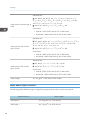
• Horizontal: 148.0–1,260.0 mm (5.83–49.60
inches)
Paper weight
52–300 g/m2 (14 lb. Bond–110 lb. Cover)
• 80 g/m2 (20 lb. Bond) : 100 sheets
• Thick Paper 1: 40 sheets
• Thick Paper 2, 3: 20 sheets
Paper capacity
• Thick Paper 4: 16 sheets
• OHP (Transparency):50 sheets
• Label Paper: 30 sheets
• Envelopes: 10 sheets
35
2. Printing
500-sheet paper feed unit
Paper type
Paper sizes selected automatically
Plain Paper, Recycled Paper, Color Paper, Special
Paper 1 to 3, Letterhead, Preprinted Paper, Bond Paper,
Cardstock, Coated Paper, Coated Paper: Gloss Print,
Envelope
A3 , A4
, A5 , B4 JIS , B5 JIS
,
11 × 17 , 81/2 × 14 , 81/2 × 11
71/4 × 101/2 , A4 , A5 , B5 JIS
,
81/
2 × 11
Standard size:
11 × 17 , 81/2 × 14 , 81/2 × 13 ,
1
1
2 × 11 , 8 /4 × 14 , 8 /4 × 13 , 8 × 13 ,
81/
8 × 10 , 71/4 × 101/2
, 8K , 16K
1
1
, 10 × 14 , 4 /8 × 9 /2 , C5 Env
Paper sizes requiring manual setting
, 11 × 15
A3 , A4 , B4 JIS , B5 JIS , 81/2 × 13
, 81/4 × 14 , 81/4 × 13 , 8 × 13 ,
8 × 10 , 71/4 × 101/2 , 8K , 16K
10 × 14 , 41/8 × 91/2 , C5 Env
, 11 × 15 ,
Custom size:
• Vertical: 182.0–297.0 mm (7.17–11.69 inches)
• Horizontal: 148.0–432.0 mm (5.83–7.00 inches)
Paper weight
52–256 g/m2 (14 lb. Bond–140 lb. Index)
Paper capacity (80 g/m2, 20 lb.
Bond)
550 sheets
1000-sheet paper feed unit
Paper type
Paper sizes selected automatically
Plain Paper, Recycled Paper, Color Paper, Special
Paper 1 to 3, Letterhead, Preprinted Paper, Bond Paper,
Cardstock, Coated Paper, Coated Paper: Gloss Print,
Envelope
81/2 × 11
71/
4
36
A3 , A4
, A5 , B4 JIS , B5 JIS
,
11 × 17 , 81/2 × 14 , 81/2 × 11
2 , A4 , A5 , B5 JIS
,
× 101/
Paper Specification
Standard size:
11 × 17 , 81/2 × 14 , 81/2 × 13 ,
1
1
2 × 11 , 8 /4 × 14 , 8 /4 × 13 , 8 × 13 ,
81/
8 × 10 , 71/4 × 101/2
, 8K , 16K
1
1
, 10 × 14 , 4 /8 × 9 /2 , C5 Env
Paper sizes requiring manual setting
, 11 × 15
A3 , A4 , B4 JIS , B5 JIS , 81/2 × 13
, 81/4 × 14 , 81/4 × 13 , 8 × 13 ,
8 × 10 , 71/4 × 101/2 , 8K , 16K
10 × 14 , 41/8 × 91/2 , C5 Env
, 11 × 15 ,
Custom size:
• Vertical: 182.0–297.0 mm (7.17–11.69 inches)
• Horizontal: 148.0–432.0 mm (5.83–17.00
inches)
Paper weight
52–256 g/m2 (14 lb. Bond–140 lb. Index)
Paper capacity (80 g/m2, 20 lb.
Bond)
550 sheets × 2 tray
2000-sheet paper feed unit
Paper type
Paper sizes
Plain Paper, Recycled Paper, Color Paper, Special
Paper 1 to 3, Letterhead, Preprinted Paper, Bond Paper,
Cardstock, Coated Paper, Coated Paper: Gloss Print
A4
81/2 × 11
Paper weight
52–256 g/m2 (14 lb. Bond–140 lb. Index)
Paper capacity (80 g/m2, 20 lb.
Bond)
1,000 sheets × 2 trays
• Custom paper size is not supported.
Note
• The paper tray fence is fixed. If you wish to change
the size of paper placed in this tray, contact your
service representative.
37
2. Printing
1200-sheet paper feed unit
Paper type
Paper sizes
Plain Paper, Recycled Paper, Color Paper, Special
Paper 1 to 3, Letterhead, Preprinted Paper, Bond Paper,
Cardstock, Coated Paper, Coated Paper: Gloss Print
A4
81/2 × 11
Paper weight
60–216 g/m2 (16 lb. Bond–80 lb. Cover)
Paper capacity (80 g/m2, 20 lb.
Bond)
1,200 sheets
• Custom paper size is not supported.
Note
• The paper tray fence is fixed. If you wish to change
the size of paper placed in this tray, contact your
service representative.
Duplex printing
Paper type
Plain Paper, Recycled Paper, Color Paper, Special
Paper 1 to 3, Letterhead, Preprinted Paper, Bond Paper,
Cardstock
Standard size:
A3 , A4
, A5
, A6 , B4 JIS , B5 JIS
, B6
1
1
1
JIS , 11 × 17 , 8 /2 × 14 , 8 /2 × 13 , 8 /2 ×
11
, 81/4 × 14 , 81/4 × 13 , 8 × 13 ,
Paper sizes
8 × 10 , 71/4 × 101/2
, 51/2 × 81/2 , 8K ,
16K
, 11 × 15 , 10 × 14
Custom size:
• Vertical: 90.0–297.0 mm (3.55–11.69 inches)
• Horizontal: 148.0–432.0 mm (5.83–17.00
inches)
Paper weight
38
52–169 g/m2 (14 lb. Bond–90 lb. Index)
Paper Specification
Supported Paper for Each Output Tray
The following tables provide details of the sizes, feed directions, and maximum number of sheets of
paper that can be stacked in each of the printer's output trays. They also describe the specifications for
the staple function of the optional finisher.
• The paper capacities described in the tables below are examples. The actual paper capacities
might be lower, depending on the paper type.
Standard output tray
Paper capacity (80 g/m2, 20 lb. Bond):
• 500 sheets (A4 , 81/2 × 11 or smaller)
• 250 sheets (B4 JIS , 81/2 × 14
or larger)
Bridge unit
Paper capacity (80 g/m2, 20 lb. Bond):
• 250 sheets: A4, 81/2 × 11 or smaller
• 125 sheets: B4 JIS, 81/2 × 14 or larger
Mailbox
Standard size:
A3 , A4
, A5
, A6 , B4 JIS , B5 JIS
, B6
JIS , 11 × 17 , 81/2 × 14 , 81/2 × 13 , 81/2 ×
11
, 81/4 × 14 , 81/4 × 13 , 8 × 13 ,
Paper sizes
8 × 10 , 71/4 × 101/2
91/2
, 37/8 × 71/2
DL Env
, 8K , 16K
, 51/2 × 81/2 , 41/8 ×
, C5 Env
, C6 Env
,
Custom size:
Vertical: 105.0–297.0 mm (4.14–11.69 inches)
Horizontal: 139.7–431.8 mm (5.50–17.00 inches)
Paper weight
60–81 g/m2 (16–20 lb. Bond)
Paper capacity (80 g/m2, 20 lb.
Bond)
125 sheets × 4
39
2. Printing
2000-sheet booklet finisher
The finisher upper tray
Standard size:
A3 , B4 JIS , A4
, B5 JIS
, A5
, B6 JIS ,
A6 , 12 × 18 , 11 × 17 , 11 × 15 , 10 × 14 ,
81/2 × 14 , 81/2 × 13 ,
Paper sizes
81/2 × 11
, 81/4 × 14 , 81/4 × 13 , 8 × 13 ,
1
8 × 10 , 5 /2 × 81/2 , 71/4 × 101/2
, 8K ,
16K
Custom size:
• Vertical: 100.0–305.0 mm (3.94–12.00 inches)
• Horizontal: 148.0–600.0 mm (5.83–23.62
inches)
Paper weight
Stack capacity(80 g/m2, 20 lb.
Bond)
52–163 g/m2 (14 lb. Bond–90 lb. Index)
• A4, 81/2 × 11 or smaller: 250 sheets
• B4 JIS, 81/2 × 14 or larger: 50 sheets
The finisher shift tray
Paper sizes
A3 , B4 JIS , A4
, B5 JIS
, A5
, B6 JIS ,
A6 , 12 × 18 , 11 × 17 , 11 × 15 , 10 × 14 ,
81/2 × 14 , 81/2 × 13 , 81/2 × 11
, 81/4 × 14
, 81/4 × 13 , 8 × 13 ,
8 × 10 , 51/2 × 81/2 , 71/4 × 101/2
16K
, custom size
Paper weight
40
52–256 g/m2 (14 lb. Bond–140 lb. Index)
, 8K ,
Paper Specification
Standard size:
Paper sizes that can be shifted when
delivered to the finisher shift tray
A3 , A4
, A5
, B4 JIS , B5 JIS
, 12 × 18 ,
11 × 17 , 11 × 15 , 10 × 14 , 81/2 × 14 , 81/2
× 13 , 81/2 × 11
, 81/4 × 14 , 81/4 × 13 , 8
× 13 ,
8 × 10 , 71/4 × 101/2
, 8K , 16K
Custom size:
• Vertical: 148.0–305.0 mm (5.83–12.00 inches)
• Horizontal: 148.0–457.2 mm (5.83–18.00
inches)
Paper weight that can be shifted
when delivered to the finisher shift
tray
60–105 g/m2 (16–28 lb. Bond)
• 2,000 sheets: A4 , 81/2 × 11
Stack capacity(80 g/m2, 20 lb.
Bond)
• 1,000 sheets: A3 , B4 JIS , A4 , B5 JIS
,
11 × 17 , 81/2 × 14 , 81/2 × 11 , 12 × 18
• 500 sheets: A5
• 100 sheets: A5 , B6 JIS , A6 , 51/2 × 81/2
Stapling
Paper sizes
A3 , B4 JIS , A4
, B5 JIS
, 11 × 17 , 11 ×
15 , 10 × 14 , 81/2 × 14 , 81/2 × 11
, 71/4 ×
1
10 /2
, 8 × 13 ,
81/2 × 13 , 81/4 × 14 , 81/4 × 13 , 8 × 10 , 8K
, 16K
Paper weight
64–90 g/m2 (17–24 lb. Bond)
Without Mixed Size:
Staple capacity (80 g/m2, 20 lb.
Bond)
• 30 sheets: A3 , B4 JIS , 11 × 17 , 81/2 × 14
, 8 × 13 , 81/2 × 13 , 81/4 × 14 , 81/4 ×
13 , 11 × 15 , 10 × 14 , 8K
• 50 sheets: A4
, B5 JIS
, 81/2 × 11
1
1
10 , 7 /4 × 10 /2
, 16K
,8×
With Mixed Size:
• 30 sheets (A3 /A4 , B4 JIS /B5 JIS , 11 ×
17 /81/2 × 11 )
41
2. Printing
Without Mixed Size:
• 2–12 sheets: 150 sets (A4 , 81/2 × 11 )
• 13–50 sheets: 150–40 sets (A4 , 81/2 × 11 )
• 2–9 sheets: 100 sets (A4 , B5 JIS
)
Stack capacity after stapling (80
g/m2, 20 lb. Bond)
, 81/2 × 11
• 10–50 sheets: 100–20 sets (A4 , B5 JIS
81/2 × 11 )
,
• 2–9 sheets: 100 sets (other size paper)
• 10–30 sheets: 100–33 sets (other size paper)
With Mixed Size:
• 2–30 sheets: 50 sets (A3 /A4 , B4 JIS /B5 JIS
, 11 × 17 /81/2 × 11 )
Staple position
4 positions (Top, Top Slant, Bottom, 2 Staples)
Saddle stitch
Paper size
A3 , B4 JIS , A4 , B5 JIS , 11 × 17 , 81/2 × 14
, 81/2 × 11
Paper weight
64–90 g/m2 (17–24 lb. Bond)
Saddle stitch capacity (80 g/m2, 20
lb. Bond)
1 set (15 sheets)
Stack capacity after saddle stitching
(80 g/m2, 20 lb. Bond)
Saddle stitch position
42
• 2–5 sheets: approx. 30 sets
• 6–10 sheets: approx. 15 sets
• 11–15 sheets: approx. 10 sets
Center 2 positions
Paper Specification
3000-sheet finisher
The finisher upper tray
Standard size:
A3 , B4 JIS , A4
, B5 JIS
, A5
, B6 JIS ,
A6 , 12 × 18 , 11 × 17 , 11 × 15 , 10 × 14 ,
81/2 × 14 , 81/2 × 13 , 81/2 × 11
, 81/4 × 14
, 81/4 × 13 ,
8 × 13 , 8 × 10 , 51/2 × 81/2 , 71/4 × 101/2
, 8K , 16K
Paper sizes*
Custom size:
• Vertical: 100.0–305.0 mm (3.94–12.00 inches)
• Horizontal: 148.0–600.0 mm (5.83–23.62
inches)
When installing the output jogger unit, paper sizes for
the finisher upper tray are listed below:
A3 , B4 JIS , A4
, B5 JIS , A5 , 11 × 17 ,
81/2 × 14 , 81/2 × 11
, 51/2 × 81/2 .
Paper weight
Stack capacity (80 g/m2, 20 lb.
Bond)
52–105 g/m2 (14 lb. Bond–28 lb. Index)
• A4, 81/2 × 11 or smaller: 250 sheets
• B4 JIS, 81/2 × 14 or larger: 50 sheets
The finisher shift tray
Standard size:
A3 , B4 JIS , A4
, B5 JIS
, A5
, B6 JIS ,
A6 , 12 × 18 , 11 × 17 , 11 × 15 , 10 × 14 ,
81/2 × 14 , 81/2 × 13 , 81/2 × 11
, 81/4 × 14
, 81/4 × 13 , 8 × 13 ,
Paper sizes
8 × 10 , 51/2 × 81/2 , 71/4 × 101/2
16K
, 8K ,
Custom size:
• Vertical: 100.0–305.0 mm (3.94–12.00 inches)
• Horizontal: 148.0–600.0 mm (5.83–23.62
inches)
Paper weight
52–256 g/m2 (14 lb. Bond–140 lb. Index)
43
2. Printing
Standard size:
A3 , A4
, A5
, B4 JIS , B5 JIS
, 12 × 18 ,
11 × 17 , 11 × 15 , 10 × 14 , 81/2 × 14 , 81/2
× 13 , 81/2 × 11
,
Paper sizes that can be shifted when
delivered to the finisher shift tray
81/4 × 14 , 81/4 × 13 , 8 × 13 , 8 × 10 , 71/4
× 101/2
, 8K , 16K
Custom size:
• Vertical: 148.0–305.0 mm (5.83–12.00 inches)
• Horizontal: 148.0–600.0 mm (5.83–23.62
inches)
Paper weight that can be shifted
when delivered to the finisher shift
tray
60–105 g/m2 (16–28 lb. Bond)
• 3,000 sheets: A4 , 81/2 × 11
Stack capacity (80 g/m2, 20 lb.
Bond)
• 1,500 sheets: A3 , B4 JIS , A4 , B5 JIS
,
12 × 18 , 11 × 17 , 81/2 × 14 , 81/2 × 11
• 500 sheets: A5
• 100 sheets: A5 , B6 JIS , A6 , 51/2 × 81/2
Stapling
Paper sizes
A3 , B4 JIS , A4
, B5 JIS
, 12 × 18 , 11 ×
17 , 11 × 15 , 10 × 14 , 81/2 × 14 , 81/2 × 11
, 71/4 × 101/2
,
8 × 13 , 81/2 × 13 , 81/4 × 14 , 81/4 × 13 , 8
× 10 , 8K , 16K
Paper weight
75–81 g/m2 (20 lb. Bond)
Without Mixed Size:
Staple capacity (80 g/m2, 20 lb.
Bond)
• 30 sheets: A3 , B4 JIS , 11 × 17 , 81/2 × 14
, 8 × 13 , 81/2 × 13 , 81/4 × 14 , 81/4 ×
13 , 11 × 15 , 10 × 14 , 8K
• 50 sheets: A4
, B5 JIS
, 81/2 × 11
1
1
10 , 7 /4 × 10 /2
, 16K
,8×
With Mixed Size:
• 30 sheets (A3 /A4 , B4 JIS /B5 JIS , 11 ×
17 /81/2 × 11 )
44
Paper Specification
Without Mixed Size:
• 2–19 sheets: 150 sets (A4 , 81/2 × 11 )
• 20–50 sheets: 150–60 sets (A4 , 81/2 × 11 )
• 2–14 sheets: 100 sets (A4 , B5 JIS
11 )
Stack capacity after stapling (80
g/m2, 20 lb. Bond)
, 81/2 ×
• 15–50 sheets: 100–30 sets (A4 , B5 JIS
81/2 × 11 )
,
• 2–14 sheets: 100 sets (other size paper)
• 15–30 sheets: 100–33 sets (other size paper)
With Mixed Size:
• 2–30 sheets: 50 sets (A3 /A4 , B4 JIS /B5 JIS
, 11 × 17 /81/2 × 11 )
Punch unit
Standard size:
: A3, B4 JIS, A4, B5 JIS, A5, 11 × 17, 81/2 × 14, 81/2 × 11,
1
1
1
1
1
2 × 8 /2, 7 /4 × 10 /2, 8 × 13, 8 /2 × 13, 8 /4 × 13, 8K,
1
16K, 8 /4 × 14, 8 × 10, 11 × 15, 10 × 14
51/
Paper sizes for 2 & 4 holes
type: 2 holes
: A4, B5 JIS, A5, 81/2 × 11, 71/4 × 101/2, 16K
Custom size:
• Vertical: 100.0–305.0 mm (3.94–12.00 inches)
• Horizontal: 148.0–600.0 mm (5.83–23.62 inches)
Standard size:
: A3, B4 JIS, 11 × 17, 11 × 15, 8K
Paper sizes for 2 & 4 holes
type: 4 holes
: A4, B5 JIS, 81/2 × 11, 71/4 × 101/2, 16K
Custom size:
• Vertical: 255.0–305.0 mm (10.04–12.00 inches)
• Horizontal: 148.0–600.0 mm (5.83–23.62 inches)
45
2. Printing
Standard size:
: A3, B4 JIS, A4, B5 JIS, A5, 11 × 17, 81/2 × 14, 81/2 × 11,
1
1
1
1
1
2 × 8 /2, 7 /4 × 10 /2, 8 × 13, 8 /2 × 13, 8 /4 × 13, 8K,
16K, 81/4 × 14, 8 × 10, 11 × 15, 10 × 14
51/
Paper sizes for 4 holes type: 4
holes
: A4, B5 JIS, A5, 81/2 × 11, 71/4 × 101/2, 16K
Custom size:
• Vertical: 125.0–305.0 mm (4.93–12.00 inches)
• Horizontal: 148.0–600.0 mm (5.83–23.62 inches)
Standard size:
Paper sizes for 2 & 3 holes
type: 2 holes
: A3, B4 JIS, B5 JIS, A5, 11 × 17, 81/2 × 14, 81/2 × 11, 51/2 ×
1
8 /2, 71/4 × 101/2, 8 × 13, 81/2 × 13, 81/4 × 13, 8K, 16K,
81/4 × 14, 8 × 10, 11 × 15, 10 × 14
: A4, B5 JIS, A5, 81/2 × 11, 71/4 × 101/2, 16K
Custom size:
• Vertical: 100.0–305.0 mm (3.94–12.00 inches)
• Horizontal: 148.0–600.0 mm (5.83–23.62 inches)
Standard size:
: A3, B4 JIS, 11 × 17, 11 × 15, 10 × 14, 8K
Paper sizes for 2 & 3 holes
type: 3 holes
: A4, B5 JIS, 81/2 × 11, 71/4 × 101/2, 16K
Custom size:
• Vertical: 230.0–305.0 mm (9.06–12.00 inches)
• Horizontal: 148.0–600.0 mm (5.83–23.62 inches)
Paper weight
52–163 g/m2 (14 lb. Bond–90 lb. Index)
Notes about Paper Thickness
The following tables define the paper weight for the paper thickness menu on the control panel.
.
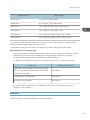
Paper thickness*1
46
Paper weight
Thin Paper*2
52–59 g/m2 (14–15 lb. Bond)
Plain Paper 1
60–74 g/m2 (16–20 lb. Bond)
Paper Specification
Paper thickness*1
Paper weight
Plain Paper 2
75–81 g/m2 (20 lb. Bond)
Middle Thick
82–105 g/m2 (20–28 lb. Bond)
Thick Paper 1
106–169 g/m2 (28 lb. Bond–90 lb. Index)
Thick Paper 2
170–220 g/m2 (65–80 lb. Cover)
Thick Paper 3
221–256 g/m2 (80 lb. Cover–140 lb. Index)
Thick Paper 4
257–300 g/m2 (140 lb. Index–110 lb. Cover)
*1 Print quality will decrease if the paper you are using is close to the minimum or maximum weight.
Change the paper weight setting to thinner or thicker.
*2 Depending on the type of thin paper, the edges may crease or the paper may be misfed.
Paper thickness for each paper type
The following tables provide the default paper thickness for each paper type. The paper thickness
depending on each paper type is displayed Tray Paper Settings in the [User Tools] menu.
Configure the appropriate paper thickness for the loaded paper type.
For details how to specify the setting, see "Specifying a Paper Type", Operating Instructions.
Paper type
Default paper thickness
Plain Paper, Recycled Paper, Color Paper, Special
Paper 1, Letterhead, Preprinted Paper, Bond Paper,
Cardstock, Label Paper
Plain Paper 2
Coated Paper , Special Paper 2,
Thick Paper 1
Envelope, Special Paper 3
Thick Paper 2
If you select OHP (Transparency) or Coated Paper: Gloss Print for the paper type, "Paper
Thickness" is not available.
Print Area
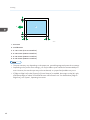
The following shows the recommended print area for this printer.
47
2. Printing
5
1
2
6
3
4
CLD001
1. Print area
2. Feed direction
3. 2.7 to 5.7 mm (0.11 to 0.23 inches)
4. 0.5 to 6.0 mm (0.02 to 0.24 inches)
5. 0.5 to 4.0 mm (0.02 to 0.16 inches)
6. 0.5 to 4.0 mm (0.02 to 0.16 inches)
• The print area may vary depending on the paper size, printed language and printer driver settings.
• Depending on the printer driver settings, you may be able to print outside the recommended print
area. However, the actual output may not be as desired, or a paper feed problem may occur.
• If [Edge to Edge Print] under [System] in [Printer Features] is enabled, the margins on the left, right,
and bottom edges in relation to the feed direction will become 0 mm. For details about [Edge to
Edge Print], see "System", Operating Instructions.
48
Loading Paper
Loading Paper
This section explains how to load paper into the paper trays.
Precautions for Loading Paper
• When loading paper, take care not to trap or injure your fingers.
When loading paper, take care not to trap or injure your fingers.
• Do not stack paper over the limit mark.
• After changing the paper size, be sure to specify the appropriate paper size in the [Tray Paper
Settings] menu. If you do not, misfeeds might occur. For details, see "Tray Paper Settings",
Operating Instructions.
• To prevent multiple sheets from being fed at once, fan the paper before loading it.
• If you load paper when only a few sheets of paper remain in the tray, multiple sheet feeding may
occur. Remove any remaining paper, stack them with the new sheets of paper, and then fan the
entire stack before loading it into the tray.
• Straighten curled or warped paper before loading.
• For details about available paper sizes and types for each paper tray, see p.33 "Supported Paper
for Each Input Tray".
• Depending on the environment where the printer is being used, you might at times hear a rustling
noise from paper moving through the printer. This noise does not indicate a malfunction.
Unusable Paper
• Do not attempt to print on stapled sheets, aluminum foil, carbon paper, or any kind of
conductive paper. Doing so risks fire.
Do not attempt to print on stapled sheets, aluminum foil, carbon paper, or any kind of conductive paper.
Doing so risks fire.
• To prevent faults, do not use any of the following kinds of treated paper:
49
2. Printing
• Paper for inkjet printers
• Thermal fax paper
• Art paper
• Aluminum foil
• Carbon paper
• Conductive paper
• Paper with perforated lines
• Hemmed-edge paper
• Window envelopes
• Faults can occur if you print onto sides that are already printed. Take care to print onto unprinted
sides only.
• Certain types of OHP transparencies for color printing cannot be used. For details about types that
can be used, contact your sales or service representative.
• To prevent misfeeds, do not use the following kinds of paper:
• Bent, folded, or creased paper
• Perforated paper
• Slippery paper
• Torn paper
• Rough paper
• Thin paper with little stiffness
• Paper with a dusty surface
• Even supported types of paper may cause paper jams or malfunctions if the paper is not in good
condition. (Sheets can become jammed if they have been improperly stored.)
• If you print onto rough grain paper, the output image might be blurred.
• Do not load sheets that have already been printed by another printer.
Paper Storage
When storing paper, the following precautions should always be followed:
• Do not store paper where it will be exposed to direct sunlight.
• Avoid storing paper in humid areas (humidity: 70% or less).
• Store on a flat surface.
• Do not store paper vertically.
50
Loading Paper
• Once opened, store paper in plastic bags.
Loading Paper into Paper Trays
In the following example procedure, paper is loaded into Tray 2.
• Check the paper edges are aligned at the right side.
• Slide the side fences until they are aligned with the sides of the paper, and then re-lock the side
fences. If there is space between the side fences and the paper, it may cause the image to be
misaligned or thin paper may wrinkle.
• When loading a low number of sheets, be sure not to squeeze the side fences in too tightly. If the
side fences are squeezed too tightly against the paper, the edges may crease, thin paper may
wrinkle, or the paper may be misfed.
• If a paper tray is pushed vigorously when putting it back into place, the position of the tray's side
fences may slip out of place.
1. Carefully pull out the paper tray until it stops.
CQT038
2. Release the lock on the side fences.
CQT041
51
2. Printing
3. While pressing down the release lever, slide the side fences outward.
CQT042
4. Slide the end fence outward.
1
2
1
CQT043
1. Pinch the release levers of the end fence.
2. Slide the end fence outward.
5. Square the paper and load it print side up.
Do not stack paper over the limit mark.
CQT044
52
Loading Paper
6. Align the back and side fences gently against the paper you loaded.
CQT045
7. Re-lock the side fences.
8. Carefully push the paper tray fully in.
9. Check the paper size on the display.
• You can load envelopes in Trays 2–5. Envelopes must be loaded in a specific orientation. For
details, see p.65 "Loading Envelopes".
Loading Paper into the Bypass Tray
Use the bypass tray to use OHP transparencies, adhesive labels, translucent paper, and paper that
cannot be loaded in the paper trays.
• The maximum number of sheets you can load at the same time depends on paper type. Load only
as much paper as can be held between the paper guides on the bypass tray. For the maximum
number of sheets you can load, see p.33 "Supported Paper for Each Input Tray".
1. Open the bypass tray.
CQT037
2. Insert the paper face down until you hear the beep.
53
2. Printing
3. While pressing down the release lever, align the paper guides to the paper size.
If the guides are not flush against the paper, images might be skewed or paper misfeeds might
occur.
CJW014
• When using the bypass tray, it is recommended that you set the paper direction to
.
• Certain types of paper might not be detected properly when placed on the bypass tray. If this
happens, remove the paper and place it on the bypass tray again.
• Pull the bypass tray extension out when loading sheets larger than A4 , 81/2 × 11
bypass tray.
in the
• When the [Panel Key Sound] is turned off, it does not sound if you insert paper into the bypass tray.
For details about [Panel Key Sound], see "General Features", Operating Instructions.
• If the printer stops detecting paper sizes while printing, remove the paper and reload it.
• Letterhead paper must be loaded in a specific orientation. For details, see p.57 "Loading
Orientation-Fixed Paper or Two-Sided Paper".
• You can load envelopes into the bypass tray. Envelopes must be loaded in a specific orientation.
For details, see p.65 "Loading Envelopes".
Loading Paper into Tray 3 (LCT)
• When paper loaded in the right side of Tray 3 (LCT) runs out, paper on the left is automatically
shifted to the right. Do not pull out Tray 3 (LCT) while the tray is moving paper; wait until sounds
stop coming from the tray.
• For the right stack, align the right edge of the paper with the right edge of the tray. For the left
stack, align the left edge of the paper to the left edge of the tray.
54
Loading Paper
1. Carefully pull out Tray 3 (LCT) until it stops.
CJW015
2. Square the paper and load it print side up.
Do not stack paper over the limit mark.
• Whole tray pulled out
CJW016
• Left half of the tray pulled out
CJW017
3. Carefully push the paper tray fully in.
• You can load paper even if Tray 3 (LCT) is in use. It is okay to pull out the left half of the tray while
Tray 3 (LCT) is in use.
55
2. Printing
Loading Paper into the Large Capacity Tray (LCT)
1. Open the right cover of the large capacity tray (LCT).
CJW018
2. Load paper into the paper tray with the print side down and place it against the left side
of the tray.
Do not stack paper over the limit mark.
CJW019
3. Press the [Down] key.
The bottom plate moves down.
CJW020
4. Load additional paper by repeating steps 2 and 3.
5. Close the right cover of the large capacity tray (LCT).
56
Loading Paper
Loading Orientation-Fixed Paper or Two-Sided Paper
Orientation-fixed (top to bottom) or two-sided paper (for example, letterhead paper, punched paper, or
copied paper) might not print correctly, depending on how the paper is placed.
Settings for User Tools
Specify [Auto Detect] or [On (Always)] for [Letterhead Setting] in [System] under the Printer
Features menu, and then place the paper as shown below.
For details about the letterhead settings, see "System", Operating Instructions.
Paper orientation
The meanings of the icons are as follows:
Icon
Meaning
Place or load paper printed side face up.
Place or load paper printed side face down.
Print side
Tray 1 or Tray 3 (LCT)
Trays 2–5
Large
capacity tray
(LCT)
Bypass tray
Onesided
Twosided
• To print on letterhead paper when [Auto Detect] is specified for [Letterhead Setting], you must
specify [Letterhead] as the paper type in the printer driver's settings.
57
2. Printing
• If a print job is changed partway through printing from one-sided to two-sided printing, one-sided
output after the first copy may be printed facing a different direction. To ensure all paper is output
facing the same direction, specify different input trays for one-sided and two-sided printing. Note
also that two-sided printing must be disabled for the tray specified for one-sided printing.
• For details about how to make two-sided prints, see p.62 "Printing on Both Sides of Sheets".
58
Standard Printing
Standard Printing
Printing with Windows (PCL 6/PostScript 3)
• The default setting is duplex printing. If you want to print on only one side, select [Off] for the
duplex setting.
• If you send a print job via USB 2.0 while the printer is in Low Power mode or Sleep mode, an error
message might appear when the print job is complete. In this case, check if the document was
printed.
1. After creating a document, open the [Printing Preferences] dialog box in the document's
native application.
For details about displaying the [Printing Preferences] dialog box, see p.30 "Displaying the Printing
Preferences dialog box in an application".
2. In the "Job Type:" list, select [Normal Print].
3. In the "Document Size:" list, select the size of the document to be printed.
4. In the "Orientation:" list, select [Portrait] or [Landscape] for the orientation of the
document.
5. In the "Input Tray:" list, select the paper tray that contains the paper to which you want to
print.
If you select [Auto Tray Select] in the "Input Tray:" list, the paper tray is automatically selected
according to the paper size and type specified.
6. In the "Paper Type:" list, select the type of paper that is loaded in the paper tray.
7. Select [Color] or [Black and White] in the "Color/ Black and White:" list.
Select [Color] for color printing.
Select [Black and White] for black-and-white printing.
8. To print multiple copies, specify the number of sets in the "Copies:" box.
9. Change any other print settings as necessary.
You can set convenient print functions on the [Detailed Settings] tab. For details, see "Convenient
Print Functions", Operating Instructions.
10. Click [OK].
11. Start printing from the application's [Print] dialog box.
• If [Color] is selected in the "Color/ Black and White:" list, you can print using special color outputs
suitable for color vision impaired users. To use this function, click the [Detailed Settings] tab. Click
59
2. Printing
the [Print Quality] menu in the "Menu:" box, and then select [On] in the "Barrier-free Color
Management:" list.
Black and White printing precautions
Some applications may recognize grayscale or a black-and-white area of a document as a color
image. Because of this, it may be printed in four colors (CMYK) and counted on the billing counter as
such. To ensure that documents are printed in black and white, select [User Setting] in the "Settings for
Image:" list on the [Print Quality] menu, and then select [K (Black)] in the "Gray Reproduction:" list. For
details, see the printer driver Help.
Printing with Windows (PCL 5c/5e)
• The default setting is duplex printing. If you want to print on only one side, select [Off] for the
duplex setting.
• If you send a print job via USB 2.0 while the printer is in Low Power mode or Sleep mode, an error
message might appear when the print job is complete. In this case, check if the document was
printed.
1. After creating a document, open the [Printing Preferences] dialog box in the document's
native application.
For details about displaying the [Printing Preferences] dialog box, see p.30 "Displaying the Printing
Preferences dialog box in an application".
2. In the "Job Type:" list, select [Normal Print].
3. To print multiple copies, specify the number of sets in the "Copies:" box.
4. In the "Orientation:" list, select [Portrait] or [Landscape] for the orientation of the
document.
5. Select [Color] or [Black and White] in the "Color/ Black and White:" list.
Select [Color] for color printing.
Select [Black and White] for black and white printing.
6. Click the [Paper] tab.
7. In the "Document Size:" list, select the size of the document to be printed.
8. In the "Input Tray:" list, select the paper tray that contains the paper to which you want to
print.
If you select [Auto Tray Select] in the "Input Tray:" list, the paper tray is automatically selected
according to the paper size and type specified.
9. In the "Type:" list, select the type of paper that is loaded in the paper tray.
60
Standard Printing
10. Change any other print settings as necessary.
You can set convenient print functions on the tabs of the printer driver. For details, see "Convenient
Print Functions", Operating Instructions.
11. Click [OK].
12. Start printing from the application's [Print] dialog box.
Printing with Mac OS X
Follow the procedure below to print using the PostScript 3 printer driver for Mac OS X.
1. After creating a document, open the printing preferences screen in the document's native
application.
For details about displaying the printing preferences screen, see p.32 "Displaying the printing
preferences screen from an application"
2. In the " Paper Size:" menu, select the size of the document to be printed.
3. In the "Orientation:" menu, select the orientation of the document.
4. Select [Paper Feed] in the pop-up menu.
5. Select the paper tray that contains the paper to which you want to print.
If you select [Auto Select], the paper tray is automatically selected according to the paper size and
type specified.
6. Select [Printer Features] in the pop-up menu.
7. In the "Feature Sets:" menu, select the appropriate set of features to display the "Paper
Type:" menu.
8. In the "Paper Type:" menu, select the type of paper that is loaded in the paper tray.
9. In the "Feature Sets:" menu, select the appropriate set of features to display the "Color
Mode:" menu.
10. In the "Color Mode:" menu, select the color mode for the print job.
Select [Color] for color printing.
Select [Black and White] for black and white printing.
11. To print multiple copies, specify the number of sets in the "Copies:" box.
12. Select the [Collated] check box.
For some versions of Mac OS X, select [Paper Handling] or [Copies & Pages] in the pop-up menu,
and then select the [Collate:] check box.
13. Change any other print settings as necessary.
You can set convenient print functions in the pop-up menus of the printer driver. For details, see
"Convenient Print Functions", Operating Instructions.
61
2. Printing
14. Start printing.
• For details about collate function, see "Collate", Operating Instructions.
• If the application has its own collate function, disable the function to use the collate function on this
printer.
Printing on Both Sides of Sheets
This section explains how to print on both sides of each page using the printer driver.
Types of duplex printing
You can select which way the bound pages open by specifying which edge to bind.
Orientation
Open to Left
Open to Top
Portrait
Landscape
Duplex printing precautions
• The types of paper that can be printed on both sides are as follows:
Plain (60 to 81 g/m2), Recycled, Special 1, Special 2, Special 3, Middle Thick (82 to 105
g/m2), Thick 1 (106 to 169 g/m2), Thin (52 to 59 g/m2), Color, Letterhead, Preprinted,
Bond, Cardstock
• If the document contains pages with different original sizes, page breaks may occur.
• For details about setting the duplex printing function using the PCL 6 printer driver or PostScript 3
printer driver for Windows, see "Edit", Operating Instructions.
• For details about setting the duplex printing function using the PCL 5c/5e printer driver, see
"Setup", Operating Instructions.
• For details about setting the duplex printing function using the PostScript 3 printer driver for Mac
OS X, see "Layout", Operating Instructions.
62
Standard Printing
Combining Multiple Pages into Single Page
This section explains how to print multiple pages onto a single sheet. The combine printing function
allows you to economize on paper by printing multiple sheets at reduced size onto a single sheet.
Types of combine printing
This function allows you to print 2, 4, 6, 9, or 16 pages at reduced size onto a single sheet and to
specify a page ordering pattern for the combination. When combining 4 or more pages onto a
single sheet of paper, four patterns are available.
The following illustrations show example page ordering patterns for 2- and 4-page combinations.
• 2 Pages per Sheet
Orientation
From Left to Right/Top to
Bottom
From Right to Left/Top to
Bottom
Portrait
Landscape
• 4 Pages per Sheet
Right, then Down
Down, then Right
Left, then Down
Down, then Left
Combine printing precautions
• If the document contains pages with different original sizes, page breaks may occur.
• If the application you are using also has a combine function, disable it. If the application's
combine function is also enabled when the driver's combine function enabled, incorrect
printing may occur.
• By combining the combine printing and booklet printing functions, you can print multiple
pages onto a single sheet and bind them to form a booklet. For details about booklet printing,
see "Booklet Printing", Operating Instructions.
• For details about setting the combine printing function using the PCL 6 printer driver or PostScript 3
printer driver for Windows, see "Edit", Operating Instructions.
63
2. Printing
• For details about setting the combine printing function using the PCL 5c/5e printer driver, see
"Setup", Operating Instructions.
• For details about setting the combine printing function using the PostScript 3 printer driver for Mac
OS X, see "Layout", Operating Instructions.
64
Printing on Envelopes
Printing on Envelopes
Loading Envelopes
This section gives you various details about and recommendations concerning envelopes.
• Do not use window envelopes.
• Fan the envelopes before loading them to separate them and prevent the glue on them from
causing them to stick together. If fanning does not prevent them sticking together, load them one by
one. Note that some types of envelopes cannot be used with this printer.
• Misfeeds might occur depending on the length and shape of the flaps.
• Only envelopes that are at least 148 mm (5.9 inches) wide and whose flaps are open can be
loaded in the orientation.
• When loading envelopes in the
might not feed into the printer.
orientation, load them with flaps fully open. Otherwise, they
• Before loading envelopes, press down on them to remove any air from inside, flatten out all four
edges. If they are bent or curled, flatten their leading edges (the edge going into the printer) by
running a pencil or ruler across them.
The method for loading envelopes varies depending on the orientation of the envelopes. Be sure to load
envelopes with the correct orientation.
Types of envelopes
Paper trays 2–5
Bypass tray
Side-opening envelopes
• Flaps: open
• Flaps: open
• Bottom side of envelopes:
toward the right of the
printer
• Bottom side of envelopes:
toward the left of the printer
• Side to be printed: face up
• Side to be printed: face
down
65
2. Printing
Types of envelopes
Side-opening envelopes
Paper trays 2–5
Bypass tray
*1
• Flaps: closed
• Flaps: closed
• Bottom side of envelopes:
toward the back of the
printer
• Side to be printed: face up
• Bottom side of envelopes:
toward the back of the
printer
• Side to be printed: face
down
*1 You cannot load side-opening envelopes in the landscape orientation in Trays 2–4.
When loading envelopes, use both User Tools and the printer driver to select "Envelope" as the paper
type and specify the thickness of the envelopes. For details, see p.65 "Printing on Envelopes", Printer.
To print on envelopes that are loaded with their short edges against the printer body, rotate the print
image by 180 degrees using the printer driver.
Recommended envelopes
For information about recommended envelopes, contact your local dealer.
The size of envelopes that you can load depends on the tray in which you load them. For details,
see p.33 "Supported Paper for Each Input Tray".
• Load only one size and type of envelope at a time.
• The Duplex function cannot be used with envelopes.
• To achieve better output quality, it is recommended that you set the right, left, top, and bottom print
margin to at least 15 mm (0.6 inches) each.
• The output quality on envelopes may be uneven if parts of an envelope have differing thicknesses.
Print one or two envelopes to check the print quality.
• When printing onto envelopes, the print speed is slower than usual.
• Printed sheets are delivered to the internal tray even if you specified a different tray.
• Flatten out prints if they are creased or curled.
• Check that the envelopes are not damp.
• High temperature and high humidity conditions can reduce print quality and cause envelopes to
become creased.
• Depending on the environment, printing on envelopes may wrinkle them even if they are
recommended.
66
Printing on Envelopes
• Certain types of envelopes might be output creased, dirtied, or misprinted. If you are printing a
solid color on an envelope, lines may appear where the overlapped edges of the envelope make it
thicker.
Printing on Envelopes with Windows (PCL 6/PostScript 3)
1. After creating a document, open the [Printing Preferences] dialog box in the document's
native application.
For details about displaying the [Printing Preferences] dialog box, see p.30 "Displaying the Printing
Preferences dialog box in an application".
2. In the "Input Tray:" list, select the paper tray where the envelopes are loaded.
3. In the "Document Size:" list, select the envelope size.
4. In the "Paper Type:" list, select [Envelope].
5. Change any other print settings as necessary. For details, see the printer driver Help.
6. Click [OK].
7. Start printing from the application's [Print] dialog box.
• Configure the paper settings appropriately using both the printer driver and the control panel. For
details about settings using the control panel, see "Configuring envelope settings using the control
panel", Operating Instructions.
• Envelopes must be loaded in a specific orientation. For details, see p.65 "Loading Envelopes".
Printing on Envelopes with Windows (PCL 5c/5e)
1. After creating a document, open the [Printing Preferences] dialog box in the document's
native application.
For details about displaying the [Printing Preferences] dialog box, see p.30 "Displaying the Printing
Preferences dialog box in an application".
2. Click the [Paper] tab.
3. In the "Input Tray:" list, select the paper tray where the envelopes are loaded.
4. In the "Document Size:" list, select the envelope size.
5. In the "Type:" list, select [Envelope].
6. Change any other print settings as necessary. For details, see the printer driver Help.
7. Click [OK].
8. Start printing from the application's [Print] dialog box.
67
2. Printing
• Configure the paper settings appropriately using both the printer driver and the control panel. For
details about settings using the control panel, see "Configuring envelope settings using the control
panel", Operating Instructions.
• Envelopes must be loaded in a specific orientation. For details, see p.65 "Loading Envelopes".
Printing on Envelopes with Mac OS X
1. After creating a document, open the printing preferences screen in the document's native
application.
For details about displaying the printing preferences screen, see p.30 "Displaying the Printing
Preferences dialog box in an application".
2. Clear the [Two-Sided:] check box to disable duplex printing.
3. In the " Paper Size:" menu, select the envelope size.
4. In the "Orientation:" menu, select the orientation of the envelope.
5. Select [Paper Feed] in the pop-up menu.
6. Select the paper tray where the envelopes are loaded.
7. Select [Printer Features] in the pop-up menu.
8. In the "Feature Sets:" menu, select the appropriate set of features to display the "Paper
Type:" menu.
9. In the "Paper Type:" menu, select [Envelope].
10. Change any other print settings as necessary.
11. Start printing.
• Configure the paper settings appropriately using both the printer driver and the control panel. For
details about settings using the control panel, see "Configuring envelope settings using the control
panel", Operating Instructions.
• Envelopes must be loaded in a specific orientation. For details, see p.65 "Loading Envelopes".
68
Storing a Document
Storing a Document
Storing a Document with Windows
1. After creating a document, open the [Printing Preferences] dialog box in the document's
native application.
For details about displaying the [Printing Preferences] dialog box, see p.30 "Displaying the Printing
Preferences dialog box in an application".
2. In the "Job Type:" list, select a job type.
• Select [Sample Print] to store the document as a Sample Print file.
• Select [Locked Print] to store the document as a Locked Print file.
• Select [Hold Print] to store the document as a Hold Print file.
• Two options are available when storing a Stored Print file:
Select [Stored Print] to store the document in the printer and print it later using the control
panel.
Select [Store and Print] to store and print the document at the same time.
3. Click [Details...].
4. Enter a User ID in the "User ID:" box.
• When storing a Locked Print file, enter a password in the "Password:" box.
• When storing a Hold Print file, specify a file name and print time as necessary.
To specify the time when the document is printed, select the [Set Print Time] check box, and
then specify the time.
• When storing a Stored Print file, specify a file name and password as necessary.
5. Click [OK].
6. Change any other print settings as necessary.
7. Click [OK].
8. Start printing from the application's [Print] dialog box.
• The printer might not print a Hold Print file at the specified time under the following conditions:
• When the specified print time is close to the time in the printer's built-in clock, printing may
start immediately.
• When the main power of the printer is turned off, printing will not start even if it is the specified
print time. To print a document whose specified time has already passed, set [Jobs Not Printed
As Machn. Was Off] to [On] on [System] under [Printer Features]. For details, see "System",
Operating Instructions.
69
2. Printing
• If an error message is displayed on the control panel, printing will not start even if it is the
specified print time.
• If [Stored Print (Shared)] or [Store and Print (Shared)] is selected when a Stored Print file is stored,
the user who created the document and all users who have print privileges can print the document
using the control panel. This setting is available when User Authentication is enabled using the PCL
6 printer driver. For details, see Security Guide.
Storing a Document with Mac OS X
1. After creating a document, open the printing preferences screen in the document's native
application.
For details about displaying the printing preferences screen, see p.32 "Displaying the printing
preferences screen from an application".
2. Select [Job Log] in the pop-up menu.
3. Enter the user ID in the "User ID:" box using up to eight alphanumeric characters.
4. In the "Job Type:" pop-up menu, select a job type.
• Select [Sample Print] to store the document as a Sample Print file.
• Select [Locked Print] to store the document as a Locked Print file, and then enter the password
in the "Password:" box.
Use four to eight digits for the password.
• Select [Hold Print] to store the document as a Hold Print file.
You can add a name to the document using up to 16 alphanumeric characters.
To print a document on the specified time, select the [Set Print Time] check box.
• Two options are available when storing a Stored Print file:
Select [Stored Print] to store the document in the printer and print it later using the control
panel.
Select [Store and Print] to store and print the document at the same time.
You can add a name to the document using up to 16 alphanumeric characters.
You can set a password for the document using four to eight digits.
5. Change any other print settings as necessary.
6. Start printing.
• The printer may not print a Hold Print file at the specified time under the following conditions:
• When the specified print time is close to the time in the printer's built-in clock, printing may
start immediately.
70
Storing a Document
• When the main power of the printer is turned off, printing will not start even if it is the specified
print time. To print a document whose specified time has already passed, set [Jobs Not Printed
As Machn. Was Off] to [On] on [System] under [Printer Features]. For details, see "System",
Operating Instructions.
• If an error message is displayed on the control panel, printing will not start even if it is the
specified print time.
71
2. Printing
72
3. Troubleshooting
This chapter provides solutions to common problems and it also explains how to correct unwanted print
results.
When Indicators Are Displayed
This section describes the indicators that appear when the printer requires user attention such as
removing misfed paper, reloading paper, or performing other procedures.
Indicator
: Paper Misfeed indicator
Status
Appears when a paper misfeed occurs.
For details about removing jammed paper, see p.122
"Removing Jammed Paper".
: Load Paper indicator
Appears when paper runs out.
For details about loading paper, see p.49 "Loading Paper".
: Add Toner indicator
Appears when toner runs out.
For details about adding toner, see p.135 "Adding Toner".
: Add Staple indicator
Appears when staples run out.
For details about adding staples, see p.140 "Adding
Staples".
: Waste Toner Full indicator
Appears when the waste toner bottle is full.
For details about replacing the waste toner bottle, see p.
138 "Replacing Other Consumables".
: Empty Hole Punch Receptacle
indicator
Appears when the hole punch receptacle is full.
For details about removing punch waste, see p.133
"Removing Punch Waste".
: Service Call indicator
Appears when the printer is malfunctioning or requires
maintenance.
: Open Cover indicator
Appears when one or more covers of the printer are open.
73
3. Troubleshooting
When a Panel Tone Beeps
The following table describes various beep patterns that the printer produces to alert users about printer
conditions and the meaning of each beep pattern.
Beep pattern
Meaning
Causes
Single short beep
Panel/screen input
accepted.
A control panel or screen key was
pressed.
Short, then long beep
Panel/screen input rejected.
An invalid key was pressed on the
control panel or screen, or the entered
password was incorrect.
Two long beeps
Printer has warmed up.
When the power is turned on or the
printer exits Sleep mode, the printer
has fully warmed up and is ready for
use.
Five long beeps repeated
four times.
Soft alert
An error message appears on the
control panel if there is no tray for the
selected paper size or the tray is
empty.
Five short beeps repeated
five times.
Strong alert
Paper has jammed, the toner needs
replenishing, or other problems have
occurred.
• The beep alerts cannot be muted. If the printer's covers are opened and closed repeatedly within a
short space of time during an alert indicating a paper jam or insufficient toner, the beep alert might
continue, even after normal status has resumed.
• You can enable or disable beep alerts. For details about Panel Key Sound, see "General
Features", Operating Instructions.
74
Checking Printer Status and Settings
Checking Printer Status and Settings
Maintnc. Info
You can check the following items under [Maintnc. Info]:
• Remaining Toner
Displays the amount of remaining toner.
No Staples
Displays whether there are staples remaining or not.
Punch Receptcl Full
Displays whether the hole punch receptacle is full.
• Paper Tray
Displays the paper type and size loaded into the paper tray.
Output Tray Full
Displays whether the output tray is overloaded.
• Paper Misfeed
Displays the state of and solutions for paper misfeeds.
• Cover Open
Indicates whether one or more covers of the printer are open.
• Waste Tnr Bttl Full
Displays whether the waste toner bottle is full.
Data Storage
You can check the following items under [Data Storage]:
• HDD Remaining Mem.
Displays the amount of available hard disk memory.
• HDD File(s)
Displays the total number of jobs stored on the hard disk.
• Print Job(s)
Displays the number of jobs for "Hold Print Job(s):", "Stored Print Job(s):", "Locked Print
Job(s):", and "Sample Print Job(s):".
Machine Adres Info
You can check the following items under [Machine Adres Info]:
• Machine IPv4 Address
Displays the printer's IPv4 address.
75
3. Troubleshooting
• Machine IPv6 Address
Displays the printer's IPv6 address.
1. Press the [Check Status] key.
CQT664
2. Press the [Maintnc/MacInfo] tab.
3. Press each key, and then check the contents.
4. After checking the information, press [Exit].
• [Paper Misfeed], [No Staples], [Punch Receptacle Full], [Output Tray Full], and [Cover Open]
appear on [Maintnc. Info] only when these errors occur.
• Depending on the security settings, [Machine Adres Info] might not be displayed.
• For details about how to locate and remove misfeeds, see p.122 "Removing Jammed Paper".
76
When an Indicator for the [Check Status] Key Is Lit
When an Indicator for the [Check Status] Key
Is Lit
If an indicator for the [Check Status] key lights up, press the [Check Status] key to display the [Check
Status] screen. Check the status of the printer in the [Check Status] screen.
[Check Status] screen
1
2
3
4
CQT666
1. [Mac/ApliStat] tab
Indicates the status of the printer.
2. Status icons
The icons that can be displayed are described below:
: The printer function is performing a job.
: An error has occurred on the printer.
: An error has occurred in the printer function being used, or the printer function cannot be used because an
error has occurred on the printer.
3. Messages
Displays a message that indicates the status of the printer.
4. [Check]
If an error occurs, press [Check] to view details.
Pressing [Check] displays an error message or the printer screen. Check the error message displayed on the
printer screen and take the appropriate action. For details about error messages and their solutions, see p.
91 "When Messages Are Displayed".
The following table describes problems that cause the indicator to light:
Problem
Documents and reports do
not print out.
Cause
The paper output tray is full.
Solution
Remove the prints from the tray.
77
3. Troubleshooting
Problem
Cause
Solution
Documents and reports do
not print out.
There is no paper left.
Load paper. For details about loading
paper, see p.49 "Loading Paper".
An error has occurred.
A function that has the status
"Error Occurred" in the
[Check Status] screen is
defective.
Press [Check], and then check the
displayed message and take
appropriate action. For details about
error messages and their solutions, see
p.91 "When Messages Are
Displayed".
The printer is unable to
connect to the network.
A network error has
occurred.
• Press [Check], and then check the
displayed message and take
appropriate action. For details
about error messages and their
solutions, see p.91 "When
Messages Are Displayed".
• Check that the printer is correctly
connected to the network and that
the printer is correctly set. For
details about how to connect the
network, see "Interface Settings",
Operating Instructions.
• For details about connecting to
the network, contact your
administrator.
• If the indicator is still lit even after
trying to solve the problem as
described here, contact your
service representative.
78
When You Have Problems Operating the Printer
When You Have Problems Operating the
Printer
This section describes common problems and messages. If other messages appear, follow the
instructions displayed.
Problem
The lamp remains lit and the
printer does not enter Sleep
mode even though the
[Energy Saver] key was
pressed.
Cause
Solution
• The printer is
communicating with
external equipment.
• Check if the printer is
communicating with external
equipment.
• The hard disk is active.
• Wait a little longer.
The display is off.
The printer is in Low Power
mode.
Touch the display panel or press one
of the keys on the control panel to
cancel Low Power mode.
The display is off.
The printer is in Sleep Mode. Press the [Energy Saver] key or the
[Check Status] key to cancel Sleep
Mode.
Nothing happens when the
[Check Status] key or the
[Energy Saver] key is
pressed.
The power switch is turned
off.
"Please wait." appears.
This message appears when Wait for a while. If the printer is not
you press the [Energy Saver] ready in five minutes, contact your
key.
service representative.
"Please wait." appears.
This message appears when
the printer is warming up.
Turn on the main power switch.
• Wait until the message
disappears. Do not turn off the
power switch while the message is
displayed.
• If the printer is not ready in five
minutes, contact your service
representative.
79
3. Troubleshooting
Problem
"Please wait." appears.
Cause
This message appears when
you change the toner
cartridge.
Solution
• Wait until the message
disappears. Do not turn off the
power switch while the message is
displayed.
• If the message does not
disappear in five minutes, contact
your service representative.
80
The machine unexpectedly
enters standby mode.
ECO Night Sensor is
enabled and the light sensor
detected a low ambient light
level.
Change the ECO Night Sensor
settings. For details about ECO Night
Sensor, see "Administrator Tools",
Operating Instructions.
"Self checking..." appears.
The printer is performing
image adjustment
operations.
The printer may perform periodic
maintenance during operations. The
frequency and duration of
maintenance depends on the humidity,
temperature, and printing factors such
as number of prints, paper size, and
paper type. Wait for the printer to be
ready.
The user code entry screen is Users are restricted by User
displayed.
Code Authentication.
For details about how to log in when
User Code Authentication is enabled,
see p.23 "Logging in the Printer".
The Authentication screen
appears.
Basic Authentication,
Windows Authentication,
LDAP Authentication or
Integration Server
Authentication is set.
Enter your Login User Name and Login
Password. For details about the
Authentication screen, see p.23
"Logging in the Printer".
"Authentication has failed."
appears.
The entered Login User
Name or Login Password is
not correct.
For details about the correct Login User
Name and Login Password, see
Security Guide.
"Authentication has failed."
appears.
The printer cannot perform
authentication.
For details about authentication, see
Security Guide.
When You Have Problems Operating the Printer
Problem
Cause
"You do not have the
privileges to use this
function." continues to be
displayed even though you
have entered a valid user
name.
The logged in user does not
have permission for the
selected function.
An error message remains,
even if misfed paper is
removed.
• When a misfeed
message appears, it
remains until you open
and close the cover as
required.
Solution
For details about how to set
permissions, see Security Guide.
Remove misfed paper, and then open
and close the cover. For details about
removing jammed paper, see p.122
"Removing Jammed Paper".
• Paper is still jammed in
the tray.
Print images are printed on
the reverse side of the
paper.
You may have loaded the
paper incorrectly.
Misfeeds occur frequently.
The tray's side or end fences
may not be set properly.
• Load paper into the paper tray or
tray 3 (LCT) with the print side up.
• Load paper into the Large
capacity tray (LCT), or bypass
tray with the print side down.
• Remove misfed paper. For details
about removing jammed paper,
see p.122 "Removing Jammed
Paper".
• Check that the side or end fences
are set properly. Also, check that
the side fences are locked. For
details about setting the side and
end fences, see p.49 "Loading
Paper".
81
3. Troubleshooting
Problem
Misfeeds occur frequently.
Cause
Paper size setting is not
correct.
Solution
• Remove misfed paper. For details
about removing jammed paper,
see p.122 "Removing Jammed
Paper".
• If you load a paper size that is not
selected automatically, you must
specify the paper size with the
control panel. For details about
specifying paper size with the
control panel, see "Changing to a
Size That Is Not Automatically
Detected", Operating Instructions.
Misfeeds occur frequently.
There is a foreign object on
the finisher tray.
• Remove misfed paper. For details
about removing jammed paper,
see p.122 "Removing Jammed
Paper".
• Do not place anything on the
finisher tray.
82
Cannot print in duplex
mode.
You have selected a paper
tray that does not support
duplex printing.
Change the setting for "Apply 2 sided"
in [System Settings] to enable duplex
printing for the paper tray. For details
about setting "Apply 2 sided", see
"Tray Paper Settings", Operating
Instructions.
Cannot print in duplex
mode.
You have selected a paper
type that cannot be used for
duplex printing.
In [Tray Paper Settings], select a paper
type that can be used for duplex
printing. For details about the paper
types that can be used, see "Tray
Paper Settings", Operating Instructions.
"Output tray is full. Remove
paper." appears.
The output tray is full.
Remove paper from the output tray to
resume printing. If paper is to be output
to the finisher shift tray, press the
[Suspend] key to suspend printing and
prevent paper from falling off the tray,
and then remove the paper. Press
[Continue] on the display panel to
resume printing.
When You Have Problems Operating the Printer
Problem
Cause
Solution
"Turn main Power Switch off" The printer does not shut
appears.
down normally when the
main power switch is turned
off and then immediately
turned on.
Turn off the main power switch. Wait
for ten seconds or more after the
printer shuts down, and then turn it on
again.
"Shutting down... Please
wait. Main power will be
turned off automatically."
appears.
The shutdown procedure has
begun because the main
power switch was turned off
while the printer was in
standby mode or performing
an operation.
Follow the message that appears and
wait until the printer has shut down. Do
not turn on the main power switch
while this message is displayed. If the
main power switch has been turned on,
follow the message that appears. For
details about turning the main power
switch on and off, see p.27 "Turning
On/Off the Power".
An error has occurred when
the Address Book is
changed from the display
panel or Web Image
Monitor.
The Address Book cannot be Wait a while, and then retry the
changed while deleting the
operation.
multiple stored documents.
"Internal cooling fan is
active." appears, and the
fan is running.
Large print runs will cause
the printer's interior to heat
up, triggering the cooling
fan. The fan will
automatically begin running
when the print run reaches
approximately 3,000 sheets
of A4 , or 1,500 sheets of
A3 .(Installation
environment : 10 °C 32 °C)
The fan will run for about 30 minutes.
The fan will emit noise, but this is
normal and the printer will be operable
while the fan is running.
"Home is in use by another
function." appears.
The [Home] screen is being
edited by another function.
Wait for a while, and then try to create
the shortcut on the [Home] screen
again.
"The image data size is not
valid. See the manual for
required data." appears.
The image data size is not
valid.
For details about the file size for the
shortcut image, see "Customizing the
[Home] Screen", Operating
Instructions.
83
3. Troubleshooting
Problem
"The format of the image
data is not valid." appears.
Cause
Solution
The file format of the shortcut
image to be added is not
supported.
The file format of the shortcut image to
be added must be JPEG. Specify the
image again.
• Using curled paper often causes misfeeds, soiled paper edges, or slipped positions while
performing stack printing. When using curled paper, try to flatten the paper or load the paper
upside down. Also, lay paper on a flat surface to prevent paper from curling, and do not lean it
against a wall.
• If you cannot print as you want because of paper type, paper size, or paper capacity problems,
use recommended paper. For details about recommended paper, see p.33 "Paper Specification".
84
When the Color Registration Shifts
When the Color Registration Shifts
After moving the printer, printing on thick paper, or printing repeatedly for some time, color degradation
may occur. By performing automatic color adjustment, you can restore optimum print quality.
1. Press [Color Registration] on the [Maintenance: Image] screen.
For details about how to access the [Maintenance: Image], see "Displaying the Printer
Configuration Screens Using the Control Panel", Operating Instructions.
2. Press [Start].
Auto color registration takes about 30 seconds.
3. Press the [User Tools] key.
85
3. Troubleshooting
When the Printed Color Changes
Color gradation during color printing can change slightly, depending on a number of factors. If you
print the same file repeatedly or toner was recently replaced, changes may occur in color tones. In such
cases, you can obtain optimal print results by correcting the color gradation.
• Color gradation correction is not required under normal circumstances.
• If a printer is not used for some time, changes can occur in color tones.
• If suitable results cannot be obtained after a single correction, repeat the correction several times
as needed.
• Corrections to color gradation will be applied to all user jobs.
• Use the same type of paper when printing a run of gradation corrections. If a different type of
paper is used, corrections may not be apparent.
• This feature requires the use of the supplied Color Calibration Sample Sheet.
• Corrections to color gradation are performed in the following order:
1. Print gradation correction sheet 1.
2. Adjust the parts of highlight colors.
Set the correction value.
Print the gradation correction sheet, and then check the result of the correction.
3. Print gradation correction sheet 2.
Adjust the parts of middle colors.
Set the correction value.
Print the gradation correction sheet, and then check the result of the correction.
4. Save the correction value.
Setting the Gradation Correction Value
Correct the gradation in two areas: bright areas (highlights), and medium areas (midtones). [Print Test
Pattern 1 for Calibration] is used to set the correction value for highlights, and [Print Test Pattern 2 for
Calibration] is used for mid tones.
1. Press [Color Calibration] on the [Maintenance: Image] screen.
For details about how to access the [Maintenance: Image] screen, see "Displaying the Printer
Configuration Screens Using the Control Panel", Operating Instructions.
Press [ ] to switch the screen.
2. Press [Adjust Auto Density].
86
When the Printed Color Changes
3. Press [Start] to adjust Auto Density.
The confirmation message appears when complete. Press [Exit].
4. Press [Print Test Pattern 1 for Calibration] or [Print Test Pattern 2 for Calibration] to print
the selected sheet.
5. Select the color you want to adjust.
6. Press [ ] or [ ] to adjust the correction value for the selected color, and then press [OK].
Enter the value between 0 and 6.
7. Press [Print Result] to check the result by printing the calibration sheet.
8. After printing, press [Yes] to save the settings.
9. Press the [User Tools] key.
Gradation Correction Sheet
The Color Calibration Sample Sheet contains two color sample columns “sample 1” column for
adjusting highlights and “sample 2” column for adjusting midtones.
The gradation correction sheet contains “gradation correction sheet 1” for adjusting highlights and
“gradation correction sheet 2” for adjusting midtones. Gradation correction sheet 1 is used for
correction 1, and gradation correction sheet 2 is used for correction 2.
Color sample and correction values
The following explains how to view the color sample of the Color Calibration Sample Sheet and
the correction values of the gradation correction sheet.
This explanation uses setting K (black) as an example. The setting method for M (magenta) is
similar. For C/Y (cyan/yellow), the correction value is determined based on a combination of
these two colors, although panel settings are configured for each color separately.
• Hold the correction value (0 to 6) for “K” of the correction value setting sheet over the color
sample of gradation correction 1 of the Color Calibration Sample Sheet and find the
corrected color closest to that of the color sample. Then, enter the corresponding number
using the operation panel. The currently set correction value is printed in red.
BMW034S
87
3. Troubleshooting
BMV254S
Reading the gradation correction sheet
The printed gradation correction sheet is read as shown below.
Comparing the gradation correction sheet and correction value of each color, K (black), M
(magenta), and C (cyan)/Y (yellow) determine the required gradation correction and configure
settings using the control panel.
BFL359S
1. K (black) correction values
Used to adjust the color printed when only black toner is used. The currently set correction value is
printed in red.
2. M (magenta) correction values
Used to adjust the color printed when only magenta toner is used. The currently set correction value is
printed in red.
3. C (cyan)/Y (yellow) correction values
Used to correct the colors printed when cyan and yellow are used. For C/Y (cyan/yellow), the
correction value is determined based on combinations of these two colors, although panel settings are
configured for each color.
88
When the Printed Color Changes
4. Setting value
The value displayed is the one currently set when the gradation correction sheet is printed. This value
corresponds to the value set on the control panel.
Resetting the Gradation Correction Value to the Default Value
1. Press [Color Calibration] on the [Maintenance: Image] screen.
For details about how to access the [Maintenance: Image], see "Displaying the Printer
Configuration Screens Using the Control Panel", Operating Instructions.
Press [ ] to switch the screen.
2. Press [Reset Setting].
3. Press [OK].
The confirmation message appears when complete. Press [Exit].
4. Press the [User Tools] key.
89
3. Troubleshooting
If USB Connection Fails
Problem
90
Cause
Solution
The printer is not
automatically recognized.
The USB cable is not
connected properly.
Disconnect the USB cable, and then
turn off the main power switch. Turn on
the main power switch again. When
the printer has fully booted up,
reconnect the USB cable.
Windows has already
configured the USB settings.
Check whether the computer
has identified the printer as
an unsupported device.
Open Windows' Device Manager,
and then, under [Universal Serial Bus
controllers], remove any conflicting
devices. Conflicting devices have a [!]
or [?] icon by them. Take care not to
accidentally remove required devices.
For details, see Windows Help.
The printer does not
recognize the USB
connection even when a
USB cable is inserted.
If the USB cable is
connected while the printer
is off, the printer might not
recognize the USB
connection.
Press the [Energy Saver] key, and then
disconnect the USB cable. Press the
[Energy Saver] key again. When the
printer has returned to the ready
condition, reconnect the USB cable.
When Messages Are Displayed
When Messages Are Displayed
This section describes the main messages that appear on the display panel and printed error logs and
reports. If other messages appear, follow their instructions.
Status Messages
Message
Status
"Calibrating..."
The printer is calibrating the color. Wait a while.
"Hex Dump Mode"
In Hex Dump mode, the printer receives data in hexadecimal format.
Press [Job Reset] to cancel Hex Dump mode.
"Initializing Unit..."
The printer is initializing. Wait a while.
"Job suspended."
Printing was temporarily suspended because [Job Operation] or the
[Suspended] key was pressed.
"Loading Toner..."
The printer is loading the toner. Wait a while.
"Offline"
The printer is offline.
"Please wait."
This message might appear for a second or two while the printer is
preparing, performing initial adjustments, or adding toner. Wait a
while.
"Printing..."
The printer is printing. Wait a while.
"Ready"
This is the default ready message. The printer is ready for use. No
action is required.
"Resetting job..."
The printer is resetting the print job. Wait until "Ready" appears on the
display panel.
"Setting change..."
The printer is changing settings. You cannot use the control panel while
this message is displayed. Wait a while.
"Suspended job exists."
Printing was temporarily stopped by SmartDeviceMonitor for Client.
You can resume printing via [My Job List] in SmartDeviceMonitor for
Client, or via the Web Image Monitor. To resume printing via Web
Image Monitor, ask your system administrator first.
"Updating certif..."
The @Remote certificate is being updated. Wait a while.
91
3. Troubleshooting
Message
"Waitg. for prt.data"
Status
The printer is waiting for the next data to print. Wait a while.
Alert Messages (Displayed on the Control Panel)
• Before turning the main power switch off, see p.27 "Turning On/Off the Power".
Message
Cause
"Cannot connect with the
wireless card. Turn the main
power switch off, then check
the card."
• The wireless LAN
board was not inserted
when the printer was
turned on.
• The wireless LAN
board was pulled out
after the printer was
turned on.
• The settings are not
updated although the
unit is detected.
"Hardware Problem:
Ethernet"
An error has occurred in the
Ethernet interface.
"Hardware Problem: HDD"
An error has occurred in the
hard disk.
Solution
• Turn off the main power switch,
and then confirm the wireless LAN
board is inserted correctly. For
details about installing the board,
see "Installing the Interface Units",
Operating Instructions.
• If the message appears again,
contact your service
representative.
Turn the main power switch off and
then back on again. If the message
appears again, contact your service
representative.
• Turn the main power switch off
and then back on again. If the
message appears again, contact
your service representative.
• The hard disk may have not been
installed properly if you have
installed it yourself. Check that it is
properly installed For details
about installing the unit, see
"Installing the Memory Expansion
Units", Operating Instructions.
92
When Messages Are Displayed
Message
Cause
"Hardware Problem: Parallel An error has occurred in the
I/F"
IEEE 1284 interface board.
Solution
• Turn the main power switch off
and then confirm the IEEE 1284
interface board is inserted
correctly. For details about
installing the board, see
"Installing the Interface Units",
Operating Instructions.
• If the message appears again,
contact your service
representative.
"Hardware Problem: USB"
An error has occurred in the
USB interface.
"Hardware Problem:
Wireless Card"
The wireless LAN board can
be accessed, but an error
was detected.
Turn the main power switch off and
then back on again. If the message
appears again, contact your service
representative.
• Turn off the main power switch,
and then confirm the wireless LAN
board is inserted correctly. For
details about installing the board,
see "Installing the Interface Units",
Operating Instructions.
• If the message appears again,
contact your service
representative.
"Out of paper in n. Load
paper of the following size
and type. To cancel the
current job, press [Job
Reset]."
("n" is a figure.)
The printer driver settings are
incorrect or the tray does not
contain paper of the size
selected in the printer driver.
Check that the printer driver settings
are correct, and then load paper of the
size selected in the printer driver into
the input tray. For details about how to
change the paper size, see p.49
"Loading Paper".
93
3. Troubleshooting
Message
"Tray setg. do not match
spcfd siz&typ. Select new
tray or use sz&typ below."
Cause
The printer driver settings are
incorrect or the tray does not
contain paper of the size or
type selected in the printer
driver.
Solution
• Check that the printer driver
settings are correct, and then load
paper of the size selected in the
printer driver into the input tray.
For details about how to load
paper, see p.49 "Loading Paper".
• Select the tray manually to
continue printing, or cancel a
print job. For details about how to
select the tray manually, or cancel
a print job, see "If an Error Occurs
with the Specified Paper Size and
Type", Operating Instructions.
94
"n ppr siz msmtch Select new The size of the paper in the
tray or use ppr size below." tray does not match the
paper size specified in the
("n" is a tray name.)
printer driver.
Select a tray containing paper that is
the same size as the specified paper
size.
"Problem: Printer Font Error"
An error has occurred in the
font settings.
Contact your service representative.
"The selected file(s)
contained file(s) without
access privileges. Only
file(s) with access privileges
will be deleted."
You have tried to delete files
without the authority to do
so.
To check your access permission for
stored documents, or to delete a
document you do not have permission
to delete, see Security Guide.
"The same paper tray
cannot be set for the main
sheets and slip sheets
([Designate]). Check the
setting."
The tray selected for other
Reset the job. Be sure the tray you
pages is the same as the one select for slip sheets is not providing
for slip sheets.
paper for other pages.
"You do not have the
privileges to use this
function."
The logged in user name
For details about how to set
does not have permission for permissions, see Security Guide.
the selected function.
When Messages Are Displayed
Messages during Direct print from a memory storage device
Message
"Unable to access the
specified memory storage
device."
"Exceeded the limit value for
total data size of the
selected files. Cannot select
more files."
Causes
The memory device used
cannot be recognized.
• The size of the selected
file exceeds 1 GB.
• The total size of the
selected files exceeds
1 GB.
Solutions
For details about the recommended
memory devices for the Direct printing
function from memory storage devices,
contact your service representative. The
USB flash memory device that features
password protection or other security
features may not work normally.
Files or groups of files larger than 1 GB
cannot be printed.
• When the total size of the multiple
files that are selected exceeds 1
GB, select files separately.
• When the size of the selected file
exceeds 1 GB, print by using a
function other than the Direct
printing function from memory
storage devices.
You cannot select files of different
formats at the same time.
Alert Messages (Printed on Error Logs and Reports)
This section describes likely causes of and possible solutions for the error messages that are printed on
the error logs or reports.
Message
"84: Error"
Cause
There is no work area
available for image
processing.
Solution
• In [Printer Features], under
[System], set [Memory Usage] to
[Font Priority].
• Decrease the number of files sent
to the printer or install the optional
SDRAM module. For details about
installing SDRAM module, see
"Installing the SDRAM module",
Operating Instructions.
95
3. Troubleshooting
Message
"85: Error"
96
Cause
The specified graphics
library is unavailable.
Solution
• Check that the data is valid.
• Decrease the number of files sent
to the printer or install the optional
SDRAM module. For details about
installing SDRAM module, see
"Installing the SDRAM module",
Operating Instructions.
"86: Error"
Parameters of the control
code are invalid.
Check the print settings.
"91: Error"
Printing was canceled by the Check that the data is valid.
auto job cancel function due
to a command error.
"92: Error"
Printing was canceled
because [Job Reset] or the
[Suspended] key was
selected on the printer's
control panel.
Perform the print operation again as
necessary.
"98: Error"
The printer could not access
the hard disk correctly.
Turn the main power switch off and then
back on again. If the message appears
frequently, contact your service
representative.
"Address Book is currently in
use by another function.
Authentication has failed."
The printer currently cannot
perform authentication
because the Address Book
is being used by another
function.
Wait a while, and then retry the
operation.
"Auto-registration of user
information has failed."
Automatic registration of
information for LDAP
Authentication or Windows
Authentication failed
because the Address Book
is full.
For details about automatic registration
of user information, see Security Guide.
"Classification Code is
incorrect."
The classification code has
not been entered, or the
classification code has been
entered incorrectly.
Enter the correct classification code.
When Messages Are Displayed
Message
Cause
Solution
"Classification Code is
incorrect."
The classification code is not
supported by the printer
driver.
Select Optional for the classification
code. For details about how to specify
classification code settings, see
"Registering Classification Codes",
Operating Instructions.
"Collate has been
cancelled."
Collate was canceled.
Decrease the number of files sent to the
printer or install the optional SDRAM
module. For details about installing
SDRAM module, see "Installing the
SDRAM module", Operating
Instructions.
"Command Error"
An RPCS command error
occurred.
Check that the communication between
a device and the printer is working
correctly.
"Compressed Data Error."
The printer detected corrupt
compressed data.
• Check the connection between the
computer and the printer.
• Check that the program you used
to compress the data is functioning
correctly.
"Data storage error."
You tried to print a Sample
Print, Locked Print, Hold
Print, or Stored Print file
while the hard disk was not
installed.
The hard disk is required when printing
a Sample Print, Locked Print, Hold Print,
or Stored Print.
If the message appear after installing
the hard disk, contact your service
representative.
97
3. Troubleshooting
Message
"Duplex has been
cancelled."
Cause
Duplex printing was
canceled.
Solution
• Select the proper paper size for
the duplex function. For details
about paper size, see p.33
"Supported Paper for Each Input
Tray".
• Change the setting for "Apply 2
sided" in [System Settings] to
enable duplex printing for the
paper tray. For details about
setting "Apply 2 sided", see "Tray
Paper Settings", Operating
Instructions.
98
"Error has occurred."
A syntax error, etc.,
occurred.
Check that the PDF file is valid.
"Error occurred. Either job
was printed with settings
changed or it was
cancelled."
An error occurred during
printing, but it was skipped.
Check that the data is valid.
"Exceeded max. number of
files to print for temporary/
stored jobs."
While printing a Sample
Print, Locked Print, Hold
Print, or Stored Print file, the
maximum file capacity was
exceeded.
Delete unneeded files stored in the
printer.
"Exceeded max. number of
files. (Auto)"
While using the error job
store function to store
Normal Print jobs as Hold
Print files, the maximum file
capacity for file storage or
Hold Print file management
(automatic) was exceeded.
Delete Hold Print files (automatic) or
unneeded files stored in the printer.
"Exceeded max. number of
pages to print for
temporary/stored jobs."
While printing a Sample
Print, Locked Print, Hold
Print, or Stored Print file, the
maximum page capacity
was exceeded.
• Delete unneeded files stored in the
printer.
• Reduce the number of pages to
print.
When Messages Are Displayed
Message
Cause
Solution
"Exceeded max. pages.
Collate is incomplete."
The number of pages
Reduce the number of pages to print.
exceeds the maximum
number of sheets that can be
used with Collate.
"Exceeded max. number of
pages. (Auto)"
While using the error job
store function to store
Normal Print jobs as Hold
Print files, the maximum
page capacity was
exceeded.
"Exceeded the maximum
unit count for Print Volume
Use. The job has been
cancelled."
The number of pages the
user is permitted to print has
been exceeded.
• Delete unneeded files stored in the
printer.
• Reduce the number of pages to
print.
For details about Print Volum. Use
Limit., see Security Guide.
"Failed to obtain file system." PDF direct printing could not
be performed because the
file system could not be
obtained.
Turn the main power switch off and then
back on again. If the message appears
again, contact your service
representative.
"File system is full."
The PDF file cannot be
printed because the
capacity of the file system is
full.
Delete all unnecessary files from the
hard disk, or decrease the file size sent
to the printer.
"HDD is full."
The hard disk became full
while printing a Sample
Print, Locked Print, Hold
Print, or Stored Print file.
"HDD is full."
When printing with the
PostScript 3 printer driver,
the hard disk capacity for
fonts and forms has been
exceeded.
• Delete unneeded files stored in the
printer.
• Reduce the data size of the
Sample Print, Locked Print, Hold
Print, or Stored Print file.
Delete unneeded forms or fonts
registered in the printer.
99
3. Troubleshooting
Message
"HDD is full. (Auto)"
"I/O buffer overflow."
Cause
Solution
The hard disk became full
while using the error job
store function to store
Normal Print jobs as Hold
Print files.
• Delete unneeded files stored in the
printer.
An input buffer overflow
occurred.
• In [Printer Features], under
[System], set [Memory Usage] to
[Font Priority].
• Reduce the data size of the
Temporary Print file and/or the
Stored Print file.
• In [Printer Features], under [Host
Interface], select [I/O Buffer], and
then set the maximum buffer size
to a larger value.
• Reduce the number of files being
sent to the printer.
"Information for user
authentication is already
registered for another user."
100
The user name for LDAP
For details about User Authentication,
Authentication or Integration see Security Guide.
Server Authentication was
already registered in a
different server with a
different ID, and a
duplication of the user name
occurred due to a switching
of domains (servers), etc.
When Messages Are Displayed
Message
"Insufficient Memory"
Cause
A memory allocation error
occurred.
Solution
PCL 5/PostScript 3
Select a lower resolution on the
printer driver. For details about
how to change the resolution
setting, see the printer driver Help.
PCL 6
Select a lower resolution on the
printer driver. For details about
how to change the resolution
setting, see the printer driver Help.
On the printer driver's [Detailed
Settings] tab, click [Print Quality]
in "Menu:", and then select
[Raster] in the "Vector/Raster:" list.
In some cases, it will take a long
time to complete a print job.
• Install the optional SDRAM
module. For details about
installing SDRAM module, see
"Installing the SDRAM module",
Operating Instructions.
"Memory Retrieval Error"
A memory allocation error
occurred.
Turn the main power switch off and then
back on again. If the message appears
again, install or replace the RAM. For
details about installing SDRAM
module, see "Installing the SDRAM
module", Operating Instructions.
"No response from the
server. Authentication has
failed."
A timeout occurred while
connecting to the server for
LDAP Authentication or
Windows Authentication.
Check the status of the server.
"Output tray has been
changed."
The output tray was
changed because the paper
size of the specified output
tray is limited.
Specify the proper output tray.
101
3. Troubleshooting
Message
102
Cause
Solution
"Print overrun."
Images were discarded
while printing.
Select a lower resolution on the printer
driver. For details about how to change
the resolution setting, see the printer
driver Help.
"Printing privileges have not
been set for this document."
The PDF document you have Contact the owner of the document.
tried to print has no
privileges to print.
"Punch has been cancelled."
Punch printing was
canceled.
Check the paper orientation, print
orientation, and then punch position.
Certain settings can produce print
results that might not be as expected.
"Receiving data failed."
Data reception was
aborted.
Resend the data.
"The selected paper size is
not supported. This job has
been cancelled."
Job Reset is automatically
performed if the specified
paper size is incorrect.
Specify the correct paper size, and
then print the file again.
"Sending data failed."
The printer received a
command to stop
transmission from the printer
driver.
Check if the computer is working
correctly.
"Staple has been
cancelled."
Stapling printing was
canceled.
Check the paper orientation, paper
quantity, print orientation, and staple
position. Certain settings can produce
print results that might not be as
expected.
"The print job has been
cancelled because capture
file(s) could not be stored:
Exceeded max. memory."
The hard disk became full
after a file was stored.
Reduce the file size to be sent.
"The selected paper type is
not supported. This job has
been cancelled."
Job Reset is automatically
performed if the specified
paper type is incorrect.
Specify the correct paper type, and
then print the file again.
When Messages Are Displayed
Message
Cause
Solution
"Unauthorized Copy
Prevention error occurred.
Job cancelled."
The [Enter User Text:] field
on the [Unauthorized Copy
Prevention for Pattern
Details] screen is blank.
PCL 6/PostScript 3
"Unauthorized Copy
Prevention error occurred.
Job cancelled."
The resolution is set to a
value less than 600 dpi
when [Unauthorized Copy
Prevention] is specified.
On the printer driver, set the resolution
to 600 dpi or higher, or deselect
[Unauthorized Copy Prevention].
"User Paper Type Error"
The printer does not
recognize the paper type
specified using the printer
driver.
Check that the printer is connected to
the network correctly and bidirectional
communication is enabled. If the
problem persists, confirm the user
paper type settings of the printer. For
details, see "Registering Unique Names
to Paper Types", Operating Instructions.
On the printer driver's [Detailed
Settings] tab, click [Effects] in
"Menu:". Select [Unauthorized
Copy Prevention], and then click
[Details] to display [Unauthorized
Copy Prevention for Pattern
Details]. Enter text in [Enter User
Text:].
"You do not have a privilege The entered Login User
to use this function. This job
Name or Login Password is
has been cancelled."
not correct.
Check that the Login User Name and
Login Password are correct.
"You do not have a privilege The logged in user is not
to use this function. This job
allowed to use the selected
has been cancelled."
function.
For details about how to set
permissions, see Security Guide.
"You do not have a privilege
to use this function. This
operation has been
cancelled."
The logged in user does not For details about how to set
have the privileges to
permissions, see Security Guide.
register programs or change
the paper tray settings.
103
3. Troubleshooting
Messages during Direct print from a memory storage device
Message
"99: Error"
Causes
Solutions
This data cannot be printed.
The specified data is either
corrupt or not supported by
the Direct printing function
from memory storage
devices.
Check that the data is valid. For details
about the kinds of data supported by
the Direct printing function from
memory storage devices, see "Direct
Printing from a Memory Storage
Device", Operating Instructions.
If printing does not start, contact your service representative.
• The contents of errors may be printed on the Configuration Page. Check the Configuration Page in
conjunction with the error log. For details about how to print the Configuration Page, see "Test
Printing", Operating Instructions.
104
Checking the Error Log
Checking the Error Log
If files could not be stored due to printing errors, identify the cause of the errors by checking the error log
on the control panel.
• The most recent 30 errors are stored in the error log. If a new error is added when there are 30
errors already stored, the oldest error is deleted. However, if the oldest error is a Sample Print,
Locked Print, Hold Print, or Stored Print error, it is not deleted. The error is stored separately until the
number of errors reaches 30.
• If the main power switch is turned off, the log is deleted.
• You cannot view [Error Log] on the Simple Screen.
1. Press the [Printer] icon on the [Home] screen.
For details about how to access the [Home] screen, see p.16 "How to Use the [Home] Screen".
2. Press [Other Functns.].
3. Press [Error Log].
4. Select the error log you want to check, and then press [Details].
105
3. Troubleshooting
When You Cannot Print
Problem
Cause
Solution
Printing does not start.
The power is off.
For details about how to turn on the
main power switch, see p.27 "Turning
On/Off the Power".
Printing does not start.
The cause is displayed on
the screen of the control
panel.
Check the error message or warning
status on the display panel, and then
take the required action. For details
about solutions, see p.91 "When
Messages Are Displayed".
Printing does not start.
The interface cable is not
connected correctly.
For details about how to connect
interface cables correctly, see
"Connecting the Printer", Operating
Instructions.
Printing does not start.
The correct interface cable is The type of interface cable to use
not being used.
depends on the computer. Be sure to
use the correct one. If the cable is
damaged or worn, replace it. For
details about interface cable, see
"Connecting the Printer", Operating
Instructions.
Printing does not start.
The interface cable was
connected after the printer
was switched on.
Connect the interface cable before
turning on the main power switch.
Printing does not start.
If the printer is using wireless
LAN, failure to print might
result from a weak wireless
signal.
Check the radio signal status of the
wireless LAN in [System Settings]. If the
signal quality is not satisfactory, move
the printer to a location where radio
waves can pass or remove objects that
might cause interference.
You can check the signal status only
when wireless LAN is used in
infrastructure mode. For details about
the radio signal status of the wireless
LAN, see "Interface Settings",
Operating Instructions.
106
When You Cannot Print
Problem
Cause
Solution
Printing does not start.
If the printer is using wireless
LAN (IEEE802.11g/b),
when there is a microwave
oven, mobile phone,
industrial machine, scientific
instrument, or medical
instrument which uses the
same frequency range near
the device, radio waves may
be interfering with the
wireless LAN's
communication.
Turn off the microwave oven, mobile
phone, industrial machine, scientific
instrument, or medical instrument which
uses the same frequency range and
then try printing again. If printing is
successful, move the device to a
location where it does not interfere.
Printing does not start.
If the printer is using wireless
LAN, SSID settings may be
incorrect.
Check that the SSID is correctly set
using the printer's display panel. For
details about SSID Setting, see
"Connecting to the Wireless LAN
Interface", Operating Instructions.
Printing does not start.
If the printer is using wireless
LAN, the receiver's MAC
address may be preventing
communication with the
access point.
Check the access point settings when
using the infrastructure mode.
Depending on the access point, client
access may be filtered by MAC
address. Also, check that there are no
transmission problems between the
access point and wired clients, and
between the access point and wireless
clients.
Printing does not start.
The wireless LAN interface is
not working.
Make sure the orange LED is lit, and
the green LED is lit or flashing during
transmission.
Printing does not start.
The Login User Name, Login
Password, or Driver
Encryption Key is incorrect.
Check the Login User Name, Login
Password, and Driver Encryption Key.
Printing does not start.
Advanced encryption has
been set using the Extended
Security function.
Check the settings of the Extended
Security function. For details about
Extended Security function settings, see
Security Guide.
107
3. Troubleshooting
Problem
Cause
[List / Test Print] is disabled.
A mechanical error might
have occurred.
Printing does not start when
using the extended wireless
LAN in Ad-hoc Mode.
The correct Communication
Mode is not set.
Solution
Contact your service representative.
• Turn the main power switch off
and then back on again. For
details about how to turn on/off
the main power switch, see p.27
"Turning On/Off the Power".
• Change [Communication Mode]
in [System Settings] to [802.11
Ad-hoc Mode], and then select
[Off] for [Security Method]. For
details about Communication
Mode, see "Interface Settings",
Operating Instructions.
If printing does not start, contact your service representative.
When the Data In Indicator Does Not Light Up or Flash
When the Data In indicator does not light up or flash after starting a print job, data is not being sent to
the printer.
When the printer is connected to the computer using the interface cable
Check that the print port setting is correct. When connecting using a parallel interface, connect
using LPT1 or LPT2.
1. Open the printer properties dialog box, and then click the [Ports] tab.
For details about displaying the printer properties dialog box, see "Displaying the Printer
Driver Properties with Windows".
2. In the [Print to the following port(s)] list, check that the correct port is selected.
Network connection
For details about the network connection, contact your administrator.
108
Other Printing Problems
Other Printing Problems
This section describes likely causes of and possible solutions for problems that can occur when printing
from a computer.
When you cannot print clearly
Problem
The printed image is
smudged.
Cause
Settings for thick paper have
not been configured when
printing on thick paper in the
bypass tray.
Solution
PCL 5c
On the printer driver's [Paper]
tab, select [Bypass Tray] in the
"Input Tray:" list. Then in the
"Type:" list, select a proper paper
type.
PCL 6/PostScript 3
On the printer driver's [Detailed
Settings] tab, click [Paper] in
"Menu:", and then select [Bypass
Tray] in the "Input Tray:" list. Then
in the "Paper Type:" list, select a
proper paper type.
Printed images contain blots
or are patchy.
The paper is damp.
Use paper that has been stored in the
recommended temperature and
humidity conditions. For details about
the proper way to store paper, see
p.50 "Paper Storage".
Printed images contain blots
or are patchy.
The printer is not on a level
surface.
The printer must be placed on a stable
and level surface. Check the printer
environment and select an appropriate
location. For details about the printer's
environment, see "Moving the Printer",
Operating Instructions.
Printed images contain blots
or are patchy.
The paper is creased,
curled, or has blemishes.
Smooth out the wrinkles or replace the
paper. For details about paper, see
p.33 "Paper Specification".
109
3. Troubleshooting
Problem
Cause
Solution
The printed image is faded
over the entire page.
The paper is damp.
Use paper that has been stored in the
recommended temperature and
humidity conditions. For details about
the proper way to store paper, see
p.50 "Paper Storage".
The printed image is faded
over the entire page.
The paper is unsuitable.
Printing on coarse or treated
paper might result in faint
print image.
Use recommended paper. For details
about recommended paper, see p.33
"Paper Specification".
The printed image is faded
over the entire page.
If [On] is selected in the
"Economy Color" list in the
printer driver settings, the
entire page will be faded
when printed.
PCL 6/PostScript 3
Images smudge when
rubbed. (Toner is not fixed.)
The specified paper type
and the paper that is
actually loaded might be
different. For example, thick
paper might be loaded but
not specified as the paper
type.
PCL 5c
On the printer driver's [Detailed
Settings] tab, click [Print Quality]
in "Menu:", and then select [Off]
in the "Economy Color".
On the printer driver's [Paper]
tab, select a proper paper type in
the [Type:] box.
PCL 6/PostScript 3
On the printer driver's [Detailed
Settings] tab, click [Paper] in
"Menu:", and then select a proper
paper type in the "Paper Type:"
list.
The printed image is different Printing will be performed by PCL 6
from the image on the
the printer's graphic
On the printer driver's [Detailed
computer's display.
processing function.
Settings] tab, click [Print Quality]
in "Menu:", and then select
[Raster] in the "Vector/Raster:"
list.
The image is too dark or too
light.
110
The paper type settings are
not configured correctly.
Check that the paper loaded on the
paper tray or bypass tray matches the
paper type set on the display panel.
For details about paper type settings,
see p.33 "Paper Specification".
Other Printing Problems
Problem
Cause
Solution
The image is too dark or too
light.
The paper is loaded reverse
side up. Printing on non-print
surfaces reduces print
quality and can damage the
printer's internal
components.
Before printing on special paper,
check its surface carefully. For details
about special paper, see p.33 "Paper
Specification" and p.49 "Unusable
Paper".
Image is dirty.
Use of non-recommended
toner can result in a loss of
print quality and other
problems.
Use genuine manufacturer toner.
Contact your service representative.
Printed graphics do not
match graphics on the
screen.
If the printer driver is
configured to use the
graphics command, the
graphics command from the
printer is used to print.
If you want to print accurately, set the
printer driver to print without using the
graphics command. For details about
settings for printer driver, see the
printer driver Help.
Print result differs from the
display.
A non-Windows operating
system is being used.
Check that the application supports the
printer driver.
Print result differs from the
display.
The printer is not selected for
printing.
Use the printer's printer driver of the
printer and check that the printer is the
specified printer. For details about how
to open the printer driver settings
screen, see p.30 "Displaying the
Printing Preferences dialog box from
the [Start] menu".
Print result differs from the
display.
Data transmission failed or
was canceled during
printing.
Check whether there is failed or
canceled data remaining. For details
about how to identify the cause of the
error, see p.105 "Checking the Error
Log".
Characters differ from the
display.
The loaded paper is
unsuitable.
Printing on recommended paper
produces better resolution. For details
about recommended paper, see p.33
"Paper Specification".
111
3. Troubleshooting
Problem
Cause
Solution
Image position differs from
the display.
The page layout settings are
not configured correctly.
Check the page layout settings
configured using the application. For
details about page layout settings, see
the application's Help.
Image position differs from
the display.
The page layout settings are
not configured correctly.
PCL 5c
On the printer driver's [Paper]
tab, select [Print On] box, and
then select the desired size.
PCL 6 / PostScript 3
On the printer driver's [Detailed
Settings] tab, click [Basic] in
"Menu:", and then select the
desired size in the "Print On:" list.
112
White lines appear.
The dustproof glass is dirty.
Clean the dustproof glass. For details
about how to clean the dustproof
glass, see "Cleaning the Dustproof
Glass", Operating Instructions.
Lines of garbled or
unwanted alphanumeric
characters appear.
An incorrect printer
language might have been
selected.
Select the correct printer driver, and
then print the file again.
Images are cut off, or excess
is printed.
You may be using paper
smaller than the size
selected in the application.
Use the same size paper as that
selected in the application. If you
cannot load paper of the correct size,
use the reduction function to reduce the
image, and then print. For details
about the reduction function, see the
printer driver Help.
Photo images are grainy.
Some applications print at a
lower resolution.
Use the application's or printer driver's
settings to specify a higher resolution.
For details about printer driver's
settings, see the printer driver Help.
A solid line is printed as a
dashed line or appears
blurred.
Dither patterns do not match. Change the dithering settings on the
printer driver. For details about the
dithering settings, see the printer driver
Help.
Other Printing Problems
Problem
Fine lines are fuzzy with
inconsistent thickness or
color, or do not appear.
Images appear only
partially colored.
Cause
Solution
Super fine lines have been
specified in the application,
or a color that is too light
has been specified for the
lines.
Change the dithering settings on the
printer driver. For details about the
dithering settings, see the printer driver
Help.
The paper is damp.
Use paper that has been stored in the
recommended temperature and
humidity conditions. For details about
the proper way to store paper, see
p.50 "Paper Storage".
If the problem continues after you
change the dithering settings, use the
settings of the application in which the
image was created to change the color
and thickness of the lines.
When paper is not fed properly
Problem
Paper is not fed from the
selected tray.
Cause
When you are using
Windows, printer driver
settings override those
settings using the display
panel.
Solution
PCL 5
On the printer driver's [Paper]
tab, select the desired input tray in
the "Input Tray:" list.
PCL 6/PostScript 3
On the printer driver's [Detailed
Settings] tab, click [Paper] in
"Menu:", and then select the
desired input tray in the "Input
Tray:" list.
Images are printed at a
slant.
The tray's side fences might
not be locked.
Check that the side fences are locked.
For details about how to set the side
fences, see p.49 "Loading Paper".
Images are printed at a
slant.
The paper is feeding in at a
slant.
Load the paper correctly. For details
about loading paper, see p.49
"Loading Paper".
113
3. Troubleshooting
Problem
Cause
Solution
Misfeeds occur frequently.
The number of sheets loaded Load paper only as high as the upper
exceeds the capacity of the
limit markings on the side fences of the
printer.
paper tray, or the markings on the
paper guides of the bypass tray.
Misfeeds occur frequently.
The paper tray's side fences
are set too tightly.
Push the side fences lightly, and then
reset them.
Misfeeds occur frequently.
The paper is damp.
Use paper that has been stored in the
recommended temperature and
humidity conditions. For details about
the proper way to store paper, see
p.50 "Paper Storage".
Misfeeds occur frequently.
The paper is too thick or too
thin.
Use recommended paper. For details
about recommended paper, see p.33
"Paper Specification".
Misfeeds occur frequently.
The paper is wrinkled or has
been folded/creased.
• Use recommended paper. For
details about recommended
paper, see p.33 "Paper
Specification".
• Use paper that has been stored in
the recommended temperature
and humidity conditions. For
details about the proper way to
store paper, see p.50 "Paper
Storage".
114
Misfeeds occur frequently.
Printed paper is being used.
Do not load sheets that have already
been copied or printed by another
printer.
Misfeeds occur frequently.
Sheets are sticking together.
Fan the sheets thoroughly before
loading them. Alternatively, feed the
sheets into the printer one at a time.
Sheets are feeding in
together, resulting in jams.
Sheets are sticking together.
Fan the sheets thoroughly before
loading them. Alternatively, feed the
sheets into the printer one at a time.
Other Printing Problems
Problem
Cause
Solution
Printed paper becomes
creased.
The paper is damp.
Use paper that has been stored in the
recommended temperature and
humidity conditions. For details about
the proper way to store paper, see
p.50 "Paper Storage".
Printed paper becomes
creased.
The paper is too thin.
Use recommended paper. For details
about recommended paper, see p.33
"Paper Specification".
Edges of sheets are creased.
The paper is damp.
Use paper that has been stored in the
recommended temperature and
humidity conditions. For details about
the proper way to store paper, see
p.50 "Paper Storage".
Edges of sheets are creased.
You are using nonrecommended paper.
Use recommended paper. For details
about recommended paper, see p.33
"Paper Specification".
Duplex printing is
malfunctioning.
You have loaded thick
paper heavier than 169
g/m2 (90 lb. Index).
Change the paper.
Duplex printing is
malfunctioning.
You have selected a paper
tray that is not set for duplex
print.
Change the setting for "Apply 2 sided"
in [System Settings] to enable duplex
printing for the paper tray. For details
about setting "Apply 2 sided", see
"Tray Paper Settings", Operating
Instructions.
Duplex printing is
malfunctioning.
You have selected a paper
type that cannot be used for
duplex printing.
In [Tray Paper Settings], select a paper
type that can be used for duplex
printing. For details about the paper
types that can be used, see p.62
"Printing on Both Sides of Sheets".
115
3. Troubleshooting
Problem
The image on the back side
of duplex printing has
mottled blank patches or is
smudged.
Cause
Missing patches and
smudges are caused by
moisture leaking from the
paper.
Solution
• Do not install the printer in areas
that are susceptible to low
temperature.
• Use paper that has been stored in
the recommended temperature
and humidity conditions. For
details about the proper way to
store paper, see p.50 "Paper
Storage".
• Install the optional anti-humidity
heater. For details about the antihumidity heater, contact your
service representative.
White stripes appear on the
OHP.
Fragments of paper are
stuck to the OHP.
Use a dry cloth to wipe any paper
fragments off the back of the OHP.
Other printing problems
Problem
Causes
Solutions
It takes a long time to
complete a print job.
"Sleep Mode" might be set.
The printer requires time to warm up if
it has been in "Sleep Mode". In
[System Settings], under [Timer
Settings], select [Sleep Mode Timer],
and then specify "Sleep Mode".
It takes a long time to
complete a print job.
Photographs and other data
intensive pages take a long
time for the printer to
process, so simply wait
when printing such data.
If the Data In indicator is flashing, data
has been received by the printer. Wait
for a moment.
Changing the following settings with
the printer driver may help speed up
printing:
• Select [Speed] in "Print Priority"
list.
• Select a lower resolution.
For details about how to change the
settings, see the printer driver Help.
116
Other Printing Problems
Problem
Causes
Solutions
Images are printed in the
wrong orientation.
The feed orientation you
selected and the feed
orientation selected in the
printer driver's option setup
might not be the same.
Set the printer's feed orientation and
the printer driver's feed orientation
accordingly. For details about settings
for printer driver, see the printer driver
Help.
Optional components
connected to the printer are
not recognized.
Bidirectional communication
is not working.
Set up optional devices on the
properties of the printer. For details
about how to set up optional devices,
see the printer driver Help.
Combined printing, booklet
printing, or Auto Reduce/
Enlarge printing does not
come out as expected.
The application or printer
driver settings are not
configured correctly.
Make sure the application's paper size
and orientation settings match those of
the printer driver. If a different paper
size and orientation are set, select the
same size and orientation.
Some types of data, such as
graphics data or data from
certain applications, do not
print.
The printer driver settings are PCL 5c
not configured correctly.
On the printer driver's [Print
Quality] tab, select [600 dpi] in
the "Resolution" area.
PCL 6
• On the printer driver's
[Detailed Settings] tab, click
[Print Quality] in "Menu:",
and then select [Quality] in
the "Print Priority:" list.
• On the printer driver's
[Detailed Settings] tab, click
[Print Quality] in "Menu:",
and then select [Raster] in
the "Vector/Raster:" list.
PostScript 3
On the printer driver's [Detailed
Settings] tab, click [Print Quality]
in "Menu:", and then select
[Photographic] in the "Dithering:"
list.
For details about the printer driver
settings, see the printer driver Help.
117
3. Troubleshooting
Problem
Some characters are not
printed or appear strange.
Causes
Solutions
The printer driver settings are PCL 5c
not configured correctly.
On the printer driver's [Print
Quality] tab, select [600 dpi] in
the "Resolution" area.
PCL 6
• On the printer driver's
[Detailed Settings] tab, click
[Print Quality] in "Menu:",
and then select [Quality] in
the "Print Priority:" list.
• On the printer driver's
[Detailed Settings] tab, click
[Print Quality] in "Menu:",
and then select [Raster] in
the "Vector/Raster:" list.
PostScript 3
On the printer driver's [Detailed
Settings] tab, click [Print Quality]
in "Menu:", and then select [Text]
in the "Dithering:" list.
For details about the printer driver
settings, see the printer driver Help.
Print speed or application
relinquishing speed is slow.
The printer driver settings are PCL 6
not configured correctly.
On the printer driver's [Detailed
Settings] tab, click [Print Quality]
in "Menu:", and then select
[Speed] in the "Print Priority:" list.
For details about the printer driver
settings, see the printer driver Help.
Quit any other applications.
118
Print ends mid-job.
An error might have
occurred.
Check the printer's display panel to see
if an error has occurred.
A print instruction was issued
from the computer, but
printing did not start.
User Authentication may
have been set.
For details about User Authentication,
see Security Guide.
Other Printing Problems
Problem
Causes
Solutions
Color originals are printed in No color print settings are
black and white.
configured on the printer
driver.
Change the "Color/ Black and White:"
setting on the printer driver. For details
about how to change the "Color/
Black and White:" setting, see the
printer driver Help.
PDF files do not print out/
cannot perform PDF direct
print.
PDF files are passwordprotected.
To print password-protected PDF files,
enter the password in [PDF Menu] in
[Printer Features], or on Web Image
Monitor. For details about printing PDF
files, see "PDF Menu", Operating
Instructions, or Web Image Monitor
Help.
PDF files do not print out/
cannot perform PDF direct
print.
PDF files cannot be printed if
they are print-disabled in
PDF file security setting.
Change the PDF file security setting.
PDF direct print produces
strange or malformed
characters.
Fonts were not embedded.
Embed fonts in the PDF file you want to
print, and then print.
"Resetting job..." appears
and printing is suspended.
Memory is insufficient.
In [Printer Features], under [System],
select [Memory Usage] to [Font
Priority].
Printing did not start even
though the specified print
time has already passed.
[Jobs Not Printed As Machn.
Was Off] was set to [Do not
Print] in [Printer Features],
but at the specified printing
time, the main power switch
was turned off or the printer
was in Low Power Mode.
Set [Jobs Not Printed As Machn. Was
Off] to [Prt When Mach On] in [Printer
Features].
Printing did not start even
though the specified print
time has already passed.
The time set on the printer or
computer is incorrect.
Set the correct time on the printer or
computer.
Printing via wireless LAN is
slow.
The number of jobs exceeds
the capacity of the printer.
Reduce the number of jobs.
119
3. Troubleshooting
Problem
Printing via wireless LAN is
slow.
Causes
Solutions
• A communication error
might have occurred.
• Move the printer farther away
from the wireless LAN device.
• Interference from other
wireless LAN devices
can reduce the
communication speed
• If there are active wireless LAN
devices nearby, move the printer
or disable those devices.
• If the printer is using a
wireless LAN, radio
waves may be
interfering with the
wireless
communication. This
may occur if there is a
microwave oven,
cordless telephone,
industrial printer,
scientific instrument, or
medical instrument
using the same
frequency range near
the device.
• Turn off other printers or
instruments that use the same
frequency range, and then try
printing again. If printing is
successful, move the devices to a
location where they do not
interfere with the printer.
If the problem cannot be solved, contact your service representative.
120
When PictBridge Printing Does Not Work
When PictBridge Printing Does Not Work
Problem
PictBridge is not available.
Causes
There is a problem with the
USB connection or the
PictBridge settings.
Solutions
Use the following procedure to check
the connection and settings:
1. Disconnect, and then reconnect
the USB cable.
2. Check that the PictBridge settings
are enabled.
3. Disconnect the USB cable, and
then turn off the printer. Turn the
printer back on. When the printer
has fully booted up, reconnect the
USB cable.
When two or more digital
You have connected multiple Connect only one digital camera. Do
cameras are connected, the digital cameras.
not connect multiple cameras.
second and subsequent
cameras are not recognized.
Printing is disabled.
The number of originals
The maximum specifiable print quantity
exceeds the maximum
at a time is 999. Respecify the quantity
number of pages that can be to 999 or less, and then retry printing.
printed at a time.
Printing is disabled.
There is no paper of the
specified size remaining.
There is no paper of the specified size
remaining.
If you have to use paper that is not of
the specified size, perform Form Feed.
To cancel printing, perform Job
Cancel.
Printing is disabled.
The paper size setting for this Select the paper size setting that can
tray cannot be printed on
be printed on the printer.
the printer.
121
3. Troubleshooting
Removing Jammed Paper
Remove the jammed paper by following the procedures stated in the animation that appears on the
screen and the sticker or sheet inside the front cover. This section describes how to remove jammed
paper if the procedure is not displayed on the screen.
• The inside of the machine could be very hot. Do not touch the parts with a label indicating the
"hot surface." Otherwise, an injury might occur.
• Some of this machine's internal components get very hot. For this reason, take care when
removing misfed paper. Not doing so could result in burns.
• Keep your hands clear of the booklet finisher tray when removing misfed paper, pulling out or
pushing in the finisher's staple unit. You can trap and injure your fingers if you do not.
• When removing jammed paper, make sure not to trap or injure your fingers.
• To prevent misfeeds, do not leave any torn scraps of paper inside the printer.
• Contact your service representative if misfeeds occur frequently.
• If the error message remains displayed even after you remove misfed paper, open and close the
front cover.
• If the error message "Paper Misfeed (C)" is displayed, pay attention to the following:
• When removing jammed paper, touch only those areas explicitly indicated in the manual.
• Do not remove the fusing unit. Doing so will result in loss of print quality.
• To remove paper that has not been fed into the fixing section correctly, remove the jammed
paper through the underside of the fusing unit. If the jammed paper cannot be removed
through the underside of the fusing unit, remove it from the top.
• Inside the finisher, or inside the front cover, there are stickers or sheets explaining how to remove
misfed paper.
• If a detailed removal instruction appears on the right of the screen, follow it.
• You can also use the procedure indicated in the [Check Status] screen to remove jammed paper.
122
Removing Jammed Paper
Locating Jammed Paper
If a misfeed happens, remove the misfed paper or original following the procedures stated on the sticker
or sheet inside the finisher or front cover.
The letter displayed on the control panel indicates the location of the misfeed.
CQT680
1. Press the key of the section from where you want to remove the jammed paper.
2. After each step is complete, press [Next]. To go back to the previous step, press
[Previous].
123
3. Troubleshooting
3. When all jammed paper is removed, restore the printer to the original state.
• More than one misfeed may be indicated. When this happens, check all the areas indicated.
• If there is no misfed paper in the first area you check, see the other areas that are indicated.
When R1–R4 Is Displayed for the 2000-sheet Booklet Finisher
finisher
(left)
Pull lever R1 to
the left.
Close the bridge unit
cover (left).
Return lever R3 to
its original position.
Return lever R3 to
its original position.
Return lever R4 to
its original position.
finisher
CJH003
124
Removing Jammed Paper
When R5–R7 Is Displayed for the 2000-sheet Booklet Finisher
finisher
Return lever R5 to
its original position.
Return lever R6 to
its original position.
Return lever R3 to
its original position.
finisher
CJH004
125
3. Troubleshooting
When R8–R12 Is Displayed for the 2000-sheet Booklet Finisher
finisher
Pull handle R10,
and then pull out the
staple unit.
Remove misfed
paper.
If you cannot remove
misfed paper, pull
lever R11, and then
remove it.
Return lever R11 to
its original position.
If you cannot remove
misfed paper, pull
lever R12, and then
remove it.
Return lever R12 to
its original position.
finisher
126
CJH005
Removing Jammed Paper
When R1–R4 Is Displayed for the 3000-sheet finisher
finisher
(left)
Close the bridge unit
cover (left).
Return lever R3
and R1 to their
original positions.
Return lever R4 to its
original position.
Return lever R3 to
its original position.
finisher
CJH006
127
3. Troubleshooting
When R5 - R8 Is Displayed for the 3000-sheet finisher
finisher
Return lever R5 to
its original position.
Return lever R6 to
its original position.
Return lever R3 to
its original position.
finisher
CJH007
128
Removing Jammed Staples
Removing Jammed Staples
If a staple jam occurs, remove the jammed staple by following the procedures stated in the animation
that appears on the screen. This section describes how to remove jammed staples when the procedure is
not displayed on the screen.
• Keep your hands clear of the booklet finisher tray when removing misfed paper, pulling out or
pushing in the finisher's staple unit. You can trap and injure your fingers if you do not.
• Curled paper may cause staples to jam. To avoid this, turn paper over in the tray.
• When the finisher is installed, after removing jammed staples, staples will not be ejected the first
few times you try to use the stapler.
• Remove the jammed staples according to the finisher type. Check the type if you are unsure. For
details about type of finisher, see "Guide to Functions of the Printer's Options", Operating
Instructions.
129
3. Troubleshooting
2000-sheet Booklet Finisher
CJH012
130
Removing Jammed Staples
2000-sheet Booklet Finisher (Saddle Stitch)
CJH013
131
3. Troubleshooting
3000-sheet Finisher
of the
CJH014
132
Removing Punch Waste
Removing Punch Waste
If the punch receptacle is full, remove punch waste by following the procedures stated in the animation
that appears on the screen.
• While " Hole Punch Receptacle is full." is displayed, you cannot use the Punch function.
• " Hole Punch Receptacle is full." is displayed until the punch waste box is reinstalled.
• If the message is still displayed, reinstall the punch waste box.
• The message " Hole Punch Receptacle is full." may appear even when the punch waste box is not
yet full. If this happens, the position of the punch waste box (indicated by the arrow as shown) may
be blocked by punch waste. Remove the punch waste.
• 3000-sheet finisher:
BEK131S
• 2000-sheet booklet finisher:
BMV233S
133
3. Troubleshooting
134
4. Replenishing and Replacing
Consumables
This section explains how to replenish consumables and staples when they run out.
Adding Toner
This section explains precautions when adding toner when it has run out, and how to dispose of used
toner.
• Do not incinerate toner (new or used) or toner containers. Doing so risks burns. Toner will ignite
on contact with naked flame.
• Do not store toner (new or used) or toner containers anywhere near naked flames. Doing so
risks fire and burns. Toner will ignite on contact with naked flame.
• Do not use the cleaner to suck spilled toner (including used toner). Sucked toner may cause
firing or explosion due to electrical contact flickering inside the cleaner. However, it is possible
to use the cleaner designed for dust explosion-proof purpose. If toner is spilled over the floor,
sweep up spilled toner slowly and clean remainder with wet cloth.
• Do not crush or squeeze toner containers. Doing so can cause toner spillage, possibly resulting
in dirtying of skin, clothing, and floor, and accidental ingestion.
• Store toner (new or used), toner containers, and components that have been in contact with
toner out of reach of children.
• If toner or used toner is inhaled, gargle with plenty of water and move into a fresh air
environment. Consult a doctor if necessary.
135
4. Replenishing and Replacing Consumables
• If toner or used toner gets into your eyes, flush immediately with large amounts of water. Consult
a doctor if necessary.
• If toner or used toner is swallowed, dilute by drinking a large amount of water. Consult a doctor
if necessary.
• When removing jammed paper or replacing toner, avoid getting toner (new or used) on your
clothing. If toner comes into contact with your clothing, wash the stained area with cold water.
Hot water will set the toner into the fabric and make removing the stain impossible.
• When removing jammed paper or replacing toner, avoid getting toner (new or used) on your
skin. If toner comes into contact with your skin, wash the affected area thoroughly with soap and
water.
• Always replace the toner cartridge when a notification appears on the machine.
• Fault may occur if you use toner other than the recommended type.
• When adding toner, do not turn off the main power. Otherwise, settings will be lost.
• Store toner where it will not be exposed to direct sunlight, temperatures above 35 °C (95 °F), or
high humidity.
• Store toner on a flat surface.
• Do not shake the toner cartridge with the opening face down after removing it. Residual toner may
scatter.
• Do not repeatedly install and remove toner cartridges. This will result in toner leakage.
Replace the toner cartridge when the following messages appear on the display. Follow the instruction
on the screen regarding how to replace the toner cartridge.
" No toner. Replace Toner Cartridge."
" No color toner. Color toner is required to print in black & white with the current paper type. Replace
the color Print Cartridge or press [Job Reset] to cancel printing."
When the following message appears, the toner has almost run out. Have a replacement toner cartridge
at hand.
" Toner Cartridge is almost empty. Replace Toner Cartridge."
136
Adding Toner
• If appears when there is still toner in the cartridge, hold the cartridge with the opening face up,
shake it well, and then reinstall it.
• You can check the name of the required toner and the replacement procedure using the [ Add
Toner] screen.
• Press the [Check Status] key to check the contact number where you can order supplies. See p.75
"Checking Printer Status and Settings".
Disposing of Used Toner
The following describes what to do with used toner.
Toner cannot be re-used. Pack used toner containers in the container's box or a bag to prevent the
toner from leaking out of the container when you dispose of it.
(mainly Europe and Asia)
If you want to discard your used toner container, please contact your local sales office. If you
discard it by yourself, treat it as general plastic waste material.
(mainly North America)
Please see our local company website for information on the recycling of supply products, or you
can recycle items according to the requirements of your local municipalities or private recyclers.
137
4. Replenishing and Replacing Consumables
Replacing Other Consumables
Refer to the maintenance guide provided with the new items for the replacement.
• Do not incinerate toner (new or used) or toner containers. Doing so risks burns. Toner will ignite
on contact with naked flame.
• Store toner (new or used), toner containers, and components that have been in contact with
toner out of reach of children.
• The fusing unit becomes very hot. When installing a new fusing unit, turn off the printer and wait
at least an hour after power off before replacing parts. Not allowing the printer to cool may
result in burns.
• Exposure to light reduces black drum unit/color drum units performance. Replace the unit as
quickly as possible.
• Do not pull out the black drum unit/color drum units quickly or with force as it may fall.
• Take care that nothing comes into contact with the top surface of the black drum unit/color drum
units.
• When holding the black drum unit/color drum units, grab the green grip on the left and the handle
on the front together. Do not move the black drum unit/color drum units by only grabbing the grip.
Doing so may damage the grip.
• Waste toner bottles cannot be reused.
• Purchasing and storing extra waste toner bottles is recommended.
• Before removing the waste toner bottle from the printer, spread paper or some other material
around the area to keep toner from dirtying your workspace.
Black Drum Unit/Color Drum Unit
Replace the drum unit when the following messages appear on the display:
"Replacement of Black Photoconductor Unit is now necessary. Replace Black Photoconductor Unit."
"Replacement of Color Photoconductor Unit is now necessary. Replace Color Photoconductor
Unit."
When the following message appears on the display, the drum unit should be replaced soon.
138
Replacing Other Consumables
"Replacement of Black Photoconductor Unit will soon be necessary. A new Black Photoconductor
Unit is required. Please contact your local vendor."
"Replace Black Photoconductor Unit. Press either the Check Status key or the remaining supply
display to check information about supplies."
"Replacement of Color Photoconductor Unit will soon be necessary. A new Color Photoconductor
Unit is required. Please contact your local vendor."
"Replace Color Photoconductor Unit. Press either the Check Status key the remaining supply
display to check information about supplies."
Waste toner bottle
Replace the waste toner bottle when the following message appears on the display:
"Waste Toner Bottle is full. Replace the bottle."
When the following message appears on the display, the waste toner bottle should be replaced
soon.
"Waste Toner Bottle is almost full. A new Waste Toner Bottle is required. Please contact your local
vendor."
Fusing unit
Replace the fusing unit when the following message appears on the display:
"Replacement of Fusing Unit is now necessary. Replace Fusing Unit."
When the following message appears on the display, the fusing unit should be replaced soon.
"Replace Fusing Unit. Press either the Check Status key or the remaining supply display to check
information about supplies."
Transfer unit
Replace the transfer unit when the following message appears on the display:
"Replacement of Transfer Unit is now necessary. Replace Transfer Unit."
When the following message appears on the display, the transfer unit should be replaced soon.
"Replace Intermediate Transfer Unit. Press either the Check Status key or the remaining supply
display to check information about supplies."
139
4. Replenishing and Replacing Consumables
Adding Staples
• Keep your hands clear of the booklet finisher tray when removing misfed paper, pulling out or
pushing in the finisher's staple unit. You can trap and injure your fingers if you do not.
• Stapling failures or jams may occur if you use a staple cartridge other than that recommended.
Replace the staple cartridge when the following message appears on the display. Follow the instruction
on the screen regarding how to replace the staple cartridge.
"Add staples"
• If you cannot pull out the upper unit of the staple cartridge, there are staples remaining inside the
cartridge. Use all the staples, and do not add more.
• Refill the stapler according to the finisher type. Check the type if you are unsure. For details about
type of finisher, see "Consumables", Operating Instructions.
140
Trademarks
Trademarks
Adobe, Acrobat, PageMaker, PostScript, PostScript 3, and Reader are either registered trademarks or
trademarks of Adobe Systems Incorporated in the United States and/or other countries.
Citrix, Citrix Presentation Server and Citrix XenApp are either registered trademarks or trademarks of
Citrix Systems, Inc.
Firefox® is a registered trademark of the Mozilla Foundation.
IPS is a trademark or registered trademark of Zoran Corporation and/or its subsidiaries in the United
States or other countries.
Java is a registered trademark of Oracle and/or its affiliates.
JAWS® is a registered trademark of Freedom Scientific, Inc., St. Petersburg, Florida and/or other
countries.
Macintosh, Mac OS, Bonjour, and Safari are trademarks of Apple Inc., registered in the United States
and other countries.
Microsoft®, Windows®, Windows Server®, Windows Vista®, and Internet Explorer® are either
registered trademarks or trademarks of Microsoft Corporation in the United States and/or other
countries.
Monotype is a registered trademark of Monotype Imaging Inc.
NetWare, IPX, IPX/SPX, NCP, and NDS are either registered trademarks or trademarks of Novell, Inc.
OpenLDAP is a registered trademark of the OpenLDAP Foundation.
PCL® is a registered trademark of Hewlett-Packard Company.
PictBridge is a trademark.
UNIX is a registered trademark of the Open Group.
UPnPTM is a trademark of the UPnPTM Implementers Corporation.
The proper name of Internet Explorer 6 is Microsoft® Internet Explorer® 6.
The proper name of Internet Explorer 8 is Windows® Internet Explorer® 8.
The proper names of the Windows operating systems are as follows:
• The product names of Windows XP are as follows:
Microsoft® Windows® XP Professional Edition
Microsoft® Windows® XP Home Edition
Microsoft® Windows® XP Media Center Edition
Microsoft® Windows® XP Tablet PC Edition
• The product names of Windows Vista are as follows:
Microsoft® Windows Vista® Ultimate
Microsoft® Windows Vista® Business
141
4. Replenishing and Replacing Consumables
Microsoft® Windows Vista® Home Premium
Microsoft® Windows Vista® Home Basic
Microsoft® Windows Vista® Enterprise
• The product names of Windows 7 are as follows:
Microsoft® Windows® 7 Home Premium
Microsoft® Windows® 7 Professional
Microsoft® Windows® 7 Ultimate
Microsoft® Windows® 7 Enterprise
• The product names of Windows Server 2003 are as follows:
Microsoft® Windows Server® 2003 Standard Edition
Microsoft® Windows Server® 2003 Enterprise Edition
• The product names of Windows Server 2003 R2 are as follows:
Microsoft® Windows Server® 2003 R2 Standard Edition
Microsoft® Windows Server® 2003 R2 Enterprise Edition
• The product names of Windows Server 2008 are as follows:
Microsoft® Windows Server® 2008 Standard
Microsoft® Windows Server® 2008 Enterprise
• The product names of Windows Server 2008 R2 are as follows:
Microsoft® Windows Server® 2008 R2 Standard
Microsoft® Windows Server® 2008 R2 Enterprise
Other product names used herein are for identification purposes only and might be trademarks of their
respective companies. We disclaim any and all rights to those marks.
Microsoft product screen shots reprinted with permission from Microsoft Corporation.
142
MEMO
143
MEMO
144
EN GB
EN US
EN AU
M124-8527
© 2012
EN GB
EN US
EN AU
M124-8527