1
7TMELSQ
IGSS Mitsubishi Melsec Q Series Interface driver
4 CONFIGURING THE OBJECTS
Once the driver and the PLC nodes have been defined, IGSS Objects and Atoms can be linked
to process variable in the PLC. Various different types of PLC memory can be accessed for
read/write operations using the driver.
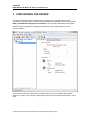
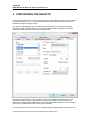
By using the “Edit Mapping” tab in the object properties dialog you can specify the binding
between the object’s atoms and the PLC process variables. Start by selecting an atom and
select the 7TMELSQ driver in the “Driver” drop down list:
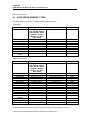
Now select the desired PLC node number and continue by setting be desired Device. Then
specify the number (register number within the device type). Note that the corresponding
Mnemonic is displayed and updated as you select the appropriate parameters. This is a help to
make sure you always bind to the correct process variable.
Continue this process for each atom on the object and save the parameters by clicking the OK
D:\DEV\IGSS32V9\DEV\DOC\HELP\DRIVER DOCUMENTATION\7TMELSQ.DOC