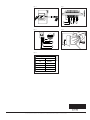
1
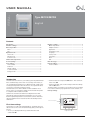
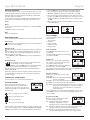
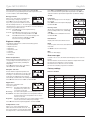
MCD4 operations manual (hydronic) A Comfort Heat floor heating system has been installed in your floor. Under floor heating will warm from the floor up giving you unparalleled feeling of comfort. This heating system is controlled by an electronic thermostat that has a floor or air sensor for optimum temperature control. PRIOR TO TURNING ON The sub-floor slab or screed has to be fully cured before turning the heating on.When turning on the floor for the first time, increase the floor temperature gradually over 2-3 days. RECOMENDED TEMPERATURE SETTINGS FLOOR TEMPERATURE [CERAMIC] - 28 degC FLOOR TEMPERATURE [TIMBER] - 25 degC AIR TEMPERATURE 20 degC WARRANTY THERMOSTAT & SENSOR - 2 years The MICROTEMP RANGE of electronic thermostats are specifically designed for underfloor heating systems. The thermostats are vertically flush mounted and have a 2pole isolator with 16A output relay. MCD4 - The MCD4 thermostat has a built in programmable time-clock to automatically turn the floor heating system ON and OFF at selected times with the addition of an air sensing option with floor limit mode or floor sensor only. During the OFF periods the floor does not turn OFF but programs the floor temperature to your selected ‘set back temperature’.When the appears on your screen, the floor is heating. If you see ‘E1’ or‘E2’ there is an error. MCD4 TECHNICAL DATA Supply Voltage: Output Relay: Switching Differential: Built-in Switch: Temperature Range: Housing/protection: Dimensions (HxWxD): Sensor Length: Mounted: 240Vac, 50/60hz 16A SPST, 3600W max 0.4 degC 2 pole 16A 0/+50 degC IP20 & IP21 115mm x 84mm x 58mm 3m Vertically/Flush Mounted Comfort Heat Australia Pty Ltd www.comfortheat.com.au [email protected] p: 02 9979 8600 f: 02 9979 7706 © 2010 OJ Electronics A/S 67033 01/10 (DJU) USER MANUAL Type MCC4/MCD4 English Contents Introduction................................................................................ 1 First time settings...................................................................... 1 General operation ...................................................................... 2 Back......................................................................................... 2 Exit ........................................................................................... 2 Operation mode ......................................................................... 2 Auto mode .............................................................................. 2 Manual mode .......................................................................... 2 Comfort mode ......................................................................... 2 Thermostat setup menus.......................................................... 2 4-event settings ......................................................................... 2 User settings .............................................................................. 2 Time and date ......................................................................... 2 Child lock ................................................................................ 2 Display settings ...................................................................... 2 4-event schedule .................................................................... 2 Energy monitor ....................................................................... 3 Engineer settings....................................................................... 3 Offset temperature................................................................... 3 Adaptive function..................................................................... 3 Application ............................................................................... 3 Temperature scale ................................................................... 3 Language ................................................................................. 3 Factory reset ............................................................................ 3 Information .............................................................................. 3 Back......................................................................................... 3 Exit ........................................................................................... 3 Error messages ......................................................................... 3 Factory settings ......................................................................... 3 Preset schedule ....................................................................... 3 Introduction The thermostat can switch on your heating system at predetermined times on different days of the week. For each day of the week, you can set individual temperatures for 4 different periods, called events. Lowering the temperature when the home is unoccupied will reduce your energy costs without reducing comfort. The thermostat comes with a default schedule suitable for most homes. Unless you change the settings, the thermostat will operate in compliance with the default schedule. Furthermore, the thermostat features an adaptive function that automatically changes heating period start times so as to ensure that the required temperature is reached at the set time. After three days the adaptive function has learned when the heating must be switched on. • Set the actual hour and press the OK button. Then set the minutes. Press OK. • Set the actual date: year, month and day. Confirm the settings with the OK button. The thermostat is now ready for use and will control your heating in accordance with the pre-programmed 4-event schedule, see Factory settings. 14:08 Power interrupter Wed 20°C Comfort Menu Manual First time settings The first time you switch the interrupter ON “I”, language, time and date must be set. The menu will automatically guide you through the process. • Choose your language with the Up and Down buttons and confirm with OK. © 2010 OJ Electronics A/S Navigation buttons 1 Type MCC4/MCD4 English General operation The interrupter button allows you to turn the thermostat on “I” and off “0” by sliding the button up and down. When the thermostat is switched off “0”, the relay disengages. All settings, including time and date, will be remembered. The thermostat is intuitively operated using the navigation buttons. The function of each button is indicated above the button in the display. 1. Press the OK button to activate the 4-event settings display. 2. Choose the days for which you want to change the settings, Mon-Fri or Sat-Sun using the up or down button. Press OK. 3. Now select the time and temperature for each daily event in the program. Press OK and set the start time for the event concerned. Confirm with OK. Set the temperature for this event and confirm with OK. 4. After setting the required events, select Exit in the menu to return to the initial display. Back In various parts of the menus and submenus you will find the Back menu item. Use Back to return to the last step. Temp Min 5.0°C Exit Time 25°C 40.0°C OK 06:00 Max 05:00 OK 08:00 Returns to initial dispay. User settings Operation mode The thermostat features three different modes of temperature control: Auto mode Select Auto if you want the temperature to be controlled automatically via the 4-event schedule. In the user settings menu you can change the following items: • Time and date • Child lock • Display settings • 4-event schedule • Energy monitor User settings OK Manual mode Select Manual to cancel the programmed 4-event schedule (e.g. during holidays) and to set the required temperature manually. You may, for example, want to adjust the temperature to 5°C for frost protection while you are away. • Press Manual, confirm with OK and choose the required temperature. Time and date Press OK and set the actual time in hours and minutes. The date will then be displayed. Set the date and confirm with OK. Time and date OK Child lock Comfort mode Select Comfort to set a temporary comfort temperature (so-called party mode) for a single event. • Press Comfort, confirm with OK and choose the required temperature. Then enter the required duration of comfort mode. After the set time has elapsed, the thermostat will automatically revert to Auto mode. Please note: Comfort mode is a temporary manual setting that will be automatically cancelled by the next event in the programmed 4-event schedule. Display settings When you wake up in the morning Allows you to select what is shown on the Display settings initial display. Time/day: Shows the actual time and day at OK the top of the display. Set temp.: Shows the current temperature setting. Act. temp.: Shows the actual measured temperature. Scr. saver: Switches off the display after 30 seconds if no button is pressed. Any subsequent press of a button reactivates the display. The thermostat remains on and runs the selected program. Press the OK button to select or deselect the display options. Then select Exit in the menu to return to the initial display and view your chosen settings. When you are away at work 4-event schedule Thermostat setup menus The menu allows you to select the following options: 4-event settings Allows you to have the temperature controlled automatically in accordance with a program of your own choice. You can select temperature settings for four different events during the day: 4-Event settings OK When you come home When you go to bed at night The thermostat is pre-programmed with a 4-event schedule for easy and economic heating control, see Preset schedule under Factory settings. The schedule can be easily changed in the following way: 2 Allows you to lock the thermostat settings, Child lock e.g. in public or other places where you do not want the settings changed. OK Press OK and set the child lock to On using the down button. Confirm with OK. The child lock can be unlocked by pressing both the Comfort and Manual buttons simultaneously for 5 seconds. Allows you to choose the type of weekly 4-Event schedule 4-event schedule you require. 5:2 : Monday to Friday with 4 events and OK Saturday to Sunday with 2 events. Typically used if you work from Monday to Friday. 6:1 : Monday to Saturday with 4 events and Sunday with 2 events. Typically used if you work from Monday to Saturday. 7:0 : Monday to Sunday with 4 individual events. Allows you to choose individual programs for each of the 7 days of week. © 2010 OJ Electronics A/S Type MCC4/MCD4 English Select the required 4-event schedule and confirm with OK. For instructions on programming the time and temperature for the 4-event schedule, see 4-event settings. Press OK to highlight Min temperature. Use the up or down button to select the minimum permissible temperature. Press OK and select the maximum permissible temperature. Confirm the settings with OK. Energy monitor Allows you to view energy consumption for Energy monitor the past 2 days, 30 days or 365 days. Press OK for the chosen period. The value OK in per cent (%) shows the relative amount of time the heating has been on. The following figure is the cost for the selected period. To ensure correct calculation, check the settings for currency, price per kWh and load. Currency: Press OK and chose the required currency. Confirm with OK. Cost/unit: Press OK and set the actual cost of electricity. The cost must be entered per kWh. Press OK. Load: Press OK and enter the connected heating power. The value must be in watt (W). Press OK. Leave the menu by pressing Exit. Language Allows the language used on the display to be changed. Press OK and select the required language. Confirm with OK. OK Factory reset Allows factory settings to be restored. Your personal settings will be lost, see Factory settings. Press OK and choose Reset in the menu. Confirm with OK. Factory reset OK Information Displays the thermostat software version. Engineer settings Information Back The Engineer settings menu contains the following options: • Offset temperature • Adaptive function • Application • Temperature scale • Language • Factory reset • Information Language OK In various parts of the menus and submenus you will find the Back menu item. Use Back to return to the last step. Exit Returns to initial dispay. Error messages Offset temperature If the actual measured temperature does not corresponding to the thermostat value, you can adjust the thermostat by offsetting the temperature. Press OK and enter the value of the measured temperature. Confirm with OK. Offset temp. OK If a fault or error occurs, the thermostat will display an error code as follows: E0: Internal failure. The thermostat is defective. Replace thermostat. E1: Internal sensor defective or short-circuited. E2: External sensor defective or short-circuited. E5: Internal overheating. Inspect the installation. Factory settings Adaptive function Ensures that the required temperature has Adaptive function already been reached when you get up in the morning or come home from work. After just OK a few days, the adaptive function will have automatically calculated when the heating must be turned on. Press OK and set the function to On. Confirm with OK. Application Set the type of regulation used. Application There are 3 options: Floor reg. : The thermostat regulates floor OK temperature only. A floor sensor must be connected. Room reg. : The thermostat regulates room temperature only. Room/limit : The thermostat regulates room temperature with min. and max. limits for floor temperature. A floor sensor must be connected. Regulator : The thermostat functions as a simple regulator and no sensors are used. The setting is a percentage. Press OK and select the required application. Confirm with OK. Preset schedule Day 1-5 Event Time With floor sensor With room sensor Day 06:00-08:00 25°C 20°C Out 08:00-16:00 20°C 15°C Home 16:00-22:30 25°C 21°C Night 22:30-06:00 20°C 15°C Time With floor sensor With room sensor Day 6-7 Event Day 08:00-23:00 25°C 21°C Night 23:00-08:00 20°C 15°C Temperature scale Allows you to set the temperature range within which the thermostat can be set. It is then only possible to set a temperature within this range in auto, comfort and manual mode. Temp scale OK © 2010 OJ Electronics A/S 3 INSTRUCTIONS Typ MCC4/MCD4 67032 01/10 - (DJU) English The thermostat is an electronic on/off thermostat for temperature control by means of an NTC sensor located either externally or internally within the thermostat. The thermostat is for flush mounting in a wall socket. A baseplate for external wall mounting is available. PRODUCT PROGRAMME MCC4-1991-UA Clock-thermostat incl. floor sensor. MCC4-1999-UA Clock-thermostat with built-in room sensor. MCD4-1999-UA Clock-thermostat with 2 sensors. Floor sensor and built-in room sensor. WARNING – Important Safety Instructions. Disconnect the power supply before carrying out any installation or maintenance work on this control unit and associated components. This control unit and associated components should only be installed by a competent person (i.e. a qualified electrician). Electrical installation must be in accordance with appropriate statutory regulations. MOUNTING OF SENSOR The floor sensor contains a safety extra-low voltage (SELV) circuit, allowing it to be placed as close to the floor surface as necessary without having to take account of the risk of shock should the sensor cable become damaged. The two wires from the sensor to the mounting box, must be additionally insulated, e.g. shrink flex. To prevent loose cables from the fixed installation from coming into contact with the terminal block for the floor sensor, they must be restrained using cable ties. It is recommended that the cable and sensor be placed in a non-conductive installation pipe embedded in the floor (fig. 3). The end of the pipe must be sealed and the pipe placed as high as possible in the concrete layer. Alternatively, the sensor can be embedded directly in the floor. The sensor cable must be led through a separate pipe or segregated from power cables. The floor sensor must be centred between the heating cable. The sensor cable may be extended up to 100 m by means of a separate two-core cable. Two vacant wires in a multi-core cable used, for example, to supply current to the floor heating cable must not be used. The switching peaks of such current supply lines may create interference signals that prevent optimum controller function. If a shielded cable is used, the shield must not be connected to earth (PE). The twocore cable must be placed in a separate pipe or segregated from power cables. MOUNTING OF THERMOSTAT WITH BUILT-IN SENSOR The room sensor is used for comfort temperature regulation in rooms. The thermostat should be mounted on the wall approx. 1.6 m above the floor in such a way as to allow free air circulation around it. Draughts and direct sunlight or other heat sources must be avoided (fig. 4). No external sensor is connected. Mounting of thermostat 1.Slide the power button down to Off “0”. 2.Release the front cover ONLY by inserting a small screwdriver into the hole on either side of the thermostat (fig. 1). 3.Connect the wires in accordance with the diagram (fig. 2). 4.Mount the thermostat in the wall socket. Please note that the adapter plate is properly clipped on the thermostat. 5.Fit the frame and carefully press the cover onto the thermostat. Ensure that both the power slide button on the cover and the power switch pin are down. DO NOT open the thermostat by releasing the four fixing clips on the back. First time settings: The first time the thermostat is connected, push the power slide button to On “I”. Language, time and date must be set using the buttons: 1.Set language 2.Set time 3.Set date PROGRAMMING See user manual. TECHNICAL DATA Voltage ............................ 230 VAC ±10% 50 Hz Max. pre-fuse............................................... 16 A Built-in circuit breaker..................... 2-pole, 16 A Output relay............. Make contact - SPST - NO Output................................. Max. 16 A / 3600 W Control principle..................................... PWM/PI Stand-by power........................................ 0.6 W Battery backup....................................... 5 years Temperature range............................... +5/+40°C Limit sensor (OCD4)............................. +5/+40°C Ambient operating temperature........... +0/+25°C Control pollution degree................................... 2 Rated impulse voltage................................. 4 kV Enclosure rating.......................................... IP 21 Dimensions...................... H/84, W/84, D/40 mm Build-in depth.......................................... 20 mm Display........ 100x64 pixel STN - white backlight EU Registered Design . ....... 001101349-0001/2 The thermostat is maintenance free. OJ ELECTRONICS A/S Stenager 13B · DK-6400 Sønderborg Tel: +45 73 12 13 14 · Fax: +45 73 12 13 13 [email protected] · www.oj.dk FAULT LOCATION If the sensor is disconnected or short-circuited, the heating system is switched off. The sensor can be checked against the resistance table (fig. 5). ERROR CODES E0:Internal error. The thermostat must be replaced. E1: Built-in sensor short-circuited or disconnected. E2: External sensor short-circuited or disconnected. E5: Overheating, The temperature is too high in the thermostat and switch off the heating. CE MARKING According to the following standard: LVD/EMC: EN 60730-2-9 CLASSIFICATION The product is a Class II device (enhanced insulation) and must be connected to in the following way: Term. 1: Neutral (N Term. 2: Phase (L) 230 V ±10%, 50/60 Hz Term. 3–4: Load, max. 16 A / 3600 W Term. X: Do not connect Term. 5-6: External floor sensor ENVIRONMENT AND RECYCLING Please help us to protect the environment by disposing of the packaging in accordance with national regulations for waste processing. RECYCLING OF OBSOLETE APPLIANCES Appliances with this label must not be disposed of with general household waste. They must be collected separately and disposed of in compliance with local regulations. © 2010 OJ Electronics A/S · ® The OJ trademark is a registred trademark belonging to OJ Electronics A/S Fig. 1 Fig. 2 Fig. 3 Fig. 4 Sensor Temp.(˚C) Value (ohm) -10 64000 0 10 38000 23300 14800 20 30 BR929A08 Fig. 5 9700 A/S © 2010 OJ Electronics A/S · ® The OJ trademark is a registred trademark belonging to OJ Electronics 2