1
User manual
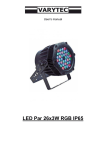
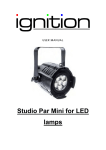
Outdoor LED Par 9 x 3W
Table of contents
1.
Safety instructions ............................................................................................................................ 3
1.1.
FOR SAFE AND EFFICIENT OPERATION ............................................................................ 3
2.
Technical data .................................................................................................................................. 4
3.
Operating Instruction: ....................................................................................................................... 4
3.1.
4.
Auto function ............................................................................................................................ 4
Dmx Chart ........................................................................................................................................ 6
2/8
1. Safety instructions
•
This device is suitable for indoor use only.
•
All modifications to the device will void the warranty.
•
Repairs are to carry out by skilled personnel only.
•
Use only fuses of the same type and original parts as spare parts.
•
Protect the unit from rain and humidity to avoid fire and electric shocks.
•
Make sure to unplug the power supply before opening the housing.
1.1. FOR SAFE AND EFFICIENT OPERATION
Be careful with heat and extreme temperature
Avoid exposing it to direct rays of the sun or near a heating appliance.
Not put it in a temperature bellow 32°F /0°C, or ex ceeding 104°F /40°C.
Keep away from humidity, water and dust
Do not place the set in a location with high humidity or lots of dust.
Containers with water should not be placed on the set.
Keep away from sources of hum and noise
Such as transformer motor, tuner, TV set and amplifier.
To avoid placing on un-stable location
Select a level and stable location to avoid vibration.
Do not use chemicals or volatile liquids for cleaning
Use a clean dry cloth to wipe off the dust, or a wet soft cloth for stubborn dirt.
If out of work, contact sales agency immediately
Any troubles arose, remove the power plug soon, and contact with an engineer for repairing,
do not open the cabinet by yourself, it might result a danger of electric shock.
Take care with the power cable
Never pull the power cable to remove the plug from the receptacle, be sure
to hold the plug. When not using the device for an extended period of time, be sure to
disconnect the plug from the receptacle.
3/8
Important:
Damages caused by the disregard of this user manual are not subject to
warranty. The dealer will not accept liability for any resulting defects or
problems. Make sure the electrical connection is carried out by qualified
personnel. All electrical and mechanical connections have to be carried out
according to the European safety standards.
2. Technical data
Voltage
100 - 240V 50/60Hz
Powerconsumption
27W
Power
0.12A
DMX512 Connector
3 Pin XLR
Weight
2,5 Kg
Meassures
144 x 144 x 230mm
Max ambient Temp.
-20° - +45°C
Max Housing Temp.
+20° - +60°C
Fuse
F1A, 250V
Channels
7
Count of LEDs
9 x 3W 3in1 RGB LEDs
Protection class
IP65
3. Operating Instruction:
1.Four Buttons: Menu, Up, Down, Enter
2.Four digital display dormant state after one minutes working,
3.1. Auto function
MENU is a function key to enter the functions menu.
Press UP,DOWN keys to scroll the menu points
These menus are described as follows:
Addr:
DMX function. Press ENTER key to display Axxx. Press UP to increase the data,
Press DOWN to reduce the data, press and hold UP or DOWN to adjust the value for
DMX address quickly.
rL--
Red Dimmer. Press ENTER key to display rLxx. Press UP to increase the data, Press
DOWN to reduce the data, press and hold UP or DOWN to adjust the value for
Brightness quickly. There are 16 steps for brightness from rL00 up to rL15.
gL --
Green Dimmer. Press ENTER key to display gLxx. Press UP to increase the data,
Press DOWN to reduce the data, press and hold UP or DOWN to adjust the value for
Brightness quickly. There are 16 steps for brightness from gL00 up to gL15.
4/8
bL --
Blue Dimmer. Press ENTER key to display bLxx. Press UP to increase the data, Press
DOWN to reduce the data, press and hold UP or DOWN to adjust the value for
Brightness quickly. There are 16 steps for brightness from bL00 up to bL15.
FLAS
Strobe effect. Press ENTER key to display FLxx. Press UP to increase the data, Press
DOWN to reduce the data, press and hold UP or DOWN to adjust the value for Strobe
speed quickly. There are 16 steps for speed from FL00 up to FL15.
ASC-
Seven Colors running effect. Press ENTER key to display ASxx. Press UP to increase
the data, Press DOWN to reduce the data, press and hold UP or DOWN to adjust the
value for program speed quickly. There are 16 steps for speed from AS00 up to AS15.
CE--
Chasing way effect. Press ENTER key to display CExx. Press UP to increase the
data, Press DOWN to reduce the data, press and hold UP or DOWN to adjust the
value for the way of chasing quickly. There are 16 kind of chasing from CE00 up to
CE15.
FAdE
Fade in and Fade out. Press ENTER key to display FAxx. Press UP to increase the
data, Press DOWN to reduce the data, press and hold UP or DOWN to adjust the
value for Fade speed quickly. There are 16 steps for speed from FA00 up to FA15
5/8
4. Dmx Chart
DMX
Value
Function
Channel
1
0 – 255
Master Dimmer
2
0 – 255
Dimmer Red
3
0 – 255
Dimmer Green
4
0 – 255
Dimmer Blue
5
0 – 14
Off
15 – 29
White
30 – 44
Light Blue
45 – 49
Blue
60 – 74
Purple
75 – 89
Bluish purple
6
7
90 – 104
Reddish purple
105 – 119
Peach blossom
120 – 134
Pink
135 – 149
Red
150 – 164
Orange
165 – 179
Yellow
180 – 194
Limone
195 – 209
Light Green
210 – 224
Green
225 – 239
Bluish green
240 – 255
Cyan
0 – 255
0–5
6 – 240
Strobe speed slow to fast
Off
Speed Chaser slow to fast
241 – 245
7 colors chase
246 – 255
Off
6/8
7/8
Importer:
B & K Braun GmbH
Industriestraße 1
D-76307 Karlsbad
www.bkbraun.com
[email protected]
8/8