1
Before You Begin (DSL Connection)
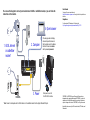
If you are connecting to a DSL line, make sure that your DSL service
is active before you install the modem router. You need the
information listed here to install your DSL modem and connect to the
Internet. Locate it and have it on hand before you start the installation
procedure.
•
DSL user name and password. These are included in the
welcome letter your DSL Internet service provider (ISP) sent you
when you signed up for your service. Record your DSL Internet
service account user name and password here:
User name:
Password:
•
Your telephone number or DSL account number. If you do not
have voice service, you can use your DSL account number in
place of a phone number.
If you do not know or cannot locate your user name and
password, call your DSL Internet service provider.
Be specific when speaking with your DSL Internet service
provider. For example, you could say:
I need my DSL service user name and password. Can you help
me?
Note: If your provider says that they do not support NETGEAR
devices, tell them you need only your DSL user name and
password; you do not need support.
2