1
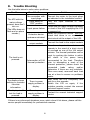
8. Trouble Shooting Use the table below to solve minor problems. Problem The ATS with the mains voltage present, does GRQ¶W turn on. (The LEDs does not flash and no alarm sounds.) Possible Cause Solution No connection with input plugs Connect the mains to the input plugs as indicated in the installation section. Input switch in ³2))´position 7XUQ WKH LQSXW VZLWFKHV LQ ³21´ position. Check that the mains voltage is present or check if the UPS supplying the ATS is powered on. Reset the protective device. Warning: check that there is no overload or short-circuit at the output of the UPS. Input power failure Protective device upstream activated No connection with output sockets The load is not powered. The display shows nothing or provides incorrect information. Intervention of 10A thermal protection There is power supply problem in display. Connect the load to the output sockets The thermal protection device will operate in the event of a short circuit or overload on one of the 10A output sockets. The thermal protection can be reset by pushing the button in which will result in the power being reconnected to the load. Therefore prior to attempting a reset of the thermal protection, please check the connected loads rating and/or determine if there are any problems. Then once reset, reconnect each load one at a time to ensure no problems exists. Shut down the ATS completely and wait for a few seconds. Switch the ATS on again, if the problem persists, contact the nearest technical support centre. The display is off There is power Contact the nearest technical support but the load is supply problem in centre. powered. display. If there is any abnormal situations occur, which doesn't list above, please call the service people immediately for professional examine. 8