1
Chapter 4: Using the Printer
�������������������������������
*** A798 – Diagnostics Form ***
������������
�������������
Model number
:
�������������
Serial
number
:
��������
Boot ���
Firmware
���
Revision
:
��������������
CRC
:
��������
P/N
:
���
Flash Firmware
���
Revision
:
CRC
:
��������������
P/N
:
�����������������
�����������������
H/W parameters
������������������
Flash
Memory Size
:
���������
Flash
Logos/Fonts
:
������������
Flash User Storage
:
��Flash
���������������
Perm’nt Fonts
:
�����������������
Flash
Journal Size
:
��������������������
SRAM
Size
:
���������
Head
setting
:
�����������
Pre-Heating
:
���������
Print
Density
:
�����
Max
Speed
:
�����������
Paper Width
:
����������������
Max
Power
:
Knife
:
���������������
Partial Cut
:
��������������
Paper
Low Sensor
:
��������������
����������
Comm.
Interface
���������
RX Buffer
Size
:
���������
Interface
type
:
��������
Parameters
������
Baud
Rate
:
������������
Data
Bits
:
����������������
Stop
Bit
:
�����������������:
Parity
Flow Control
:
�������������������
Reception Errors
:
USB Driver Type
:
USB Packet w/Error
:
21
��������������������������������
�������������������������������
� ���������
� ����������
A798-720D-TD00
C073400014
� �����
� ����
� V3.02
������������
D554
� 189-7940505A
�����
� ����
� V3.01
������������
4FFF
189-7940497A
� �������
� �����������
� 2��������
Mbytes
� 64
����������
kbytes
� 64
� kbytes
� 0�����������������
kbytes
� 1152
�����
kbytes
� 128
�����
kbytes
� C����������
� Disabled
�����
� 100%
����
� 150
�������
mm/sec
� 80
���������
mm
� 55
��������
W
Enabled
125 steps
� Disabled
����
� ���������
�������������������
������
�����������������������������
�����������������������������
�����������������������
��������������������������������
����������������������
����������������
��
��
��
��
��
��
��
�������
��������
��������
��������
��������
��������
��������
���������������������������������
�����������������������������
�
�
�
�
�
�
�
������
4096
�
RS232/USB
�
����
115200
8�������
1������
��������
NONE
DTR/DSR
� Ignore
������������������
������������������
Printer
Class
��������������
Reject
�������������������
: � 437,
850, 852, 858
�������������������
860,
863, 865, 866
1252, 862, 737, 857
����������������
� 1251,
��� 1255, KZ-1048
��������������������
� ��
Logo(s) defined
: NO
User Char(s) defined
: NO
Journal
Unused
: 1152 kbytes
�������������������������������
��������������������������
�����������������������������������
��������������������������
To enter Printer Config Menu :
1) Flip DIP switch #1 down
2) Reset the printer, while holding
the Paper Feed button down
When the printer is configured for USB, this
location will show either: “USB Driver Type: Native”,
“USB Driver Type: Printer Class”, or “USB Driver:
Comm Class”.
���������������������
Resident
Code Pages
�
���������������������������
����������������������������
�������������������������
����������������
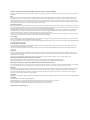
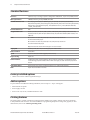
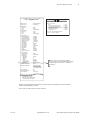
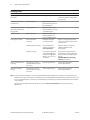
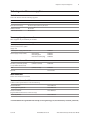
Print test and Configuration menu samples. Samples will vary depending on the printer model.
(Shown approximately 60% of size)
Short clicks are used in the main menu selections.
11/2012
A798-UG00001 Rev. D
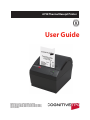
A798 Thermal Receipt Printer: User Guide