1
ProDAQ 3940 Relay Function Card User Manual
3940-XX-UM
4. Software Utilities
4.1
Introduction
The ProDAQ 3940 VXIplug&play compatible driver package encompasses the instrument
driver, soft front panel, documentation and examples. The VXIplug&play soft front panel is
a graphical user interface application developed for the instrument. It is used to verify the
instrument operation and functionality when the instrument is first integrated into a system.
It provides instrument control in a user-friendly environment, being both Windows 95 and
NT framework compatible. The soft front panel application uses the installed driver to
control and operate the instrument.
4.2
Soft Front Panel
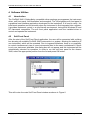
After the start of the Soft Front Panel application, the user will be presented with a dialog
box showing all available ProDAQ 3940 instruments in a system, allowing the selection of
one instrument, which will be operated. Due to imposed limitations, there is no possibility
to control simultaneously two or more instruments fitted to the same motherboard. If there
is only one instrument available, this dialog box will not appear and this instrument will be
automatically selected for operation. In order to run the soft front panel for the chosen
3940, select the appropriate position from the list and press OK button.
Figure 5: Function Card selection
This will invoke the main Soft Front Panel window as shown in Figure 6.
Copyright, © 2002 Bustec Production Ltd.
Page 21 of 32