1
[5]
24 Hour Programmer Option
If the unit is installed as a 24 hour programmer, the
built in programme will be the same for each day.
The COPY & DAY buttons have no affect if installed as
a 24 hour programmer.
Programming Notes
The unit will automatically return to normal running
mode if a period of 30 seconds passes without any
buttons being pressed.
[6]
For convenience, to allow for programmes to go past
midnight, the programme day is from 03:00am to
02:50am the next day.
If a programme is required to run from 1.00 am to
8.00 am then 2 programmes must be used because it
is not possible to programme through 2.50 am. (The
programme should be split up into two sections; 3.00
am > 8.00 am and 1.00 am > 2.50 am).
Reset
Press the reset button with a non-metallic pointed
tool to restore the built in programme. As well as
restoring the built in programme, it also resets the
time to 12:00pm and the date to 01/01/2014. Initially
the display shows all segments lit for a few seconds,
but then will show the current configuration. See
‘Setting The Time’ section to continue.
As a safety feature after reset the unit will be in OFF
operating mode. Reselect your required operating
mode.
Using Advance
The ADVANCE function allows the user to move to
the next ON or OFF programme for a “one off” event,
without having to change the programme or the
operating mode.
Warning: The ADVANCE function is only available
when programme is in AUTO or ALL DAY operating
modes.
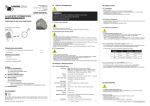
To advance Central Heating
Press the Central Heating channel ADV button. This
will turn the Central heating ON if it is in an OFF
period and OFF if it is in an ON period. It will stay in
this state until either ADV button is pressed again, or
until a programmed ON/OFF period commences. The
word ADV [5] will appear in the top left hand corner
of the LCD.
To advance Hot Water
Press the Hot Water channel ADV button. This will
turn the Hot Water ON if it is in an OFF period and
OFF if it is in an ON period. It will stay in this state
until either ADV button is pressed again, or until a
programmed ON/OFF period commences. The word
ADV [5] will appear in the top right hand corner of the
LCD.
[3]
[1]
[2]
[4]
Using +HR Boost
Holiday Mode
For +Hr Central Heating
The Holiday function allows the user to turn all
channels to the OFF operating mode, for a settable
amount of days from 01-99 days. During this
function a suitcase icon will be displayed.
Press the Central Heating channel +HR button to
make the desired selection with one, two or three
hours extra heating [6] and cancel options offered.
Warning: The +HOUR function is only available
when programme is in AUTO, ALL DAY or OFF
operating modes.
If the Central heating operating mode is OFF, then
it will switch on for the extra hours selected. If the
Central heating mode is AUTO or ALL DAY, then
during an OFF period, it will switch on for the extra
hours selected. If during an ON period, then it will
temporarily extend that programme by the number
of hours selected.
For +Hr Hot Water
Press the Hot Water channel +HR button. to make
the desired selection with one, two or three hours
extra heating [6] and cancel options offered.
Warning: The +HOUR function is only available
when programme is in AUTO, ALL DAY or OFF
operating modes.
If the Hot Water operating mode is OFF, then it will
switch on for the extra hours selected. If the Hot
Water mode is AUTO or ALL DAY, then during an OFF
period, it will switch on for the extra hours selected.
If during an ON period, then it will temporarily
extend that programme by the number of hours
selected.
NOTE: If the programmer is in the OFF mode and
then +HR button is pressed (+1 HR, + 2 HR, or + 3 HR)
and the resulting time of the boost overlaps a START
/ ON time in the AUTO mode programme memory
then the boost will disengage. If this happens simply
press +HR button again and the boost will activate
for the time period chosen.
SERVICE AND WARRANTY
Your product is not user serviceable. PLEASE DO NOT TRY TO DISMANTLE THE UNIT.
This product is guaranteed by your supplier for 5 years from the date of manufacture. If it should become defective
please contact your installer or supplier for a replacement unit or visit www.sangamo.co.uk/returns
This product must meet Waste Electronic and Electrical Equipment Regulations (WEEE) for suitable environmental
recycling, recovery and/or disposal. End of life products should be handled in line with local regulations. Alternatively
return end of life product to Sangamo for correct disposal.
CUSTOMER CARE POLICY
As part of Sangamo’s continuous improvement program, the company operates a Customer Care policy. This means we
welcome your comments and complaints, as it can help us to improve our services to you, our customer.
Due to our policy of continuous product improvement and development, the specifications in this guide may be subject
to change without prior notice.
143796 Issue B
The number of days will decrease at midnight each
day.
The +HR boost override can be used during a
holiday period.
1.
2.
3.
4.
Press & Hold DAY button for 4 seconds to enter
the holiday function , d:01 flashes.
Press +/- button to set the holiday days.
Press DAY button to activate.
Press & Hold DAY button for 4 seconds to
cancel a holiday period.
Warning: The Holiday function is only available in
AUTO, ALL DAY or ON operating modes.
Power Interruption
In the event of a mains supply failure the screen will
go blank but the back-up battery ensures that the
programmer continues to keep the time and retain
your stored programme. When power is restored, if
there has been no change to the rear DIP switch, the
programmer then returns to its expected operating
condition.
If the configuration setting on the rear DIP switch
has been altered during the power interruption the
screen will initially show the new configuration. And
the appropriate factory default programme (see
BUILT IN PROGRAMME section) will be installed.
Press SET button to return to RUN mode.
If you have a problem or require any
further information please contact us on:
01475 745131
Sangamo Limited
Industrial Estate, Port Glasgow,
Renfrewshire, PA14 5XG
Tel 01475 745131
Fax: 01475 744567
Email: [email protected]
Web: www.sangamo.co.uk
WEE/JH0069TY