1
DVMRe Pro
Page 9
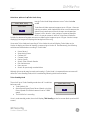
Test Duration: This option is for the type of test to run – Fast or Thorough. The Thorough test will test
significantly more sectors than the Fast test. The Thorough test is recommended because the Fast
test can miss some disk failures.
Use the Jog to move between the
menu fields and the Shuttle for the
selections within the fields. When
satisfied with the selections select OK
and press the Enter button to execute.
Disk Test Setup
Disk Test:
DISABLE
Test Frequency in hours:
Test Duration:
0
Fast
[CANCEL]
Disk Test Result:
[OK]
Disk Failed
Disk 1: Write Error
Disk 2: Write Error
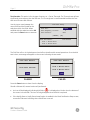
The Disk Test will run in the background and will not interfere with normal operations. Once the disk
test is done, a message will appear on the screen indicating the test result.
Disk Test Result
Disk Test Result
Disk Failure
Disk Test Success
Disk 1:Write Error
Disk 2:Write Error
[OK]
[OK]
PASSED
FAILED
Press the Enter button to clear from the display.
Should a disk test fail, several actions will performed:
•
It is displayed on Monitor A on the bottom of
An icon will be displayed indicating disk failure.
the screen in the middle. This icon will only disappear when the disk is replaced.
•
If the Notify Alarm or Notify Record email option is enabled in the Email Notification Setup screen,
an email will be sent indicating that a disk failure occurred.
GE Security
Product Release Guide
g