1
3 Quick Reference
8
9
10
1
11
12
13
14
15
2
16
3
BACK
NEXT
4
5
HUMID
6
7
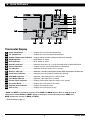
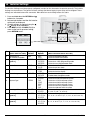
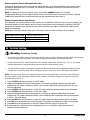
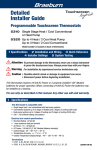
Thermostat Display
1
Room
Temperature....................... .Displays the current room temperature
2
Set Temperature........................... .Displays the current set point temperature
3
Outdoor Temperature Indicator.... .Displays along with the outdoor temperature reading**
4
BACK Indicator*............................ .BACK button is active
5
NEXT Indicator*............................ .NEXT button is active
6
Humidity Indicator ...................... .Indicates when there is a call for humidification or dehumidification
7
Service Indicators . ..................... .Displays various service/maintenance information
8
Fan Indicator................................. .Indicates when the system fan is running
9
Wireless Indicator......................... .Indicates a wireless connection (flashes when connection has been lost)
10
Low Battery Indicator................... .Indicates when the batteries need to be replaced
11
Hold Mode Indicator .................... .Indicates if the thermostat is in HOLD mode
12
Lock Mode Indicator . .................. .Indicates if the thermostat is locked
13
System Status Indicator .............. .Displays information about the status of the system
14
Day of the Week............................ .Displays the current day of the week
15
Program Event Indicator.............. .Displays the program event
16
Time of Day .................................. .Displays the current time of day
* BACK and NEXT are secondary functions of the PROG and HOLD buttons. When in programming or configuration modes, BACK and NEXT appear in the display screen indicating that the PROG and
HOLD buttons now function as BACK and NEXT.
** Also see #24 on page 10.
9
Installer Guide