1
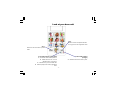
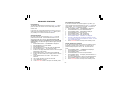
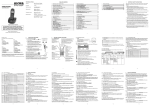
Look at your handset
Earpiece/Receiver
Redial / Up / Pause
Display
Use to redial any of the last 10 numbers called.
Press and hold to enter a pause in a number.
Press during a call to inscrease earpiece volume.
Use to scroll up through the menu options and
through phonebook and Calls logg entries.
The display lights up every time a keypad
button is pressed and when you receive
an incoming call.
Speaker phone / Handsfree
Talk-Off / Esc / Power
Press to use the phone in handsfree mode.
Press to end calls.
Press to escape from programming.
Press and hold in standby mode to
switch the handset power off.
Press when the handset is off, to
switch back on again.
Calls log / Down
Use to acess the Calls log.
Press during a call to decrease
earpiece volume.
Use to scroll down through the menu
options and through phonebook and
Calls log entries.
INT / Cancel
Talk-On / Recall
Press to delete an incorrect
character / digit.
Press to return to previous menu.
Call another registered handsets.
Press to make and receive calls.
For use with certain network services
OK/ Menu
Press to confirm a setting.
Press to access the menu.
Phonebook / Mute
Use to access the phonebook.
During a call, press to mute
your voice.
Microphone
-3-