1
Accessing the Internet
After the client device is connected to the Wi-Fi hotspot
successfully, you can access the Internet.
Configuring Your PC
The following procedure describes how to configure the
Internet Protocol in the Windows 7 operating system for
your Wi-Fi connection.
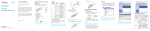
1. Right-click Network and select Properties.
2.Select Change adapter settings.
3. Right-click Wireless Network Connection and select
Properties.
4.Select Internet Protocol Version 4 (TCP/IPv4), and
click Properties.
5.Select Obtain an IP address automatically and Obtain DNS server address automatically, and click OK.
14