1
Getting to Know Your Device
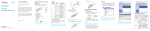
Installing Your Device
1. Slide the back cover and remove it.
NOTE: Do not remove the cover rudely.
2. Install a (U)SIM card to the (U)SIM card slot.
WARNING!
Your device does not support the micro-SIM and nano-SIM
card or any other non-standard SIM cards. To avoid damaging the device, do not use those cards or any card holders.
6