1
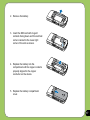
2. Remove the battery.
3. Insert the SIM card with its gold
contacts facing down and the notched
corner oriented to the lower right
corner of the slot as shown.
4. Replace the battery into the
compartment with its copper contacts
properly aligned to the copper
conductor on the device.
5. Replace the battery compartment
cover.
17