1
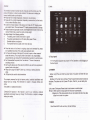
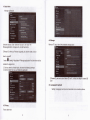
ln the ma n interfaoe,you can∶
Manogement叩 a n interfaCe software ICONs"ong press the icons3second,after
32status bar desC“be
lhe℃ ons wⅢ b咱 eG then you can drag anywhere h tIe mle亻 ace
● The slatus bar above oflhe screen
Top eft disp ay main intel亻
ace so伽 ǎre,孓 FIash card,VsB conneC"on
status and so on
T° p"ght
dispIay the battery battery charge oons,current ume,set ume,
settngs Menu,EsC bu廿 on
33Vse touch paneI
Dev|oe equipped wkh a7°
touch soreen Fol|oWing the main touch screen
area ls desCHbed,and desC冖 bes som0of the ups for how to use the touoh
No ma廿 er Whioh hterface yo凵 are on the soreen,can go backto mam s。 reen
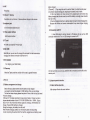
Ddetei∞ ns∶ bng press the℃ ons3second,dragthe Consto lhe Recyde Bh沦
once"become red,Loosen your hand,a仳 erthat you can de丨 ete ioon
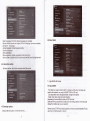
You louch the screen keep a ume,appearthe diabg bo¢
shown be ow∶
on,
through presslng the so△
Attenu°
【
Add yo Home sCreen” as
n】
key■■ on
the b¢ tom right oorner oflhe mon screen
The main sCreen soft key Dundions as the mach ne back
key溺
h dfeFentapⅡ ∞t ons,by bp口 ng me back son key uontheb。 ttom rtgh
∞meron hetouCh sC旧 en,you oan retum to ts hterfa∞ on me upn∞
h山 fferent
apu⒗
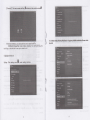
at ons,by tap0ng the menu key口
oorner of touch screen,the scΓ
fo|loWs、
r
on the upper rght
een wⅢ aρ pear the opefa刂 on se廿 ing ntel亻 ace as