1
Getting Started
Turning on the Edge
Press and hold POWER to turn on the
Edge.
Configuring the Edge
The first time you turn on the Edge,
you are prompted to configure system
settings and user profile settings.
• Follow the on-screen instructions
to complete the initial setup.
• Press and to view choices
and change the default selection.
• Press ENTER to make a selection.
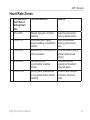
• Use the table on page 5 to answer
the activity class question.
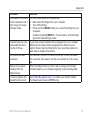
Icons
Battery charge level
GPS is on and receiving
signals.
GPS is turned off.
Heart rate monitor is active.
Speed and cadence sensor
is active.
Power meter is active.
Edge 500 Owner’s Manual