1
User Manual for Fingertip Oximeter
3 Operation
3.1 Directly Measurement
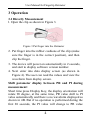
1. Open the clip as shown in Figure 3.
Figure 3 Put finger into the Oximeter
2. Put finger into the rubber cushions of the clip (make
sure the finger is in the correct position), and then
clip the finger.
3. The device will power on automatically in 2 seconds,
and start to display software version number.
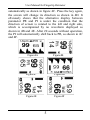
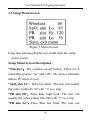
4. Next enter into data display screen (as shown in
Figure 4). The user can read the values and view the
waveform from display screen.
Shift parameter display between PR and PI during
measurement:
Short time press Display Key, the display orientation will
rotate 90 degree, at the same time, PR value shift to PI
value automatically and there is no waveform displayed as
shown in 4B. But if no operation is performed during the
first 20 seconds, the PI value will change to PR value
4