1
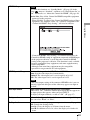
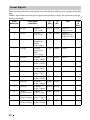
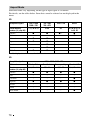
Original image
Recommended setting and resultant images
Squeeze
Projecting
16:9
When using an anamorphic lens
Normal (When a computer signal is input)
Full (When a computer signal is input)
Notes
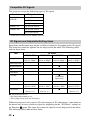
• Selectable aspect modes vary depending on the input signal.
• You can adjust the vertical position of the picture with “V Center” and “Vertical Size” in the
Screen
menu only when “Aspect” is set to “Zoom.” (1 page 38)
Notes on switching the “Aspect” setting
• Select the aspect mode taking into account that changing the aspect ratio of the original
picture will provide a different look from that of the original image.
• Note that if the unit is used for profit or for public viewing, modifying the original
picture by switching the aspect may constitute an infringement of the rights of authors
or producers, which are legally protected.
21