1
Table of Contents
Location of Controls
Front/Right Side ................................. 4
Rear/Bottom ....................................... 5
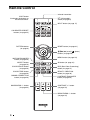
Remote Control .................................. 6
Adjusting the Picture Using Real Color
Processing .........................................27
Using the Menus
Operation through the Menus ...........29
Picture Menu ....................................32
Connections and
Preparations
Advanced Picture Menu ...................36
Screen Menu .....................................37
Preparation 1: Installing the
Projector ............................................. 7
Setup Menu .......................................39
Installing the Unit ......................... 7
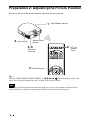
Preparation 2: Adjusting the Picture
Position .............................................. 8
Items Locked by Settings
Lock ..........................................44
Installation Menu ..............................45
Preparation 3: Connecting the
Projector ........................................... 13
Information Menu .............................47
Connecting to a VCR ................. 13
Connecting to a Computer ......... 15
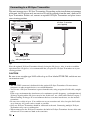
Connecting to a 3D Sync
Transmitter ................................. 16
Function Menu .................................41
About the Preset Memory No. ....48
Others
About the Control for HDMI ............49
About the x.v.Color ..........................50
Projecting
About the simulated 3D feature ........50
Projecting the Picture ....................... 17
Troubleshooting ................................51
Turning Off the Power ............... 18
Selecting the Aspect Ratio According to
the Video Signal ............................... 19
Warning Indicators .....................54
Message Lists ..............................55
Replacing the Lamp and the Air Filter
and Cleaning the Ventilation Holes
(intake) ..............................................57
Watching 3D Video Images ............. 22
Using the Simulated 3D
Function ...................................... 23
Selecting the Picture Viewing
Mode ............................................... 25
Adjusting the Picture Quality .......... 26
Selecting to Directly Adjust the
Desired Menu Item ..................... 26
2
Cleaning the Air Filter ......................60
Fitting the Lens Cap .........................60
Cleaning ............................................61
Specifications ...................................62
Preset Signals ..............................64