1
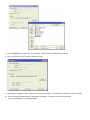
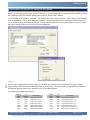
7. Click the OPEN button to finish the kernel selection. Make sure the correct kernel is chosen.
8. Click the UPDATE TARGET button to install the kernel.
9. A dialog box will appear to show the status of the kernel installation. This could take a couple of minutes to install.
10. When the dialog windows close, the installation is complete. The Solves-It may be connected to
normally and programs may be downloaded.