1
ADOBE FRAMEMAKER 6.0 34
Changing Menus and Commands
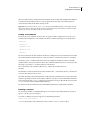
To define an Japanese-only command, use the <AsianFonts Yes> statement. For example, the
following statements define the Format > Document > Combined Fonts command:
<Command CombinedFonts
<Label Combined Fonts...>
<KeySequence \!oco>
<Definition \x338>
<AsianFonts Yes>
<Mode All>>
The <AsianFonts No> statement has the same effect as omitting the statement. If the AsianFonts
statement is set to No or is not specified, the command applies to all configurations.
Removing a command
You can remove commands from a menu. Removing a command from a menu doesn’t remove the actual
command or its associated keyboard shortcut from FrameMaker products. Only the menu changes.
Removing a command also doesn’t affect other commands, even though they may seem to be related. For
example, if you remove the Group command, the Ungroup command doesn’t disappear.
To remove a command, use the following statement:
<Remove ItemID <Menu MenuID>>
ItemID is the identifier of the command that you’re removing. MenuID is the identifier of the menu
containing the item you want to remove.
If a command appears on more than one menu and you want to remove it from each menu, use one
Remove statement for each menu. For instance, to remove the Reshape command from both the quick and
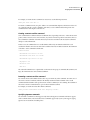
complete Graphics menus, use the following statements:
<Remove GraphicsReshape <Menu GraphicsMenu>>
<Remove GraphicsReshape <Menu QuickGraphicsMenu>>
Adding shortcuts for a command
There are two ways to specify a shortcut for a command. One is to specify a mnemonic shortcut and the
other is to specify a key sequence. A mnemonic shortcut is a one-character shortcut; the character must
occur somewhere in the label for the command. A key sequence shortcut usually consists of more than one
key.
• Adding mnemonic shortcuts
A mnemonic shortcut is an underlined character in a command label. When the menu is open, you can
press the underlined key to execute the command. For example, when the File menu is open, you can press
x to choose the Exit command.
To specify a mnemonic shortcut for a command, find the statement in which the command’s label is
specified and place an ampersand before the letter of the label which you wish to underline.