1
Using eCaring’s CareTracker
SECTION
7
Sign Out of CareTracker
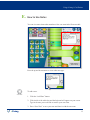
When you have finished entering information for the day, make sure to sign
out of CareTracker by clicking the “Sign Out” button on the top right of the
CareTracker screen.
When you sign out, CareTracker automatically saves the data they entered
throughout the day.
Congratulations!
You are now ready to start using CareTracker!
NEED HELP?
Our team is always here to help if you get stuck or have a problem.
>> eCaring FAQ’s page
Email us at [email protected]
Call us toll free at 1 (855) 8eCaring
1 (855) 832-2746
Updated 7/18/13
eCaring
Caring
14