1
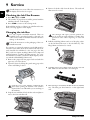
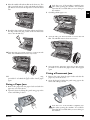
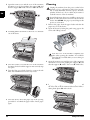
5 Clean the feed roller (A) and the underside of the support pad of the feeder roller (B) with a soft, lint-free
cloth moistened with cleaning alcohol (96 percent).
Rotate the feed roller; You must clean the entire roller.
6 Close the scanner cover and the cover of the automatic
document feeder. Both the supports must securely snap
into place.
7 Turn the blue gear wheel forward to tension the ink
film. The ink film must not have any creases.
1 Press OK, 45 and OK.
2 Enter a service code:
7117—Deletes all changed settings and saved data.
The device is reset to factory settings and the initial installation process is started.
7140—Deletes all changed settings. Saved data and
telephone book entries remain intact.
7227—Deletes saved faxes, when there are problems with printing.
3 Confirm using OK.
4 Dial using [ SURE: YES.
5 Confirm using OK.
If you have entered the incorrect code, you can
cancel the entry with SURE: NO.
Power Cycling
If a problem occurs that cannot be corrected with the instructions in this user manual (see also the help below), follow the steps given here.
1 Pull out the power plug.
2 Wait at least ten seconds, then plug the power plug
back into the socket.
3 If the error occurs again, please contact our technical
customer service or your retailer. Follow the instructions on the display and on the error report.
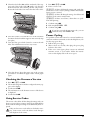
8 Close the device. Insert the paper tray in the opening
provided for it behind the paper feeder. Insert paper
again.
Checking the Firmware Version
1 Press OK, 47 and OK.
2 The model designation and the configured country appear on the display.
3 Confirm with OK.
4 The information on the firmware version of the device
is displayed.
5 Confirm with OK.
Using Service Codes
The service codes delete all the changed settings and your
device is reset to factory settings. It may be possible that the
device with the changed settings reacts differently than expected.
Only use the service codes if this is absolutely necessary. Some service codes also delete saved messages
and telephone book entries.
Using Service Codes
Service
31
EN