1
User’s Manual
VMware Perl API
TM
VMware, Inc.
Please note that you will always find the most up-to-date technical documentation on our Web site at http://www.vmware.com/support/.
The VMware Web site also provides the latest product updates.
3145 Porter Drive
Palo Alto, CA 94304
www.vmware.com
Copyright © 2002 VMware, Inc. All rights reserved. U.S. Patent No. 6,397,242 and patents pending. VMware, the
VMware “boxes” logo, GSX Server and ESX Server are trademarks of VMware, Inc. Microsoft, Windows, and
Windows NT are registered trademarks of Microsoft Corporation. Linux is a registered trademark of Linus
Torvalds. All other marks and names mentioned herein may be trademarks of their respective companies.
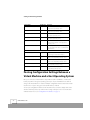
Table of Contents
Introducing the VMware Perl API _________________________________ 5
What is the VMware Perl API? ______________________________________ 6
Installing the VMware Perl API on Another Machine ____________________ 7
Installing the VMware Perl API on a Linux Host ______________________ 7
The VMware Perl API Modules _____________________________________ 7
VMware::Control _____________________________________________ 7
VMware::Control::Server ________________________________________ 8
VMware::Control::VM _________________________________________ 10
Error Codes ___________________________________________________ 14
VMware Perl API Error Codes ___________________________________ 15
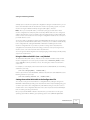
Setting and Retrieving Variables ________________________________
VMware Perl API Variables ________________________________________
Namespace for Properties _____________________________________
Configuration File Variables ____________________________________
Status Variables _____________________________________________
Statistics Variables ___________________________________________
VMware ESX Server System Resource Variables _____________________
Virtual Machine Resource Variables for VMware ESX Server ____________
Passing Configuration Settings Between a Virtual Machine and a Host
Operating System ______________________________________________
Using the VMware Perl API’s $vm->set() Method ____________________
Setting the machine.id Variable in the Configuration File _____________
Retrieving a Virtual Machine’s Configuration Settings ________________
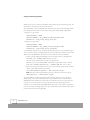
Passing User-Defined Information Between a Running Guest Operating
System and a Host Operating System _______________________________
Sending Information Set in the Host Operating System to the Guest
Operating System ___________________________________________
Sending Information Set in the Guest Operating System to the Host
Operating System ___________________________________________
17
18
18
19
20
21
22
24
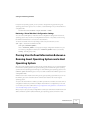
Using Sample Perl Scripts ______________________________________
Sample Perl Scripts _____________________________________________
Listing the Virtual Machines on VMware ESX Server _________________
Checking a Virtual Machine’s Power Status ________________________
Starting, Stopping and Suspending a Virtual Machine _______________
33
34
34
36
38
26
27
27
29
29
30
31
www.vmware.com
3
Monitoring a Virtual Machine’s Heartbeat _________________________
Answering Questions Posed by a Virtual Machine ___________________
Monitoring a Virtual Machine’s Usage of the Host CPU _______________
Suspending a Virtual Machine __________________________________
Setting a Virtual Machine’s IP Address ____________________________
Adding a Redo Log to a Virtual Disk ______________________________
Committing a Redo Log to a Virtual Disk without Freezing the Virtual
Machine ___________________________________________________
Committing the Topmost Redo Log _____________________________
4
www.vmware.com
41
44
46
48
50
52
54
57
1
Introducing the VMware Perl API
Introducing the VMware Perl API
What is the VMware Perl API?
VMware’s Perl API is an application programming interface that utilizes the Perl scripting
language to control VMware™ ESX Server™, VMware GSX Server™ and the virtual machines that
are created by and run in both of these products. This control can be done both locally and
remotely across servers.
You can incorporate the API’s function calls in a Perl script in order to automate some of the dayto-day functioning of your GSX Server and ESX Server processes and virtual machines, such as
the starting and stopping of virtual machines. You can also gather information about the virtual
machines.
You can use the API to send and receive configuration to a virtual machine. See Passing
Configuration Settings Between a Virtual Machine and a Host Operating System on page 26. You
can also send properties you define from the host operating system to a virtual machine’s guest
operating system and vice versa. For more information, see Passing User-Defined Information
Between a Running Guest Operating System and a Host Operating System on page 29.
By using the VMware Perl API, you can access and administer a virtual machine without using a
local or remote console. The virtual machine — or VMware ESX Server for that matter — does
not have to be running in order to use the VMware Perl API.
Note: The Perl APIs in ESX Server 1.5 are experimental and may not be supported in their
entirety in future releases of VMware server products. For more information about VMware API
development, see www.vmware.com/support/developer.
The Perl API consists of three modules or packages:
•
VMware::Control — which contains global definitions such as version information and
error codes.
•
VMware::Control::Server — which controls interaction with a GSX Server or ESX Server
machine (via the vmware-serverd daemon)
•
VMware::Control::VM — which controls interaction with a particular virtual machine on a
GSX Server or ESX Server system.
Each module is described below and includes the methods and their usage. In addition, sample
scripts and lists of error codes and variables are provided. For the list of error codes returned by
these modules, go to Error Codes on page 12. The variables start on VMware Perl API Variables
on page 18. The sample scripts begin on Sample Perl Scripts on page 34.
4
www.vmware.com
Introducing the VMware Perl API
Installing the VMware Perl API on Another
Machine
The VMware Perl API is installed on VMware ESX Server when you installed the software.
However, if you want to run scripts from a machine other than VMware ESX Server, you need to
install the VMware Perl API installation package on that machine.
Installing the VMware Perl API on a Linux Host
1. Copy the VMware Perl API package from /usr/lib/vmware/perl/control.tar
to the machine on which you want to run the VMware Perl API.
2. Untar the package
tar xvf control.tar
3. Change to the directory where you expanded the package.
cd control-only
4. Build the intermediate Makefile.
perl Makefile.pl
5. Build the VMware Perl API against the version of Perl you have installed. You will need to
make sure the proper Perl packages are installed and will need a compiler on the system
from which you wish to run the Perl API remotely.
make
In older distributions of Linux, the necessary Perl packages are automatically installed. In
newer versions, there is often an RPM package named perl-devel-<xxxx>.rpm,
where <xxxx> is a series of numbers representing the version, that you need to install.
6. To install the Perl packages, use:
make install
The VMware Perl API Modules
VMware::Control
The VMware::Control package and its sub-packages, VMware::Control::Server and
VMware::Control::VM, provide the ability to enumerate, query, and control the virtual machines
running on a given server. The VMware::Control module contains global definitions such as
version information and error codes. It is the initialization module for the API interface and must
www.vmware.com
5
Introducing the VMware Perl API
be loaded in order to load the VMware::Control::Server and VMware::Control::VM modules. This
module determines the version of the software, and is used to create a Control::Server object.
Note the VMware::Control class is a generic high level class with limited function. It holds the
VMware::Control::Server and VMware::Control::VM classes, which do most of the work.
VMware::Control::Server
VMware::Control::Server is a Perl module for programmatically manipulating a server running
virtual machines running under VMware GSX Server or VMware ESX Server. The methods in this
module control interaction with a GSX Server or ESX Server machine by way of the vmwareserverd daemon. Examples of this interaction include connecting to a server, listing the
virtual machines available on the server, getting a virtual machine’s handle on a particular server,
creating virtual machine objects and disconnecting from the server.
You can also register and unregister configuration files for virtual machines on the server.
Except where noted otherwise, these methods are synchronous; the method does not return
until it finishes its operation, fails or times out. Most operations time out after 2 minutes.
For example, in $server->register(), the script does not continue until the virtual
machine has finished registering, the operation timed out or failed and returned undef.
VMware::Control::Server Methods
Method
Description
VMware::Control::Server
::new( $hostname,
$port, $username,
$password )
Use this method to create a new server object, specified by the host name
($hostname) and network port ($port), sending the supplied user
name and password for authentication. Once the object is created, you can
open a connection to this server object, enumerate the virtual machines on
the server, register or unregister the virtual machines and create new virtual
machine objects.
Returns a server object of class
VMware::Control::Server or undef.
If $hostname is not given or undefined, the authentication is
performed on the local machine. In this case, the user name and password
are optional; if they are not supplied, the current user is authenticated on
the local machine. Otherwise, the user name and password may still be
supplied to authenticate as that user.
The vmware-authd service listens on port 902 to authenticate users.
$port defaults to port 902; if $port is undefined, port 902 is used.
$server->connect()
Returns 1 if successful or undef if not
successful.
6
www.vmware.com
Use this method to attempt to establish a connection to the server specified
by $server.
Introducing the VMware Perl API
Method
Description
$server->
get_last_error()
When a method fails (that is, returns undef ), use this method to return
the error code corresponding to the failure on the server specified by
$server, along with a string description (often with more specific error
information). For more information, see Error Codes on page 12.
Returns the error code and descriptive
string.
For example, to return an error code and a description of the error, in your
scripts, use:
my ($ret, $string) = $server>get_last_error();
Alternately, to return only the error code, in your scripts, use:
my $ret = $server-get_last_
error();
$server->
is_connected()
Use this method to determine whether or not a connection exists to the
server specified by $server.
Returns Boolean.
The remaining methods only work after you connect to the server with $server->connect().
Method
Description
$server->enumerate()
Use this method to enumerate the virtual machines on the server (specified
by $server) to which you have opened a connection. This returns a list
of configuration files for registered virtual machines on the host. Once the
path is known, a virtual machine object can be created using the
VMware::Control::VM::new method.
Returns list of paths to configuration files
for virtual machines on the server for
which you have access rights. If there are
no virtual machines on the server, the list is
empty.
The list is not returned in any particular order.
$server->enumerate only returns the paths to configuration
files for virtual machines for which you have appropriate access rights. Thus
it is possible for the enumeration to not return a complete list of all virtual
machines on the current machine.
For more information about access and permissions, see
www.vmware.com/support/esx15/doc/reference_running_vm_esx.html.
Note: You need to be a registered ESX Server user with a user name and
password to see this document.
$server->register(
<path_to_config> )
Returns 1 if successful or undef if not
successful.
Use this method to register a virtual machine’s configuration file. You need
to specify the server in $server and the path to the configuration file
in <path_to_config>.
www.vmware.com
7
Introducing the VMware Perl API
Method
Description
$server->unregister(
<path_to_config> )
Use this method to unregister a virtual machine’s configuration file. You
need to specify the server in $server and the path to the
configuration file in <path_to_config>.
Returns 1 if successful or undef if not
successful.
$server->
get(<Resource.system
.variable_name>)
Use this method to get server statistics such as Resource.system.* variables.
For more information on these variables, see VMware ESX Server System
Resource Variables on page 22.
Returns 1 if successful or undef if not
successful.
$server->disconnect()
This method closes the connection to the server specified by $server.
Returns 1 if successful or undef if not
successful.
VMware::Control::VM
VMware::Control::VM is a Perl module for controlling the interactions with virtual machines
running on VMware GSX Server or VMware ESX Server. You can connect to a virtual machine,
check its state, start, stop, suspend and resume virtual machines and query and modify the
configuration file settings.
Except where noted otherwise, these methods are synchronous; the method does not return
until it finishes its operation, fails or times out. Most operations time out after 2 minutes, except
for power operations, which time out after 4 minutes.
For example, in $vm->start(), the script does not continue until the virtual machine has
completely started, the operation timed out or failed and returned undef.
VMware::Control::VM Methods
Method
Description
VMware::Control::VM::
new( $server,
$config_pathname )
This method creates a new object for a given virtual machine, identified by
the path to its configuration file ($config_pathname) on the
server specified by the server object ($server). The path can be
obtained using the
Returns a virtual machine object of class
VMware::Control::VM or undef.
VMware::Control::Server::enumerate()
$vm->connect()
Use this method to attempt to establish a connection to the virtual machine
specified by $vm on the server.
Returns 1 if successful or undef if not
successful.
8
www.vmware.com
method.
Introducing the VMware Perl API
Method
Description
$vm->get_last_error()
When a method for a virtual machine specified by $vm fails (that is, returns
undef ), this method returns the error code corresponding to the failure,
along with a string description (often with more specific error information).
For more information, see Error Codes on page 12.
Returns the error code and descriptive
string.
For example, to return an error code and a description of the error, in your
scripts, use:
my ($ret, $string) = $vm->get_last_error();
Alternately, to return only the error code, in your scripts, use:
my $ret = $vm->get_last_error();
$vm->is_connected()
Returns Boolean.
Use this method to determine whether or not a connection exists to the
virtual machine specified by $vm.
The remaining methods only work after you connect to the virtual machine with
$vm->connect(). In the following table, TRUE refers to any non-zero value.
Method
Description
$vm->start()
This method starts (powers on) the virtual machine specified by $vm. Use
this method to start a virtual machine that is powered off or resume a
suspended virtual machine.
Returns 1 if successful or undef if not
successful.
$vm->stop( $force )
Returns 1 if successful or undef if not
successful.
This method stops (powers off ) the virtual machine specified by $vm. If
$force is specified and TRUE (a non-zero value), the guest operating system
is powered off hard (not gracefully) instead of having a soft, clean shutdown
attempted. In a soft shutdown, applications are saved and closed in an
orderly manner.
$force defaults to false, so a soft shutdown is performed unless you
specify $force and set it to TRUE. A soft shutdown is only possible
when a current version of VMware Tools is installed and running in the guest
operating system.
$vm->reset( $force )
Returns 1 if successful or undef if not
successful.
Resets (powers off and on) the virtual machine specified by $vm. If
$force is specified and TRUE (a non-zero value), the guest operating
system is reset hard (not gracefully) instead of having a soft, clean reset
attempted. In a soft reset, applications are saved and closed in an orderly
manner.
$force defaults to false, so a soft reset is performed unless you specify
$force and set it to TRUE. A soft reset is only possible when VMware
Tools is installed and running in the guest operating system.
www.vmware.com
9
Introducing the VMware Perl API
Method
Description
$vm->request_stop(
$force )
This method sends a request to the server to stop (power off ) the virtual
machine specified by $vm. This method is asynchronous, allowing the
script to continue running without having to wait for the power off
operation to complete. If $force is specified and TRUE (a non-zero value), the
guest operating system is powered off hard (not gracefully) instead of
having a soft, clean shutdown attempted.
Returns 1 if successful or undef if not
successful.
$force defaults to false, so a soft shutdown is performed unless you
specify $force and set it to TRUE. A soft shutdown is only possible
when VMware Tools is installed and running in the guest operating system.
$vm->request_reset(
$force )
Returns 1 if successful or undef if not
successful.
This method sends a request to the server to reset (power off and on) the
virtual machine specified by $vm. This method is asynchronous, allowing
the script to continue running without having to wait for the reset operation
to complete. If $force is specified and is TRUE (a non-zero value), the guest
operating system is reset hard (not gracefully) instead of having a soft, clean
reset attempted.
$force defaults to false, so a soft reset is performed unless you specify
$force and set it to TRUE. A soft reset is only possible when VMware
Tools is installed and running in the guest operating system.
$vm->suspend()
Returns 1 if successful or undef if not
successful.
$vm->add_redo( $disk )
Returns 1 if successful or undef if not
successful.
Suspends to disk the virtual machine specified by $vm. To resume the
virtual machine, use $vm->start().
This method is experimental. It adds a redo log to a running virtual SCSI disk
specified by $disk, that is associated with the virtual machine specified
by $vm. Changes made to the virtual disk accumulate in the new redo log.
This disk must be a VMware ESX Server virtual disk stored on VMFS.
The virtual disk can be in persistent, undoable or append mode. The redo
log for a virtual disk in persistent mode uses the file name of the virtual disk
with .REDO appended to it (for example, if the disk is called, vm.dsk, the redo
log is called vm.dsk.REDO). A virtual disk in undoable or append mode
already has a redo log associated with it, so the new redo log you create is
called vm.dsk.REDO.REDO, whose parent is the existing redo log,
vm.dsk.REDO.
This method fails if the specified virtual disk does not exist, the specified
virtual disk is in nonpersistent mode, an online commit is already in
progress, or the virtual disk already has two redo logs associated with it.
If you add a redo log using the $vm->add_redo() method, but
do not commit your changes with the $vm->commit() method,
then the redo is automatically committed when the virtual machine is
powered off.
10
www.vmware.com
Introducing the VMware Perl API
Method
Description
$vm->commit( $disk,
$level, $freeze,
$wait)
This method is experimental. It commits the changes in a redo log to a
running virtual SCSI disk specified by $disk that is associated with the
virtual machine specified by $vm. This disk must be a VMware ESX Server
virtual disk stored on VMFS.
Returns 1 if successful or undef if not
successful.
$level can be 0 or 1. When $level is 0, there can be one or two
redo logs associated with the disk. If $level is 0, then the top-most
redo log (the redo log being modified) is committed to its parent. For
example, if there is currently only the disk vm.dsk with a single redo log
vm.dsk.REDO, then the changes in vm.dsk.REDO are committed to vm.dsk. If
a second REDO log vm.dsk.REDO.REDO has been added, then the changes
in vm.dsk.REDO.REDO are committed to vm.dsk.REDO.
$level can be 1 only when there are two redo logs associated with the
disk, vm.dsk.REDO and vm.dsk.REDO.REDO. When $level is 1, the
changes in the next-to-top REDO log — vm.dsk.REDO — are committed to
vm.dsk. In this case, the virtual machine does not have to freeze while the
redo log is being committed. Also, when the log is committed,
vm.dsk.REDO.REDO is renamed to vm.dsk.REDO.
$freeze can be 0 or 1. If $freeze is 0, then the virtual machine is
not frozen when changes are committed, though it runs more slowly. If
$freeze is 1, then the virtual machine is frozen until the commit
operation finishes. If $level is 0, then the virtual machine must be
frozen when changes are committed and $freeze is ignored.
$wait can be 0 or 1. If $wait is 0, then the method returns as soon as
the commit begins. If $wait is 1, then the method does not return until
the commit completes.
The method fails if the specified virtual disk does not exist, the specified
virtual disk is in nonpersistent mode, an online commit is already in progress
or the virtual disk currently has no redo logs.
$vm->get(
<PROPERTY_NAME> )
Returns 1 if successful or undef if not
successful.
$vm->answer_question()
Returns the answer as a string.
$vm->device_connect(
$device, $type,
$pathname )
Returns 1 if successful or undef if not
successful.
Use this method to retrieve status information for a virtual machine
specified by $vm or a value for a variable from its configuration file. The
<PROPERTY_NAME> is a variable name you specify so its value can be
returned. For an overview of the variables that can be retrieved, see VMware
Perl API Variables on page 18.
Use this method to answer a status question returned when
$vm->get(Status.question.*) is called. For more
information about status question variables, see Status Variables on page 20.
Connects a removable device to the virtual machine. The device must be
present in the virtual machine's configuration file. The last two arguments
are optional: $type can be either “file”' or “device” depending on
whether the $pathname is a file (floppy or CD-ROM image) or a real
device.
www.vmware.com
11
Introducing the VMware Perl API
Method
Description
$vm->
device_disconnect(
$device )
Disconnects a removable device specified by $device from a running
virtual machine.
Returns 1 if successful or undef if not
successful.
$vm->reload_config()
Returns 1 if successful or undef if not
successful.
$vm->set(
<PROPERTY_NAME>,
<VALUE> )
Returns 1 if successful or undef if not
successful.
$vm->disconnect()
Returns 1 if successful or undef if not
successful.
Reloads the virtual machine’s configuration file; for example, if the
configuration file has been modified through some external means. This
should only be used when a virtual machine is powered off.
Use this method to set a value for a variable used by a virtual machine
configuration. You need to specify a variable name
(<PROPERTY_NAME>) and the value (<VALUE>) to which you want
it to be set. For an overview of the variables that can be set, see
Configuration File Variables on page 19.
This method closes the connection to the virtual machine specified by
$vm.
Error Codes
The error codes apply to and can be returned by the VMware::Control package and its subpackages, VMware::Control::Server and VMware::Control::VM.
When a $server method returns undef, use $server->get_last_error() in a script
to retrieve the error code and, optionally, its description. For example, to return an error code
and a description of the error, in your scripts, use:
my ($ret, $string) = $server->get_last_error();
Alternately, to return only the error code, in your scripts, use:
my $ret = $server->get_last_error();
When a $vm method returns undef, use $vm->get_last_error() in a script to retrieve
the error code and, optionally, its description. For example, to return an error code and a
description of the error, in your scripts, use:
my ($ret, $string) = $vm->get_last_error();
Alternately, to return only the error code, in your scripts, use:
my $ret = $vm->get_last_error();
12
www.vmware.com
Introducing the VMware Perl API
VMware Perl API Error Codes
VMware::Control::VM_E_ALREADYCONNECTED — A connection to this virtual
machine has already been opened.
VMware::Control::VM_E_BADRESPONSE — An unexpected error has occurred in
vmware-authd. Please submit a support request at the VMware Website
(www.vmware.com/requestsupport).
VMware::Control::VM_E_BADSTATE — An attempt was made to move a virtual
machine from a valid state to an invalid one. For example, you tried to restore a non-suspended
virtual machine or power on an already powered on virtual machine.
VMware::Control::VM_E_BADVERSION — The version of the VMware::Control
module and the VMware server product are not compatible.
VMware::Control::VM_E_DISCONNECT — The network connection to the virtual
machine was lost.
VMware::Control::VM_E_GARBAGE — An unexpected error has occurred in or corrupt
data has been encountered by vmware-authd. Please submit a support request at the
VMware Website (www.vmware.com/requestsupport).
VMware::Control::VM_E_INVALIDARGS — The arguments specified are not valid for
this operation.
VMware::Control::VM_E_NEEDINPUT — The operation did not complete because
the virtual machine is stuck and waiting for user input; that is, a question must be answered by
the user before the virtual machine can continue its operation.
VMware::Control::VM_E_NETFAIL — A network failure or misconfiguration
prevented the operation from completing.
VMware::Control::VM_E_NOACCESS — The operation could not be completed
because of an access violation (a permissions problem).
VMware::Control::VM_E_NOEXECVMAUTHD — The vmware-authd process could
not execute. Please submit a support request at the VMware Website
(www.vmware.com/requestsupport ).
VMware::Control::VM_E_NOMEM — Your machine has run out of memory. Please shut
down some processes to free up some memory.
VMware::Control::VM_E_NOPROPERTY — The desired property does not exist.
VMware::Control::VM_E_NOSUCHVM — The indicated virtual machine does not exist.
The path to the configuration file may have been entered incorrectly or the configuration file
may not be registered in vm-list.
www.vmware.com
13
Introducing the VMware Perl API
VMware::Control::VM_E_NOTCONNECTED — An operation was attempted on a
disconnected virtual machine ($vm).
VMware::Control::VM_E_NOTSUPPORTED — An operation was attempted that is not
supported by your version of VMware ESX Server.
VMware::Control::VM_E_SUCCESS — The operation succeeded.
VMware::Control::VM_E_TIMEOUT — The operation timed out.
VMware::Control::VM_E_UNSPECIFIED — An unknown error has occurred. Please
submit a support request at the VMware Website (www.vmware.com/requestsupport ).
14
www.vmware.com
2
Setting and Retrieving Variables
Setting and Retrieving Variables
VMware Perl API Variables
The following variables can be called by the $vm->get(), $vm->set() or
$server->get() methods. Note that $vm->set() can be used only to set configuration
file variables and $server->get() can be used to get server statistics (Resource.system.*)
variables.
Before you can use these methods, you need to make sure you meet the following conditions in
your script:
1. You call each of the three modules (VMware::Control, VMware::Control::Server,
VMware::Control::VM) with a separate use statement. For example:
use VMware::Control;
use VMware::Control::Server;
use VMware::Control::VM;
2. You create a new server object and connect it to that server.
VMware::Control::Server::new($hostname, $port, $username, \
$password);
$server->connect();
3. You create a new virtual machine object and connect it to that virtual machine.
VMware::Control::VM::new($server, $config_pathname);
$vm->connect();
For examples describing how to use these methods, see Using Sample Perl Scripts on page 33.
Namespace for Properties
The namespace for the properties that can be called by $vm->get(), $vm->set() or
$server->get() is divided into four top-level domains:
18
•
Config.* — this domain contains all settings and parameters for a virtual machine. These
variables can be found in the virtual machine’s configuration file.
•
Status.* — this domain contains status and performance information for specific virtual
machines. In addition, statistics are available.
•
Resource.system.* — this domain describes the VMware ESX Server resource management
variables.
•
Resource.* — this domain describes the resource management variables for virtual
machines running on VMware ESX Server.
www.vmware.com
Setting and Retrieving Variables
Virtual Machine Configuration Variables
The Config.* domain models the existing configuration file. For example,
$foo = $vm->get("Config.ethernet0.present") would set $foo to TRUE if
ethernet0 was present.
Status Variables
The Status.* namespace returns information on the state of the virtual machine and its
performance. The namespace is read-only.
ESX Server System Resource Variables
The Resource.system.* statistic returns resource statistics that can be written for ESX Server.
Virtual Machine Resource Variables
The Resource.* statistic returns or sets resource statistics that can be written for virtual machines
running on VMware ESX Server.
Configuration File Variables
The following table lists some variables that appear in a virtual machine’s configuration file. To
set or retrieve a variable from the configuration file, add Config. before the variable in your
script. For example, use $vm->get(Config.log.filename) to retrieve the value for the
log.filename variable in the virtual machine's configuration file.
Usage
$vm->get(“Config.<variable_name>”)
$vm->set(“Config.<variable_name>”)
Variable Name
Variable Type
Description
Config.filename
string
The path name to a virtual machine's configuration file. On
a given system, this variable is always unique.
Config.displayName
string
A descriptive name for a virtual machine. This variable is not
necessarily unique.
Config.log.filename
string
The path name to a virtual machine's log file.
Config.memSize
string
The amount of RAM, in MB, allocated to the virtual machine.
Config.guestOS
string
The guest operating system installed on the virtual
machine.
Config.scsi<n>.present
Boolean
Returns TRUE if a SCSI device <n> is present.
Config.scsi<n>.virtualDev
string
The type of SCSI device present in the virtual machine.
Config.scsi<n>:<n1>.present
Boolean
Returns TRUE if a SCSI device <n>:<n1> is present.
www.vmware.com
19
Setting and Retrieving Variables
Variable Name
Variable Type
Description
Config.scsi<n>:<n1>.name
string
The name of the SCSI device <n>:<n1>.
Config.scsi<n>:<n1>.mode
string
If the SCSI device in question is a virtual disk, this variable
returns the disk mode for SCSI device <n>:<n1>.
Config.remotedisplay.depth
INT
The color depth for the virtual machine, expressed in the
number of bits of color.
Status Variables
Use these variables to retrieve status information for a virtual machine, such as its state and the
state of the guest operating system running in it, the installed operating system and a device
listing.
Usage
$vm->get(“Status.<variable_name>”)
20
Variable Name
Variable Type
Description
Status.power
string
The state of the virtual machine: "on", "off",
"suspended" or "stuck" — "stuck" indicates
VMware ESX Server is waiting for user input, such
as acknowledgment of a message.
Status.version
string
The version of VMware ESX Server that is running.
For example, "VMware ESX Server Version 1.0
Build 957."
Status.capabilities
INT
The permissions for the current user. This number
is a bit vector where 4=read, 2=write, 1=execute.
Thus, for a user with all three permissions, 7 would
be returned when $vm->get(Status.capabilities) is
used in a script.
Status.capabilites.<username>
INT
The permissions for a particular user.
Status.remoteConnections.number
INT
The number of remotely connected users, which
includes the number of remote console, Perl API
and Web-based management interface
connections made to the virtual machine in
question.
Status.devices
string
A list of the devices present in the virtual
machine. For example, "ide1:0," "ide0:0," "floppy0"
and "ethernet0."
www.vmware.com
Setting and Retrieving Variables
Variable Name
Variable Type
Description
Status.id
string
The unique ID for a virtual machine. For VMware
ESX Server, this corresponds to the world ID. This
ID is valid only when the virtual machine is
powered on.
Status.guest.state
string
The state of the guest operating system,
including "unknown", "running", or "halting/
rebooting." VMware Tools must be running in the
virtual machine in order for the state of the guest
operating system to be known.
Status.guest.tools.seen
Boolean
The script returns TRUE if VMware Tools have
been seen by VMware ESX Server since the virtual
machine was powered on.
Status.guest.tools.softPowerCapable
Boolean
The script returns TRUE if the version of VMware
Tools in the guest operating system supports soft
power operations (halt and reboot).
Status.guest.tools.softPowerPending
Boolean
The script returns TRUE if a soft power operation
has been requested by VMware ESX Server.
Status.question.current
string
Valid only if Status.power returns "stuck." This
variable returns the ID for the currently pending
question.
Status.question.<ID>.text
string
The text of the question with this <ID>.
Status.question.<ID>.choices.number
string
The number of choices for the question with this
<ID>.
Status.question.<ID>.choices.<n>
string
The text for choice number <n> (choices are
numbered starting with 0) for the question with
this <ID>. For example, a question might have the
choices "OK" and "Cancel." To answer a question
use $vm->answer_question(ID, n) to choose
choice <n> on question ID.
Statistics Variables
Use these variables to retrieve statistics for a virtual machine once it is powered on.
Usage
$vm->get(“Status.stats.<variable_name>”)
www.vmware.com
21
Setting and Retrieving Variables
Variable Name
Variable Type
Description
Status.stats.devices
array
A list of devices for which statistics are being
collected. For example, [ ethernet0 ide0:0 ide1:0
system vm ].
Status.stats.vm.stats
array
A list of statistics that are being collected for this
virtual machine. For example, [ memSize,
cpuShares].
Status.stats.system.stats
array
A list of statistics that are being collected for the
console operating system. For example, [ cpuUsage,
memUsage, uptime].
Status.stats.vm.<stat>
string
The most recent value for this virtual machine
statistic. For most statistics, this value is cumulative
from the time the virtual machine was powered on.
For example, Status.stats.vm.cpuUsage returns the
percentage of the virtual machine’s CPU usage.
Status.stats.system.<stat>
string
The most recent value for this statistic. For most
statistics, this value is cumulative from the time the
virtual machine was powered on. For example,
Status.stats.system.uptime returns the amount of
time the console operating system has been
running.
VMware ESX Server System Resource Variables
Use these variables to return statistics on VMware ESX Server.
Usage
$server->get (“Resource.system.<variable_name>”)
In the following table, <HTL> represents the host target LUN for a SCSI device. For example, for
vmhba1:2:0, 1 represents the host adapter, 2 represents the target on the adapter, and 0
specifies the LUN.
<vmnic> represents the physical network interface card, for example, vmnic0.
22
www.vmware.com
Setting and Retrieving Variables
Variable Name
Variable Type
Description
INT
Number of CPUs on the ESX Server system.
INT
Amount of memory available for virtual
machines (in KB).
Resource.system.disk.HTL
string
Space-delimited set of disks specified as a set
of host target LUN (HTL); for example,
vmhba0:0:0 or vmhba1:0:1.
Resource.system.disk.<HTL>.reads
INT
Total number of reads for the target SCSI
device specified by <HTL>.
Resource.system.disk.<HTL>.writes
INT
Total number of writes for the target SCSI
device specified by <HTL>.
Resource.system.disk.<HTL>.KBread
INT
Total data read (in KB) for the target SCSI
device specified by <HTL>.
Resource.system.disk.<HTL>.KBwritten
INT
Total data written (in KB) for the target SCSI
device specified by <HTL>.
Resource.system.disk.<HTL>.cmdsAborted
INT
Total number of commands aborted for the
target SCSI device specified by <HTL>.
Resource.system.disk.<HTL>.busResets
INT
Total number of bus resets for the target SCSI
device specified by <HTL>.
Resource.system.net.adapters
string
Space-delimited set of physical network
adapters; for example, vmnic0 or
vmnic1.
Resource.system.net.<vmnic>.totPktsTx
INT
Total number of packets transmitted for a
physical adapter specified by <vmnic>.
Resource.system.net.<vmnic>.totPktsRx
INT
Total number of packets received for a
physical adapter specified by <vmnic>.
Resource.system.net.<vmnic>.totKBTx
INT
Total amount of data transmitted (in KB) for a
physical adapter specified by <vmnic>.
Resource.system.net.<vmnic>.totKBRx
INT
Total amount of data received (in KB) or a
physical adapter specified by <vmnic>.
string
Space-delimited set of IDs listing running
virtual machines.
CPU Statistic
Resource.system.cpu.number
Memory Statistic
Resource.system.mem.avail
Disk Statistics
Network Statistics
Miscellaneous Statistic
Resource.system.worlds
www.vmware.com
23
Setting and Retrieving Variables
Virtual Machine Resource Variables for VMware ESX Server
Use these variables to return or set resource statistics on virtual machines running on VMware
ESX Server.
Usage
$vm->get(“Resource.<variable_name>”)
$vm->set(“Resource.<variable_name>”)
In the following table, <HTL> represents the host target LUN for a SCSI device. For example, for
vmhba1:2:0, 1 represents the host adapter, 2 represents the target on the adapter, and 0
specifies the LUN.
Similarly, <MAC> represents the media access control (MAC) address for virtual network
adapters.
The virtual machine session lasts until all remote connections are closed, including remote
consoles and remote control connections through the API.
Note: You can set a configuration variable as many times as you want through the API (per
virtual machine session), but only the latest change is kept in the virtual machine session.
All of the variables in the following table can be queried by using the $vm->get() method.
Some of these variables can also be modified with the $vm->set() method. These variables
that can be both queried and modified are indicated, where appropriate, in the table.
Variable Name
Variable Type
Description
INT
Number of CPU shares assigned to a virtual
machine. For more information on CPU shares, see
www.vmware.com/support/esx15/doc/
reference_resource_mgmt_esx.html .
CPU Statistics
Resource.cpu.shares
Read-write
24
Resource.cpu.usedsec
INT
Number of seconds of CPU time used by a virtual
machine.
Resource.cpu.waitsec
INT
Number of seconds that a virtual machine is waiting
for something other than the CPU.
Resource.cpu.active
INT
Percentage of time that a virtual machine is actively
using the CPU.
www.vmware.com
Setting and Retrieving Variables
Variable Name
Variable Type
Description
Resource.cpu.affinity
string
CPU affinity set as a comma-delimited set of
numbers, with each number referring to a CPU
number. For example, if a CPU affinity set is
0,1,3, then a virtual machine runs on CPU 0, 1,
or 3.
Read-write
Memory Statistics
Resource.mem.shares
INT
Read-write
Number of memory shares assigned to a virtual
machine.
You can use memory shares to calculate
proportional server resource allocation between
virtual machines. For more information, see
www.vmware.com/support/esx15/doc/
reference_resource_mgmt_esx.html .
Resource.mem.min
INT
Read-write
Resource.mem.max
INT
Read-write
Size of the minimum memory (in KB) for a virtual
machine.
Size of the maximum memory (in KB) for a virtual
machine. (This is the amount of memory a virtual
machine thinks it has.)
Resource.mem.size
INT
Size of the actual memory (in KB) for a virtual
machine.
Resource.mem.memctl
INT
Amount of reclaimed memory (in KB) after running
the vmmemctl module for a virtual machine.
Resource.mem.swapped
INT
Amount of memory (in KB) swapped in and out to
the VMFS partition swap file for a virtual machine.
Resource.mem.shared
INT
Amount of memory (in KB) that is shared through
transparent page sharing either within a virtual
machine or with other virtual machines running on
the same server.
Resource.mem.active
INT
Amount of memory (in KB) actively used by a virtual
machine.
Resource.mem.overhd
INT
Overhead memory (in KB) for a virtual machine.
string
Space-delimited set of disks specified as a set of
host target LUN (HTL); for example,
vmhba0:0:0 or vmhba1:0:1.
INT
Number of disk shares assigned to a virtual machine
on the target device specified by <HTL>. For more
information, see www.vmware.com/support/esx15/
doc/reference_resource_mgmt_esx.html .
Disk Statistics
Resource.disk.HTL
Resource.disk.<HTL>.shares
Read-write
www.vmware.com
25
Setting and Retrieving Variables
Variable Name
Variable Type
Description
Resource.disk.<HTL>.reads
INT
Total number of disk reads for a virtual machine on
the target device specified by <HTL>.
Resource.disk.<HTL>.writes
INT
Total number of disk writes for a virtual machine on
the target device specified by <HTL>.
Resource.disk.<HTL>.KBread
INT
Total data read (in KB) for a virtual machine on the
target device specified by <HTL>.
Resource.disk.<HTL>.KBwritten
INT
Total data written (in KB) for a virtual machine on the
target device specified by <HTL>.
Resource.disk.<HTL>.cmdsAborted
INT
Total number of commands made by a virtual
machine that were aborted on the target device
specified by <HTL>.
Resource.disk.<HTL>.busResets
INT
Number of bus resets that occurred on the target
device specified by <HTL> due to a command from
a virtual machine.
Resource.net.adapters
string
Space-delimited set of MAC addresses
corresponding to virtual network adapters.
Resource.net.<mac>.totPktsTx
INT
Total number of packets transmitted by the virtual
machine on the virtual NIC specified by <mac>.
Resource.net.<mac>.totPktsRx
INT
Total number of packets received by the virtual
machine on the virtual NIC specified by <mac>.
Resource.net.<mac>.totKBTx
INT
Total data transmitted (in KB) by the virtual machine
on the virtual NIC specified by <mac>.
Resource.net.<mac>.totKBRx
INT
Total data received (in KB) by the virtual machine on
the virtual NIC specified by <mac>.
Network Statistics
Passing Configuration Settings Between a
Virtual Machine and a Host Operating System
Once you connect to a virtual machine object with the $vm->connect() method, but
before you power on the guest operating system, you can pass information in the form of
strings to the virtual machine in order to modify its configuration for the next time the virtual
machine runs. To pass a string, you use the $vm->set() method.
You can pass configuration variables to the virtual machine, such as the display name or the
amount of memory; that is, any element in the Config.* namespace. For an overview of the
variables that can be set, see Configuration File Variables on page 19.
26
www.vmware.com
Setting and Retrieving Variables
Similarly, if you need to find out a particular configuration setting for a virtual machine, you can
retrieve this information from the virtual machine into the host operating system or any client
machine running the VMware Perl API by using the $vm->get() method.
Note: When you use the $vm->set() method, any changes you make to the virtual
machine configuration are temporary, and are stored by VMware ESX Server. The change lasts
until the virtual machine session ends; that is, when the virtual machine is powered off and all
remote consoles connected to it are closed. A given configuration variable can be set only once
per virtual machine session.
You can also utilize a configuration variable called machine.id, which can be used two ways.
You can pass this variable with the $vm->set() method, or you can add this variable directly
to the configuration file. Setting the machine.id variable and adding it to the virtual
machine’s configuration file on your host is a permanent change to the virtual machine’s
configuration and should only be done for settings you want to use beyond a single virtual
machine session, such as the host name of the virtual machine.
You need a good understanding of the Perl scripting language and the ability to modify startup
scripts in the virtual machine.
Using the VMware Perl API’s $vm->set() Method
The VMware Perl API’s $vm->set() method can set a value for a variable used by a virtual
machine configuration. You need to specify a variable name (<PROPERTY_NAME>) and the
value (<VALUE>) to which you want it to be set. This setting lasts until the virtual machine
session ends.
For example, to set the display name for this virtual machine to RedHat62VM, use the following
statement in your script:
$vm->set("displayName", "RedHat62VM");
However, if you want to set the machine.id for this virtual machine to RedHat62VM, use the
following statement in your script:
$vm->set("Config.machine.id", "RedHat62VM");
Setting the machine.id Variable in the Configuration File
You can place a string in the virtual machine's configuration file by setting the string to the
machine.id variable. By providing each virtual machine with a unique identifying string, you
can make copies of the same configuration file, add a different string to each, then use these
variations of the same configuration file to launch the same nonpersistent virtual disk multiple
times in a training or testing environment.
Once you pass the machine.id to the virtual machine, you must retrieve it in the guest
operating system with the VMware guest operating system service (vmware-guestd or
www.vmware.com
27
Setting and Retrieving Variables
VMware guest service, a component of VMware Tools that aids the guest operating system). This
must be done every time you start the virtual machine.
This is what portions of two configuration files that point to the same virtual disk might look like.
Each configuration file contains its own unique string set for the machine.id parameter.
<config_file_1>.cfg contains:
ide0:0.present = TRUE
ide0:0.fileName = "my_common_virtual_hard_drive.dsk"
machine.id = "the_string_for_my_first_vm"
<config_file_2>.cfg contains:
ide0:0.present = TRUE
ide0:0.fileName = "my_common_virtual_hard_drive.dsk"
machine.id = "the_string_for_my_second_vm"
In the following example, we use a Linux guest to illustrate how you can use the VMware guest
service to retrieve a string containing what becomes the virtual machine's machine name and IP
address. We use RedHat62VM as the machine name and 148.30.16.24 as the IP address.
1. Define a string by adding the following line to your virtual machine's configuration file:
machine.id = "RedHat62VM 148.30.16.24"
then launching a virtual machine using this configuration file.
Otherwise, you can pass the machine.id variable using the $vm->set() method.
$vm->set("Config.machine.id", "RedHat62VM 148.30.16.24")
2. Retrieve the string in the virtual machine. In your system startup script, before the network
startup section, add the following command:
/etc/vmware/vmware-guestd --cmd 'machine.id.get'
Note: If this were a Microsoft® Windows® guest, the command to retrieve the string is
VMwareService --cmd machine.id.get
You need to further customize the virtual machine’s startup script so it uses the string the
VMware guest service retrieved during startup to set the virtual machine's network name to
RedHat62VM and its IP address to 148.30.16.24. This should be located in the script before the
network services are started. If you're using a Windows 2000 guest operating system, for
example, you can call the NetShell utility (netsh) and pass it the contents of the string, which
then uses the string accordingly (that is, it can set a new IP address for the virtual machine, if that
is what was passed in the string originally).
28
www.vmware.com
Setting and Retrieving Variables
From your host operating system, you can prevent a string from being passed to the guest
operating system via the guest service. To do this, set the following line in your virtual machine's
configuration file.
isolation.tools.machine.id.get.disable = TRUE
Retrieving a Virtual Machine’s Configuration Settings
You can use the $vm->get() method to retrieve configuration settings back into the host
operating system of any machine, including VMware ESX Server or any remote client running
the VMware Perl API that can connect to the virtual machine.
To retrieve the variable in the host operating system of any client machine, use the
$vm->get() method in the VMware Perl API:
$vm->get(<PROPERTY_NAME>)
where <PROPERTY_NAME> is a string representing a configuration variable. Since you
are retrieving configuration variables, the <PROPERTY_NAME> must be preceded by
Config. (including the period).
Passing User-Defined Information Between a
Running Guest Operating System and a Host
Operating System
When the guest operating system is running inside a virtual machine, you can pass information
from the host operating system to the guest operating system and from the guest operating
system to the host operating system through use of the VMware guest operating system service
(vmware-guestd or VMware guest service). You utilize a variable in the VMware guest service
called guestinfo.
VMware Tools must be installed and running in the guest operating system before you can use
the VMware guest service for bidirectional communication between the host and guest
operating system.
You pass to the virtual machine variables you define yourself. These variables are not the same as
configuration variables. If you want to modify the virtual machine’s configuration, you need to
use one of the procedures outlined in Passing Configuration Settings Between a Virtual Machine
and a Host Operating System on page 26.
What you pass is up to you, but you might find it useful to pass items like the virtual machine’s IP
address, Windows system ID (SID, for Windows guest operating systems) or machine name.
www.vmware.com
29
Setting and Retrieving Variables
This is useful in situations where you want to deploy virtual machines on a network using a
common configuration file, while providing each machine with its own unique identity. By
providing each virtual machine with a unique identifying string, you can use the same
configuration file to launch the same nonpersistent virtual disk multiple times in a training or
testing environment, where each virtual machine would be unique on the network. Note that in
the case of persistent or undoable disks, each virtual disk file must be copied into its own
directory if it shares its file name with another virtual disk file.
The information you pass is temporary, lasting until the virtual machine is powered off and all
consoles connected to the virtual machine are closed.
For an example showing how the VMware guest service can be invoked in a Perl script, see the
sample Perl script to get the IP address of a guest operating system on Setting a Virtual
Machine’s IP Address on page 50.
Sending Information Set in the Host Operating System to the Guest
Operating System
To send information from the host operating system to a running guest operating system, you
use the VMware Perl API’s $vm->set() method. You need to specify a variable name
(<PROPERTY_NAME>) and the value (<VALUE>) to which you want it to be set. However,
since this information is being sent to a running virtual machine, the <PROPERTY_NAME>
must be preceded with Config.guestinfo. (including both periods).
For example, to set the IP address for this virtual machine to 255.255.0.0, use the following
statement in your script:
$vm->set("Config.guestinfo.ip", "255.255.0.0");
This setting lasts until you power off the virtual machine and close any connected consoles.
Retrieving the Information in the Guest Operating System
In the running guest operating system, you use the VMware guest operating system service (or
VMware guest service) to retrieve variables set for the virtual machine as described above.
For example, inside the guest operating system startup script, you have the VMware guest
service retrieve the string, which can then be used in another script you write and include in the
startup script to set this string, which could be your virtual machine's system ID, machine name
or IP address.
From the guest operating system, you retrieve the value for the variable name by using:
vmware-guestd --cmd 'info-get <PROPERTY_NAME>'
Where <PROPERTY_NAME> is a string representing a variable that must begin with
guestinfo. (including the period).
30
www.vmware.com
Setting and Retrieving Variables
So, to retrieve the IP address specified above, you would add the following to your script:
vmware-guestd --cmd 'info-get guestinfo.ip'
Sending Information Set in the Guest Operating System to the Host
Operating System
In a virtual machine’s guest operating system, you can use the VMware guest operating system
service (or VMware guest service) to set variables for the virtual machine. Since the virtual
machine must be powered on for the VMware guest service to be running, the values for
variables set in this way are not written to the virtual machine’s configuration file; rather, they are
sent to VMware ESX Server and are valid as long as the virtual machine is powered on.
To set a value for a variable, at a command prompt inside the virtual machine, use:
vmware-guestd --cmd 'info-set <PROPERTY_NAME>, <VALUE>'
Where <PROPERTY_NAME> is a string representing a variable and <VALUE> is a string
representing the value for the variable, which can contain spaces. Note that
<PROPERTY_NAME> must always begin with guestinfo. (including the period).
In this way, you can set the IP address of the virtual machine (defined as ip, for example) in the
guest operating system with the VMware guest service by using:
vmware-guestd --cmd 'info-set guestinfo.ip 255.255.255.255'
Retrieving Information in the Host Operating System
With the VMware Perl API, you use the $vm->get() method to retrieve information set in the
guest operating system into the host operating system of any machine, including VMware ESX
Server or any remote client that can connect to the virtual machine.
$vm->get(<PROPERTY_NAME>)
Where <PROPERTY_NAME> is a string representing a variable that must start with
Config.guestinfo. (including both periods).
To retrieve the IP address set by the VMware guest service, query the guest operating system by
using the VMware Perl API:
$vm->get('Config.guestinfo.ip')
www.vmware.com
31
Setting and Retrieving Variables
32
www.vmware.com
3
Using Sample Perl Scripts
Using Sample Perl Scripts
Sample Perl Scripts
This section contains sample Perl scripts written and tested by VMware. You can download them
from the VMware ESX Server Web site. The links are listed with each script below.
The sample scripts illustrate:
•
Listing the Virtual Machines on VMware ESX Server
•
Checking a Virtual Machine’s Power Status
•
Starting, Stopping and Suspending a Virtual Machine
•
Monitoring a Virtual Machine’s Heartbeat
•
Answering Questions Posed by a Virtual Machine
•
Monitoring a Virtual Machine’s Usage of the Host CPU
•
Suspending a Virtual Machine
•
Setting a Virtual Machine’s IP Address
•
Adding a Redo Log to a Virtual Disk
•
Committing a Redo Log to a Virtual Disk without Freezing the Virtual Machine
•
Committing the Topmost Redo Log
Feel free to download and use these scripts as they are, or modify them to suit the needs of your
organization. Please be aware that the scripts on the VMware Web site are saved with a .TXT
extension for online viewing. If you download them for use, please remove the .TXT extension.
Note: If you plan on using the VMware Perl API remotely on a Windows machine, you must copy your
scripts into the same directory in which you installed the VMware Perl API.
Listing the Virtual Machines on VMware ESX Server
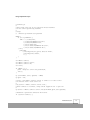
You can use a script like the following to generate a list of all the registered virtual machines on
VMware ESX Server. You need to know the name of the host machine and you must provide a valid
user name and password to connect to the server.
This script (enumerate.pl) can be found on the VMware Web site at
www.vmware.com/support/developer/perl-API/doc/enumerate.pl.txt.
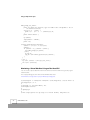
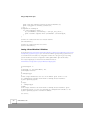
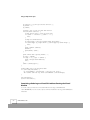
#!/usr/bin/perl -w
#
# Copyright (C) 1999-2002 VMware, Inc.
# All Rights Reserved
#
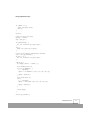
34
www.vmware.com
Using Sample Perl Scripts
#
#
#
#
#
#
#
enumerate.pl
This script lists all of the registered virtual machines
on the server specified by hostname.
usage:
enumerate.pl hostname user password
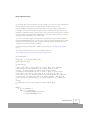
BEGIN {
if ($^O eq "MSWin32") {
@INC = ("./5.00503/lib",
"./5.00503/lib/MSWin32-x86/auto",
"./5.00503/lib/MSWin32-x86",
"./site/5.00503/lib",
"./site/5.00503/lib/MSWin32-x86/auto",
"./site/5.00503/lib/MSWin32-x86");
} else {
push(@INC,
("/usr/lib/perl5/site_perl/5.005/i386-linux",
"/usr/lib/perl5/5.00503",
"."));
}
}
use
use
use
use
VMware::Control;
VMware::Control::Server;
VMware::Control::VM;
strict;
if (@ARGV != 3) {
print "Usage $0: server user password\n";
exit(1);
}
my ($serverName, $user, $passwd) = @ARGV;
my $port = 902;
# Create a new VMware::Control::Server to connect to a remote server
# To interact with a local server use:
#
# my $server = VMware::Control::Server::new();
# which connects to localhost, using current logged-on user to port 902
#
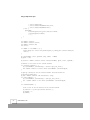
my $server = VMware::Control::Server::new($serverName,$port,$user,$passwd);
# Establish a persistent connection with server
if (!$server->connect()) {
www.vmware.com
35
Using Sample Perl Scripts
my ($errorNumber, $errorString) = $server->get_last_error();
die "Cannot connect to server: Error $errorNumber: $errorString\n";
}
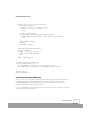
print "\nThe following Virtual machines are registered on $serverName: \n";
# Obtain a list containing every config file path registered with the
# server.
my @list = $server->enumerate();
print "$_\n" foreach (@list);
# Kill the connection with the server.
$server->disconnect();
Checking a Virtual Machine’s Power Status
You can use this script to determine whether a virtual machine is running, suspended or powered off.
Once you know its power status, you can use this information in conjunction with other scripts to
start, stop or suspend a virtual machine.
This script (status.pl) can be found on the VMware Web site at
www.vmware.com/support/developer/perl-API/doc/status.pl.txt.
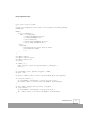
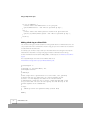
#!/usr/bin/perl -w
#
# Copyright (C) 1999-2002 VMware, Inc.
# All Rights Reserved
#
# status.pl
#
# This script returns the current power status (on, off, suspended) of the
# virtual machine specified by config on the server defined by hostname.
#
# usage:
#
status.pl hostname user password config
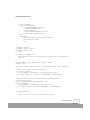
BEGIN {
if ($^O eq "MSWin32") {
@INC = ("./5.00503/lib",
"./5.00503/lib/MSWin32-x86/auto",
"./5.00503/lib/MSWin32-x86",
"./site/5.00503/lib",
"./site/5.00503/lib/MSWin32-x86/auto",
"./site/5.00503/lib/MSWin32-x86");
36
www.vmware.com
Using Sample Perl Scripts
} else {
push(@INC,
("/usr/lib/perl5/site_perl/5.005/i386-linux",
"/usr/lib/perl5/5.00503",
"."));
}
}
use
use
use
use
VMware::Control;
VMware::Control::Server;
VMware::Control::VM;
strict;
if (@ARGV != 4) {
print "Usage $0: server user password path_to_config_file\n";
exit(1);
}
my ($serverName, $user, $passwd, $cfg_path) = @ARGV;
my $port = 902;
my $server = VMware::Control::Server::new($serverName,$port,$user,$passwd);
if (!$server->connect()) {
my ($errorNumber, $errorString) = $server->get_last_error();
die "Cannot connect to server: Error $errorNumber: $errorString\n";
}
my $vm = VMware::Control::VM::new($server, $cfg_path);
if (!$vm->connect()) {
my ($errorNumber, $errorString) = $vm->get_last_error();
die "Cannot connect to vm: Error $errorNumber: $errorString\n";
}
# Gets the Power status of the virtual machine to determine if it is running
my $curState = $vm->get("Status.power");
if (!$curState) {
my ($errorNumber, $errorString) = $vm->get_last_error();
die "Error $errorNumber: $errorString\n";
}
print "$cfg_path is currently $curState\n";
$vm->disconnect();
$server->disconnect();
www.vmware.com
37
Using Sample Perl Scripts
Starting, Stopping and Suspending a Virtual Machine
The following sample Perl script can be used to start, stop and suspend a virtual machine locally from
VMware ESX Server. You can use a script like this to perform these commands without connecting to
the virtual machine from the VMware Management Interface or remote console.
This script (control_vm.pl) can be found on the VMware Web site at
www.vmware.com/support/developer/perl-API/doc/control_vm.pl.txt.
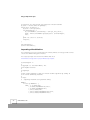
#!/usr/bin/perl -w
#
# Copyright (C) 1999-2002 VMware, Inc.
# All Rights Reserved
#
# control_vm.pl
#
# You can use this script to start, stop or suspend the virtual machine
# specified by config.
#
# usage:
# control_vm.pl start|stop|suspend config
BEGIN {
if ($^O eq "MSWin32") {
@INC = ("./5.00503/lib",
"./5.00503/lib/MSWin32-x86/auto",
"./5.00503/lib/MSWin32-x86",
"./site/5.00503/lib",
"./site/5.00503/lib/MSWin32-x86/auto",
"./site/5.00503/lib/MSWin32-x86");
} else {
push(@INC,
("/usr/lib/perl5/site_perl/5.005/i386-linux",
"/usr/lib/perl5/5.00503",
"."));
}
}
use strict;
# Specify the VMware Perl modules and version.
use VMware::Control '1.00';
use VMware::Control::Server;
use VMware::Control::VM;
38
www.vmware.com
Using Sample Perl Scripts
my $ops = "(start|stop|suspend)";
my ($server, $vm);
sub usage() {
print STDERR "Usage: control_vm.pl start|stop|suspend config\n";
exit(1);
}
usage() unless (scalar(@ARGV) == 2);
my $op = $ARGV[0];
usage() unless ($op =~ /^$ops$/);
my $cfg = $ARGV[1];
#
#
#
#
Require
Read in
Require
Read in
an operation and a path.
the requested operation.
a valid operation.
the specified path.
# Disconnects any connected objects.
sub cleanup() {
if ($vm) {
$vm->disconnect();
}
if ($server) {
$server->disconnect();
}
}
# Don't try to perform the following obviously incorrect operations.
my %noops = ("start" => "on",
"stop" => "off|suspended",
"suspend" => "off|suspended");
#
#
#
#
#
#
#
Connect to remote machine, as user root .
Uncomment this, and comment out other Server::new() to use.
my $serverName = "esxserver";
my $user = "root";
my $passwd = "secretpwd";
$server = VMware::Control::Server::new($serverName,902,$user,$passwd);
# Connect to the local host on the default port as yourself.
$server = &VMware::Control::Server::new();
unless ($server && $server->connect()) {
my ($err, $errstr) = $server->get_last_error();
die "$err: $errstr\n";
}
# Establish a connection to the virtual machine $cfg via the server
# object $server.
$vm = VMware::Control::VM::new($server, $cfg);
unless ($vm && $vm->connect()) {
my ($err, $errstr) = $vm->get_last_error();
www.vmware.com
39
Using Sample Perl Scripts
cleanup();
print STDERR "Error ($err): $errstr\n";
exit(1);
}
# Check the power state of the virtual machine.
my $power = $vm->get("Status.power");
if ($power eq "stuck") {
print STDERR "The virtual machine $cfg is $power. Exiting...\n";
exit(1);
}
print STDOUT "The virtual machine $cfg is currently $power.\n";
# If the power is in the correct state for the requested operation, proceed.
if ($power !~ /^$noops{$op}$/) {
print STDOUT "Asking $cfg to $op...\n";
# Allow users to use suspend keyword, which is shorter than suspend_to_disk.
my $realop;
if ($op eq "suspend") {
$realop = "suspend_to_disk";
} else {
$realop = "$op";
}
# Using the force option with all requests is benign.
my $ok = $vm->$realop(1);
unless ($ok) {
my ($err, $errstr) = $vm->get_last_error();
cleanup();
print STDERR "Error ($err): $errstr\n";
exit(1);
}
print STDOUT "Your $op request was completed.\n";
} else {
cleanup();
print STDERR "Cannot ask a virtual machine to $op when it is
$power.\n";
exit(1);
}
exit(0);
40
www.vmware.com
Using Sample Perl Scripts
Monitoring a Virtual Machine’s Heartbeat
The following sample Perl script provides one method to monitor a virtual machine's heartbeat. If the
heartbeat is lost or is not detected, the script powers on a second instance of the virtual machine.
This script (hb_check.pl) can be found on the VMware Web site at
www.vmware.com/support/developer/perl-API/doc/hb_check.pl.txt.
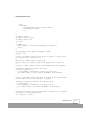
#!/usr/bin/perl -w
#
# Copyright (C) 1999-2002 VMware, Inc.
# All Rights Reserved
#
# hb_check.pl
#
# You can use this script to check the virtual machine specified by
# ConfigToCheck for a heartbeat within a certain interval in seconds.
# If no heartbeat is received within the specified Interval, then this
# script will forcefully shutdown ConfigToCheck, and start ConfigToStart.
#
# usage:
#
hb_check.pl ConfigToCheck ConfigToStart [Interval]
BEGIN {
if ($^O eq "MSWin32") {
@INC = ("./5.00503/lib",
"./5.00503/lib/MSWin32-x86/auto",
"./5.00503/lib/MSWin32-x86",
"./site/5.00503/lib",
"./site/5.00503/lib/MSWin32-x86/auto",
"./site/5.00503/lib/MSWin32-x86");
} else {
push(@INC,
("/usr/lib/perl5/site_perl/5.005/i386-linux",
"/usr/lib/perl5/5.00503",
"."));
}
}
# Import required VMware Perl modules and version.
use VMware::Control '1.00';
use VMware::Control::Server;
use VMware::Control::VM;
sub usage() {
www.vmware.com
41
Using Sample Perl Scripts
print STDERR "Usage: hb_check.pl config_to_check config_to_start
[interval_in_secs]\n";
exit(1);
}
# Read in command line options.
usage() unless (scalar(@ARGV) == 3 || scalar(@ARGV) == 2);
my $cfg_to_check = shift;
my $cfg_to_start = shift;
my $interval = shift;
# Set the interval to 30 seconds if it is not specified.
$interval ||= 30;
# These variables will hold virtual machine objects.
my $vm_to_start;
# Connect to the local host on the default port as yourself.
my $server = &VMware::Control::Server::new();
unless ($server && $server->connect()) {
my ($err, $errstr) = $server->get_last_error();
die "$err: $errstr\n";
}
# Initialize the object for the virtual machine we want to check.
my $vm = VMware::Control::VM::new( $server, $cfg_to_check );
unless ($vm && $vm->connect()) {
my ($err, $errstr) = $vm->get_last_error();
die "$err: $errstr\n";
}
# Check the virtual machine's state.
sub get_state {
my $vmtmp = shift;
return ($vmtmp->get("Status.power"));
}
# Check for the virtual machine's heartbeat.
sub get_heartbeat {
my $vmtmp = shift;
my $hb = $vmtmp->get( "Status.stats.vm.heartbeat", $interval );
unless (defined $hb) {
my ($err, $errstr) = $vmtmp->get_last_error();
die "$err: $errstr\n";
}
return $hb->{sum}->{$interval};
42
www.vmware.com
Using Sample Perl Scripts
}
# Check to see if the virtual machine is powered on; if not, end.
my $vm_state = get_state($vm);
if ($vm_state eq "off" || $vm_state eq "suspended") {
$vm->disconnect();
$server->disconnect();
die "The virtual machine $cfg_to_check\n is $vm_state. Exiting.\n";
}
while ($vm) {
if (get_heartbeat($vm) == 0) {
# Since we don't have a heartbeat, we need to do something
# about it. Let's shut this virtual machine down, and then start
# the backup virtual machine (specified by vm_to_start).
# Use stop with the boolean force option to power off the virtual
# machine.
$vm->stop(1);
$vm->disconnect();
$server->disconnect();
# Initialize the new virtual machine object.
$vm_to_start = VMware::Control::VM::new($server, $cfg_to_start);
unless ($vm_to_start && $vm_to_start->connect()) {
my ($err, $errstr) = $vm_to_start->get_last_error();
die "$err: $errstr\n";
}
# Start the new virtual machine and clean up.
my $start_ok = $vm_to_start->start();
unless ($start_ok) {
my ($err, $errstr) = $vm_to_start->get_last_error();
die "$err: $errstr\n";
}
$vm_to_start->disconnect();
$server->disconnect();
die "Lost Heartbeat to $cfg_to_check,\n Powered on
$cfg_to_start\n";
} else {
# wait for some duration before checking for the virtual machine's
heartbeat.
sleep ($interval);
}
}
www.vmware.com
43
Using Sample Perl Scripts
Answering Questions Posed by a Virtual Machine
You can use this script to answer a question posed by a virtual machine in a stuck state; that is, one
that is waiting for user acknowledgment before it can complete an operation such as suspending or
resuming the virtual machine. The script allows the question to be answered at the command line,
saving you the effort of connecting to the virtual machine from a console or the VMware
Management Interface in order to answer the question.
This script (answer_question.pl) can be found on the VMware Web site at
www.vmware.com/support/developer/perl-API/doc/answer_question.pl.txt.
#!/usr/bin/perl -w
#
# Copyright (C) 1999-2002 VMware, Inc.
# All Rights Reserved
#
# answer_question.pl
#
# You can use this script to check if the virtual machine specified by
# config is stuck. If it's stuck, you can answer any question posed by this
# virtual machine to allow it to continue.
#
# usage:
#
answer_question.pl config
BEGIN {
if ($^O eq "MSWin32") {
@INC = ("./5.00503/lib",
"./5.00503/lib/MSWin32-x86/auto",
"./5.00503/lib/MSWin32-x86",
"./site/5.00503/lib",
"./site/5.00503/lib/MSWin32-x86/auto",
"./site/5.00503/lib/MSWin32-x86");
} else {
push(@INC,
("/usr/lib/perl5/site_perl/5.005/i386-linux",
"/usr/lib/perl5/5.00503",
"."));
}
}
# Import the required VMware Perl modules and version.
use VMware::Control '1.00';
use VMware::Control::Server;
44
www.vmware.com
Using Sample Perl Scripts
use VMware::Control::VM;
# Read in command line options.
my $cfg = shift or die "Usage: answer_question.pl config\n";
# Connect to the local host on the default port as yourself.
my $server = &VMware::Control::Server::new();
my $server_ok = $server && $server->connect();
unless ($server_ok) {
my ($err, $errstr) = $server->get_last_error();
die "$err: $errstr\n";
}
# Initialize the object for the virtual machine we want to check.
my $vm = VMware::Control::VM::new($server, $cfg);
my $vm_ok = $vm && $vm->connect();
unless ($vm_ok) {
my ($err, $errstr) = $vm->get_last_error();
die "$err: $errstr\n";
}
# Check the power state of the virtual machine.
# question and list the possible responses.
if ($vm_ok) {
my $state = $vm->get("Status.power");
If it’s stuck, get the
if ($state ne "stuck") {
die "There are no questions to answer.\n";
} else {
my $id = $vm->get("Status.question.current");
die "Could not get the question ID.\n" unless (defined($id));
my $limit = $vm->get("Status.question.$id.choices.number");
die "Could not get the number of choices.\n" unless (defined($limit));
$limit--;
my $question = $vm->get("Status.question.$id.text");
die "Could not get the question.\n" unless (defined($question));
my @answers;
for my $i (0 .. $limit) {
$answers[$i] = $vm->get("Status.question.$id.choices.$i");
die "Could not get answer " . ($i + 1) ." of $limit.\n"
unless (defined($answers[$i]));
}
print "$question\n\n";
www.vmware.com
45
Using Sample Perl Scripts
REDO_prompt_for_answer:
print "To answer the question, type the number that corresponds to one of
the answers below:\n";
for my $i (0 .. $limit) {
print "\t" . ($i + 1) . ". $answers[$i]\n";
}
print "Final answer? ";
my $answer;
chop($answer = <STDIN>);
print "\n";
# Remove unintentional whitespace.
$answer =~ s/^(\s*)(.*?)(\s*)$/$2/;
$answer--;
if ($answer < 0 || $answer > $limit) {
goto REDO_prompt_for_answer;
} else {
my $op_ok;
$op_ok = $vm->answer_question($id, $answer);
}
}
} else {
my ($err, $errstr) = $vm->get_last_error();
die "$err: $errstr\n";
}
Monitoring a Virtual Machine’s Usage of the Host CPU
You can use this script to determine how much of the host machine’s CPU is being used by a given
virtual machine.
This script (cpuUsage.pl) can be found on the VMware Web site at
www.vmware.com/support/developer/perl-API/doc/cpuUsage.pl.txt.
#!/usr/bin/perl -w -Iblib/arch -Iblib/lib -I/usr/lib/perl5/5.6.0/i386-linux -I/
usr/lib/perl5/5.6.0 -I.
#
# Copyright (C) 1999-2001 VMware, Inc.
# All Rights Reserved
#
# cpuUsage.pl
#
# This script queries the cpu usage of a virtual machine, and prints out
46
www.vmware.com
Using Sample Perl Scripts
# the result every 10 seconds.
#
# usage: perl cpuUsage.pl tooele.vmware.com root passwd /root/vmware/win2000/
win2000.cfg
BEGIN {
if ($^O eq "MSWin32") {
@INC = ("./5.00503/lib",
"./5.00503/lib/MSWin32-x86/auto",
"./5.00503/lib/MSWin32-x86",
"./site/5.00503/lib",
"./site/5.00503/lib/MSWin32-x86/auto",
"./site/5.00503/lib/MSWin32-x86");
} else {
push(@INC,
("/usr/lib/perl5/site_perl/5.005/i386-linux",
"/usr/lib/perl5/5.00503",
"."));
}
}
use
use
use
use
VMware::Control;
VMware::Control::Server;
VMware::Control::VM;
strict;
if (@ARGV != 4) {
print "Usage $0: server user password path_to_config_file";
exit(1);
}
my ($serverName, $user, $passwd, $cfg_path) = @ARGV;
my $port = 902;
my $server = VMware::Control::Server::new($serverName,$port,$user,$passwd);
if (!$server->connect()) {
my ($errorNumber, $errorString) = $server->get_last_error();
die "Cannot connect to server: Error $errorNumber: $errorString\n";
}
my $vm = VMware::Control::VM::new($server, $cfg_path);
if (!$vm->connect()) {
my ($errorNumber, $errorString) = $vm->get_last_error();
die "Cannot connect to vm: Error $errorNumber: $errorString\n";
}
www.vmware.com
47
Using Sample Perl Scripts
# statistics are only present for powered on virtual machines
my $stat = "Status.stats.vm.cpuUsage";
for(my $i=0; $i<100;$i++) {
my $test = $vm->get($stat);
if(!defined($test)) {
my ($errorNumber, $errorString) = $vm->get_last_error();
print "Error $errorNumber querying $stat: $errorString\n";
last;
}
print "$i) $stat is: $test\n";
sleep(10);
}
$vm->disconnect();
$server->disconnect();
Suspending a Virtual Machine
This script allows you to suspend a virtual machine remotely without connecting to it with a remote
console or the VMware Management Interface.
This script (suspend.pl) can be found on the VMware Web site at
www.vmware.com/support/developer/perl-API/doc/suspend.pl.txt.
#!/usr/bin/perl -w
#
# Copyright (C) 1999-2001 VMware, Inc.
# All Rights Reserved
#
# suspend.pl
#
# This script suspends to disk the virtual machine specified by config on
# the server defined by hostname.
#
# usage:
#
suspend.pl hostname user password config
BEGIN {
if ($^O eq "MSWin32") {
@INC = ("./5.00503/lib",
"./5.00503/lib/MSWin32-x86/auto",
"./5.00503/lib/MSWin32-x86",
"./site/5.00503/lib",
"./site/5.00503/lib/MSWin32-x86/auto",
"./site/5.00503/lib/MSWin32-x86");
48
www.vmware.com
Using Sample Perl Scripts
} else {
push(@INC,
("/usr/lib/perl5/site_perl/5.005/i386-linux",
"/usr/lib/perl5/5.00503",
"."));
}
}
use
use
use
use
VMware::Control;
VMware::Control::Server;
VMware::Control::VM;
strict;
if (@ARGV != 4) {
print "Usage $0: server user password path_to_config_file";
exit(1);
}
my ($serverName, $user, $passwd, $cfg_path) = @ARGV;
my $port = 902;
# Create a new VMware::Control::Server object to connect to a remote server
# To interact with a local server use:
#
# my $server = VMware::Control::Server::new();
# which connects to localhost, using current logged-on user to port 902
#
my $server = VMware::Control::Server::new($serverName,$port,$user,$passwd);
# Establish a persistent connection with server
if (!$server->connect()) {
my ($errorNumber, $errorString) = $server->get_last_error();
die "Cannot connect to server: Error $errorNumber: $errorString\n";
}
# Create a new VMware::Control::VM object to interact with a virtual machine
my $vm = VMware::Control::VM::new($server, $cfg_path);
# Establish a persistent connection with virtual machine
if (!$vm->connect()) {
my ($errorNumber, $errorString) = $vm->get_last_error();
die "Cannot connect to vm: Error $errorNumber: $errorString\n";
}
# Gets the Power status of the virtual machine to determine if it is running
my $curState = $vm->get("Status.power");
if (! $curState =~ m/on/) {
www.vmware.com
49
Using Sample Perl Scripts
print "Can only suspend a powered on Virtual Machine.\n";
print "$cfg_path is currently $curState\n";
} else {
# Suspends the running vm
if (!$vm->suspend_to_disk()) {
my ($errorNumber, $errorString) = $vm->get_last_error();
print "Couldn't suspend: Error $errorNumber: $errorString\n";
}
}
# Kills the connection with the virtual machine
$vm->disconnect();
# Kills the connection with the server.
$server->disconnect();
Setting a Virtual Machine’s IP Address
As described in Passing User-Defined Information Between a Running Guest Operating System and a
Host Operating System on page 29, you can invoke the VMware guest operating system service to
set a virtual machine’s IP address “ip” configuration variable. This script gets the guest operating
system’s IP address and sets the configuration variable guestinfo.ip to this IP address.
This script (configsetip.pl) can be found on the VMware Web site at
www.vmware.com/support/developer/perl-API/doc/configsetip.pl.txt.
#!/usr/bin/perl -w
#
# Copyright (C) 1999-2002 VMware, Inc.
# All Rights Reserved
#
# configsetip.pl
#
# This script demonstrates the use of the VMware guest service to set
# a configuration variable from within a running virtual machine's
# guest operating system.
#
# usage:
#
configsetip.pl
# NOTE:
# The script should be run from within a running virtual machine's guest
# operating system. It sets the guestinfo.ip configuration variable to the
# guest operating system's current IP address.
use strict;
50
www.vmware.com
Using Sample Perl Scripts
if (@ARGV != 0) {
print "$0 Usage: $0\n";
exit(1);
}
my($err);
# Get the IP for the Guest
my($ip) = (undef);
$ip = &get_ip();
if(!defined($ip)) {
die "$0: Could not get guest ip\n";
}
else {
print "$0: guest ip is $ip\n";
}
# Sets the ip address configuration variable.
$err = &set_ip_variable();
if($err != 0) {
die "$0: Could not set guest ip\n";
}
sub get_ip {
my ($myip, @iparr) = (undef, []);
# For Windows Guest OS.
if ($^O eq "MSWin32") {
$_ = `ipconfig`;
@iparr = /IP Address.*?(\d+\.\d+\.\d+\.\d+)/ig;
$myip = $iparr[0];
}
# For Linux Guest OS.
else {
$_ = `ifconfig`;
@iparr = /inet addr:(\d+\.\d+\.\d+\.\d+)/ig;
$myip = $iparr[0];
}
return $myip;
}
sub set_ip_variable {
www.vmware.com
51
Using Sample Perl Scripts
if ($^O eq "MSWin32") {
# Please ensure that VMwareService is in your path
system("VMwareService --cmd 'info-set guestinfo.ip $ip'");
}
else {
# Please ensure that vmware-guestd is found in the path used below
system("/etc/vmware/vmware-guestd --cmd 'info-set guestinfo.ip $ip'");
}
return $?;
}
Adding a Redo Log to a Virtual Disk
You can add a redo log to a virtual SCSI disk in a running virtual machine on VMware ESX Server. You
can specify the disk on the command line or let the script give you a choice of disks to select that are
associated with the virtual machine.
For example, you can write a script to back up a virtual disk. Add a new redo log, then back up the
virtual disk. The virtual disk is no longer changing as all data is now written to the redo log.
For more information about the $vm->add_redo() method, please see VMware::Control::VM on
page 8.
This script (addredo.pl) can be found on the VMware Web site at
www.vmware.com/support/developer/perl-API/doc/addredo.pl.txt.
#!/usr/bin/perl -w
#
# Copyright (C) 1999-2002 VMware, Inc.
# All Rights Reserved
#
# addredo.pl
#
# This script takes a specification of a server name, user, password,
# and the path for the config file of a virtual machine on that
# server. It then displays the disks in the virtual machine
# configuration, allows the user to choose a disk and then adds a redo
# log to that disk. The user can also specify the disk directly as the
# fifth argument on the command line.
#
# usage:
#
addredo.pl server user password config [virtual disk]
#
BEGIN {
52
www.vmware.com
Using Sample Perl Scripts
if ($^O eq "MSWin32") {
@INC = ("./5.00503/lib",
"./5.00503/lib/MSWin32-x86/auto",
"./5.00503/lib/MSWin32-x86",
"./site/5.00503/lib",
"./site/5.00503/lib/MSWin32-x86/auto",
"./site/5.00503/lib/MSWin32-x86");
} else {
push(@INC,
("/usr/lib/perl5/site_perl/5.005/i386-linux",
"/usr/lib/perl5/5.00503",
"."));
}
}
use
use
use
use
VMware::Control;
VMware::Control::Server;
VMware::Control::VM;
strict;
if (@ARGV != 4 && @ARGV != 5) {
print "Usage $0: server user password path_to_config_file [virtual disk]\n";
exit(1);
}
my ($serverName, $user, $passwd, $cfg, $disk) = @ARGV;
my $port = 902;
my $server = VMware::Control::Server::new($serverName, $port, $user, $passwd);
# Connect to the server on the current machine
if (!$server->connect()) {
my ($errorNumber, $errorString) = $server->get_last_error();
die "Cannot connect to server: Error $errorNumber: $errorString\n";
}
# Open up a VM object for the virtual machine associated with the
# specified config file.
my $vm = VMware::Control::VM::new($server, $cfg);
if (!$vm->connect()) {
my ($errorNumber, $errorString) = $vm->get_last_error();
die "Cannot connect to vm: Error $errorNumber: $errorString\n";
}
if (!defined($disk)) {
# Get a list of all the devices in the virtual machine
www.vmware.com
53
Using Sample Perl Scripts
my @devices = @{ $vm->get("Status.devices") };
my $ndisk = 1;
my @disks;
# Build a list of all the SCSI disk devices
foreach $disk (@devices) {
# SCSI devices have a colon in their name
if ($disk =~ "ethernet" || $disk !~ ":") {
next;
}
# Skip the CD-ROM devices
my $deviceType = $vm->get("Config.$disk.deviceType");
if ($deviceType eq "atapi-cdrom" || $deviceType eq "cdrom-image") {
next;
}
print "$ndisk: $disk\n";
$ndisk++;
push(@disks, $disk);
}
print "Which disk (specify number): ";
my $opt = <STDIN>;
if ($opt <= 0 || $opt >= $ndisk) {
print "Illegal disk number\n";
exit;
}
$disk = $disks[$opt-1];
}
# Add a REDO log to the specified disk
if (!$vm->add_redo($disk)) {
my ($errorNumber, $errorString) = $vm->get_last_error();
die "Cannot add redo log: Error $errorNumber: $errorString\n";
}
$vm->disconnect();
$server->disconnect();
Committing a Redo Log to a Virtual Disk without Freezing the Virtual
Machine
To use this script, you must have a virtual disk with two redo logs (<disk>.REDO and
<disk>.REDO.REDO). You can use this script to commit a virtual disk’s redo log (<disk>.REDO) to its
virtual disk.
54
www.vmware.com
Using Sample Perl Scripts
You specify the disk on the command line or let the script give you a choice to select of disks that are
associated with the virtual machine. The virtual machine is not frozen when the redo
log(<disk>.REDO) is committed to the virtual disk, but the script waits until the commit finishes.
For example, you keep the virtual disk of a virtual machine in undoable mode. At some point, you
may want to commit your changes and back up the entire contents of the virtual disk. You can add a
(second) new redo log using the $vm->add_redo() method. The original redo log is no longer
changing; all data is now written to the new redo log.
You can then commit the original redo log to the base virtual disk by using the $vm->commit()
method with $level with a value of 1. The presence of the second redo log allows you to commit
changes from the original redo log to the virtual disk without freezing the virtual disk. Once the
commit is done, you can back up the virtual disk.
For more information about the $vm->commit() method, please see VMware::Control::VM on
page 8.
This script (commitnext.pl) can be found on the VMware Web site at
www.vmware.com/support/developer/perl-API/doc/commitnext.pl.txt.
#!/usr/bin/perl -w
#
# Copyright (C) 1999-2002 VMware, Inc.
# All Rights Reserved
#
# commitnext.pl
#
# This script takes a specification of a server name, user, password,
# and the path for the config file of a virtual machine on that
# server. It then displays the disks in the virtual machine
# configuration and allows the user to choose a disk. It then commits
# the next-to-top redo log (there must be at least two redo logs) of
# that disk to its. The virtual machine is not frozen during the committing
# process, but the script waits until the commit finishes. The user can
# also specify the disk directly as the fifth argument on the command line.
#
# usage:
# commitnext.pl server user password config [virtual disk]
#
BEGIN {
if ($^O eq "MSWin32") {
@INC = ("./5.00503/lib",
"./5.00503/lib/MSWin32-x86/auto",
"./5.00503/lib/MSWin32-x86",
www.vmware.com
55
Using Sample Perl Scripts
"./site/5.00503/lib",
"./site/5.00503/lib/MSWin32-x86/auto",
"./site/5.00503/lib/MSWin32-x86");
} else {
push(@INC,
("/usr/lib/perl5/site_perl/5.005/i386-linux",
"/usr/lib/perl5/5.00503",
"."));
}
}
use
use
use
use
VMware::Control;
VMware::Control::Server;
VMware::Control::VM;
strict;
if (@ARGV != 4 && @ARGV != 5) {
print "Usage $0: server user password path_to_config_file [virtual disk]\n";
exit(1);
}
my ($serverName, $user, $passwd, $cfg, $disk) = @ARGV;
my $port = 902;
my $server = VMware::Control::Server::new($serverName, $port, $user, $passwd);
# Connect to the server on the current machine
if (!$server->connect()) {
my ($errorNumber, $errorString) = $server->get_last_error();
die "Cannot connect to server: Error $errorNumber: $errorString\n";
}
# Open up a VM object for the virtual machine associated with the
# specified config file.
my $vm = VMware::Control::VM::new($server, $cfg);
if (!$vm->connect()) {
my ($errorNumber, $errorString) = $vm->get_last_error();
die "Cannot connect to vm: Error $errorNumber: $errorString\n";
}
if (!defined($disk)) {
# Get a list of all the devices in the virtual machine
my @devices = @{ $vm->get("Status.devices") };
my $ndisk = 1;
my @disks;
56
www.vmware.com
Using Sample Perl Scripts
# Build a list of all the SCSI disk devices
foreach $disk (@devices) {
# SCSI devices have a colon in their name
if ($disk =~ "ethernet" || $disk !~ ":") {
next;
}
# Skip the CD-ROM devices
my $deviceType = $vm->get("Config.$disk.deviceType");
if ($deviceType eq "atapi-cdrom" || $deviceType eq "cdrom-image") {
next;
}
print "$ndisk: $disk\n";
$ndisk++;
push(@disks, $disk);
}
print "Which disk (specify number): ";
my $opt = <STDIN>;
if ($opt <= 0 || $opt >= $ndisk) {
print "Illegal disk number\n";
exit;
}
$disk = $disks[$opt-1];
}
# Commit the next-to-top REDO log
if (!$vm->commit($disk, 1, 0, 1)) {
my ($errorNumber, $errorString) = $vm->get_last_error();
die "Cannot commit redo log: Error $errorNumber: $errorString\n";
}
$vm->disconnect();
$server->disconnect();
Committing the Topmost Redo Log
You can use this script to commit a virtual disk’s topmost redo log, which is the redo log added most
recently to the virtual disk (<disk>.REDO when there is only one redo log for the virtual disk;
<disk>.REDO.REDO when there are two redo logs for the virtual disk). The virtual disk can be in
persistent mode if there is only one redo log present.
You can specify the disk on the command line or let the script give you a choice of disks to select that
are associated with the virtual machine.
www.vmware.com
57
Using Sample Perl Scripts
Since there is only one redo log, the virtual machine must be frozen when the redo log is committed
to the virtual disk. For more information about the $vm->commit() method, please see
VMware::Control::VM on page 8.
This script (committop.pl) can be found on the VMware Web site at
www.vmware.com/support/developer/perl-API/doc/committop.pl.txt.
#!/usr/bin/perl -w
#
# Copyright (C) 1999-2002 VMware, Inc.
# All Rights Reserved
#
# committop.pl
#
# This script takes a specification of a server name, user, password,
# and the path for the config file of a virtual machine on that
# server. It then displays the virtual disks in the virtual machine
# configuration and allows the user to choose a disk. It then commits
# the topmost redo log of the virtual disk. The virtual machine is
# frozen during the committing process. The user can also specify the disk
# directly as the fifth argument on the command line.
#
# This script is the same as commitnext.pl, but commits the top-most REDO
# log, freezing the virtual machine in the process.
#
# usage:
# committop.pl server user password config [virtual disk]
#
BEGIN {
if ($^O eq "MSWin32") {
@INC = ("./5.00503/lib",
"./5.00503/lib/MSWin32-x86/auto",
"./5.00503/lib/MSWin32-x86",
"./site/5.00503/lib",
"./site/5.00503/lib/MSWin32-x86/auto",
"./site/5.00503/lib/MSWin32-x86");
} else {
push(@INC,
("/usr/lib/perl5/site_perl/5.005/i386-linux",
"/usr/lib/perl5/5.00503",
"."));
}
}
58
www.vmware.com
Using Sample Perl Scripts
use
use
use
use
VMware::Control;
VMware::Control::Server;
VMware::Control::VM;
strict;
if (@ARGV != 4 && @ARGV != 5) {
print "Usage $0: server user password path_to_config_file [virtual disk]\n";
exit(1);
}
my ($serverName, $user, $passwd, $cfg, $disk) = @ARGV;
my $port = 902;
my $server = VMware::Control::Server::new($serverName, $port, $user, $passwd);
# Connect to the server on the current machine
if (!$server->connect()) {
my ($errorNumber, $errorString) = $server->get_last_error();
die "Cannot connect to server: Error $errorNumber: $errorString\n";
}
# Open up a VM object for the virtual machine associated with the
# specified config file.
my $vm = VMware::Control::VM::new($server, $cfg);
if (!$vm->connect()) {
my ($errorNumber, $errorString) = $vm->get_last_error();
die "Cannot connect to vm: Error $errorNumber: $errorString\n";
}
if (!defined($disk)) {
# Get a list of all the devices in the virtual machine
my @devices = @{ $vm->get("Status.devices") };
my $ndisk = 1;
my @disks;
# Build a list of all the SCSI disk devices
foreach $disk (@devices) {
# SCSI devices have a colon in their name
if ($disk =~ "ethernet" || $disk !~ ":") {
next;
}
# Skip the CD-ROM devices
my $deviceType = $vm->get("Config.$disk.deviceType");
if ($deviceType eq "atapi-cdrom" || $deviceType eq "cdrom-image") {
next;
}
www.vmware.com
59
Using Sample Perl Scripts
print "$ndisk: $disk\n";
$ndisk++;
push(@disks, $disk);
}
print "Which disk (specify number): ";
my $opt = <STDIN>;
if ($opt <= 0 || $opt >= $ndisk) {
print "Illegal disk number\n";
exit;
}
$disk = $disks[$opt-1];
}
# Commit the top REDO log
if (!$vm->commit($disk, 0, 0, 1)) {
my ($errorNumber, $errorString) = $vm->get_last_error();
die "Cannot commit redo log: Error $errorNumber: $errorString\n";
}
$vm->disconnect();
$server->disconnect();
60
www.vmware.com