1
Notices
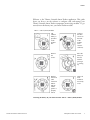
-40°C / +85°C modules
The
Lithium
battery is
provided in
the product
box.
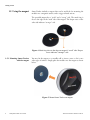
Unscrew
the three
screws on
the back
of the
module
(turn
counter-cl
ockwise).
Remove the
screws.
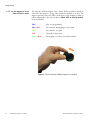
Place the
battery in
the slot,
making
sure to
respect
polarity.
Replace the
screws
(turn
clockwise).
Ensure that
the rubber
gasket is
properly
seated.
That’s all.
Your
module is
now ready
to use.
Inserting the battery in your Smart-Tracker -40°C / +85°C module
4
Smartphone-Tablet User Guide
Thermo Scientific™ Smart-Tracker™