1
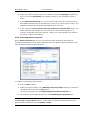
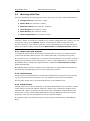
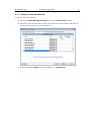
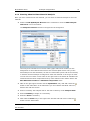
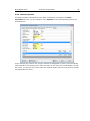
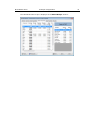
BATCHMAKER SUITE Example of Application 25 You enter in the Batch size box, according to selection in the Batch Type dropdown list box, the amount in kg that should be used as basis for the calculation of the batch recipe. You enter in the Furnace Load box optionally the average glass amount produced per day. The required batches per day are calculated from this in the batch recipe. You select from the Nominal adjustment dropdown list box a component that should be used for automatic nominal value adjustment. Example: You specify in the glass recipe a nominal composition that results in total in 99% in order to leave some play (namely 1%) for impurities that are necessarily brought into the glass by raw materials and cullet. However, in fact 1.25% impurities are brought in, so that the total sum would be 100.25%. In this case the nominal value of the component selected here is adjusted so that the sum of the nominal composition results in 98.75% (therefore 100% including the 1.25% impurities). If you do not want to perform an automatic nominal value adjustment, select the (None) entry. In this case the components are adjusted proportionately so that the sum of the calculated glass composition results in 100%. NOTE: The tolerances in the calculation of the batch recipe are always checked on the basis of the corrected nominal composition! You select from the Empty weights dropdown list box how raw materials that were stated as carrier raw material but are not required in the batch recipe to achieve the required glass composition should be handled in the calculated batch recipe. For instance, with the Eliminate and notify setting raw materials without weights are removed from the batch recipe. However, you will be advised by a corresponding message which raw materials are affected in the calculation of the batch recipe. You activate the Accept nominal values for components without carriers checkbox if you want to specify nominal values for components that are not brought into the batch by carrier raw materials. You can enter a comment in the Comment box, which is also taken over in the batch recipe. You can subsequently change this comment in the calculated batch recipe.