1
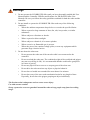
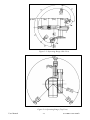
Safety The SCORBOT-ER 9Pro is a potentially dangerous machine. Safety during operation is of the utmost importance. Use extreme caution when working with the robot. Precautions The following chapters of this manual provide complete details for proper installation and operation of the SCORBOT-ER 9Pro. The list below summarizes the most important safety measures. 1. Define a safety area as detailed on Figure 4-1. 2. Make sure the robot base is properly and securely bolted in place. 3. Make sure the cable from the body to the base can move freely during all movements of the robot's base axis. 4. Make sure both the encoder cable and the robot power cable are properly connected to the controller before it is turned on. 5. Make sure the robot arm has ample space in which to operate freely. 6. Make sure a guardrail or rope has been set up around the SCORBOT-ER 9Pro operating area to protect both the operator and bystanders. 7. If the distance between the robot and the Controller is greater than 1.5m, ensure that an EMERGENCY button is easily accessible, either with an external EMERGENCY button, or from the Teach Pendant. 8. Do not enter the robot's safety range or touch the robot when the system is in operation. 9. Press the controller's EMERGENCY button before you enter the robot's operating area. 10. Turn off the controller's POWER switch before you connect any inputs or outputs to the controller.0. To immediately abort all running programs and stop all axes of motion, do one of the following: • Press the red EMERGENCY button on the controller. • Press the EMERGENCY button on the Teach Pendant. i