1
4.2 Turn on/off UPS
4.2.1 Connecting with Utility
CAUTION!
MAKE SURE GROUNDING IS PROPERLY DONE!
◆ Set the Battery Breaker to the “ON” position according to the user’s manual.
◆ Switch on the UPS
CAUTION!
Check to see if the load is safely connected with the output of the UPS. If the
load is not ready to receive power from the UPS, make sure that it is safely
isolated from the UPS output terminals
The internal fan of the UPS starts spinning, the UPS is performing self-diagnostics until
buzzer beeps twice to show the UPS is normal. Then, the UPS goes to bypass supply, Utility
LED and Bypass LED turn Green, the inverter is starting up now. When the inverter is checked
“normal”, the UPS goes to working mode and the load is supplied by the inverter now.
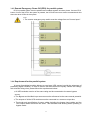
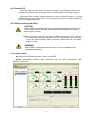
No matter the UPS is operated normally or not, the LCD display will indicate
current status. The top lines display the UPS operational status and the bottom
lines indicate alarm conditions when they occur.
4.2.2 Black(Cold) start procedure
CAUTION!
Follow these procedures when the input AC Utility Failure, but battery is normal
◆ Turn on the battery switch.
The battery will feed the Auxiliary power board.
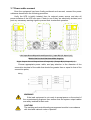
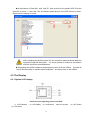
◆ Trigger the cold start buttons of the modules respectively as the position 5 of the above
drawing.
When battery normal, rectifier starts operation, 30s later, inverter starts and
operates, INV and output light up.
CAUTION!
Wait fo r approximately 30 seconds before you press the black start key
13