1
Contents
1. Safety························································································································ 2
1.1 Safety notes ··························································································································· 2
1.2 Symbols used in this guide ····································································································· 2
2. Main feature ············································································································· 3
2.1 Summarization························································································································ 3
2.2 Functions and Features·········································································································· 3
3. Installation················································································································ 4
3.1 Unpack checking ···················································································································· 4
3.2 UPS Module Outlook ············································································································ 4
3.3 LCD control panel··················································································································· 5
3.4 Installation notes····················································································································· 5
3.5 External Protective Devices···································································································· 6
3.6 Power Cables ························································································································· 6
3.7 Power cable connect ·············································································································· 7
3.8 Battery connection ·················································································································· 8
3.9 UPS Multi-Module Installation ······························································································ 9
3.9.1 Cabinet Installation ·············································································································· 9
3.9.2 Parallel cable Installation ··································································································· 10
3.9.3 Remote emergency power Off(EPO) for parallel system··················································· 11
3.9.4 Requirement for the parallel system ·················································································· 11
4. Operation································································································································ 12
4.1 Operation Modes ·················································································································· 12
4.2 Turn on/off UPS ···················································································································· 13
4.2.1 Connecting with Utility ······································································································· 13
4.2.2 Black start procedure ········································································································· 13
4.2.3 Inverter Off························································································································· 14
4.2.4 Disconnecting with Utility ··································································································· 14
4.2.5 Parallel setting ··················································································································· 14
4.3 The Display··························································································································· 16
4.3.1System LCD display ··········································································································· 16
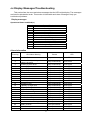
4.4 Display Messages/Troubleshooting ······················································································ 21
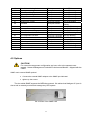
4.5 Options ································································································································· 22
Appendix 1 Specifications ··········································································································· 23
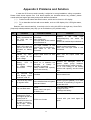
Appendix 2 Problems and Solution ···························································································· 24
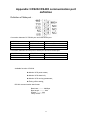
Appendix 3 RS232/485 communication port definition ··························································· 25
1