1
Compressor
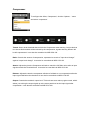
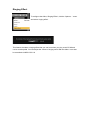
To configure the effect; ‘Compressor’, click the ‘Options…’ menu
and select ‘compressor’.
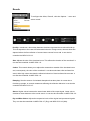
Thresh: Sets a level threshold above which the Compressor starts working. Only levels that
rise above this threshold will be reduced by the compression; signals that stay below it will
be left unprocessed. It can also be controlled via MIDI CC# 102.
Ratio: Controls the amount of compression, expressed as a ratio of “input level change”
against “output level change”. It can also be controlled via MIDI CC# 103.
Attack: Adjusts the time the Compressor will take to reach the full Ratio value after an input
signal exceeds the Threshold level. It can also be controlled via MIDI CC# 104.
Release: Adjusts the time the compressor will take to fall back to non-compression after the
input signal falls below the threshold. It can also be controlled via MIDI CC# 105.
Output: Controls the module’s output level. This knob acts as a make-up gain control, which
allows you to bring the output signal up to the same peak level as the input signal after
compression. It can also be controlled via MIDI CC# 106.