1
Email2CRM – How to order Email Credits
October 13, 2010
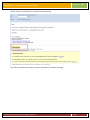
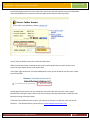
On the web page that opens from the email either click on the Pay Online button to pay with the default
Intuit PaymentNetwork or select the Credit Card radio button and then select Pay Online.
You will then be asked to enter your credit card information.
Within minutes we receive a notification that you have paid. We will then issue the credits to your
account and you will be sent an email confirmation.
In the upper right hand corner of the VerticalResponse screen you will be able to see how many credits
you have available.
During regular business hours we can usually turn around an order within the hour. After regular
business hours during the week it will be then next morning or during the weekends it could take until
Monday morning. Please plan ahead.
If you don’t have sufficient email credits in your account to send out an email then it will not be sent.
Questions – Call 913.492.2764 or send an email to: [email protected]
© 2010 CRM Innovation LLC All Rights Reserved
Page 4