1
Table of Contents
Copyright ............................................................................................................................................. i
Trademarks .......................................................................................................................................... i
Table of Contents................................................................................................................................ ii
1.
INTRODUCTION
1
Features ........................................................................................................................................ 1
Supported OS ............................................................................................................................... 1
Customer Support ............................................................................................................................... 2
Web Site....................................................................................................................................... 2
Limited One-Year Warranty............................................................................................................... 2
How to Obtain Service........................................................................................................................ 2
Liability............................................................................................................................................... 2
Safety Precautions .............................................................................................................................. 3
Safety Information ....................................................................................................................... 3
Handling Precautions ................................................................................................................... 3
FCC PART 15 Class A Notice .................................................................................................... 4
2.
OVERVIEW
5
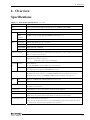
Specifications...................................................................................................................................... 5
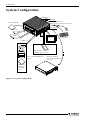
System Configuration ......................................................................................................................... 8
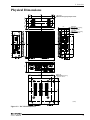
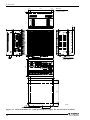
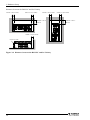
Physical Dimensions........................................................................................................................... 9
3.
HARDWARE SETUP
11
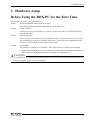
Before Using the BOX-PC for the First Time.................................................................................. 11
Hardware Setup................................................................................................................................. 12
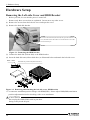
Removing the Left-side Cover and HDD Bracket .................................................................... 12
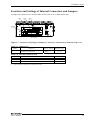
Locations and Settings of Internal Connectors and Jumpers .................................................... 13
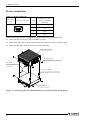
Power connection....................................................................................................................... 14
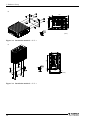
Installation method .................................................................................................................... 15
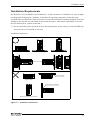
Installation Requirements .......................................................................................................... 17
4.
BIOS SETUP
19
BIOS Setup ....................................................................................................................................... 19
Starting the Setup Screen........................................................................................................... 19
Main Menu ................................................................................................................................. 22
Standard CMOS Setup ............................................................................................................... 23
Advanced BIOS Features Setup ................................................................................................ 25
Advanced Chipset Features Setup ............................................................................................. 29
Integrated Peripherals ................................................................................................................ 35
ii
User’s Manual