1
FERTIRIEGO CONSORCIO SL
ACTIVA
14.1. TOTAL DELETE
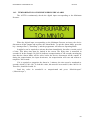
The first configuration parameter is “Borrado Total” (“Total Delete”) of the ACTIVA.
When installing the ACTIVA for the first time, the memory has stored incorrect data.
To prevent malfunctions, all the activations, configurations and other data must be deleted.
In the screen, the letter “S” (YES) indicates the aproval to start running the “Total
Delete” (Borrado Total), then press “Menu/Aceptar” (“Menu/Accept”). To make sure to keep
running the “Total Delete”, the programmer asks again to continue with the operation.
Indicating with the letter “S” (YES), the operation is approved, then the screen will
show for a period of thirty seconds the message “Borrando!!!!!!!!” (Deleting!!!!!!!!). The unit
has done a total delete of the memory.
If the message “Borrando!!!!!!!” (“Deleting!!!!!!!!”) remains on the screen after thirty
seconds, it means that the Watchdog of the TT-16 is deactivated. To activate it, search the
25