1
ArcMap Mapping Link
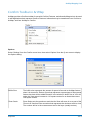
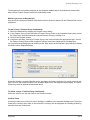
Measurement Toler- When digitising a Confirm feature, a warning message will appear if the digitised
ance:
feature length exceeds the Asset's Primary Measurement by more than the Tolerance set in this field. The number will be in the measurement set for the layer
(usually metres).
Nudge Size:
The 'Nudge feature zooms in or out from a feature in degrees. The amount to
zoom in or out on each nudge is set by this number. The number will be in the
measurement set for the layer (usually metres).
User Type:
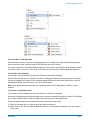
Select from the drop down list to control the rights and privileges assigned to the
current User.
Standard - Users may select Features for Map in Confirm, and may update and
view them in ArcMap, but they may not register new layers.
Advanced - Users may carry out all the functions in ArcMap related to the Confirm
link.
Debug Logging
Logs processes. Tick only when advised by Pitney Bowes.
Registered Layers
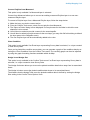
To enable the functionality of the Confirm Tools, each layer containing spatial features representing
Assets within Confirm, must be registered to the corresponding Confirm Feature Groups.
Note: only users of the User Type: 'Advanced' may register layers.
A layer can contain spatial features that represent Confirm Assets belonging to multiple Confirm Feature
Groups. In this case, the Confirm Feature Group for each of the layer's spatial features must be registered to that layer.
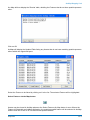
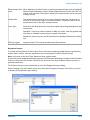
The Feature Group to Layer relationship is set in the Registered Layers dialog.
Select 'Settings' from the Confirm menu item, then select 'Registered Layers' from the fly-out menu
to display the Registered Layers dialog:
Pitney Bowes
14 of 19