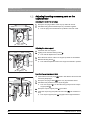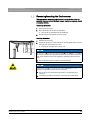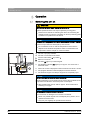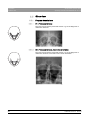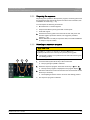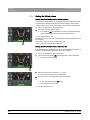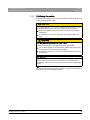
1
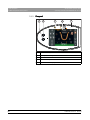
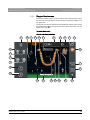
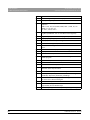
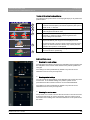
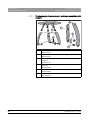
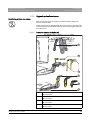
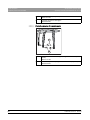
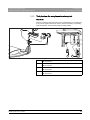
kÉï=~ë=çÑW=
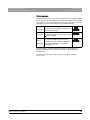
MRKOMNR
loqelmelp=pi=Oa=L=loqelmelp=pi=Oa=`ÉéÜ=
loqelmelp=pi=Pa=L=loqelmelp=pi=Pa=`ÉéÜ
léÉê~íáåÖ=fåëíêìÅíáçåë
båÖäáëÜ=ErpF
Cover page
=
Sirona Dental Systems GmbH
Table of contents
Operating Instructions ORTHOPHOS SL 2D / 3D
Table of contents
1
2
General data.............................................................................................................
8
1.1
Dear Customer,.............................................................................................
8
1.2
Contact information .......................................................................................
8
1.3
Copyright and trademark...............................................................................
9
1.4
General information about this operating manual .........................................
1.4.1 Structure of the document................................................................
1.4.1.1 Identification of danger levels............................................
1.4.1.2 Formats and symbols used ...............................................
9
10
10
10
1.5
Other relevant documents .............................................................................
11
1.6
Warranty and liability .....................................................................................
11
1.7
Obligation of system owner and personnel ...................................................
11
1.8
Intended use .................................................................................................
12
1.9
Indication and contraindication......................................................................
12
Safety information ....................................................................................................
13
2.1
Information on the unit ..................................................................................
13
2.2
Ventilation slots .............................................................................................
13
2.3
Condensation ................................................................................................
13
2.4
Qualifications of operating personnel ............................................................
14
2.5
Switching the unit on .....................................................................................
14
2.6
Radiation protection ......................................................................................
14
2.7
Emergency Stop............................................................................................
15
2.8
Laser light localizer .......................................................................................
15
2.9
Hygiene .........................................................................................................
15
2.10
Touchscreen .................................................................................................
15
2.11
Trouble-free operation...................................................................................
16
2.12
Interference with electronic devices ..............................................................
16
2.13
Risks of electromagnetic fields......................................................................
16
2.14
Combination with other equipment................................................................
16
2.15
Modifications to the unit ................................................................................
17
2.16
Structural alterations .....................................................................................
17
2.17
Electromagnetic compatibility........................................................................
17
2.18
Electrostatic discharge ..................................................................................
18
64 94 954 D3632
D3632.201.03.01.23
05.2015
3
Table of contents
Sirona Dental Systems GmbH
Operating Instructions ORTHOPHOS SL 2D / 3D
3
4
5
4
Unit description.........................................................................................................
20
3.1
Certification and registration .........................................................................
20
3.2
Technical data...............................................................................................
3.2.1 Unit data...........................................................................................
3.2.2 Operating and transport conditions ..................................................
3.2.3 Diagrams ..........................................................................................
3.2.4 Values of the secondary scattered radiation ....................................
3.2.5 Requirements for the PC system .....................................................
21
21
23
24
25
26
3.3
Overview of exposure programs ...................................................................
27
3.4
Main components of the product ...................................................................
3.4.1 Basic unit..........................................................................................
3.4.2 Cephalometer...................................................................................
3.4.3 Easypad ...........................................................................................
3.4.4 Easypad touchscreen.......................................................................
3.4.5 Remote control .................................................................................
30
30
31
32
33
37
3.5
Spare parts and consumables ......................................................................
3.5.1 Accessory parts................................................................................
3.5.1.1 Bite blocks and contact segments.....................................
3.5.1.2 3D bite block and spherical bite blocks .............................
3.5.1.3 Universal and occlusal bite block ......................................
3.5.1.4 Temple supports, forehead support, and
temporomandibular joint supports
3.5.2 Hygienic protective sleeves..............................................................
3.5.2.1 Protective sleeves for basic unit........................................
3.5.2.2 Protective sleeves for cephalometer .................................
3.5.3 Test phantom for acceptance/constancy test...................................
38
38
38
39
39
40
Installation and start-up ............................................................................................
44
4.1
Replacing accessories on the basic unit .......................................................
4.1.1 Replacing the bite block, contact segment, 3D bite block or chin rest
4.1.2 Using the occlusal bite block ............................................................
4.1.3 Using the universal bite block ..........................................................
4.1.4 Using spherical bite blocks and the spherical bite block plate .........
4.1.5 Changing the temple supports and temporomandibular joint
supports
44
44
44
46
47
47
4.2
Adjusting/inserting accessory parts on the cephalometer .............................
48
4.3
Removing/inserting the Ceph sensor ............................................................
49
Operation..................................................................................................................
50
5.1
Switching the unit on .....................................................................................
50
5.2
Switching SIDEXIS 4 to ready for exposure state .........................................
51
41
41
42
43
64 94 954 D3632
D3632.201.03.01.23 05.2015
Sirona Dental Systems GmbH
Table of contents
Operating Instructions ORTHOPHOS SL 2D / 3D
5.3
Panoramic and bite wing exposure ...............................................................
5.3.1 Program descriptions .......................................................................
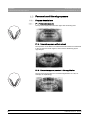
5.3.1.1 P1 – Panoramic exposure .................................................
5.3.1.2 P2 – Panoramic exposure, without ascending rami ..........
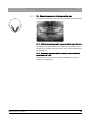
5.3.1.3 P10 – Panoramic exposure for children ............................
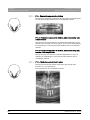
5.3.1.4 P12 – Thick slice, anterior tooth region .............................
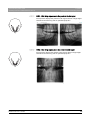
5.3.1.5 BW1 – Bite wing exposures in the posterior tooth region..
5.3.1.6 BW2 – Bite wing exposures in the anterior tooth region....
5.3.2 Preparing the exposure ....................................................................
5.3.3 Selecting an exposure program .......................................................
5.3.4 Setting quadrants .............................................................................
5.3.5 Adjusting the Quickshot function......................................................
5.3.6 Setting the temple width ...................................................................
5.3.7 Setting the kV/mA values .................................................................
5.3.8 Positioning the patient......................................................................
5.3.8.1 Positioning with an occlusal bite block ..............................
5.3.8.2 Positioning with chin rest and rod for bite block ................
5.3.8.3 Positioning with chin rest and bar......................................
5.3.8.4 Positioning with bite block .................................................
5.3.8.5 Positioning with contact segment ......................................
52
52
52
53
54
54
55
55
56
57
58
59
59
60
61
62
65
68
68
68
5.4
Temporomandibular joint exposure...............................................................
5.4.1 Program descriptions .......................................................................
5.4.1.1 TM1.1 / TM1.2 – Lateral view of temporomandibular joints
with mouth open and closed
5.4.1.2 TM3 – Temporomandibular joints lateral, ascending rami.
5.4.2 Preparing the exposure ....................................................................
5.4.3 Selecting an exposure program .......................................................
5.4.4 Adjusting the angle preselection ......................................................
5.4.5 Setting the kV/mA values .................................................................
5.4.6 Positioning the patient......................................................................
5.4.6.1 Positioning for a lateral temporomandibular joint exposure
69
69
69
5.5
64 94 954 D3632
D3632.201.03.01.23
Sinus view .....................................................................................................
5.5.1 Program descriptions .......................................................................
5.5.1.1 S1 – Paranasal sinuses.....................................................
5.5.1.2 S3 – Paranasal sinuses, linear slice orientation ................
5.5.2 Preparing the exposure ....................................................................
5.5.3 Selecting an exposure program .......................................................
5.5.4 Setting the kV/mA values .................................................................
5.5.5 Positioning the patient......................................................................
5.5.5.1 Positioning for paranasal sinus exposures........................
5.5.5.2 Positioning for maxillary sinus exposures using the bite
block
5.5.5.3 Positioning for maxillary sinus exposures using the
contact segment
05.2015
69
70
70
71
72
73
74
76
76
76
76
77
77
78
79
80
81
83
5
Table of contents
Sirona Dental Systems GmbH
Operating Instructions ORTHOPHOS SL 2D / 3D
6
5.6
Volume exposures........................................................................................
5.6.1 Program description ........................................................................
5.6.1.1 VOL1 / VOL1 HD ..............................................................
5.6.1.2 VOL2 / VOL2 HD ..............................................................
5.6.1.3 Option: VOL3 / VOL3 HD .................................................
5.6.2 Preparing the exposure ...................................................................
5.6.3 Selecting the volume exposure .......................................................
5.6.4 Adjusting the volume area and collimation......................................
5.6.5 Selecting HD mode .........................................................................
5.6.6 Selecting kV/mA values...................................................................
5.6.7 Positioning the patient .....................................................................
5.6.7.1 Positioning with 3D bite block or universal bite block .......
5.6.7.2 Positioning with chin rest ..................................................
5.6.7.3 Positioning with blue bite block or the universal bite block.
84
84
84
85
86
87
88
89
90
91
92
93
95
96
5.7
Cephalometric exposures.............................................................................
5.7.1 Program description ........................................................................
5.7.1.1 C1 – Posterior-anterior exposure, symmetrical ................
5.7.1.2 C2 – Anterior - posterior exposure, symmetrical ..............
5.7.1.3 C3 – Lateral exposure ......................................................
5.7.1.4 C4 – Carpus view, symmetrical ........................................
5.7.2 Preparing the exposure ...................................................................
5.7.3 Selecting an exposure program ......................................................
5.7.4 Adjusting the collimation..................................................................
5.7.5 Adjusting the Quickshot function .....................................................
5.7.6 Setting the kV/mA values ................................................................
5.7.7 Positioning the patient .....................................................................
5.7.7.1 Positioning for symmetrical exposures C1, C2.................
5.7.7.2 Positioning for C3 lateral exposures.................................
5.7.7.3 Positioning for carpal exposures C4.................................
98
98
98
98
99
100
101
103
103
104
105
106
107
108
110
5.8
Pediatric exposures......................................................................................
111
5.9
Starting the test cycle ...................................................................................
113
5.10
Releasing the exposure................................................................................
113
5.11
Rescue program for issues during image transfer and raw data import.......
5.11.1 Unit rescue ......................................................................................
5.11.2 Starting the "Data import" program .................................................
117
117
120
5.12
Using the remote control ..............................................................................
123
5.13
Canceling an exposure.................................................................................
124
5.14
Changing the basic settings and start settings.............................................
5.14.1 PAN program group ........................................................................
5.14.2 3D program group ...........................................................................
5.14.3 CEPH program group......................................................................
125
125
127
128
64 94 954 D3632
D3632.201.03.01.23 05.2015
Sirona Dental Systems GmbH
Table of contents
Operating Instructions ORTHOPHOS SL 2D / 3D
5.15
Adjusting the touchscreen ............................................................................
130
5.16
Calling the Info screen..................................................................................
131
5.17
Calling the service menu ..............................................................................
132
6
Panorama editor ......................................................................................................
133
7
Service.....................................................................................................................
134
7.1
Cleaning and care ........................................................................................
7.1.1 Cleaning ..........................................................................................
7.1.2 Disinfecting......................................................................................
7.1.3 Sterilization......................................................................................
7.1.4 Cleaning the occlusal bite block ......................................................
134
134
134
136
137
7.2
Inspection and maintenance ........................................................................
138
Malfunctions ............................................................................................................
140
8.1
Help messages.............................................................................................
140
8.2
Error message structure...............................................................................
142
8.3
Error description ...........................................................................................
8.3.1 Ex – Error type.................................................................................
8.3.2 yy – Locality.....................................................................................
143
143
144
Settings and repair ..................................................................................................
145
9.1
Program values ............................................................................................
9.1.1 Panoramic exposure with DCS sensor code 1E .............................
9.1.2 Panoramic exposure with DCS sensor code 2E .............................
9.1.3 Volume exposure ............................................................................
9.1.4 Cephalometric exposures................................................................
9.1.5 Dose information .............................................................................
9.1.5.1 Dose area product parameters for Panorama images .....
9.1.5.2 Dose area product parameters for Ceph-images .............
9.1.5.3 Calculate dosage..............................................................
145
145
147
149
151
152
152
153
153
9.2
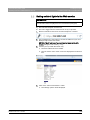
Setting ambient light via the Web service ....................................................
155
Dismantling and disposal.........................................................................................
157
10.1
Dismantling and reinstallation ......................................................................
157
10.2
Disposal........................................................................................................
157
8
9
10
64 94 954 D3632
D3632.201.03.01.23
05.2015
7
1 General data
Sirona Dental Systems GmbH
1.1 Dear Customer,
Operating Instructions ORTHOPHOS SL 2D / 3D
1
General data
1.1 Dear Customer,
We are pleased that you have equipped your practice with the
ORTHOPHOS SL X-ray system from Sirona.
We are pleased ...., Orthophos SL
Sirona was one of the first inventors of film-based panoramic X-ray
systems, and since 1996 has been a pioneer of digital X-ray technology.
You benefit from the vast experience we have gained through the
thousands of digital panoramic X-ray systems installed worldwide. This
device is characterized by many features including outstanding image
quality, simple operation, and a high day-to-day reliability.
Performance description
This operating manual should be of good help to you before use as well
as serve anytime later as a reference material.
ORTHOPHOS SL, complimentary close
We wish you every success with using your ORTHOPHOS SL system.
Your ORTHOPHOS SL team
1.2 Contact information
Customer service center
In the event of technical queries, please use our online contact form at
www.sirona.com. In the navigation bar, go to the menu commands
"CONTACT" / "Customer Service Center" and then click the "CONTACT
FORM FOR TECHNICAL QUESTIONS" button.
Manufacturer's address
Sirona Dental Systems GmbH
Fabrikstrasse 31
64625 Bensheim
Germany
Worldwide customer service
Manufacturer's address (worldwide)
Phone: +49 (0) 6251/16-0
Fax: +49 (0) 6251/16-2591
e-mail: [email protected]
www.sirona.com
Trademark
8
64 94 954 D3632
D3632.201.03.01.23 05.2015
Sirona Dental Systems GmbH
1 General data
Operating Instructions ORTHOPHOS SL 2D / 3D
1.3 Copyright and trademark
1.3 Copyright and trademark
Copyright
© Sirona Dental Systems GmbH. All rights reserved.
Copyright
The information contained in this manual may be changed without notice.
The software and all related documentation are protected by copyright.
You must therefore handle it in the same way as any other protected
material.
Anyone who copies this software to any medium for any purpose other
than his own personal use without the written permission of Sirona Dental
Systems will be liable to prosecution.
Trademarks
Microsoft® and Windows 7® are registered trademarks.
Trademarks
WindowsTM is a trademark of Microsoft Corporation.
All other trademarks are the property of their respective holders.
Notes on 3rd party code libraries must be stored in license.pdf in the
installation directory.
3rd party code libraries
1.4 General information about this operating manual
Observe the Operating Instructions
Please familiarize yourself with the unit by reading through these
Operating Instructions before putting it into operation. It is essential that
you comply with the specified warning and safety information.
Keep documents safe
Always keep the Operating Instructions handy in case you or another
user require(s) information at a later point in time. Save the Operating
Instructions on the PC or print them out.
Observe the Operating Instructions
Storage of documents, online portal, help
If you sell the unit, make sure that the Operating Instructions are included
with it either as a hard copy or on an electronic storage device so that the
new owner can familiarize himself with its functions and the specified
warning and safety information.
Online portal for technical documents
We have set up an online portal for the Technical Documents at http://
www.sirona.com/manuals. From here, you can download these
Operating Instructions along with other documents. Please complete the
online form if you would like a hard copy of a particular document. We will
then be happy to send you a printed copy free of charge.
Help
If you reach an impasse despite having thoroughly studied the operating
instructions, please contact your dental depot.
64 94 954 D3632
D3632.201.03.01.23
05.2015
9
1 General data
Sirona Dental Systems GmbH
1.4 General information about this operating manual
Operating Instructions ORTHOPHOS SL 2D / 3D
1.4.1
Structure of the document
1.4.1.1
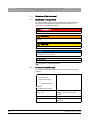
Identification of danger levels
To prevent personal injury and material damage, please observe the
warning and safety information provided in this document. Such
information is highlighted as follows:
DANGER
An imminent danger that could result in serious bodily injury or death.
WARNING
A possibly dangerous situation that could result in serious bodily injury
or death.
CAUTION
A possibly dangerous situation that could result in slight bodily injury.
NOTICE
A possibly harmful situation which could lead to damage of the product
or an object in its environment.
IMPORTANT
Application instructions and other important information.
Tip: Information on making work easier.
1.4.1.2
Formats and symbols used
The formats and symbols used in this document have the following
meaning:
Prerequisite
Prompts you to do something.
1. First action step
2. Second action step
or
➢
Alternative action
Result
➢ Individual action step
10
see "Formats and symbols
used [ → 10]"
Identifies a reference to another text
passage and specifies its page
number.
● List
Designates a list.
"Command/menu item"
Indicates commands, menu items or
quotations.
64 94 954 D3632
D3632.201.03.01.23 05.2015
Sirona Dental Systems GmbH
1 General data
Operating Instructions ORTHOPHOS SL 2D / 3D
1.5 Other relevant documents
1.5 Other relevant documents
The X-ray system includes other components, such as PC software,
which are detailed in other documents. Instructions and warning and
safety information provided in the following documents must be taken into
account:
● SIDEXIS 4 User Manual
● ORTHOPHOS SL Panorama Editor
Addendum to "SIDEXIS 4 User Manual"
1.6 Warranty and liability
Maintenance
In the interest of the safety and health of patients, users and other
persons, inspection and preventive maintenance must be performed at
scheduled intervals to ensure the operational reliability and functional
safety of your product (IEC 60601-1 / DIN EN 60601-1 etc.).
The system owner must ensure that all inspections and maintenance
events take place.
As manufacturers of medical electrical equipment, we can assume
responsibility for the safety properties of the system only if maintenance
and repair work on the system is performed by ourselves or by agencies
expressly authorized by us, and if components affecting safe operation of
the system are replaced by original spare parts in case of failure.
Exclusion of liability
If the system owner fails to fulfill the obligation to have inspections and
maintenance work performed or ignores error messages, Sirona Dental
Systems GmbH and its authorized dealers cannot assume any liability for
resulting damage.
Certificate of work
We suggest that you request a certificate, showing the nature and extent
of the work performed, from those who carry out such work, and specify
that the certificate show any changes in rated parameters or working
ranges, as well as the date, the name of the firm and a signature.
1.7 Obligation of system owner and personnel
These operating instructions presuppose that you are familiar with the
use of SIDEXIS software.
Prior to the exposure, please ask women of a childbearing age as to
whether they are pregnant or not. If the patient is pregnant, a risk/benefit
analysis must be performed.
According to the X-ray Ordinance of Germany, owners of X-ray
equipment must perform constancy tests at regular intervals in order to
ensure the safety of operating staff and patients. Sirona recommends
monthly testing.
64 94 954 D3632
D3632.201.03.01.23
05.2015
11
1 General data
Sirona Dental Systems GmbH
1.8 Intended use
Operating Instructions ORTHOPHOS SL 2D / 3D
1.8 Intended use
The X-ray system creates data for digital exposures in the maxillofacial
area and in subareas for dentistry and pediatric dentistry, for hard-tissue
diagnostics within ENT medicine, and carpus exposures.
Intended use ww
This unit must not be operated in areas subject to explosion hazards.
The operating and maintenance instructions must be observed.
WARNING
3D X-rays may not be used for routine or medical check-ups for which
an X-ray exposure is produced irrespective of the existence or nonexistence of clinical signs and symptoms. 3D X-ray examinations must
be able to be justified for each patient in order to demonstrate that the
benefits outweigh the risks.
For the USA only:
For the USA only + customer
Caution: Federal Law (USA) restricts the sale of this device to or on the
order of a physician, dentist, or licensed practitioner.
Warning for USA children
CAUTION
CAUTION!
Not for use on patients less than approximately 5 years old [~21 kg
(46 lb) and 113 cm (44.5 in) standing height]
1.9 Indication and contraindication
Indications in dentistry areas:
● Conservative dentistry
WW indication
● Endodontics
● Periodontology
● Prosthodontics / template scan exposures
● Functional diagnosis and therapy of craniomandibular dysfunctions
● Surgical dentistry
● Implantology
● Oral and maxillofacial surgery
● Orthodontics
● Pediatric dentistry
● ENT medicine (hard-tissue diagnostics)
Contraindications:
● Display of cartilage structures
WW contraindication
● Display of soft tissue
● Not for use on patients less than approximately 5 years old [~21 kg
(46 lb) and 113 cm (44.5 in) standing height]
Warning for USA children
12
64 94 954 D3632
D3632.201.03.01.23 05.2015
Sirona Dental Systems GmbH
2 Safety information
Operating Instructions ORTHOPHOS SL 2D / 3D
2
2.1 Information on the unit
Safety information
2.1 Information on the unit
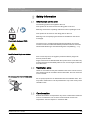
The following symbols are applied to the unit:
This symbol can be found next to the rating plate on the unit.
Meaning: Observe the Operating Instructions when operating the unit.
This symbol can be found on the rating plate on the unit.
Meaning: The accompanying documents are available on the Sirona
homepage.
Electrostatic discharge (ESD)
Connector pins or sockets bearing ESD warning labels must not be
touched or interconnected without ESD protective measures. See also
"Electrostatic Discharge" and "Electromagnetic Compatibility" [ → 17].
Identification of single use devices
Single use hygienic protective sleeves
Prior to each exposure, the hygienic protective sleeves (single use
devices) must be fitted.
Single use devices are identified with the symbol shown on the left. They
must be disposed of immediately after use. Do not use single use devices
more than once.
2.2 Ventilation slots
Under no circumstances may the ventilation slots on the unit be covered,
since otherwise the air circulation will be obstructed. This can cause the
unit to overheat.
Ventilation slots
Do not spray into the ventilation slots
Do not spray liquids such as disinfectants into the ventilation slots. This
may lead to malfunctions. Use wipe disinfection only in the vicinity of the
ventilation slots.
2.3 Condensation
Extreme fluctuations of temperature may cause condensation inside the
unit. Do not switch the unit on before it has reached normal room
temperature. See the chapter on “Technical data”.
Safety information for condensation: Customer
64 94 954 D3632
D3632.201.03.01.23
05.2015
13
2 Safety information
Sirona Dental Systems GmbH
2.4 Qualifications of operating personnel
Operating Instructions ORTHOPHOS SL 2D / 3D
2.4 Qualifications of operating personnel
The system may only be operated by skilled or properly trained
personnel.
Personnel, who are to be trained, taught, instructed or are taking part in
a general training, may operate the device only under the supervision of
an experienced person.
Operating personnel
Qualification
To operate the unit, the operating personnel must:
● have read and understood the Operating Instructions
● be familiar with the fundamental structure and functions of the unit
● be able to recognize irregularities in the functioning of the unit and
implement the appropriate measures where necessary
The operators of the unit must be adequately trained in the DVT
technology with regard to the principles of operation and radiation
protection.
Qualification, DVT technology
2.5 Switching the unit on
The patient may not be positioned in the unit when starting it and setting
the operating mode (until the sensor has been positioned).
Malfunction may cause injury to the patient.
Safety information for switching on the unit: Customer
In case of an error that requires switching the unit off and back on again,
the patient must be removed from the unit, at the latest before the unit is
switched back on.
2.6 Radiation protection
Warning USA children
CAUTION
CAUTION!
The device is not intended for use on patients less than approximately
21 kg (46lb) in weight and 113 cm (44.5 in) in height; these height and
weight measurements approximately correspond to that of an average
5 year old US child. Use of equipment and exposure settings designed
for adults of average size can result in excessive radiation exposure for
a smaller patient. Studies have shown that pediatric patients may be
more radiosensitive than adults (i.e. the cancer risk per unit dose of
ionizing radiation is higher), and so unnecessary radiation exposure is
of particular concern for pediatric patients.
The valid radiation protection regulations and measures must be
observed. The statutory radiation protection equipment must be used. In
order to reduce radiation exposure, Sirona recommends using bismuth or
lead shields or aprons, especially for pediatric patients.
Safety information for radiation protection: Customer
During an exposure, the operator should move as far away from the X-ray
tube assembly as the coiled cable of the manual release permits.
With the exception of the patient, no other persons without radiation
protection are allowed to stay in the room during an exposure. In
exceptional cases, a third person may provide assistance, but not the
practice staff. Visual contact with the patient and the unit must be
maintained throughout the entire exposure.
In case of malfunctions, cancel the exposure immediately by letting go of
the exposure release button.
14
64 94 954 D3632
D3632.201.03.01.23 05.2015
Sirona Dental Systems GmbH
2 Safety information
Operating Instructions ORTHOPHOS SL 2D / 3D
2.7 Emergency Stop
2.7 Emergency Stop
(not included in the scope of supply)
Not included in the scope of supply
If any parts of the unit touch the patient during the rotary movement, let
go of the exposure release button (X-Ray) immediately or stop the unit at
once by actuating the unit main switch or an Emergency Stop switch!
2.8 Laser light localizer
The system incorporates Class 1 laser products.
Safety information for light localizer: Customer
The light localizers are intended for correct patient positioning. They must
not be used for any other purposes.
A minimum distance of 10 cm (4") is required between the eye and the
laser. Do not stare into the beam.
The light localizers may be switched on only when functioning perfectly.
Repair work must be carried out by authorized staff only.
Do not use the system with any other lasers, and do not make any
changes to settings or processes that are not described in these
operating instructions. This may lead to a dangerous exposure to
radiation.
2.9 Hygiene
The protective sleeves must be exchanged and all auxiliary exposure
equipment must also be disinfected for each new patient in order to
prevent any possible transmission of infective agents which might cause
serious illnesses.
Suitable hygienic measures must be taken to prevent cross
contamination between patients, users and other persons.
The following chapters contain more information about sterilization and
hygienic protective sleeves: Hygienic protective sleeves [ → 41],
Preparing the exposure, Sterilization [ → 136] .
2.10 Touchscreen
The Easypad monitor is equipped with touch-sensitive control
technology.
The touchscreen must not be operated with pointed objects such as ballpoint pens, pencils, etc. Such objects could damage or scratch its
surface. Always operate the touchscreen by pressing it gently with your
fingertip.
64 94 954 D3632
D3632.201.03.01.23
05.2015
15
2 Safety information
Sirona Dental Systems GmbH
2.11 Trouble-free operation
Operating Instructions ORTHOPHOS SL 2D / 3D
2.11 Trouble-free operation
Use of this system is permissible only if it works properly without
malfunctions. If trouble-free operation cannot be ensured, the unit must
be taken out of service, checked by authorized technicians for
malfunctions and, if necessary, repaired.
Generally valid
X-rays of patients may be taken only when the system is working troublefree.
Trouble-free operation
The movements of the unit must not be obstructed by physical
constitution, clothing, dressings, wheelchairs or hospital beds.
Obstruction of unit movements
The travel range of the unit must be kept free from foreign matter.
Do not leave the patient at the unit unattended.
2.12 Interference with electronic devices
To prevent the malfunctioning of electronic devices and data storage
devices, e.g. radio-controlled watches, telephone cards, etc., these
objects must be removed prior to X-raying.
2.13 Risks of electromagnetic fields
The function of implanted systems (cardiac pacemakers or cochlear
implants, for example) can be affected by electromagnetic fields. Before
commencing treatment, ask if the patient has a cardiac pacemaker or any
other implanted system.
Any prevailing risks are listed in the documentation provided by the
equipment manufacturer.
2.14 Combination with other equipment
Any person, who assembles or modifies a medical electrical system
complying with the standard IEC 60601-1 (safety requirements for
medical electrical equipment) by combining it with other equipment is
responsible for ensuring that the requirements of this regulation are met
to their full extent for the safety of the patients, the operators and the
environment.
If any devices not approved by Sirona are connected, they must comply
with the applicable standards:
● IEC 60950-1 for information technology equipment and
● IEC 60601-1 for medical devices
See "Installation requirements" and the compatibility list/declaration of
conformity by the system integrator.
If in doubt, contact the manufacturer of the system components.
16
64 94 954 D3632
D3632.201.03.01.23 05.2015
Sirona Dental Systems GmbH
2 Safety information
Operating Instructions ORTHOPHOS SL 2D / 3D
2.15 Modifications to the unit
2.15 Modifications to the unit
Modifications to this unit which might affect the safety of the system
owner, patients or other persons are prohibited by law!
For reasons of product safety, this product may be operated only with
original Sirona accessories or third-party accessories expressly approved
by Sirona. The user is responsible for any damage resulting from the use
of non-approved accessories.
2.16 Structural alterations
If structural changes are made in the vicinity of the X-ray unit which result
in the device being exposed to very high levels of vibration or even
impact, the device must be inspected by a service engineer and readjusted and re-calibrated if necessary.
2.17 Electromagnetic compatibility
The unit complies with the requirements of standard IEC 60601-1-2.
Medical electrical equipment is subject to special EMC preventive
measures. It must be installed and operated as specified in the document
"Installation Requirements".
If high-voltage systems, radio link systems or MRI systems are located
within 5 m of the unit, please observe the specifications stated in the
installation requirements.
Portable and mobile RF communications equipment may interfere with
medical electrical equipment. Therefore, the use of mobile wireless
phones in medical office or hospital environments must be prohibited.
Please also observe the ESD protective measures in the chapter entitled
"Electrostatic discharge [ → 18]".
Reference to ESD protective measures in operating instructions
64 94 954 D3632
D3632.201.03.01.23
05.2015
17
2 Safety information
Sirona Dental Systems GmbH
2.18 Electrostatic discharge
Operating Instructions ORTHOPHOS SL 2D / 3D
2.18 Electrostatic discharge
Protective measures
Electrostatic discharge (abbreviated: ESD – ElectroStatic Discharge)
Electrostatic discharge from people can damage electronic components
when the components are touched. Damaged components usually have
to be replaced. Repairs must be performed by qualified personnel.
Measures to protect against ESD include:
● Procedures to avoid electrostatic charging via
– air conditioning
– air humidification
– conductive floor coverings
– non-synthetic clothing
● discharging the electrostatic charges from your own body through
contact with
– a metallic unit casing
– a larger metallic object
– any other metal part grounded with the protective earth
Endangered regions are indicated on the unit by the ESD warning label:
We recommend that all persons working with this system are made aware
of the significance of the ESD warning label. A training course should also
be held to inform users about the physics of electrostatic charges.
Physics of electrostatic charges
An electrostatic discharge requires prior electrostatic charging.
There is a danger of electrostatic charges building up whenever two
bodies rub against each other, e.g. when:
● walking (soles of shoes against the floor) or
● moving (chair casters against floor).
The amount of charge depends on several factors: The charge is:
● higher at low air humidity than at high air humidity, and
● higher with synthetic materials than with natural materials (clothing,
floor coverings).
The following rule of thumb can be applied to assess the transient
voltages resulting from an electrostatic discharge.
An electrostatic discharge is:
● perceptible at 3,000 V or higher
● audible at 5,000 V or higher (cracking, crackling)
● visible at 10,000 V or higher (arc-over)
The transient currents resulting from these discharges have a magnitude
of over 10 amps. They are not hazardous for humans because they last
for only several nanoseconds.
18
64 94 954 D3632
D3632.201.03.01.23 05.2015
Sirona Dental Systems GmbH
Operating Instructions ORTHOPHOS SL 2D / 3D
2 Safety information
2.18 Electrostatic discharge
Tip: 1 nanosecond = 1/1,000,000,000 second = 1 billionth of a second
Voltage differentials exceeding 30,000 volts per centimeter may lead to a
charge transfer (electrostatic discharge, lightning, arc-over).
Integrated circuits (logical circuits and microprocessors) are used in order
to implement a wide variety of functions in a device. The circuits must be
miniaturized to a very high degree in order to include as many functions
as possible on these chips. This leads to structure thicknesses as low as
a few ten thousandths of a millimeter. Integrated circuits that are
connected to wires leading externally are therefore particularly at risk
from electrostatic discharge.
Even voltages that are imperceptible to the user can cause breakdown of
the structures, thus leading to a discharge current that melts the chip in
the affected areas. Damage to individual integrated circuits may cause
malfunction or failure of the unit.
64 94 954 D3632
D3632.201.03.01.23
05.2015
19
3 Unit description
Sirona Dental Systems GmbH
3.1 Certification and registration
Operating Instructions ORTHOPHOS SL 2D / 3D
3
Unit description
3.1 Certification and registration
ORTHOPHOS SL complies with:
with AS/NZS 3200.1.0 ORTHOPHOS SL
● IEC 60601-1
● IEC 60601-1-3
● IEC 60601-2-63
Original language: German
This product bears the CE marking in accordance with the provisions of
Council Directive 93/42/EEC of June 14, 1993 concerning medical
devices.
CE mark, general
0123
20
64 94 954 D3632
D3632.201.03.01.23 05.2015
Sirona Dental Systems GmbH
3 Unit description
Operating Instructions ORTHOPHOS SL 2D / 3D
3.2 Technical data
3.2 Technical data
3.2.1
Unit data
Model designation:
ORTHOPHOS SL
Nominal voltage:
200 – 240 V
Permissible fluctuation:
± 10%
Permissible drop under load: 10%
Rated current:
12 A
Nominal power output:
2 kW at 90 kV/16 mA with any radiation
time
Nominal frequency:
50 Hz / 60 Hz
Mains resistance:
max. 0.8 ohms
Main building fuse:
25 A slow-blow (16 A for single line)
Power consumption:
2 kVA
Power output of tube
assembly:
69 kV/16 mA = 1104 W with any radiation
time
Tube voltage:
60 – 90 kV (for 90 kV max. 12 mA)
Tube current:
3 – 16 mA (for 16 mA max. 69 kV)
Maximum setting range:
60 kV / 3 mA to 90 kV / 12 mA
High-voltage waveform:
High-frequency multipulse
Residual ripple ≤ 4 kV
High voltage generation
frequency:
40 – 120 kHz
Program duration:
See "Program values" [ → 145].
Exposure time:
See "Program values" [ → 145].
Image acquisition scale:
For P1, normal dental arch (slice center)
approx. 1:1.19, i.e. the acquired image is
magnified by approx. 19% on average
compared to reality.
Exposure time for a
cephalometric image:
14.9 s max.
Image acquisition scale for a approx. 1:1.1, i.e. the acquired image is
cephalometric image:
magnified by approx. 10% on average
compared to reality.
64 94 954 D3632
D3632.201.03.01.23
05.2015
Total filtration of X-ray tube
assembly:
> 2.5 mm AI / 90 IEC 60522
0.3 mm Cu for volume exposures
Focal spot size acc. to IEC
60336, measured in the
central X-ray beam:
0.5 mm
21
3 Unit description
Sirona Dental Systems GmbH
3.2 Technical data
Operating Instructions ORTHOPHOS SL 2D / 3D
Marking of focal spot:
Source-skin distance
> 200 mm (8“)
Automatic exposure
blocking:
The duration of automatic exposure
blocking (cooling period) depends on the
set kV/mA level and the actual exposure
time. Depending on the tube load,
interval times of 8 s to 300 s are
automatically set by the system.
Example: For program P1 with exposure
data of 84kV/12mA and a radiation time
of 14.1 s, the pause duration is 150 s.
Equipment class:
IPX0
Class I device
Degree of protection against
Type B device
electric shock:
Degree of protection against Ordinary equipment (without protection
ingress of water:
against ingress of water)
Year of manufacture:
(on the rating plate)
Mode of operation:
Continuous operation
Long-term power output:
200 W
Anode material:
Tungsten
Exposure parameters for
determining leakage
radiation:
2 mA / 90 kV
X-ray tube
Siemens SR 90/15 FN
22
64 94 954 D3632
D3632.201.03.01.23 05.2015
Sirona Dental Systems GmbH
3 Unit description
Operating Instructions ORTHOPHOS SL 2D / 3D
3.2 Technical data
PAN sensor
Digital CdTe sensor with direct converter technology for panoramic
exposure technology
Active sensor area, Pan type: 146 mm x 6 mm
Pixel size:
0.1 mm
Focus-sensor distance:
497 mm
Flat Panel Detector
Digital Flat Panel Detector with a-Si technology (amorphous silicon)
With 3D exposure technology:
Active sensor area
160mm x 160mm
Pixel size:
0.12 mm
Focus-sensor distance:
524mm
Max. filtration in front of
sensor:
< 1.2 mm Al
Ceph sensor
Digital line sensor with CCD technology
3.2.2
64 94 954 D3632
D3632.201.03.01.23
05.2015
Active sensor area, Ceph
type:
230 mm x 6.48 mm
Pixel size:
0.027 mm
Focus-sensor distance:
1,714 mm
Operating and transport conditions
Transport and storage
temperature:
-10 °C – +70 °C (14 °F – 158 °F)
Air humidity:
10 % – 95 %
Admissible operating
temperature:
+18 °C - +31 °C (64 °F – 88 °F)
Operating altitude:
≤ 3,000 m above sea level
23
3 Unit description
Sirona Dental Systems GmbH
3.2 Technical data
Operating Instructions ORTHOPHOS SL 2D / 3D
3.2.3
Diagrams
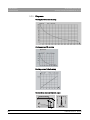
Cooling curve for tube housing
Diagrams, 2D XG 3D Plus
Cooling curve of X-ray tube
SR 90/15 FN
Heating curve of tube housing
Central X-ray beam and anode angle
7°
24
10°
64 94 954 D3632
D3632.201.03.01.23 05.2015
Sirona Dental Systems GmbH
3 Unit description
Operating Instructions ORTHOPHOS SL 2D / 3D
3.2.4
3.2 Technical data
Values of the secondary scattered radiation
9.
8.
10.
11.
7.
5.
12.
1. (3. + 4.)
13.
6.
2.
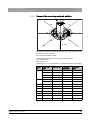
The highest scattered radiation is listed here as it is generated in the HD
mode for 3D X-ray operation.
3D X-ray measurement criteria:
The following parameters were set for the measurements:
Tube voltage 85 kV,
tube current 7 mA,
radiation time 14.1 s (corresponds to a current-time product of 98.7 mAs).
Angle
[°]
Measuring
point
Distance [m]
Measured
dose [µSv]
Dose/mAs
[µSv]
0
1
1
3,6
0,0365
2
2
096
0,00973
3
1 (45° below)
3,55
0,0359
4
1 (45° above)
0,75
0,00759
5
1
5,59
0,0556
6
2
1,52
0,0154
90
7
1
7,68
0,0778
135
8
1
11,10
0,112
180
9
1
0,6
0,00607
225
10
1
9,63
0,0976
270
11
1
7,04
0,0713
315
12
1
4,55
0,0461
315
13
2
1,31
0,0132
45
64 94 954 D3632
D3632.201.03.01.23
05.2015
25
3 Unit description
Sirona Dental Systems GmbH
3.2 Technical data
Operating Instructions ORTHOPHOS SL 2D / 3D
3.2.5
Requirements for the PC system
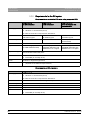
Requirements on workstation PCs when using a separate RCU
Requirements
for 2D workstation
Operating system:
Requirements
for 3D workstation
Requirements for
2D/3D workstation with
panorama editor
● Windows 7 Professional/Ultimate (64 bit)
● Windows 8.1 Professional (64 bit)
An Internet connection is required from Windows 8.
Processor
≥ 2.3 GHz DualCore
with SSE3 support
≥ 2.3 GHz QuadCore
with SSE3 support
≥ 2.3 GHz QuadCore
with SSE3 support
Main memory
≥ 4 GB
≥ 8 GB
≥ 8 GB (16 GB
recommended)
Hard disk
≥ 500 GB of free hard disk space
Graphics card
DirectX 9.0c graphics card
(512 MB RAM dedicated)
Graphics settings
Minimum 1280x1024 pixels
Recommended 1600x1200 pixels
Drive
● DVD ROM
DirectX 10 graphics card
(1GB RAM dedicated) with
WDDM driver 1.0 or higher
DirectX 10 graphics card
(1GB RAM dedicated) with
WDDM driver 1.0 or higher
● DVD RAM (to use Wrap & Go)
Screen
Suitable for diagnostic applications
Software
● Acrobat Reader 8.0, contained on DVD
(required for the PDF test report function)
Requirements on RCU hardware
Requirements
Operating system:
● Windows 7 Professional/Ultimate (64 bit)
● Windows 8.1 Professional (64 bit)
An Internet connection is required from Windows 8.
Processor
≥ 2.3 GHz QuadCore with SSE3 support, only intel ≥ i73xx
Main memory
≥ 16 GB
Hard disk
≥ 2 TB of free hard disk space
Graphics card
Only for combined use as workstation on one PC, see above.
Drive
● DVD ROM
● DVD RAM (to use Wrap & Go)
26
64 94 954 D3632
D3632.201.03.01.23 05.2015
Sirona Dental Systems GmbH
3 Unit description
Operating Instructions ORTHOPHOS SL 2D / 3D
3.3 Overview of exposure programs
3.3 Overview of exposure programs
The following is a list of the available exposure programs and the possible
program settings. The exposure programs are displayed on the
touchscreen in abbreviated form.
Panoramic exposures
Panoramic exposures XG 3D Plus
P1
Panoramic exposure, standard
P1 A
Panoramic exposure, artifact-reduced
P1 C
Panoramic exposure, constant 1.25x magnification
P2
Panoramic exposure, without ascending rami
P2 A
Panoramic exposure, without ascending rami,
artifact-reduced
P2 C
Panoramic exposure, without ascending rami,
constant 1.25x magnification
P10
Panoramic exposure for children
P10 A
Panoramic exposure for children, without ascending
rami, artifact-reduced
P10 C Panoramic exposure for children, without ascending
rami, constant 1.25x magnification
P12
Thick slice, anterior tooth region
Program settings:
Single-quadrant selection (only upper/ lower jaw for P12),
Quickshot function (no P12 for Quickshot function),
kV/mA values
For more information about the panoramic exposure programs, see after
page [ → 52].
Bitewing exposures
BW1
Bitewing exposures in the posterior tooth region
BW2
Bitewing exposures in the anterior tooth region
Program settings: For BW1 quadrant selection left/right half-view or both
sides, kV/mA values
For more information about the bite wing exposure programs, see after
page [ → 55].
64 94 954 D3632
D3632.201.03.01.23
05.2015
27
3 Unit description
Sirona Dental Systems GmbH
3.3 Overview of exposure programs
Operating Instructions ORTHOPHOS SL 2D / 3D
Temporomandibular joint exposures
Temporomandibular joint exposures E02
TM1.1/TM1.2
Temporomandibular joints from a lateral aspect
with the mouth open and closed, two-part exposure
TM3
Temporomandibular joints lateral, ascending rami
Program settings: In two-part exposure programs with angle preselection
(0°, 5°, 10°, 15°), kV/mA values
For more information about the temporomandibular joint programs, see
after page [ → 69].
Sinus exposures
Sinus exposures XG 3D Plus
S1
Paranasal sinuses
S3
Paranasal sinuses, linear slice orientation
Program settings: kV/mA values
For more information on sinus exposure programs, see after page [ → 76].
Cephalometric exposures
Cephalometric exposures XG 3D Plus
If the unit is equipped with a cephalometer, you can also take
cephalometric images.
C1
Posterior-anterior exposure, symmetrical
C2
Anterior-posterior exposure, symmetrical
C3
Lateral exposure
C3F
Full-format exposure, lateral
C4
Carpus view, symmetrical
Program settings: Quickshot function, collimation (except for C4), kV/mA
values
For more information on cephalometric exposure programs, see above
page [ → 98].
Volume exposures XG 3D Plus
28
64 94 954 D3632
D3632.201.03.01.23 05.2015
Sirona Dental Systems GmbH
3 Unit description
Operating Instructions ORTHOPHOS SL 2D / 3D
3.3 Overview of exposure programs
Volume exposure
The ORTHOPHOS SL X-ray system is available as a 2D or 2D/3D hybrid
device. 2D devices are prepared for subsequent upgrades with a 3D flat
panel detector. The volume programs VOL1, VOL1 HD, VOL2, VOL2 HD
(optionally VOL3 and VOL3 HD) are only available with this.
VOL1
VOL1 HD
VOL2
VOL2 HD
Optional
VOL3
VOL3 HD
Volume exposure with a diameter of
approx. 8 cm and a height of approx. 8 cm
or 5.5 cm collimated.
Volume exposure with a diameter of about
5 cm and a height of about 5.5 cm for upper
or lower mandible
Volume exposure with a diameter of about
11 cm and a height of about 10 cm or
selection of upper quadrant collimated to
7.5 cm and selection lower quadrant
collimated to 8.0 cm
Program settings: Volume area (anterior teeth, molars right/left or
temporomandibular joints right/left), collimation of upper/lower jaw,
radiation time
For more information about the 3D exposure program, see after
page [ → 84].
64 94 954 D3632
D3632.201.03.01.23
05.2015
29
3 Unit description
Sirona Dental Systems GmbH
3.4 Main components of the product
Operating Instructions ORTHOPHOS SL 2D / 3D
3.4 Main components of the product
3.4.1
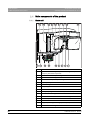
Basic unit
B
A
C
D
B1
E
M
L
G
F
H
Aufnahmebereit
Q
30
P
O
N
K
J
I
A
Main switch
B
Light localizer with height adjustment of the light line (Frankfurt
plane) for panoramic exposures
B1
Light localizers for 3D positioning
C
Light localizer central light beam for face center
D
Control mirror for patient positioning
E
Tray for jewelry, etc.
F
Forehead support
G
Temple supports
H
PAN/3D sensor unit
I
Primary diaphragm field on the X-ray tube assembly
J
Bite block, contact segment or chin rest
K
Holder for chin rest, bite blocks, or contact segments etc.
L
Handle for patient
M
Drawer for accessories
N
Easypad (swiveling and tilting operator panel)
O
Touch bar for swiveling the control mirror in and out
64 94 954 D3632
D3632.201.03.01.23 05.2015
Sirona Dental Systems GmbH
3 Unit description
Operating Instructions ORTHOPHOS SL 2D / 3D
3.4.2
3.4 Main components of the product
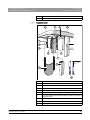
P
Release button
Q
Ambient light (backlight), adjustable via an Internet browser
Cephalometer
D
C
F
G
H
20
30
40
50
B
A
K
K
I
F
20
J
30
40
50
A
64 94 954 D3632
D3632.201.03.01.23
05.2015
A
Projection scale
B
Scale for vertical nose support adjustment
C
Nose support
D
Locking knob for nose support
F
Pushbutton for sensor removal
G
Rotating element for rotary movement of head supports
H
Secondary diaphragm with light localizer of light line (Frankfurt
horizontal plane)
I
Sensor
J
Carpus support plate
K
Ear plugs with holders
31
3 Unit description
Sirona Dental Systems GmbH
3.4 Main components of the product
Operating Instructions ORTHOPHOS SL 2D / 3D
3.4.3
Easypad
A
B
C
E
D
Ready for exposure
32
A
"Unit down" key
B
"Unit up" arrow key
C
Optical radiation indicator
D
Touchscreen (touch-sensitive screen)
E
"Unit ON" LED display
64 94 954 D3632
D3632.201.03.01.23 05.2015
Sirona Dental Systems GmbH
3 Unit description
Operating Instructions ORTHOPHOS SL 2D / 3D
3.4.4
3.4 Main components of the product
Easypad touchscreen
The screen for this system is a touchscreen, which responds to touch by
the user. The user touches the screen surface to make the settings for Xray exposures.
The structure of the user interface is subdivided into 2 levels. By touching
the toothed wheel J in the upper right corner of the touchscreen, you can
switch to the 2nd level:
1st level: Main menu
Control and display elements
A
B C
D E
F
G
D
H
J
I
Z
K
Z
Y
Y
T
X
N
W
Ready for exposure
V
64 94 954 D3632
D3632.201.03.01.23
05.2015
U
S R Q
P
O
33
3 Unit description
Sirona Dental Systems GmbH
3.4 Main components of the product
34
Operating Instructions ORTHOPHOS SL 2D / 3D
A
Light localizer ON/OFF
B
Forehead support adjustment display
C
Display of height adjustment
D
Program selection keys -/+
sequence
PAN: P1, P2, P10, P12, BW1, BW2, TM1.1, TM3, S1, S3
CEPH: C1, C2, C3, C4
3D: VOL1, VOL2, VOL3
E
Orange: Display of the minimum exposure area for the selected
program (mandibular arch or mandibular arch segment)
F
Program display, selection of subprograms (A/C)
G
Display of program group selection
H
Display of patient head positioning
I
Submenu column (options)
J
Toothed wheel Navigation element to switch between levels 1
and 2
K
Quadrant selection display marked with R (right) and L (left)
N
Display of kV/mA value
O
Question mark: Help or info screen
P
Display of color-coded bite block or contact segment for the
chosen program
Q
Symbol for temporomandibular joints
R
Symbol for mandibular arch
S
Expected radiation time (after completion: actual radiation time)
T
Quick ON / Quick OFF
Reduction in the exposure time
U
Comment line for help and error messages
V
Patient symbols (child, youth/woman, woman/man, large
individuals): Exposure parameter presettings
W
"R" button for acknowledging device messages. The return of
the unit is one of these messages!
X
"T" key for test cycle without radiation
Y
"Move forehead support towards forehead" and "Move forehead
support away from forehead" keys
Z
"Close temple supports" and "Open temple supports" keys
64 94 954 D3632
D3632.201.03.01.23 05.2015
Sirona Dental Systems GmbH
3 Unit description
Operating Instructions ORTHOPHOS SL 2D / 3D
3.4 Main components of the product
Display aid for patient head positioning
The patient head symbol shown on the top right helps you to position the
patient's head.
P1, P2, P10, P12, BW1, BW2
A
The patient head icon shows the head posture: straight
(Frankfurt horizontal plane), bent forward (anterior) with open or
closed mouth, or reclined.
B
B
A colored symbol (yellow or blue) indicates if a bite block or a
contact segment should be used.
D
C
In red, this line shows the reflecting light localizer line (Frankfurt
horizontal), in white it is simply used as a guide for the
corresponding head inclination.
D
For temporomandibular joint and sinus views, the
temporomandibular joint support is also displayed in blue.
A
C
TM1.1
TM1.2
S1, S3
If a small circle with a dot in its center appears at the end of the
support, ear holders must be inserted; only contact pads are
required if this symbol is not displayed.
C
E
E
When using the occlusal bite block, a green line and a green
arrow are shown for positioning.
2nd level: Sub-menus
● Selecting the basic settings
In the 2nd level, the factory-set exposure parameters of the programs and
the adaptation of the kV/mA values stored for the patient symbols are
changed.
The settings are then preselected by default every time the unit is
switched on and for every new exposure.
Select basic settings
● Selecting default settings
You can access the start settings via the diskette symbol at the top of the
touchscreen. In the default settings, the patient symbol can be
preselected and the Quickshot function can be enabled/disabled.
The settings are then preselected by default every time the unit is
switched on and for every new exposure.
Select start settings
● Selecting the service menu
The spanner icon is used to access the service menu. The service menu
is intended exclusively for service engineers. Service routines can be
activated and unit settings incl. tests and calibrations can be performed in
this menu.
64 94 954 D3632
D3632.201.03.01.23
05.2015
35
3 Unit description
Sirona Dental Systems GmbH
3.4 Main components of the product
Operating Instructions ORTHOPHOS SL 2D / 3D
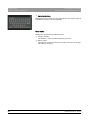
● Activating functions
The keyboard icon is used to access the keyboard. The service menu is
intended exclusively for service engineers.
Color codes
Settings are marked with two different colors:
● Orange: selected
The function or value has been selected by the user.
● White: preset
This function or value is preset in the system. The user can change
the setting by touching.
36
64 94 954 D3632
D3632.201.03.01.23 05.2015
Sirona Dental Systems GmbH
3 Unit description
Operating Instructions ORTHOPHOS SL 2D / 3D
3.4.5
3.4 Main components of the product
Remote control
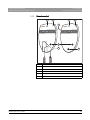
A
A
B
B
C
P 1
Prog.
14.1
s
64
kV
8
P 1
mA
R
Prog.
14.1
E
F
64 94 954 D3632
D3632.201.03.01.23
05.2015
A
Radiation indicator
B
"Unit ON" LED display
C
Display field
D
Exposure release button
E
"R" key for return of unit
F
Exposure release button with coiled cable
s
64
kV
8
mA
R
D
37
3 Unit description
Sirona Dental Systems GmbH
3.5 Spare parts and consumables
Operating Instructions ORTHOPHOS SL 2D / 3D
3.5 Spare parts and consumables
3.5.1
3.5.1.1
Accessory parts
Bite blocks and contact segments
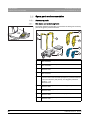
The drawer between the handles is provided for the storage of accessory
parts and hygienic protective sleeves.
F
A
B
C
G
H
E
38
I
D
A
Bite block (10 pieces)
REF 18 88 887
B
Bite block rod (5 pieces)
REF 18 88 895
C
Bar for chin rest
REF 59 61 461
D
Rest
REF 14 49 227
E
Chin rest assembly, including A (5 pieces), B (1 piece), C, D,
protective sleeves for bite block (500 pieces), protective sleeves
for chin rest and bar (100 pieces), see "Hygiene protective
sleeves" [ → 41]
REF 59 81 472
F
Contact segment yellow for subnasale (5 pieces)
REF 89 31 545
G
Bite block yellow (5 pieces)
REF 89 21 843
H
Contact segment blue for subnasale (5 pieces)
REF 89 31 552
I
Bite block blue (5 pieces)
REF 89 21 850
64 94 954 D3632
D3632.201.03.01.23 05.2015
Sirona Dental Systems GmbH
3 Unit description
Operating Instructions ORTHOPHOS SL 2D / 3D
3.5.1.2
3.5 Spare parts and consumables
3D bite block and spherical bite blocks
D
B
A
C
3.5.1.3
A
3D bite block rod (5 pieces)
REF 61 34 949
B
Lower jaw spherical bite block (with symbol for UK) (1 piece)
REF 61 50 226
C
Upper jaw spherical bite block (with symbol for UK) (1 piece)
REF 61 50 218
D
Spherical bite block plate with markers for creating implant
surgical guides
Available at the online shop of SICAT www.sicat.com
Universal and occlusal bite block
A
A
B
64 94 954 D3632
D3632.201.03.01.23
05.2015
C
A
Bite block foam, single use device (100 pieces)
REF 61 41 449
B
Occlusal bite block
REF 62 11 143
C
Universal bite block
REF 61 41 431
39
3 Unit description
Sirona Dental Systems GmbH
3.5 Spare parts and consumables
Operating Instructions ORTHOPHOS SL 2D / 3D
3.5.1.4
Temple supports, forehead support, and temporomandibular joint
supports
D
2
1
C
A
E
B
F
40
A
Forehead support and temple supports (1 set)
REF 64 83 973
B
Contact pads for forehead and temple supports (1 set)
REF 64 85 010
C
Temporomandibular joint support 1 for temporomandibular joint
exposures
REF 64 84 112
D
Temporomandibular joint support 2 for temporomandibular joint
exposures
REF 64 85 002
E
Contact pads for temporomandibular joint supports (10 pieces)
REF 59 90 648
F
Ear holders for temporomandibular joint supports (10 pieces)
REF 18 88 838
64 94 954 D3632
D3632.201.03.01.23 05.2015
Sirona Dental Systems GmbH
3 Unit description
Operating Instructions ORTHOPHOS SL 2D / 3D
3.5.2
Identification of single use devices
3.5 Spare parts and consumables
Hygienic protective sleeves
Single use hygienic protective sleeves
Prior to each exposure, the hygienic protective sleeves (single use
devices) must be fitted.
Single use devices are identified with the symbol shown on the left. They
must be disposed of immediately after use. Do not use single use devices
more than once.
3.5.2.1
Protective sleeves for basic unit
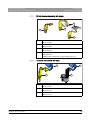
A
B
C
D
E
F
A
For forehead support and temple supports (500 pieces)
REF 59 68 263
B
For bite block dimensions, 43 x 21 mm (500 pieces)
REF 33 14 072
C
For chin rest and bar (100 pieces)
REF 59 32 603
D
For bite blocks and contact segments (500 pieces)
REF 33 14 080
Orth SL table
64 94 954 D3632
D3632.201.03.01.23
05.2015
41
3 Unit description
Sirona Dental Systems GmbH
3.5 Spare parts and consumables
Operating Instructions ORTHOPHOS SL 2D / 3D
3.5.2.2
E
For 3D bite block (500 pieces)
REF 61 27 745
F
Protective sleeve for hand grips
REF 59 68 255
Protective sleeves for cephalometer
20
30
40
50
A
B
42
A
Protective sleeve for nose support, single use devices (100
pieces)
REF 33 14 106
B
Protective caps for ear plugs, reusable devices (20 pieces)
REF 89 32 261
64 94 954 D3632
D3632.201.03.01.23 05.2015
Sirona Dental Systems GmbH
3 Unit description
Operating Instructions ORTHOPHOS SL 2D / 3D
3.5.3
3.5 Spare parts and consumables
Test phantom for acceptance/constancy test
Worldwide
Test phantom ww
Perform constancy tests according to the specifications for operating an
X-ray unit at regular intervals in order to ensure the safety of operating
staff and patients. Sirona recommends monthly testing.
50
40
30
C
20
A
B
C
64 94 954 D3632
D3632.201.03.01.23
05.2015
D
A
Exposure phantom assembly spare (for 2D test)
REF 59 85 416
B
Constancy test phantom spare (for 3D test)
REF 61 40 813
C
Contrast element OP SL spare
REF 64 90 895
D
Test phantom Ceph
REF 59 79 419
43
4 Installation and start-up
Sirona Dental Systems GmbH
4.1 Replacing accessories on the basic unit
Operating Instructions ORTHOPHOS SL 2D / 3D
4
Installation and start-up
4.1 Replacing accessories on the basic unit
4.1.1
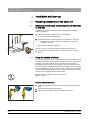
Replacing the bite block, contact segment, 3D bite block
or chin rest
You will need to replace accessory parts according to the patient or
exposure program.
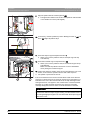
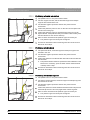
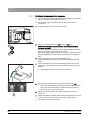
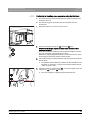
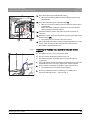
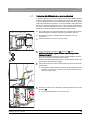
1. Pull the accessories upwards and out of the holder.
ª The accessory part disengages.
2. Insert the bite block, contact segment, 3D bite block or chin rest.
ª The bite block, contact segment, 3D bite block or chin rest
engages in position.
ª The accessory has been replaced.
The chin rest can be combined with the bite block rod or the bar.
➢ Insert the rod for the bite block or the bar into the chin rest from
above.
4.1.2
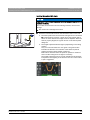
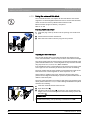
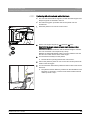
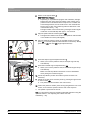
Using the occlusal bite block
The occlusal bite block can be used for all panoramic and 3D exposures
(except temporomandibular and sinus exposures) in place of the yellow
bite block or contact segment. The angle of the bite block plate is
transmitted to the X-ray unit. The displays on the touchscreen and the
color change of the height adjustment buttons for adjusting the unit height
and an automatic stop function assist the user in positioning the patient.
An interchangeable bite block foam is used for the bite block, which can
also be used for patients without anterior teeth.
Bite block foam (single use device), 100 pieces
REF 61 41 449
Inserting the bite block foam
1. Insert the plug of the top section into the opening on the bite block
plate.
2. Fold the bite block foam downwards.
3. Place the lower section onto the plug of the top section.
44
64 94 954 D3632
D3632.201.03.01.23 05.2015
Sirona Dental Systems GmbH
4 Installation and start-up
Operating Instructions ORTHOPHOS SL 2D / 3D
4.1 Replacing accessories on the basic unit
Inserting the occlusal bite block
NOTICE
Occlusal bite block plug contact
A contact for transmitting the angle to the X-ray system is located on the
occlusal bite block.
The contact can be broken off or bent during insertion, removal and
storage.
➢ Be careful not to damage the contact.
➢ Insert the occlusal bite block into the bite block holder on the unit.
A
ª The head symbol on the touchscreen changes as soon as the tab
A is inserted into the device; a green arrow may appear which
shows in which direction the height must be adjusted. When the
head is properly aligned, the green arrows on the head symbol
disappear.
ª The height adjustment buttons light up depending on the biting
position.
Only one of the two buttons is ever green. The green button
indicates the direction of movement of the stand required to
achieve the best possible patient positioning.
Both buttons become blue if the optimum position is achieved
and no further change to the height is necessary.
The height adjustment can be moved upwards and downwards
irrespective of the lighting of the buttons. The color of the button
is just a suggestion!
Ready for exposure
64 94 954 D3632
D3632.201.03.01.23
05.2015
45
4 Installation and start-up
Sirona Dental Systems GmbH
4.1 Replacing accessories on the basic unit
4.1.3
Operating Instructions ORTHOPHOS SL 2D / 3D
Using the universal bite block
The universal bite block can replace all other bite blocks and contact
segments. An interchangeable bite block foam is used for the bite block,
which can also be used for patients without anterior teeth.
Bite block foam (single use device), 100 pieces
REF 61 41 449
Inserting the bite block foam
1. Insert the plug of the top section into the opening on the bite block
plate.
2. Fold the bite block foam downwards.
3. Place the lower section onto the plug of the top section.
Adjusting the bite block height
The colored marking lines on the bite block slider are identical to the
colors of the bite blocks. These correspond to the same bite block height.
The yellow marking has the same meaning as the bite block height of the
yellow standard bite block or contact segment for the panoramic and bite
wing exposures: P1, P2, P10, P12, BW1 and BW2.
If the mandibular ramus is not displayed on the exposure and parts of the
sinus region are not necessarily of interest, then use the red marking.
The blue marking has the same meaning as the bite block height of the
blue bite block or contact segment for sinus exposures: S1, S3.
ORTHOPHOS SL
Green mark for maxillary exposures, where the alveolar ridge of the
patient's head is aligned horizontally to position the patient a little lower in
relation to the beam path.
The gray, black and white color markings offer further grid positions each
with a position distance of 1 cm, in order to distinguish between the yellow
and blue color marking.
1. Insert the universal bite block into the unit.
2. Open the button (A).
B
3. Adjust the bite block slider (B), according to the required bite block
height, to the colored marking lines and lock this setting in place with
the button (A).
A
A
46
IMPORTANT
Universal bite block for bite wing exposure
For programs BW1 and BW2, the universal bite block must not be used
from the black marking. The positioning is otherwise too low.
64 94 954 D3632
D3632.201.03.01.23 05.2015
Sirona Dental Systems GmbH
4 Installation and start-up
Operating Instructions ORTHOPHOS SL 2D / 3D
4.1.4
4.1 Replacing accessories on the basic unit
Using spherical bite blocks and the spherical bite block
plate
Two spherical bite blocks are available for preparing an implant drilling
template for measuring scans of the upper or lower jaw.
1. Insert the spherical bite block for mandibular exposures (A) (spheredown) and the spherical bite block for maxillary exposures (B)
(sphere-up) in the unit.
C
A
B
4.1.5
2. Position the spherical bite block plate C onto the sphere of the
corresponding spherical bite block.
The spherical bite block plate (C) contains 6 radiopaque markers
(spheres) which are used for orientation in the X-ray volume. Further
applications can be set up on this spherical bite block plate.
Changing the temple supports and temporomandibular
joint supports
For temporomandibular joint views, the temporomandibular joint supports
(A) "1" right and (C) "2" left must be inserted in place of the temple
supports (B).
Procedure description
✔ Temple supports are inserted in the unit.
Procedure
1. Press the respective locking button and remove the temple supports
B.
B
ª Both temple supports are removed.
2. Plug a sterile ear holder D into each of the temporomandibular joint
supports A and C.
2
1
ª The ear holders snap into the temporomandibular joint supports.
C
A
3. Insert temporomandibular joint supports A and C into the holders on
the device.
ª The temporomandibular joint supports snap into place.
D
64 94 954 D3632
D3632.201.03.01.23
05.2015
ª The unit is converted for temporomandibular joint exposures.
47
4 Installation and start-up
Sirona Dental Systems GmbH
4.2 Adjusting/inserting accessory parts on the cephalometer
Operating Instructions ORTHOPHOS SL 2D / 3D
4.2 Adjusting/inserting accessory parts on the
cephalometer
Adjusting the holder for ear plugs
1. Grasp the ear plug holders at the very top with both hands.
ª The ear plugs are inserted into the patient's outer ear canal.
50
40
30
20
2. Simultaneously pull the holders apart or push them together.
Adjusting the nose support
1. Fold down the nose support.
2. Lightly press and hold latching button A.
ª The vertical adjustment is released.
A
3. Move the blue section of the nose support upwards or downwards.
30
4. Release latching button A.
40
50
ª The vertical adjustment of the nose support is latched in position.
Inserting the carpus support plate
✔ The holders for the ear plugs (C) stand in line with the sensor and the
secondary diaphragm.
1. Grasp the ear plug holders (C) at the very top with both hands.
2. Simultaneously twist the holders by 90 degrees.
ª The nose support B is on the side facing away from the carpus
support plate C.
A
3. Grasp the carpus support plate D by its sides.
4. Insert the carpus support plate into both holes (A) until it reaches a
stop.
D
48
C
B
ª The carpus support plate (D) engages with a slight resistance.
64 94 954 D3632
D3632.201.03.01.23 05.2015
Sirona Dental Systems GmbH
4 Installation and start-up
Operating Instructions ORTHOPHOS SL 2D / 3D
4.3 Removing/inserting the Ceph sensor
4.3 Removing/inserting the Ceph sensor
The Ceph sensor must always be inserted in order for the unit to be
operated. However, should the Ceph sensor need to be removed, please
proceed as follows:
Inserted XG 3D Plus sensor
Removing the sensor
Removing/inserting the sensor
1. Hold the sensor firmly.
2. Press the button all the way in and hold it.
ª The sensor is released from the fastening.
3. Pull the sensor downwards out of the guide.
Inserting the sensor
50
40
30
20
1. Hold the sensor firmly.
2. Using both guide pins, insert the sensor into the guide sleeves on the
unit and push until it reaches a stop.
ª The sensor engages in the X-ray unit.
NOTICE
Risk of damage to the sensor
When removing the sensor, it can be damaged by impact or if dropped.
The sensor contains an integrated vibration sensor to detect impacts or
falls. If the vibration sensor has triggered, guarantee claims become
void.
➢ Do not drop the sensor under any circumstances!
Electrostatic charge
NOTICE
Electrostatic charges from persons are discharged on the unit.
Electrical components of the unit are destroyed.
➢ Do not touch any electrical components or unprotected plug
contacts.
➢ Discharge yourself by touching a conductive grounded object.
64 94 954 D3632
D3632.201.03.01.23
05.2015
49
5 Operation
Sirona Dental Systems GmbH
5.1 Switching the unit on
Operating Instructions ORTHOPHOS SL 2D / 3D
5
Operation
5.1 Switching the unit on
Patient position when switching on
CAUTION
Malfunctions can occur when the unit is switched on.
A patient positioned in the unit may be injured by moving parts.
➢ Please ensure that when activating the device and selecting the
operating mode (up until the completion of sensor positioning) that
a patient is not positioned in the device.
NOTICE
Condensation: Customer
Fluctuations in temperature can cause condensation to form in the unit.
Electrical components are destroyed by short circuits.
➢ Do not switch the unit on until the temperature of the unit has
adapted to the ambient temperature and the condensation has
evaporated. See the chapter on “Technical data”.
A
✔ The unit is properly installed.
✔ The unit is connected to the mains.
B
1. Turn the main switch A to position I.
2. Wait for one minute.
ª The LED (B) lights up on the Easypad.
ª The radiation indicator (C) lights up for approx. one second as a
functional check.
C
ª The home screen is displayed on the touchscreen for about 1 minute.
ª The program selection is then displayed on the touchscreen.
ª The forehead support and temple supports are completely open.
NOTICE
Waiting time when switching on and off
The unit must not be switched on/off constantly.
Constant switching on and off reduces the service life of individual unit
components and results in increased power consumption.
➢ After switching the unit off, wait for approx. 60 seconds before
switching it on again.
NOTICE
Touchscreen
The surface of the touchscreen is sensitive.
The touchscreen is damaged or its surface is scratched.
➢ Never use pointed objects such as ballpoint pens, pencils, etc. to
operate the touchscreen.
➢ Only use your fingertips to operate the touchscreen.
50
64 94 954 D3632
D3632.201.03.01.23 05.2015
Sirona Dental Systems GmbH
5 Operation
Operating Instructions ORTHOPHOS SL 2D / 3D
5.2 Switching SIDEXIS 4 to ready for exposure state
5.2 Switching SIDEXIS 4 to ready for exposure state
Refer to the SIDEXIS 4 User Manual
http://www.sirona.com/manuals
64 94 954 D3632
D3632.201.03.01.23
05.2015
51
5 Operation
Sirona Dental Systems GmbH
5.3 Panoramic and bite wing exposure
Operating Instructions ORTHOPHOS SL 2D / 3D
5.3 Panoramic and bite wing exposure
5.3.1
5.3.1.1
Program descriptions
P1 – Panoramic exposure
The exposure displays the full tooth region with ascending rami.
P1 – Panoramic exposure
P1 A – Panoramic exposure, artifact-reduced
The exposure can be taken in an artifact-reduced format to avoid artifacts
in the condylar and molar regions, and to reduce shadowing by the
opposite jaw.
Artifact-reduced exposure
P1 C – Panoramic exposure, constant 1.25x magnification
The exposure can be taken at a constant magnification of 1.25x, for
example, for implantology.
52
64 94 954 D3632
D3632.201.03.01.23 05.2015
Sirona Dental Systems GmbH
5 Operation
Operating Instructions ORTHOPHOS SL 2D / 3D
5.3.1.2
5.3 Panoramic and bite wing exposure
P2 – Panoramic exposure, without ascending rami
The exposure represents a reduced tooth region without ascending rami.
P2 A - Artifact-reduced panoramic exposure without ascending rami
The exposure can also be taken in an artifact-reduced format to avoid
artifacts in the condylar and molar regions, and to reduce shadowing by
the opposite jaw.
P2 C - Panoramic exposure without ascending rami at a constant
magnification of 1.25x
The exposure can be taken at a constant magnification of 1.25x, for
example, for implantology.
64 94 954 D3632
D3632.201.03.01.23
05.2015
53
5 Operation
Sirona Dental Systems GmbH
5.3 Panoramic and bite wing exposure
Operating Instructions ORTHOPHOS SL 2D / 3D
5.3.1.3
P10 – Panoramic exposure for children
The exposure represents a reduced tooth region without ascending rami.
For this exposure the radiation dose is considerably reduced.
P10 – Panoramic exposure for children, without ascending rami
P10 A – Panoramic exposure for children, without ascending rami,
artifact-reduced
The exposure can also be taken in an artifact-reduced format to avoid
artifacts in the condylar and molar regions, and to reduce shadowing by
the opposite jaw. For this exposure the radiation dose is considerably
reduced.
P10 C – Panoramic exposure for children, without ascending rami,
constant 1.25x magnification
The exposure can be taken at a constant magnification of 1.25x, for
example, for implantology. For this exposure the radiation dose is
considerably reduced.
5.3.1.4
P12 – Thick slice, anterior tooth region
The exposure shows the anterior tooth region with a larger slice
thickness, e.g. for implantology.
The image section can be selected for UJ/LJ.
54
64 94 954 D3632
D3632.201.03.01.23 05.2015
Sirona Dental Systems GmbH
5 Operation
Operating Instructions ORTHOPHOS SL 2D / 3D
5.3.1.5
5.3 Panoramic and bite wing exposure
BW1 – Bite wing exposures in the posterior tooth region
The exposure displays the posterior tooth regions with an image height
restricted to the bite wing and an optimized projection.
5.3.1.6
BW2 – Bite wing exposures in the anterior tooth region
The exposure displays the anterior tooth regions with an image height
restricted to the bite wing and an optimized projection.
64 94 954 D3632
D3632.201.03.01.23
05.2015
55
5 Operation
Sirona Dental Systems GmbH
5.3 Panoramic and bite wing exposure
Operating Instructions ORTHOPHOS SL 2D / 3D
5.3.2
Preparing the exposure
Depending on the patient or the exposure program, accessory parts must
be replaced and the appropriate exposure mode must be selected; see
"Installation and start-up" [ → 44].
Reference for changing accessory parts, XG 3D Plus
You will require the following accessories:
Preparation of panoramic exposure with universal bite block
● Chin rest with bite block rod or bar or
yellow bite block or contact segment or
universal bite block or occlusal bite block.
CAUTION
The chin rest must not be used for children when using programs BW1
and BW2. The positioning is otherwise too low.
IMPORTANT
For programs BW1 and BW2, the universal bite block must not be used
from the black marking. The positioning is otherwise too low.
● Temple supports
● Forehead support
➢ Insert the accessory parts to be used into the unit and pull on the
relevant hygienic protective sleeves, see "Hygienic protective
sleeves" [ → 41].
➢ Switch SIDEXIS to a ready for exposure state; see "Switch SIDEXIS
to ready for exposure state".
Reference to attaching protective sleeves
Preparing for a 2D exposure
56
64 94 954 D3632
D3632.201.03.01.23 05.2015
Sirona Dental Systems GmbH
5 Operation
Operating Instructions ORTHOPHOS SL 2D / 3D
5.3.3
5.3 Panoramic and bite wing exposure
Selecting an exposure program
Moving into the starting position
CAUTION
Pressing the R key moves the unit to the starting position.
A patient positioned in the unit may be injured by moving parts.
➢ Check that a patient is not positioned in the unit before moving it to
the starting position.
✔ The unit is switched on and ready for exposure.
Selecting exposure programs, XG 3D Plus
1. Touch the PAN symbol at the top of the touchscreen.
ª The program group PAN is selected.
A
B
C
2. Select an exposure program. To do this, touch the arrow keys +C and
-A. If a subroutine, e.g. without artifacts or 1.25x magnification, is
available for this program, the program display is grayed out. Touch
the program display B several times. All subroutines of the selected
program are displayed one by one.
3. Follow the instructions in the comment line on the touchscreen. Press
the R key if necessary.
ª The diaphragm and the sensor move into the starting position.
ª The exposure program is selected.
Ready for exposure
NOTICE
PAN/3D sensor unit rotation, XG 3D Plus
The PAN/3D sensor unit is rotated via a motor drive.
The gearing of the sensor unit can be damaged if it is turned by hand.
➢ Press the R key to rotate the sensor unit back to the starting position
via motor drive. The sensor unit is always rotated in combination
with the entire main rotation unit. The combisensor travels to the
proper starting position for panoramic, ceph or 3D exposures,
depending on the program group selected.
64 94 954 D3632
D3632.201.03.01.23
05.2015
57
5 Operation
Sirona Dental Systems GmbH
5.3 Panoramic and bite wing exposure
Operating Instructions ORTHOPHOS SL 2D / 3D
5.3.4
Setting quadrants
The exposure can be restricted to quadrants. You can select a half-view
of the right or left jaw in programs P1, P2, P10 and BW1, or upper jaw/
lower jaw in programs P1, P2, P10 and P12. In P1, P2, P10, also for
constant magnification and artifact-reduced view.
Setting the quadrant Orth SL
✔ Level 1 is displayed on the touchscreen.
Selecting quadrants, XG 3D Plus
A
1. Press the quadrant symbol (A) on the right side of the touchscreen.
ª A submenu line is opened.
2. Select the desired quadrant(s). See the figure below. Quadrants can
be selected as half-views or individually. Touch the quadrant field in
the center to reactivate the full frame.
ª The selected quadrants are emphasized / the non-selected ones
are grayed out.
Ready for exposure
R
L
R
Ready for exposure
R
L
Ready for exposure
L
R
Ready for exposure
L
Ready for exposure
3. Touch the cross on the left side of the submenu line.
or
➢
Touch the quadrant symbol (A) again.
ª The submenu line is closed.
ª The quadrant or quadrants are set.
IMPORTANT
The program duration for individual quadrant exposures equals the
program duration for half-view exposures.
58
64 94 954 D3632
D3632.201.03.01.23 05.2015
Sirona Dental Systems GmbH
5 Operation
Operating Instructions ORTHOPHOS SL 2D / 3D
5.3.5
5.3 Panoramic and bite wing exposure
Adjusting the Quickshot function
✔ Level 1 is displayed on the touchscreen.
A
1. Touch the Quickshot display A on the right side of the touchscreen.
ª A submenu line is opened.
Ready for exposure
2. Press the Quick On or Quick Off icons on the touchscreen.
ª The selection is highlighted orange in the submenu line.
3. Touch the cross on the left side of the submenu line.
or
➢ Touch the Quick symbol (A) again.
ª The submenu line is closed.
Ready for exposure
ª The Quickshot function is set.
5.3.6
Setting the temple width
The temple support width changes the radiation time slightly.
The slice width is selected automatically for different dental arches in P1,
P2, P10, and their offshoots.
64 94 954 D3632
D3632.201.03.01.23
05.2015
59
5 Operation
Sirona Dental Systems GmbH
5.3 Panoramic and bite wing exposure
Operating Instructions ORTHOPHOS SL 2D / 3D
5.3.7
Setting the kV/mA values
Setting the kV/mA values via the patient symbols
Preset kV/mA combinations are assigned to the patient symbols, which
are selected according to the patient's size and weight. The symbols
roughly correspond to child, youth/woman, woman/man, hefty persons.
✔ Level 1 is displayed on the touchscreen.
➢ Touch the required patient symbol.
ª The selection (A) is highlighted in orange. The selected kV/mA
value is displayed on the right side of the touchscreen.
ª The kV/mA value is set.
For the USA only: The source to image distance (SID) is displayed on the
touchscreen.
This is 497 mm (19.6“) for the PAN sensor and
524 mm (20.6“) for the Flat Panel Detector.
SID 497 mm for PAN sensor and Flat Panel Detector 524
Ready for exposure
A
Setting the kV/mA values via the submenu line
Setting the kV/mA values via the submenu line, XG 3D Plus
If the preset kV/mA combinations do not provide a satisfactory result, you
can also set the kV/mA values manually in all programs.
✔ Level 1 is displayed on the touchscreen.
1. Touch the kV/mA symbol (B) on the right side of the touchscreen.
ª A submenu line is opened.
Ready for exposure
B
2. Select a kV/mA value. Touch the - or + keys.
ª The selected kV/mA value is displayed.
3. Touch the cross on the left side of the submenu line.
or
➢ Touch the kV/mA symbol (B) again.
Ready for exposure
ª The submenu line is closed.
ª The kV/mA value is set.
60
64 94 954 D3632
D3632.201.03.01.23 05.2015
Sirona Dental Systems GmbH
5 Operation
Operating Instructions ORTHOPHOS SL 2D / 3D
5.3.8
5.3 Panoramic and bite wing exposure
Positioning the patient
The patient is positioned on the unit while standing. Positioning in the seat
is also possible without issue.
Positioning while standing and seated
Height adjustment
CAUTION
The height adjustment motor starts slowly and then increases its speed.
A patient positioned in the unit may be injured by moving parts.
➢ Monitor the patient and the movement of the unit during height
adjustment.
➢ To make minor corrections, press and immediately release the
keys.
Laser light localizer
CAUTION
The light localizer consists of one Class 1 laser.
Patients and users can be blinded by the laser light localizer.
➢ Do not stare directly into the laser beam. Make sure that the laser
beam does not meet the eyes of the patient.
➢ A distance of at least 10 cm must be maintained between the eye
and the laser.
IMPORTANT
Metallic objects
Ask the patient to take off all metallic objects such as glasses and
jewelry in the head and neck area as well as all removable dental
prostheses. The tray in front of the control mirror is used for depositing
jewelry.
Tip: The Easypad shows the reference values of the height and forehead
support settings, which are saved for further exposures in the additional
information area of the SIDEXIS software.
Easypad reference values
64 94 954 D3632
D3632.201.03.01.23
05.2015
61
5 Operation
Sirona Dental Systems GmbH
5.3 Panoramic and bite wing exposure
Operating Instructions ORTHOPHOS SL 2D / 3D
5.3.8.1
Positioning with an occlusal bite block
The occlusal bite block sets the inclination according to the occlusal plane
instead of the Frankfurt horizontal plane. This results in fewer overlaps in
the anterior tooth region and upper jaw.
If required, the service engineer can adjust the angle by +5° in order to
preset the Frankfurt horizontal plane.
✔ The occlusal bite block with bite block foam is inserted in the device.
The green arrows are displayed on the touchscreen.
✔ The forehead support and temple supports are inserted in the unit.
The hygienic protective sleeves are pulled on.
1. Guide the patient in front of the control mirror.
A
B
2. Set the unit height using the up (A) and down (B) keys. The height
adjustment buttons are illuminated and show the direction in which
the device is to be moved by a green arrow.
CAUTION! The height adjustment motor starts slowly and then
increases its speed.
Press and hold down the button until the desired height is reached.
The unit movement is accompanied by a beep.
Release the height adjustment buttons once the bite block plate and
the patient's anterior teeth are at the same height.
3. Guide the patient to the unit and instruct him to hold the handles with
both hands.
4. Instruct the patient to bite into the grooves of the bite block foam with
the teeth.
ª If necessary, push the lower anterior teeth forwards until they
reach a stop.
62
64 94 954 D3632
D3632.201.03.01.23 05.2015
Sirona Dental Systems GmbH
Operating Instructions ORTHOPHOS SL 2D / 3D
5 Operation
5.3 Panoramic and bite wing exposure
5. Check the position of the patient's spine.
ª Ensure that the patient's spine is slightly inclined, as shown in the
diagram.
Tip: To achieve the correct positioning of the spine, ask the
patient to take a small step towards the column of the unit. The
patient's cervical vertebrae are thus stretched. This prevents
regions of diminished density in the anterior tooth region.
6. Use the green arrows on the touchscreen to align the patient's head
inclination until the desired position is reached. Instruct the patient to
let his head rest.
If the green arrow on the touchscreen points up, press the button for
height adjustment A upwards.
CAUTION! If no change in the angle of the bite block plate is found
for about 3 seconds, the height adjustment motor runs at a higher
speed.
7. When the green arrow points downwards, press the down button B.
ª The inclination of the patient's head changes according to the
height of the unit. While the angle of the bite block plate is being
changed, the unit height adjustment motor can only travel at a
very slow speed.
ª The green arrow on the head symbol indicates how far the unit
height must be moved until the nominal position for head
inclination is reached. The inclination of the displayed head
symbol also changes accordingly.
ª Once the desired position is reached, the movement stops
automatically and a beep is sounded by the user interface. The
green-illuminated arrows of the height adjustment buttons light
up blue.
8. Switch on the light localizer. CAUTION! Risk of dazzle
ª Two red light lines reflect on the patient's head. To switch off the
light localizer, press the key again. It switches off automatically
after approx. 100 seconds.
64 94 954 D3632
D3632.201.03.01.23
05.2015
63
5 Operation
Sirona Dental Systems GmbH
5.3 Panoramic and bite wing exposure
Operating Instructions ORTHOPHOS SL 2D / 3D
9. Align the patient with the central light line (G).
ª The light beam reflects in the center of the patient's anterior teeth
or the middle of his face (mid-sagittal).
G
E
10. If necessary, check the patient's position. Briefly press the up (A) and
down (B) height adjustment keys.
11. Press the temple support adjustment button I.
ª When you touch the patient's head, the temple supports stop
automatically.
12. Press the forehead support adjustment key (H).
ª When you touch the patient's head, the forehead support stops
automatically.
Make sure that the patient's head does not move backwards
when placing the forehead support.
13. Instruct the patient to exhale, place his tongue against the roof of his
mouth, and to hold this position until the end of the exposure.
ª The patient is positioned in the unit.
H
I
If the occlusal bite block is stuck in the bite block holder even after the
exposure is carried out and you select an exposure program that is not
intended for the use of the occlusal bite block, the help message "H307 Change bite block " will appear in the comment line. Insert the relevant
bite block or contact segment required for the exposure. The help
message disappears as soon as the occlusal bite block is removed.
IMPORTANT
Temple supports setting, XG 3D Plus
In P1, P2, P10, the slice width is selected automatically for different
dental arches with the temple support setting, and the radiation time is
also changed slightly through this in accordance with the temple support
width which is set.
64
64 94 954 D3632
D3632.201.03.01.23 05.2015
Sirona Dental Systems GmbH
5 Operation
Operating Instructions ORTHOPHOS SL 2D / 3D
5.3.8.2
5.3 Panoramic and bite wing exposure
Positioning with chin rest and rod for bite block
✔ The chin rest and bite block segment, as well forehead support and
temple supports are inserted in the unit.
✔ The relevant hygienic protective sleeves are pulled over the
accessories.
1. Guide the patient in front of the control mirror.
2. Set the unit height using the up (A) and down (B) keys.
CAUTION! The height adjustment motor starts slowly and then
increases its speed.
Press and hold down the button until the desired height is reached.
The unit movement is accompanied by a beep.
Release the height adjustment buttons once the patient's chin and
the chin rest on the unit are at the same height.
A
B
3. Turn the bite block away from the patient.
ª The bite block is pointing towards the control mirror.
4. Instruct the patient to place his chin on the chin rest and place both
hands on the hand grips.
5. Turn the bite block towards the patient and instruct him to bite on the
bite block.
ª The patient's anterior teeth are positioned in the indentation in the
bite block. If necessary, push the lower anterior teeth forwards
until they reach a stop.
64 94 954 D3632
D3632.201.03.01.23
05.2015
65
5 Operation
Sirona Dental Systems GmbH
5.3 Panoramic and bite wing exposure
Operating Instructions ORTHOPHOS SL 2D / 3D
6. Check the patient's occlusal plane (C). Correct the height of the unit
using the up (A) and down (B) keys.
A
ª The occlusal plane is slightly inclined toward the front.
C
B
7. Check the position of the patient's spine.
ª Ensure that the patient's spine is slightly inclined, as shown in the
diagram.
Tip: To achieve the correct positioning of the spine, ask the
patient to take a small step towards the column of the unit. The
patient's cervical vertebrae are thus stretched. This prevents
regions of diminished density in the anterior tooth region.
8. Swivel the control mirror outwards by pressing the left recess on the
touchbar (D).
ª You can see the patient in the control mirror.
9. Switch on the light localizer. CAUTION! Risk of dazzle
ª Two red light lines reflect on the patient's head. To switch off the
light localizer, press the key again. It switches off automatically
after approx. 100 seconds.
10. Align the patient with the central light line (G).
ª The light beam reflects in the center of the patient's anterior teeth
or the middle of his face (mid-sagittal).
F
G
E
D
66
64 94 954 D3632
D3632.201.03.01.23 05.2015
Sirona Dental Systems GmbH
5 Operation
Operating Instructions ORTHOPHOS SL 2D / 3D
E
A
5.3 Panoramic and bite wing exposure
11. Align the patient's head according to the Frankfurt horizontal plane
(E).
Tip: The Frankfurt horizontal is used as a reference plane. It runs
between the upper edge of the ear canal and the deepest point of the
lower eye socket edge.
12. Adjust the height of the light localizer using the slider (F).
ª The light beam reflects on the upper edge of the outer ear canal.
13. Correct the patient's head inclination as necessary. Briefly press the
up (A) and down (B) height adjustment keys.
C
B
ª The light beam reflects on the lowest point of the lower eye
socket edge.
14. Press the temple support adjustment button I.
ª When you touch the patient's head, the temple supports stop
automatically.
15. Press the forehead support adjustment key (H).
ª When you touch the patient's head, the forehead support stops
automatically.
Make sure that the patient's head does not move backwards
when placing the forehead support.
16. Check the patient's position and make any final corrections as
necessary.
17. Swivel the control mirror back into place by pressing the right recess
on the touchbar (D).
I
H
ª The patient can see himself in the control mirror.
18. Instruct the patient to exhale, place his tongue against the roof of his
mouth, and to hold this position until the end of the exposure.
ª The patient is positioned in the unit.
IMPORTANT
Temple supports setting, XG 3D Plus
In P1, P2, P10, the slice width is selected automatically for different
dental arches with the temple support setting, and the radiation time is
also changed slightly through this in accordance with the temple support
width which is set.
64 94 954 D3632
D3632.201.03.01.23
05.2015
67
5 Operation
Sirona Dental Systems GmbH
5.3 Panoramic and bite wing exposure
Operating Instructions ORTHOPHOS SL 2D / 3D
5.3.8.3
Positioning with chin rest and bar
✔ The patient has no or only a few anterior teeth.
✔ The chin support and bar, and the forehead support and temple
supports are inserted in the unit.
✔ The relevant hygienic protective sleeves are pulled over the
accessories.
1. Instruct the patient to place his chin on the chin rest and place both
hands on the hand grips.
2. Instruct the patient to place his subnasale (the base of his nose)
against the bar. If the patient's lower jaw contains anterior teeth, place
the bar between his chin and his lower lip.
3. Place a cotton roll between the patient's upper and lower jaw.
ª The patient's upper and lower jaw are aligned.
4. Proceed as described under "Positioning with chin rest and rod for
bite block" from step 6.
5.3.8.4
Positioning with bite block
✔ The yellow bite block, forehead support and temple supports are
inserted in the unit.
✔ The relevant hygienic protective sleeves are pulled over the
accessories.
1. Instruct the patient to hold the handles with both hands and bite into
the bite block.
ª The patient's anterior teeth are positioned in the indentation in the
bite block. If necessary, push the lower anterior teeth forwards
until they reach a stop.
2. Proceed as described under "Positioning with chin rest and rod for
bite block" from step 6.
5.3.8.5
Positioning with contact segment
✔ The patient has no or only a few anterior teeth.
✔ The yellow contact segment, forehead support and temple supports
are inserted in the unit.
✔ The relevant hygienic protective sleeves are pulled over the
accessories.
1. Instruct the patient to hold the handles with both hands and place his
subnasale (the base of his nose) against the contact segment.
2. Place a cotton roll between the patient's upper and lower jaw.
ª The patient's upper and lower jaw are aligned.
3. Proceed as described under "Positioning with chin rest and rod for
bite block" from step 6.
68
64 94 954 D3632
D3632.201.03.01.23 05.2015
Sirona Dental Systems GmbH
5 Operation
Operating Instructions ORTHOPHOS SL 2D / 3D
5.4 Temporomandibular joint exposure
5.4 Temporomandibular joint exposure
5.4.1
Program descriptions
IMPORTANT
Note on two-part exposure programs
Note the information on the two-part exposure programs in the
"Releasing the exposure" chapter, see Two-part exposure
programs [ → 116].
5.4.1.1
TM1.1 / TM1.2 – Lateral view of temporomandibular joints with
mouth open and closed
(Two-part exposure program)
0° – 15°
This exposure displays the temporomandibular joints from a lateral
aspect with the mouth open and closed and provides 4 views in one
image.
15° – 0°
This program enables angle preselection (0°, 5°, 10°, and 15°) for the
temporomandibular joint area.
5.4.1.2
TM3 – Temporomandibular joints lateral, ascending rami
The exposure shows a lateral projection of the temporomandibular joints
with ascending rami, with 2 views in one image.
64 94 954 D3632
D3632.201.03.01.23
05.2015
69
5 Operation
Sirona Dental Systems GmbH
5.4 Temporomandibular joint exposure
Operating Instructions ORTHOPHOS SL 2D / 3D
5.4.2
Preparing the exposure
Depending on the patient or the exposure program, accessory parts must
be replaced and the appropriate exposure mode must be selected; see
"Installation and start-up" [ → 44].
Reference for changing accessory parts, XG 3D Plus
You will require the following accessories:
Preparation of temporomandibular joint
● Temporomandibular joint supports with ear holders
● Forehead support
➢ Insert the accessory parts to be used into the unit and pull on the
relevant hygienic protective sleeves, see "Hygienic protective
sleeves" [ → 41].
➢ Switch SIDEXIS to a ready for exposure state; see "Switch SIDEXIS
to ready for exposure state".
Reference to attaching protective sleeves
Preparing for a 2D exposure
5.4.3
Selecting an exposure program
Moving into the starting position
CAUTION
Pressing the R key moves the unit to the starting position.
A patient positioned in the unit may be injured by moving parts.
➢ Check that a patient is not positioned in the unit before moving it to
the starting position.
✔ The unit is switched on and ready for exposure.
Selecting exposure programs, XG 3D Plus
A
B
C
1. Touch the PAN symbol at the top of the touchscreen.
ª The program group PAN is selected.
2. Select the exposure program. Press the arrow keys + C and - A.
ª The exposure program is displayed in the program display (B).
3. Follow the instructions in the comment line on the touchscreen. Press
the R key if necessary.
Ready for exposure
ª The diaphragm and the sensor move into the starting position.
ª The exposure program is selected.
70
64 94 954 D3632
D3632.201.03.01.23 05.2015
Sirona Dental Systems GmbH
5 Operation
Operating Instructions ORTHOPHOS SL 2D / 3D
5.4.4
5.4 Temporomandibular joint exposure
Adjusting the angle preselection
In the TM1 exposure program, angle (0°, 5°, 10° and 15°) can be preset
for the temporomandibular joint area. This can be helpful if more detailed
analyses of the temporomandibular joint are necessary, but the standard
projections (0°) do not provide an optimal image.
Angle preselection for programs, XG 3D Plus
0° – 15°
15° – 0°
The figure shows the direction in which the slice orientation is being
swiveled during angle preselection.
TM1
A
✔ Level 1 is displayed on the touchscreen.
Angle preselection, XG 3D Plus
1. Touch the angle preselection symbol (A) on the right side of the
touchscreen.
ª A submenu line is opened.
Ready for exposure
2. Select the corresponding angle preselection.
ª The selection is highlighted orange in the submenu line. The
selected angle preselection is displayed on the right side of the
touchscreen.
3. Touch the cross on the left side of the submenu line.
or
Ready for exposure
➢ Touch the angle preselection symbol (A) again.
ª The submenu line is closed.
ª The angle preselection is set.
IMPORTANT
Resetting the angle preselection settings
When you confirm the exposure with the R key, the angle setting that
was changed in the submenu line will automatically be reset to the
default setting of 0°.
64 94 954 D3632
D3632.201.03.01.23
05.2015
71
5 Operation
Sirona Dental Systems GmbH
5.4 Temporomandibular joint exposure
Operating Instructions ORTHOPHOS SL 2D / 3D
5.4.5
Setting the kV/mA values
Setting the kV/mA values via the patient symbols
Preset kV/mA combinations are assigned to the patient symbols, which
are selected according to the patient's size and weight. The symbols
roughly correspond to child, youth/woman, woman/man, hefty persons.
✔ Level 1 is displayed on the touchscreen.
➢ Touch the required patient symbol.
ª The selection (A) is highlighted in orange. The selected kV/mA
value is displayed on the right side of the touchscreen.
ª The kV/mA value is set.
For the USA only: The source to image distance (SID) is displayed on the
touchscreen.
This is 497 mm (19.6“) for the PAN sensor and
524 mm (20.6“) for the Flat Panel Detector.
SID 497 mm for PAN sensor and Flat Panel Detector 524
Ready for exposure
A
Setting the kV/mA values via the submenu line
Setting the kV/mA values via the submenu line, XG 3D Plus
If the preset kV/mA combinations do not provide a satisfactory result, you
can also set the kV/mA values manually in all programs.
✔ Level 1 is displayed on the touchscreen.
1. Touch the kV/mA symbol (B) on the right side of the touchscreen.
ª A submenu line is opened.
Ready for exposure
B
2. Select a kV/mA value. Touch the - or + keys.
ª The selected kV/mA value is displayed.
3. Touch the cross on the left side of the submenu line.
or
➢ Touch the kV/mA symbol (B) again.
Ready for exposure
ª The submenu line is closed.
ª The kV/mA value is set.
72
64 94 954 D3632
D3632.201.03.01.23 05.2015
Sirona Dental Systems GmbH
5 Operation
Operating Instructions ORTHOPHOS SL 2D / 3D
5.4.6
5.4 Temporomandibular joint exposure
Positioning the patient
The patient is positioned on the unit while standing. Positioning in the seat
is also possible without issue.
Positioning while standing and seated
Height adjustment
CAUTION
The height adjustment motor starts slowly and then increases its speed.
A patient positioned in the unit may be injured by moving parts.
➢ Monitor the patient and the movement of the unit during height
adjustment.
➢ To make minor corrections, press and immediately release the
keys.
Laser light localizer
CAUTION
The light localizer consists of one Class 1 laser.
Patients and users can be blinded by the laser light localizer.
➢ Do not stare directly into the laser beam. Make sure that the laser
beam does not meet the eyes of the patient.
➢ A distance of at least 10 cm must be maintained between the eye
and the laser.
IMPORTANT
Metallic objects
Ask the patient to take off all metallic objects such as glasses and
jewelry in the head and neck area as well as all removable dental
prostheses. The tray in front of the control mirror is used for depositing
jewelry.
Tip: The Easypad shows the reference values of the height and forehead
support settings, which are saved for further exposures in the additional
information area of the SIDEXIS software.
Easypad reference values
64 94 954 D3632
D3632.201.03.01.23
05.2015
73
5 Operation
Sirona Dental Systems GmbH
5.4 Temporomandibular joint exposure
Operating Instructions ORTHOPHOS SL 2D / 3D
5.4.6.1
Positioning for a lateral temporomandibular joint exposure
✔ The forehead support and temporomandibular joint supports with ear
Positioning for a lateral temporomandibular joint exposure
holders are plugged into the unit (1 right, 2 left, see Changing the
temple supports and temporomandibular joint supports [ → 47].
✔ The relevant hygienic protective sleeves are pulled over the
accessories.
1. Guide the patient in front of the control mirror.
2. Set the unit height using the up (A) and down (B) keys.
CAUTION! The height adjustment motor starts slowly and then
increases its speed.
Press and hold down the button until the desired height is reached.
The unit movement is accompanied by a beep.
Release the height-adjustment buttons once the ear holders of the
temporomandibular joint supports are at the same height as that of
the patient's ears.
A
B
3. Instruct the patient to position himself between the
temporomandibular joint supports and hold the handles with both
hands.
J
4. Close the temporomandibular joint supports (J and K). Press the I
key.
K
ª The temporomandibular joint supports stop automatically when
they come into contact with the patient's head. The patient is
fixed to the unit by the ear holders.
5. Swivel the control mirror outwards by pressing the left recess on the
touchbar (D).
1
ª You can see the patient in the control mirror.
I
6. Switch on the light localizer. CAUTION! Risk of dazzle
ª Two red light lines reflect on the patient's head. To switch off the
light localizer, press the key again. It switches off automatically
after approx. 100 seconds.
74
64 94 954 D3632
D3632.201.03.01.23 05.2015
Sirona Dental Systems GmbH
5 Operation
Operating Instructions ORTHOPHOS SL 2D / 3D
5.4 Temporomandibular joint exposure
7. Align the patient with the central light line (G).
ª The light beam reflects in the center of the patient's anterior teeth
or the middle of his face (mid-sagittal).
G
F
E
D
E
A
8. Align the patient's head according to the Frankfurt horizontal plane
(E).
9. Adjust the height of the light localizer using the slider (F).
ª The light beam reflects on the upper edge of the outer ear canal.
10. Correct the patient's head inclination as necessary. Briefly press the
up (A) and down (B) height adjustment keys.
ª The light beam reflects on the lowest point of the lower eye
socket edge.
B
11. Press the forehead support adjustment key (H).
1
ª The forehead supports stop moving automatically when they
come into contact with the patient's forehead.
Ensure that the patient's head does not move backward when the
forehead support is put in place.
12. Check the patient's position and make any final corrections as
necessary.
13. Swivel the control mirror back into place by pressing the right recess
on the touchbar (D).
ª The patient can see himself in the control mirror.
14. Instruct the patient to exhale, place his tongue against the roof of his
mouth, and to hold this position until the end of the exposure.
ª The patient is positioned in the unit.
H
IMPORTANT
Note on two-part exposure programs
Note the information on the two-part exposure programs in the
"Releasing the exposure" chapter, see Two-part exposure
programs [ → 116].
64 94 954 D3632
D3632.201.03.01.23
05.2015
75
5 Operation
Sirona Dental Systems GmbH
5.5 Sinus view
Operating Instructions ORTHOPHOS SL 2D / 3D
5.5 Sinus view
5.5.1
Program descriptions
5.5.1.1
S1 – Paranasal sinuses
This exposure shows the paranasal sinuses e.g. for the diagnosis of
orbital floor fractures.
5.5.1.2
S3 – Paranasal sinuses, linear slice orientation
This exposure shows the paranasal sinuses e.g. for the diagnosis of
orbital floor fractures. The section has a linear orientation.
76
64 94 954 D3632
D3632.201.03.01.23 05.2015
Sirona Dental Systems GmbH
5 Operation
Operating Instructions ORTHOPHOS SL 2D / 3D
5.5.2
5.5 Sinus view
Preparing the exposure
Depending on the patient or the exposure program, accessory parts must
be replaced and the appropriate exposure mode must be selected; see
"Installation and start-up" [ → 44].
Reference for changing accessory parts, XG 3D Plus
You will require the following accessories:
Preparing the sinus view
● Blue bite block or contact segment
● Temporomandibular joint supports with contact pads
● Forehead support
➢ Insert the accessory parts to be used into the unit and pull on the
relevant hygienic protective sleeves, see "Hygienic protective
sleeves" [ → 41].
➢ Switch SIDEXIS to a ready for exposure state; see "Switch SIDEXIS
to ready for exposure state".
Reference to attaching protective sleeves
Preparing for a 2D exposure
5.5.3
Selecting an exposure program
Moving into the starting position
CAUTION
Pressing the R key moves the unit to the starting position.
A patient positioned in the unit may be injured by moving parts.
➢ Check that a patient is not positioned in the unit before moving it to
the starting position.
✔ The unit is switched on and ready for exposure.
Selecting exposure programs, XG 3D Plus
A
B
C
1. Touch the PAN symbol at the top of the touchscreen.
ª The program group PAN is selected.
2. Select the exposure program. Press the arrow keys + C and - A.
ª The exposure program is displayed in the program display (B).
3. Follow the instructions in the comment line on the touchscreen. Press
the R key if necessary.
Ready for exposure
ª The diaphragm and the sensor move into the starting position.
ª The exposure program is selected.
64 94 954 D3632
D3632.201.03.01.23
05.2015
77
5 Operation
Sirona Dental Systems GmbH
5.5 Sinus view
Operating Instructions ORTHOPHOS SL 2D / 3D
5.5.4
Setting the kV/mA values
Setting the kV/mA values via the patient symbols
Preset kV/mA combinations are assigned to the patient symbols, which
are selected according to the patient's size and weight. The symbols
roughly correspond to child, youth/woman, woman/man, hefty persons.
✔ Level 1 is displayed on the touchscreen.
➢ Touch the required patient symbol.
ª The selection (A) is highlighted in orange. The selected kV/mA
value is displayed on the right side of the touchscreen.
ª The kV/mA value is set.
For the USA only: The source to image distance (SID) is displayed on the
touchscreen.
This is 497 mm (19.6“) for the PAN sensor and
524 mm (20.6“) for the Flat Panel Detector.
SID 497 mm for PAN sensor and Flat Panel Detector 524
Ready for exposure
A
Setting the kV/mA values via the submenu line
Setting the kV/mA values via the submenu line, XG 3D Plus
If the preset kV/mA combinations do not provide a satisfactory result, you
can also set the kV/mA values manually in all programs.
✔ Level 1 is displayed on the touchscreen.
1. Touch the kV/mA symbol (B) on the right side of the touchscreen.
ª A submenu line is opened.
Ready for exposure
B
2. Select a kV/mA value. Touch the - or + keys.
ª The selected kV/mA value is displayed.
3. Touch the cross on the left side of the submenu line.
or
➢ Touch the kV/mA symbol (B) again.
Ready for exposure
ª The submenu line is closed.
ª The kV/mA value is set.
78
64 94 954 D3632
D3632.201.03.01.23 05.2015
Sirona Dental Systems GmbH
5 Operation
Operating Instructions ORTHOPHOS SL 2D / 3D
5.5.5
5.5 Sinus view
Positioning the patient
The patient is positioned on the unit while standing. Positioning in the seat
is also possible without issue.
Positioning while standing and seated
Height adjustment
CAUTION
The height adjustment motor starts slowly and then increases its speed.
A patient positioned in the unit may be injured by moving parts.
➢ Monitor the patient and the movement of the unit during height
adjustment.
➢ To make minor corrections, press and immediately release the
keys.
Laser light localizer
CAUTION
The light localizer consists of one Class 1 laser.
Patients and users can be blinded by the laser light localizer.
➢ Do not stare directly into the laser beam. Make sure that the laser
beam does not meet the eyes of the patient.
➢ A distance of at least 10 cm must be maintained between the eye
and the laser.
IMPORTANT
Metallic objects
Ask the patient to take off all metallic objects such as glasses and
jewelry in the head and neck area as well as all removable dental
prostheses. The tray in front of the control mirror is used for depositing
jewelry.
Tip: The Easypad shows the reference values of the height and forehead
support settings, which are saved for further exposures in the additional
information area of the SIDEXIS software.
Easypad reference values
64 94 954 D3632
D3632.201.03.01.23
05.2015
79
5 Operation
Sirona Dental Systems GmbH
5.5 Sinus view
Operating Instructions ORTHOPHOS SL 2D / 3D
5.5.5.1
Positioning for paranasal sinus exposures
✔ The blue contact segment and the temporomandibular joint supports
Positioning for paranasal sinus exposures
with contact pads are inserted into the unit.
✔ The relevant hygienic protective sleeves are pulled over the
accessories.
1. Guide the patient in front of the control mirror.
2. Set the unit height using the up (A) and down (B) keys.
CAUTION! The height adjustment motor starts slowly and then
increases its speed.
Press and hold down the button until the desired height is reached.
The unit movement is accompanied by a beep.
Release the height-adjustment buttons once the contact pads of the
temporomandibular joint supports are located above the patient's
ears.
A
B
3. Instruct the patient to position himself between the
temporomandibular joint supports and hold the handles with both
hands.
4. Instruct the patient to place his subnasale (the base of his nose)
against the contact segment and tilt his head backwards as far as
possible.
ª The patient's head is reclined as far as possible.
5. Close the temporomandibular joint supports with the key (C).
ª The temporomandibular joint supports stop automatically when
they come into contact with the patient's head. The patient is
fixed to the unit by the contact pads.
C
6. Check the patient's position and make any final corrections as
necessary.
7. Instruct the patient to exhale, place his tongue against the roof of his
mouth, and to hold this position until the end of the exposure.
ª The patient is positioned in the unit.
80
64 94 954 D3632
D3632.201.03.01.23 05.2015
Sirona Dental Systems GmbH
5 Operation
Operating Instructions ORTHOPHOS SL 2D / 3D
5.5.5.2
5.5 Sinus view
Positioning for maxillary sinus exposures using the bite block
✔ The blue bite block, the forehead support and temple supports are
inserted in the unit.
✔ The relevant hygienic protective sleeves are pulled over the
accessories.
1. Guide the patient in front of the control mirror.
2. Set the unit height using the up (A) and down (B) keys.
CAUTION! The height adjustment motor starts slowly and then
increases its speed.
Press and hold down the button until the desired height is reached.
The unit movement is accompanied by a beep.
Release the height-adjustment buttons once the bite block is at the
same height as that of the patient's anterior teeth.
A
B
3. Instruct the patient to hold the handles with both hands and bite into
the bite block.
ª The patient's anterior teeth are positioned in the indentation in the
bite block. If necessary, push the lower anterior teeth forwards
until they reach a stop.
4. Check the patient's occlusal plane (C). Correct the height of the unit
using the up (A) and down (B) keys.
A
ª The occlusal plane is slightly inclined toward the front.
C
B
64 94 954 D3632
D3632.201.03.01.23
05.2015
81
5 Operation
Sirona Dental Systems GmbH
5.5 Sinus view
Operating Instructions ORTHOPHOS SL 2D / 3D
5. Check the position of the patient's spine.
ª Ensure that the patient's spine is slightly inclined, as shown in the
diagram.
Tip: To achieve the correct positioning of the spine, ask the
patient to take a small step towards the column of the unit. The
patient's cervical vertebrae are thus stretched. This prevents
regions of diminished density in the anterior tooth region.
6. Swivel the control mirror outwards by pressing the left recess on the
touchbar (D).
ª You can see the patient in the control mirror.
7. Switch on the light localizer. CAUTION! Risk of dazzle
ª Two red light lines reflect on the patient's head. To switch off the
light localizer, press the key again. It switches off automatically
after approx. 100 seconds.
8. Align the patient with the central light line (G).
ª The light beam reflects in the center of the patient's anterior teeth
or the middle of his face (mid-sagittal).
G
F
E
D
A
E
9. Align the patient's head according to the Frankfurt horizontal plane E
10. Adjust the height of the light localizer using the slider (F).
ª The light beam reflects on the upper edge of the outer ear canal.
11. Correct the patient's head inclination as necessary. Briefly press the
up (A) and down (B) height adjustment keys.
ª The light beam reflects on the lowest point of the lower eye
socket edge.
C
82
B
64 94 954 D3632
D3632.201.03.01.23 05.2015
Sirona Dental Systems GmbH
5 Operation
Operating Instructions ORTHOPHOS SL 2D / 3D
5.5 Sinus view
12. Press the temple support adjustment button I.
ª When you touch the patient's head, the temple supports stop
automatically.
13. Press the forehead support adjustment key (H).
ª When you touch the patient's head, the forehead support stops
automatically.
Make sure that the patient's head does not move backwards
when placing the forehead support.
14. Check the patient's position and make any final corrections as
necessary.
15. Swivel the control mirror back into place by pressing the right recess
on the touchbar (D).
I
H
ª The patient can see himself in the control mirror.
16. Instruct the patient to exhale, place his tongue against the roof of his
mouth, and to hold this position until the end of the exposure.
ª The patient is positioned in the unit.
5.5.5.3
Positioning for maxillary sinus exposures using the contact
segment
✔ The patient has no or only a few anterior teeth.
✔ The blue contact segment is inserted in the unit.
✔ The relevant hygienic protective sleeves are pulled over the
accessories.
1. Instruct the patient to hold the handles with both hands and place his
subnasale (the base of his nose) against the contact segment.
2. Place a cotton roll between the patient's upper and lower jaw.
ª The patient's upper and lower jaw are aligned.
3. Proceed as described under "Positioning for maxillary sinus
exposures with bite block" [ → 81] from step 4.
64 94 954 D3632
D3632.201.03.01.23
05.2015
83
5 Operation
Sirona Dental Systems GmbH
5.6 Volume exposures
Operating Instructions ORTHOPHOS SL 2D / 3D
5.6 Volume exposures
5.6.1
Program description
If the panoramic X-ray unit is equipped with a 3D function unit, volume
exposures can be prepared using cone-beam technology. This enables
the diagnosis of section images at the axial, sagittal, and coronal level.
ORTHOPHOS XG 3D Plus
5.6.1.1
VOL1 / VOL1 HD
The Easypad can be used to select one of the five volume regions:
● Anterior tooth region
● Right/left molar region
● Right/left temporomandibular joint area
The volume range on the object / field of view (FoV) corresponds to a
cylinder with a diameter of approx. 8 cm and a height of approx. 8 cm. For
dose reduction, the volume for upper/lower jaw exposures can be
collimated to approx. 5.5cm.
HD mode (High Definition mode):
Four more single projections that can be used for finer reconstructed
image quality are generated in HD mode. This can reduce typical DVT/
conebeam artifacts.
Please be aware of the maximum patient dose.
Please note that blurring can occur in the marginal area of the cylinder.
Objects are nevertheless represented in the maximum possible image
quality.
84
64 94 954 D3632
D3632.201.03.01.23 05.2015
Sirona Dental Systems GmbH
5 Operation
Operating Instructions ORTHOPHOS SL 2D / 3D
5.6.1.2
5.6 Volume exposures
VOL2 / VOL2 HD
The Easypad can be used to select one of the five volume regions:
● Upper jaw / lower jaw anterior tooth region
● Premolar or molar region to the left/right, up/down
The volume range on the object / field of view (FoV) corresponds to a
cylinder with a diameter of approx. 5 cm and a height of approx. 5.5 cm.
A smaller volume reduces the patient dose.
HD mode (high-definition mode):
Offers a voxel resolution of 80µm in HD mode.
Please be aware of the maximum patient dose.
Please note that blurring can occur in the marginal area of the cylinder.
Objects are nevertheless represented in the maximum possible image
quality.
64 94 954 D3632
D3632.201.03.01.23
05.2015
85
5 Operation
Sirona Dental Systems GmbH
5.6 Volume exposures
Operating Instructions ORTHOPHOS SL 2D / 3D
5.6.1.3
Option: VOL3 / VOL3 HD
The Easypad can be used to select one of the 4 volume regions:
● Anterior tooth region
● Molar region without anterior teeth
● Temporomandibular joint area with molars right/left
The volume range on the object / field of view (FoV) corresponds to a
cylinder with a diameter of approx. 11 cm and a height of approx. 10 cm.
For dose reduction, the volume can be collimated for exposures of the
upper jaw to approximately 7.5 cm to about 8.0 cm by selecting the lower
quadrants.
HD mode (High Definition mode):
Four more single projections that can be used for finer reconstructed
image quality are generated in HD mode. This can reduce typical DVT/
conebeam artifacts.
Please be aware of the maximum patient dose.
Please note that blurring can occur in the marginal area of the cylinder.
Objects are nevertheless represented in the maximum possible image
quality.
86
64 94 954 D3632
D3632.201.03.01.23 05.2015
Sirona Dental Systems GmbH
5 Operation
Operating Instructions ORTHOPHOS SL 2D / 3D
5.6.2
5.6 Volume exposures
Preparing the exposure
You will need to replace accessory parts according to the patient or
exposure program.
3D preparation
In general, exposures of all volume areas can be made with the 3D bite
block, the yellow bite block or the universal bite block. The 3D bite block
or universal bite block is recommended for volume exposures. If it is not
possible to work with these bite blocks, another possibility is to use the
chin rest with the bite block rod or bar.
While positioning the patient, the upper and lower volume limit is shown
with the light localizer on the patient's head. If it then becomes apparent
that the desired exposure area is located outside of the limits of the light
localizer, the patient's head can be positioned lower or higher in the beam
path by using a different bite block.
If exposures are to be taken in the maxillary, temporomandibular, sinus
and orbital regions, the patient can then be positioned lower accordingly
with the blue bite block or the universal bite block in several layers. The
proportional volume in the sinus region is thus greater.
Positioning is also possible with the universal bite block, as this can be
adjusted in several stages and the wide, soft bite block foam offers
increased safety against vibrations. The bite block foam is equally
suitable for patients without anterior teeth.
Positioning is also possible with the occlusal bite block. The occlusal bite
block sets the inclination according to the occlusal plane instead of the
Frankfurt horizontal plane.
Two spherical bite blocks are available for preparing an implant drilling
template for measuring scans of the upper or lower jaw. The bite block
plates can be ordered from the SICAT Online Shop, www.sicat.com.
The following accessories are also required:
● Temple supports or temporomandibular joint supports with contact
pads
● Forehead support
➢ Insert the accessory parts to be used into the unit and pull on the
relevant hygienic protective sleeves, see "Hygienic protective
sleeves" [ → 41].
➢ Switch SIDEXIS to a "Ready for 3D exposure" state, see "Switch
sidexis to ready for exposure state".
Reference to attaching protective sleeves
3D exposure readiness
64 94 954 D3632
D3632.201.03.01.23
05.2015
87
5 Operation
Sirona Dental Systems GmbH
5.6 Volume exposures
Operating Instructions ORTHOPHOS SL 2D / 3D
5.6.3
Selecting the volume exposure
Moving into the starting position
CAUTION
Pressing the R key moves the unit to the starting position.
A patient positioned in the unit may be injured by moving parts.
➢ Check that a patient is not positioned in the unit before moving it to
the starting position.
✔ The unit is switched on and ready for exposure.
Selecting volume programs, XG 3D Plus
A
B
C
1. Touch the 3D symbol at the top of the touchscreen.
ª The 3D program group is selected.
2. Select the exposure program. Press the arrow keys + C and - A.
ª The exposure program is displayed in the program display (B).
The radiation time is displayed under the name of the exposure
program.
Select region of exposure
3. Follow the instructions in the comment line on the touchscreen. Press
the R key if necessary.
ª The diaphragm and the sensor move into the starting position for
volume exposures.
ª The exposure program is selected.
ª In volume exposures, the total filtration of the X-ray tube assembly is
displayed below the head symbol on the touchscreen. It corresponds
to 0.3 mm Cu.
88
64 94 954 D3632
D3632.201.03.01.23 05.2015
Sirona Dental Systems GmbH
5 Operation
Operating Instructions ORTHOPHOS SL 2D / 3D
5.6.4
5.6 Volume exposures
Adjusting the volume area and collimation
You can change between VOL1, VOL2, and VOL3 depending on whether
a smaller or larger volume can be used.
For volume exposures one of the predefined volume areas must be
selected. By selecting the quadrants, collimation of the volume in VOL1
program can be set to a height of 5.5 cm for the upper or lower jaw area,
while in VOL2 program, the height is permanently set to 5.5 cm and in
VOL3 program, collimation of the volume can be set to a height of 7.5 cm
for the upper jaw and 8.0 cm for the lower jaw. However, you must always
select a quadrant; or, for the front upper jaw teeth or front lower jaw teeth,
the upper or lower area must be selected.
IMPORTANT
3D exposure areas on the touchscreen
The regions shown do not correspond to the actual diameter of the
volume on the touchscreen. See the figure in the section "VOL1 –
Program description".
✔ Level 1 is displayed on the touchscreen.
✔ The message "H403 – Switch SIDEXIS to ready for exposure state"
appears in the comment line.
B
1. Select the desired volume area A. Touch one of the circles for the
anterior, molar, or temporomandibular joint area (only VOL1, VOL3)
in the center of the touchscreen.
ª The selected volume area is highlighted orange. According to
your selection, the quadrant selection presetting B changes if
necessary:
VOL1, VOL3: The quadrant selection can be used for volume
collimation. Selecting the molar or temporomandibular joint
region, for example, sets collimation for the upper or lower jaw
region.
Ready for exposure
2. Press the quadrant symbol (B) on the right side of the touchscreen.
ª A submenu line is opened.
A
B
Ready for exposure
A
64 94 954 D3632
D3632.201.03.01.23
05.2015
89
5 Operation
Sirona Dental Systems GmbH
5.6 Volume exposures
Operating Instructions ORTHOPHOS SL 2D / 3D
3. To adjust the collimation, select the lower or upper jaw in the
quadrant selection.
ª The selection is highlighted in orange.
4. Touch the cross on the left side of the submenu line.
or
➢ Touch the quadrant symbol (B) again.
Ready for exposure
ª The submenu line is closed.
ª The volume area is selected.
VOL1, VOL3: The collimation is set.
5.6.5
Selecting HD mode
HD mode (High Definition mode):
4 more single projections that can be used for finer reconstructed image
quality are generated in HD mode. This can reduce typical DVT/
conebeam artifacts.
Please be aware of the maximum patient dose.
You can select or deselect the high-resolution exposure mode via the
selection list on the side for the volume programs.
✔ Level 1 is displayed on the touchscreen.
➢ Touch the desired exposure mode.
ª The selection (A) is highlighted in orange. The selected HD mode
is displayed on the right side of the touchscreen.
Ready for exposure
ª The HD mode is selected.
The HD ON/OFF option can also be set in the Start settings menu by
default.
A
90
64 94 954 D3632
D3632.201.03.01.23 05.2015
Sirona Dental Systems GmbH
5 Operation
Operating Instructions ORTHOPHOS SL 2D / 3D
5.6.6
5.6 Volume exposures
Selecting kV/mA values
85 kV are usually emitted for volume exposures. Preset kV/mA
combinations and radiation times are assigned to the patient symbols,
which are selected according to the patient's size and weight. The
symbols roughly correspond to child, youth/woman, woman/man, hefty
persons. The kV/mA values and radiation times are preset, see also
"Program values for volume exposures".
Selecting kV/mA values for O
RTHOPHOS XG 3D
✔ Level 1 is displayed on the touchscreen.
➢ Touch the required patient symbol.
ª The selection (A) is highlighted in orange. The selected kV/mA
value is displayed on the right side of the touchscreen and the
radiation time is shown below the program name.
ª The kV/mA value is selected.
For the USA only: The source to image distance (SID) is displayed on the
touchscreen. It equals 524 mm or 20,63“.
SID 524 mm for 3D
Ready for exposure
A
Changing kV/mA values for X
G 3D Plus
For HD ON: Setting the kV/mA values via the submenu line
If you cannot achieve a satisfactory result with the specified, pairs of kV/
mA values over the patient symbols, you can manually set the kV/mA
values for all programs in HD ON mode.
✔ Level 1 is displayed on the touchscreen.
1. Touch the kV/mA symbol (B) on the right side of the touchscreen.
ª A submenu line is opened.
2. Select a kV/mA value. To do this, touch the arrow keys - or +.
Please be aware of the maximum patient dose.
ª The selected kV/mA value is displayed.
Ready for exposure
B
3. Touch the cross on the left side of the submenu line.
or
➢ Touch the kV/mA symbol (B) again.
ª The submenu line is closed.
ª The kV/mA value is set.
Ready for exposure
64 94 954 D3632
D3632.201.03.01.23
05.2015
91
5 Operation
Sirona Dental Systems GmbH
5.6 Volume exposures
Operating Instructions ORTHOPHOS SL 2D / 3D
5.6.7
Positioning the patient
The patient is positioned on the unit while standing. Positioning in the seat
is also possible without issue.
Positioning while standing and seated
Height adjustment
CAUTION
The height adjustment motor starts slowly and then increases its speed.
A patient positioned in the unit may be injured by moving parts.
➢ Monitor the patient and the movement of the unit during height
adjustment.
➢ To make minor corrections, press and immediately release the
keys.
Laser light localizer
CAUTION
The light localizer consists of one Class 1 laser.
Patients and users can be blinded by the laser light localizer.
➢ Do not stare directly into the laser beam. Make sure that the laser
beam does not meet the eyes of the patient.
➢ A distance of at least 10 cm must be maintained between the eye
and the laser.
IMPORTANT
Metallic objects (3D exposures)
The image quality of volume exposures is limited by metal or other
radiopaque materials located in the patient's mouth.
Ask the patient to take off all metallic objects such as glasses and
jewelry in the head and neck area as well as all removable dental
prostheses. The tray in front of the control mirror is used for depositing
jewelry.
Tip: The Easypad shows the reference values of the height and forehead
support settings, which are saved for further exposures in the additional
information area of the SIDEXIS software.
Easypad reference values
In volume exposures, 2 red light beams are emitted after switching on the
light localizer. The light beams show the upper and lower volume limit
depending on the program and collimation.
2 red lines are displayed in the head symbol on the touchscreen. They
indicate the limit of the volume at the bottom and the approximate position
of the bottom light beam at the top.
The patient should be aligned in accordance with the occlusal plane. The
position can be easily corrected via the head inclination.
92
64 94 954 D3632
D3632.201.03.01.23 05.2015
Sirona Dental Systems GmbH
5 Operation
Operating Instructions ORTHOPHOS SL 2D / 3D
5.6.7.1
5.6 Volume exposures
Positioning with 3D bite block or universal bite block
In general, exposures of all volume areas can be made with the 3D bite
block, the yellow bite block or the universal bite block. The 3D bite block
or the universal bite block is recommended for volume exposures, as the
patient is positioned more securely. If it is not possible to work with these
bite blocks, another possibility is to use the chin rest with the bite block
rod or bar, see Positioning with chin rest [ → 95]. The foam of the universal
bite block is equally suitable for patients without anterior teeth.
✔ The 3d bite block, the yellow bite block, the universal bite block and
forehead support and temple supports are inserted in the unit.
✔ The relevant hygienic protective sleeves are pulled over the
accessories.
1. Guide the patient in front of the control mirror.
2. Set the unit height using the up (A) and down (B) keys.
CAUTION! The height adjustment motor starts slowly and then
increases its speed.
Press and hold down the button until the desired height is reached.
The unit movement is accompanied by a beep.
Release the height adjustment buttons once the patient's mouth and
the bite block are at the same height.
A
B
3. Instruct the patient to hold the handles with both hands and bite into
the bite block.
ª The patient's anterior teeth are positioned in the indentation in the
bite block. If necessary, push the lower anterior teeth forwards
until they reach a stop.
4. Swivel the control mirror outwards by pressing the left recess on the
touchbar (D).
ª You can see the patient in the control mirror.
G
F
D
64 94 954 D3632
D3632.201.03.01.23
05.2015
93
5 Operation
Sirona Dental Systems GmbH
5.6 Volume exposures
Operating Instructions ORTHOPHOS SL 2D / 3D
5. Switch on the light localizer F.
CAUTION! Risk of dazzle
ª Depending on a preselected program and collimation, the light
beams show the upper and lower edges of the volume on the
patient's head. If the desired area of exposure is not within the
horizontal light beams, the blue bite block or the universal bite
block must be used; see Positioning with blue bite block or the
universal bite block. [ → 96].
The light localizer can be turned off by pressing the button again.
It switches off automatically after approx. 100 seconds.
6. Align the patient with the central light line (G).
ª The light beam reflects in the center of the patient's anterior teeth
or the middle of his face (mid-sagittal).
7. Align the patient's head as closely as possible along the occlusal
plane (C). Correct the patient's head inclination as necessary. Briefly
press the up (A) and down (B) height adjustment keys.
A
C
B
8. Press the temple support adjustment button I.
ª When you touch the patient's head, the temple supports stop
automatically.
9. Press the forehead support adjustment key (H).
ª When you touch the patient's head, the forehead support stops
automatically.
Make sure that the patient's head does not move backwards
when placing the forehead support.
10. Check the patient's position and make any final corrections as
necessary.
11. Swivel the control mirror back into place by pressing the right recess
on the touchbar (D).
H
I
ª The patient can see himself in the control mirror.
12. Instruct the patient to exhale, place his tongue against the roof of his
mouth, and to hold this position until the end of the exposure.
ª The patient is positioned in the unit.
Tip: You can limit the volume by selecting individual segments using the
quadrant selection, see Adjusting the volume area and
collimation [ → 89].
94
64 94 954 D3632
D3632.201.03.01.23 05.2015
Sirona Dental Systems GmbH
5 Operation
Operating Instructions ORTHOPHOS SL 2D / 3D
5.6.7.2
5.6 Volume exposures
Positioning with chin rest
If it is not possible to work with the 3D bite block or the yellow bite block,
it is possible to use the chin rest instead. Patients without anterior teeth
also can be positioned with the bar.
The chin rest can be used to ensure that the mandible is represented in
the volume.
Chin rest with bite block rod
✔ The chin rest and bite block rod, and the forehead support and temple
supports are inserted in the unit.
✔ The relevant hygienic protective sleeves are pulled over the
accessories.
1. Turn the bite block away from the patient.
ª The bite block is pointing towards the control mirror.
2. Instruct the patient to place his chin on the chin rest and place both
hands on the hand grips.
3. Turn the bite block towards the patient and instruct him to bite on the
bite block.
ª The patient's anterior teeth are positioned in the indentation in the
bite block. If necessary, push the lower anterior teeth forwards
until they reach a stop.
4. Proceed as described in Positioning with 3D bite block or universal
bite block [ → 93] from step 4.
Chin rest with bar
✔ The patient has no or only a few anterior teeth.
✔ The chin rest and bar and the forehead support and temple supports
are inserted in the unit.
✔ The relevant hygienic protective sleeves are pulled over the
accessories.
1. Instruct the patient to place his chin on the chin rest and place both
hands on the hand grips.
2. Instruct the patient to place his subnasale (the base of his nose)
against the bar. The patient's upper and lower jaws must be aligned
above one another. If the patient's lower jaw contains anterior teeth,
place the bar between his chin and his lower lip.
3. Proceed as described in Positioning with 3D bite block or universal
bite block [ → 93] from step 4.
64 94 954 D3632
D3632.201.03.01.23
05.2015
95
5 Operation
Sirona Dental Systems GmbH
5.6 Volume exposures
Operating Instructions ORTHOPHOS SL 2D / 3D
5.6.7.3
Positioning with blue bite block or the universal bite block.
For maxillary exposures with the full volume, the patient should be
positioned lower with the blue bite block or universal bite block in the
position marked blue; this also applies to exposures taken in the
temporomandibular, sinus and orbital regions. The proportional volume in
the sinus region is thus greater.
More secure positioning is possible with the universal bite block due to
the wider bite area. The bite block foam is equally suitable for patients
without anterior teeth.
✔ The blue bite block or the universal bite block and the
temporomandibular joint supports with contact pads are inserted into
the unit.
✔ The relevant hygienic protective sleeves are pulled over the
accessories.
1. Guide the patient in front of the control mirror.
A
B
2. Set the unit height using the up (A) and down (B) keys.
CAUTION! The height adjustment motor starts slowly and then
increases its speed.
Press and hold down the button until the desired height is reached.
The unit movement is accompanied by a beep.
Release the height-adjustment buttons once the bite block is at the
same height as that of the patient's anterior teeth.
3. Instruct the patient to hold the handles with both hands and bite into
the bite block.
ª The patient's anterior teeth are positioned in the indentation in the
bite block. If necessary, push the lower anterior teeth forwards
until they reach a stop.
4. Swivel the control mirror outwards by pressing the left recess on the
touchbar (D).
ª You can see the patient in the control mirror.
5. Switch on the light localizer F.
CAUTION! Risk of dazzle
ª Depending on a preselected program and collimation, the light
beams show the upper and lower edges of the volume on the
patient's head. The desired exposure area must be located
between the two horizontal light beams.
The light localizer can be switched off by pressing the button
once again. It switches off automatically after approx. 100
seconds.
96
64 94 954 D3632
D3632.201.03.01.23 05.2015
Sirona Dental Systems GmbH
5 Operation
Operating Instructions ORTHOPHOS SL 2D / 3D
5.6 Volume exposures
6. Align the patient with the central light line (G).
ª The light beam reflects in the center of the patient's anterior teeth
or the middle of his face (mid-sagittal).
G
F
D
7. Align the patient's head as closely as possible along the occlusal
plane (C). Correct the patient's head inclination as necessary. Briefly
press the up (A) and down (B) height adjustment keys.
A
C
B
8. Press the temple support adjustment button I.
ª When you touch the patient's head, the temple supports stop
automatically.
9. Press the forehead support adjustment key (H).
ª When you touch the patient's head, the forehead support stops
automatically.
Make sure that the patient's head does not move backwards
when placing the forehead support.
10. Check the patient's position and make any final corrections as
necessary.
11. Swivel the control mirror back into place by pressing the right recess
on the touchbar (D).
I
H
ª The patient can see himself in the control mirror.
12. Instruct the patient to exhale, place his tongue against the roof of his
mouth, and to hold this position until the end of the exposure.
ª The patient is positioned in the unit.
64 94 954 D3632
D3632.201.03.01.23
05.2015
97
5 Operation
Sirona Dental Systems GmbH
5.7 Cephalometric exposures
Operating Instructions ORTHOPHOS SL 2D / 3D
5.7 Cephalometric exposures
5.7.1
Program description
Be aware of the different viewing directions in medical and dental
radiology.
SIDEXIS 4
5.7.1.1
C1 – Posterior-anterior exposure, symmetrical
The program takes a full-format exposure from posterior to anterior. This
program is suitable only for semi-axial cranial exposures. The exposure
provides a cranio-eccentric overview.
5.7.1.2
C2 – Anterior - posterior exposure, symmetrical
The program takes a full-format exposure from anterior to posterior. This
program is suitable only for semi-axial cranial exposures. The exposure
provides a cranio-eccentric overview.
98
64 94 954 D3632
D3632.201.03.01.23 05.2015
Sirona Dental Systems GmbH
5 Operation
Operating Instructions ORTHOPHOS SL 2D / 3D
5.7.1.3
5.7 Cephalometric exposures
C3 – Lateral exposure
With this exposure technique, a metal scale integrated in the nose
support is displayed on the X-ray exposure. Using this scale, the
magnification factor in the median plane can be determined precisely via
a measurement.
C3 - Lateral exposure, asymmetric
This program displays a full-format lateral view (approx. 18x23cm). This
program omits the front of the patient's head.
C3F - Lateral full-format exposure
This program displays a full-format lateral view (approx. 30x23cm). This
program displays the whole of the patient's head.
Tip: By default, the image of lateral exposure C3 or C3F shows the
patient's face facing to the right. You can change the representation in
SIDEXIS. "Settings" - "Gereral Setting" - Representation - "Ceph a.p./
Orth SL representation Ceph AP-PA
p.a."
Please note that all other Ceph exposures C1, C2 and C4 will then also
be displayed "mirrored", i.e. laterally reversed.
64 94 954 D3632
D3632.201.03.01.23
05.2015
99
5 Operation
Sirona Dental Systems GmbH
5.7 Cephalometric exposures
Operating Instructions ORTHOPHOS SL 2D / 3D
5.7.1.4
C4 – Carpus view, symmetrical
The program displays a carpus view. The carpus view is used to
determine the growth stage of the body or the jaw.
100
64 94 954 D3632
D3632.201.03.01.23 05.2015
Sirona Dental Systems GmbH
5 Operation
Operating Instructions ORTHOPHOS SL 2D / 3D
5.7.2
5.7 Cephalometric exposures
Preparing the exposure
NOTICE
Cephalometer and extension arm
The adjustment of the cephalometer may alter depending on the load.
A change in the adjustment may lead to faulty x-rays.
➢ Never lean against the cephalometer or the extension arm.
➢ Do not hang or place any objects against or on the cephalometer or
extension arm.
Depending on the patient or the exposure program, accessory parts must
be replaced and the appropriate exposure mode must be selected; see
"Installation and start-up" [ → 44].
Reference for changing accessory parts, XG 3D Plus
The following illustrations of the cephalometer are shown in the lefthanded arm version. They also apply for the cephalometer with a righthanded arm.
Preparations on the cephalometer
A = asymmetrical
S = symmetrical
Preparing the nose support
1. Grasp the nose support at the rotary joint.
A
2. Pull the nose support forwards until it reaches the stop.
50
40
30
20
3. Swivel the nose support sideways and upwards.
Move the ear plug holders
1. Grasp the holders at the very top with both hands.
A
64 94 954 D3632
D3632.201.03.01.23
50
40
30
20
2. Push the holders simultaneously outwards as far as they will go.
05.2015
101
5 Operation
Sirona Dental Systems GmbH
5.7 Cephalometric exposures
Operating Instructions ORTHOPHOS SL 2D / 3D
Turn the ear plug holders
S
p.a.
Note that the holder for the ear plugs must be rotated by 90 degrees for
symmetrical exposures and carpus exposures.
1. Grasp the holders at the very top with both hands.
2. Rotate the ear plug holders.
ª In posterior-anterior exposure: The nose support points towards
the sensor. In posterior-anterior exposure and carpal exposures:
The nose support points towards the secondary diaphragm.
S
a.p.
Protective caps and hygienic protective sleeves
➢ Plug the protective caps onto the ear plugs and pull the hygienic
protective sleeve onto the nose support, see "Hygienic protective
sleeves" [ → 41].
Reference to attaching Ceph protective sleeves
Preparing for a 2D exposure
➢ Switch SIDEXIS to a ready for exposure state; see "Switch SIDEXIS
to ready for exposure state".
Preparing for a 2D exposure
102
64 94 954 D3632
D3632.201.03.01.23 05.2015
Sirona Dental Systems GmbH
5 Operation
Operating Instructions ORTHOPHOS SL 2D / 3D
5.7.3
5.7 Cephalometric exposures
Selecting an exposure program
Moving into the starting position
CAUTION
Pressing the R key moves the unit to the starting position.
A patient positioned in the unit may be injured by moving parts.
➢ Check that a patient is not positioned in the unit before moving it to
the starting position.
A
B
✔ The unit is switched on and ready for exposure.
C
1. Touch the CEPH symbol at the top of the touchscreen.
ª The CEPH program group is selected.
2. Select an exposure program. To do this, touch the arrow keys + C
and - A. If you want to select a subroutine (e.g. C3F), touch the
program display B repeatedly. All subroutines of the selected
program are displayed one by one.
3. Follow the instructions in the comment line on the touchscreen. Press
the R key if necessary.
Ready for exposure
ª The diaphragm and the sensor move into the starting position for
cephalometric exposures.
ª The exposure program is selected.
5.7.4
Adjusting the collimation
In programs C3, C3 F, C1 p.a. and C2 a.p, the exposure area can be
limited so that certain parts of the patient's head, e.g. the upper cranial
region, thyroid gland and posterior cranial region, are not irradiated. This
reduces the patient dose.
✔ Level 1 is displayed on the touchscreen.
Setting collimation, XG 3D Plus
A
1. Press the collimation symbol (A) on the right side of the touchscreen.
ª A submenu line is opened.
Ready for exposure
2. Select the collimation.
ª The selection is highlighted orange in the submenu line.
3. Touch the cross on the left side of the submenu line.
or
➢ Press the collimation symbol (A) again.
Ready for exposure
ª The submenu line is closed.
ª The collimation is set.
64 94 954 D3632
D3632.201.03.01.23
05.2015
103
5 Operation
Sirona Dental Systems GmbH
5.7 Cephalometric exposures
Operating Instructions ORTHOPHOS SL 2D / 3D
5.7.5
Adjusting the Quickshot function
You can set whether the Quickshot function is to be switched on or off for
each CEPH program. The Quickshot function reduces the exposure time
by 30%.
✔ Level 1 is displayed on the touchscreen.
Selecting the Quickshot function, XG 3D Plus
A
1. Touch the Quickshot display A on the right side of the touchscreen.
ª A submenu line is opened.
Ready for exposure
2. Press the Quick On or Quick Off icons on the touchscreen.
ª The selection is highlighted orange in the submenu line.
3. Touch the cross on the left side of the submenu line.
or
➢ Touch the Quick symbol (A) again.
Ready for exposure
ª The submenu line is closed.
ª The Quickshot function is set.
104
64 94 954 D3632
D3632.201.03.01.23 05.2015
Sirona Dental Systems GmbH
5 Operation
Operating Instructions ORTHOPHOS SL 2D / 3D
5.7.6
5.7 Cephalometric exposures
Setting the kV/mA values
Setting the kV/mA values via the patient symbols
Preset kV/mA combinations are assigned to the patient symbols, which
are selected according to the patient's size and weight. The symbols
roughly correspond to child, youth/woman, woman/man, hefty persons.
✔ Level 1 is displayed on the touchscreen.
➢ Touch the required patient symbol.
ª The selection (A) is highlighted in orange. The selected kV/mA
value is displayed on the right side of the touchscreen.
ª The kV/mA value is set.
For the USA only: The source to image distance (SID) is displayed on the
touchscreen. It equals 1.714 mm or 67.5".
SID 1.714 mm for CEPH
Ready for exposure
Setting the kV/mA values via the submenu line, XG 3D Plus
A
Setting the kV/mA values via the submenu line
If the preset kV/mA combinations do not provide a satisfactory result, you
can also set the kV/mA values manually in all programs.
✔ Level 1 is displayed on the touchscreen.
1. Touch the kV/mA symbol (B) on the right side of the touchscreen.
ª A submenu line is opened.
Ready for exposure
B
2. Select a kV/mA value. Touch the - or + keys.
ª The selected kV/mA value is displayed.
3. Touch the cross on the left side of the submenu line.
or
➢ Touch the kV/mA symbol (B) again.
Ready for exposure
ª The submenu line is closed.
ª The kV/mA value is set.
64 94 954 D3632
D3632.201.03.01.23
05.2015
105
5 Operation
Sirona Dental Systems GmbH
5.7 Cephalometric exposures
Operating Instructions ORTHOPHOS SL 2D / 3D
5.7.7
Positioning the patient
The patient is positioned on the unit while standing. Positioning in the seat
is also possible without issue.
Positioning while standing and seated
This is the case, for example, if the patient is shorter than approx 93 cm
or taller than 197 cm. In this case, you position the patient on a fixed and
height-adjustable chair with a short backrest.
Height adjustment
CAUTION
The height adjustment motor starts slowly and then increases its speed.
A patient positioned in the unit may be injured by moving parts.
➢ Monitor the patient and the movement of the unit during height
adjustment.
➢ To make minor corrections, press and immediately release the
keys.
Laser light localizer
CAUTION
The light localizer consists of one Class 1 laser.
Patients and users can be blinded by the laser light localizer.
➢ Do not stare directly into the laser beam. Make sure that the laser
beam does not meet the eyes of the patient.
➢ A distance of at least 10 cm must be maintained between the eye
and the laser.
IMPORTANT
Metallic objects
Ask the patient to take off all metallic objects such as glasses and
jewelry in the head and neck area as well as all removable dental
prostheses. The tray in front of the control mirror is used for depositing
jewelry.
Tip: The Easypad shows the reference values of the height and forehead
support settings, which are saved for further exposures in the additional
information area of the SIDEXIS software.
Easypad reference values
106
64 94 954 D3632
D3632.201.03.01.23 05.2015
Sirona Dental Systems GmbH
5 Operation
Operating Instructions ORTHOPHOS SL 2D / 3D
5.7.7.1
5.7 Cephalometric exposures
Positioning for symmetrical exposures C1, C2
✔ Push the ear plug holders apart.
✔ The nose support is swiveled upwards.
✔ The ear plug holders are rotated at an angle of 90 degrees towards
the sensor and the secondary diaphragm.
✔ The protective caps for ear plugs are inserted.
1. Set the unit height using the up (A) and down (B) keys.
CAUTION! The height adjustment motor starts slowly and then
increases its speed.
Press and hold down the button until the desired height is reached.
The unit movement is accompanied by a beep.
Release the height-adjustment buttons once the Cephalometer is at
the same height as that of the patient's head.
A
B
2. Guide the patient between the ear plug holders.
ª In posterior-anterior exposure: The patient stands facing the
sensor. For anterior-posterior exposure: The patient stands
facing the secondary diaphragm. This position applies for both
right and left-handed arms.
S
p.a.
S
a.p.
3. Grasp the ear plug holders at the top and simultaneously slide them
together.
ª The ear plugs are positioned on the patient's outer auditory
passage.
4. Only for program C1 p.a. and C2 a.p: Instruct the patient to tilt his
head back and open his mouth as far as possible.
5. Instruct the patient to hold this position until the end of the exposure.
ª The patient is positioned in the unit.
64 94 954 D3632
D3632.201.03.01.23
05.2015
107
5 Operation
Sirona Dental Systems GmbH
5.7 Cephalometric exposures
Operating Instructions ORTHOPHOS SL 2D / 3D
5.7.7.2
Positioning for C3 lateral exposures
✔ The nose support is swiveled upwards.
✔ Push the ear plug holders apart.
✔ The ear plug holders are in a line with the sensor and the secondary
diaphragm.
✔ The protective caps for ear plugs are inserted. The hygienic
protective sleeve for the nose support is pulled on.
1. Set the unit height using the up (A) and down (B) keys.
CAUTION! The height adjustment motor starts slowly and then
increases its speed.
Press and hold down the button until the desired height is reached.
The unit movement is accompanied by a beep.
Release the height-adjustment buttons once the Cephalometer is at
the same height as that of the patient's head.
A
B
2. Guide the patient backwards between the ear plug holders.
50
40
30
20
3. Grasp the ear plug holders at the top and simultaneously slide them
together.
ª The ear plugs are positioned on the patient's outer auditory
passage.
4. Switch on the light localizer. CAUTION! Risk of dazzle
ª A red light line reflects on the patient's head. To switch off the
light localizer, press the key again. It switches off automatically
after approx. 100 seconds.
5. Align the patient's head according to the Frankfurt horizontal plane.
108
50
40
30
20
6. Correct the patient's head inclination as necessary. Briefly press the
up (A) and down (B) height adjustment keys.
ª The light beam reflects on the upper edge of the outer auditory
passage and at the deepest point of the lower eye socket.
64 94 954 D3632
D3632.201.03.01.23 05.2015
Sirona Dental Systems GmbH
5 Operation
Operating Instructions ORTHOPHOS SL 2D / 3D
5.7 Cephalometric exposures
7. Optionally: Swivel the nose support downward and adjust it in a
vertical and horizontal direction, see "Setting/inserting the
cephalometer accessories" [ → 48].
ª The nose support rests on the root of the nose.
8. Instruct the patient to hold this position until the end of the exposure.
30
40
50
ª The patient is positioned in the unit.
64 94 954 D3632
D3632.201.03.01.23
05.2015
109
5 Operation
Sirona Dental Systems GmbH
5.7 Cephalometric exposures
Operating Instructions ORTHOPHOS SL 2D / 3D
5.7.7.3
Positioning for carpal exposures C4
NOTICE
Carpus support plate
The patient may press too forcefully against the carpus support plate.
This can damage the carpus support plate.
➢ Instruct the patient to only press lightly on the carpus support plate.
✔
✔
✔
✔
The nose support is swiveled upwards.
The carpus support plate is inserted in the unit.
Push the ear plug holders apart.
The ear plug holders are rotated at an angle of 90 degrees towards
the sensor and the secondary diaphragm. The nose support points
towards the secondary diaphragm.
1. Guide the patient sideways into the unit.
A
B
2. Set the unit height using the up (A) and down (B) keys.
CAUTION! The height adjustment motor starts slowly and then
increases its speed.
Press and hold down the button until the desired height is reached.
The unit movement is accompanied by a beep.
Release the height adjustment buttons once the patient can place his/
her hand on the carpus support plate with the arm bent.
3. Instruct the patient to place his hand on the carpus support plate.
ª For a cephalometer with a right-handed arm: The patient's left
hand is positioned on the carpus support plate. For a
cephalometer with a left-handed arm: The patient's right hand is
positioned on the carpus support plate. The patient's fingertips do
not protrude beyond the upper edge (C). The patient's hand and
arm form a line.
4. Instruct the patient to hold this position until the end of the exposure.
ª The patient is positioned in the unit.
C
110
64 94 954 D3632
D3632.201.03.01.23 05.2015
Sirona Dental Systems GmbH
5 Operation
Operating Instructions ORTHOPHOS SL 2D / 3D
5.8 Pediatric exposures
5.8 Pediatric exposures
Compared to middle-aged adults, children and adolescents are three
times more at risk from radiation. A justifying indication requires
establishing that the health benefits of use outweigh the risk posed by
radiation. Other procedures with similar health benefits that do not involve
any, or only involve low-level, exposure to radiation must be preferred
when weighing up the situation.
Medical radiation exposure as part of dental care provided to children and
adolescents must produce sufficient benefits, whereby radiation
exposure resulting from an X-ray examination is to be limited as much as
can be accepted with the requirements of medical science (the ALARA
principle).
Sirona offers numerous options for reducing the radiation exposure for
adults, and especially for children and adolescents, to a necessary
minimum. Furthermore, there are numerous options for simplifying the Xray applications for children and adolescents.
Please observe the detailed descriptions on these in the respective
chapters of these operating instructions!
Dose reduction
Overview of the options for reducing doses, in particular for children
and adolescents, with the ORTHOPHOS SL:
● Using child/panorama layer imaging P10, P10A, P10C.
– The exposures present a reduced tooth region without ascending
rami. In addition, exposure times are reduced and the exposure
dose is cut by up to 40% compared to panorama layer imaging
P1.
● Selecting the relevant patient symbol for children / adolescents.
– The two smallest patient symbols represent the exposure values
for children / adolescents. Through their reduction in the Kv/mA
values for these exposure parameters the dose is lowered
accordingly.
● Selecting the Quickshot adjustment parameter.
– In addition to the child exposures P10, P10A, and P10C, the
Quickshot function can be selected for these panorama layer
images. Due to the quicker cycle, the dose is reduced by up to
40% depending on the program; the image quality is reduced
somewhat in the process.
64 94 954 D3632
D3632.201.03.01.23
05.2015
111
5 Operation
Sirona Dental Systems GmbH
5.8 Pediatric exposures
Operating Instructions ORTHOPHOS SL 2D / 3D
● Collimation to the smallest possible area / FoV for 3D exposures:
2D X-ray panorama layer imaging:
– By showing the X-ray area on a quadrant, up to 30% of dose can
be saved with panorama layer imaging.
– By combining the showing on a quadrant with the Quickshot
adjustment parameter, up to 60% of the dose can be spared.
2D X-ray Ceph exposure:
– With teleradiography, the exposure area can be shown with the
programs C3 and C3 F, as well as C1 p.a and C2 a.p. This
reduces the patient dose.
– In addition to this overlaying, the Quickshot adjustment
parameter can also be selected in CEPH mode. This further
reduces the patient dose.
3D X-rays:
– In the VOL1 volume exposure, the height of the FoV can be
collimated to 5.5 cm.
– By selecting the VOL2 volume, the volume can also be reduced
in diameter to 5 cm. This reduces the effective dose by approx.
30%.
Optimized X-ray applications
Overview of the options for simplifying X-ray applications for children
/ adolescents with the ORTHOPHOS SL:
● When seated, children and adolescents can often be positioned still
and stable. The ORTHOPHOS SL can therefore be brought down for
an exposure in the seat to a bite block height of 80 cm.
● To explain the exposure and to alleviate any fears, a radiation-free
test cycle can be started at any time.
● The ORTHOPHOS SL has been designed so that it functions openly
and does not scare or induce fear in children and adolescents.
● There are no distressing cycle noises.
● Optimum and stable positioning options and adjustment tools prevent
faulty exposures.
● The ORTHOPHOS SL does not require any target exposures to
check the correct patient positioning. This means no unnecessary
extra dosing.
112
64 94 954 D3632
D3632.201.03.01.23 05.2015
Sirona Dental Systems GmbH
5 Operation
Operating Instructions ORTHOPHOS SL 2D / 3D
5.9 Starting the test cycle
5.9 Starting the test cycle
The test cycle is executed without radiation. The test cycle is used to
check that the unit is functioning correctly and to ensure that a complete,
uninterrupted cycle is possible. The rotating unit stops automatically if the
resistance increases.
✔ The unit is in its starting position. Selecting an exposure
program [ → 77]
1. Press the T key.
T
ª The program enters test cycle mode. On the touchscreen, the
display of the kV/mA value, the exposure time and the patient
symbols is hidden. Two test cycle symbols appear.
2. Press the release button.
ª The test cycle is started.
3. Wait until the test cycle has been completed.
4. Press the T key again.
ª The program exits test cycle mode.
Ready for exposure
5.10 Releasing the exposure
The exposure can be released using the release button or the remote
control. If the unit is installed in an X-ray room, which features a door
edge, and the line of sight towards the patient is guaranteed, the
exposure is to be released via the remote release, see "Using remote
release" [ → 123].
Reference remote control
Radiation protection measures
WARNING
The unit emits X-ray radiation.
Excess exposure to X-rays is detrimental to health.
➢ Use the prescribed accessories for radiation protection.
➢ Do not stay in the X-ray room during exposure. Move as far away
from the unit as the coiled cable for the release button allows you to.
Unit movement
CAUTION
The movement of the system may be adversely affected by the patient's
physical constitution, clothing, or dressings, or by wheelchairs or
hospital beds.
The exposure is automatically terminated if the movement of the unit is
inhibited. The exposure must be repeated.
➢ Ensure that the movement of the unit is not impaired when
positioning the patient. Before the exposure, perform a test cycle
using the T key.
64 94 954 D3632
D3632.201.03.01.23
05.2015
113
5 Operation
Sirona Dental Systems GmbH
5.10 Releasing the exposure
Operating Instructions ORTHOPHOS SL 2D / 3D
Letting go of the release button prematurely
CAUTION
Prematurely letting go of the release button cancels the exposure
immediately.
The exposure must be repeated.
➢ Take care not to let go of the exposure release button prematurely.
Press the release button until the end of the exposure. Note that
radiation may be released several times during an exposure cycle.
Switching the unit off
CAUTION
The exposure memory of the unit is cleared when the unit is switched
off.
Images that have not been transferred to SIDEXIS are irretrievably lost.
The exposure must be repeated.
➢ Wait until the exposure data have be completely transferred. Do not
switch the unit off before the X-ray exposure is displayed on the
SIDEXIS screen.
Automatic return with right-handed arm
CAUTION
In the case of cephalometric exposures with right-handed arm, the
secondary diaphragm and sensor automatically return to the starting
position following exposure.
A patient who exits the unit too quickly risks injury from the moving parts.
➢ Be sure to explain the entire exposure procedure to the patient. The
patient may leave only after the exposure has been taken and the
secondary diaphragm and sensor have automatically returned from
the cephalometer.
ª Ceph arm on right side: Scanning operation from rear to front - after
the exposure, the secondary diaphragm and the sensor move
automatically to the rear for the positioning of the next patient.
In the left-handed arm version: Scanning operation from front to
rear, secondary diaphragm and sensor remain at the rear in the
position required for positioning of the next patient.
Moving into the starting position
CAUTION
Pressing the R key moves the unit to the starting position.
A patient positioned in the unit may be injured by moving parts.
➢ Check that a patient is not positioned in the unit before moving it to
the starting position.
IMPORTANT
Testing the PAN/3D exposure program
Prior to exposure, ensure that you have selected the correct exposure
program. Check the program display on the touchscreen and the
position of the sensor.
114
64 94 954 D3632
D3632.201.03.01.23 05.2015
Sirona Dental Systems GmbH
5 Operation
Operating Instructions ORTHOPHOS SL 2D / 3D
5.10 Releasing the exposure
IMPORTANT
Automatic exposure blocking
Premature release of a new exposure is prevented by the automatic
exposure blocking function. This function is used for thermal protection
of the X-ray tubes.
After the release button is pressed, the message "Ready for exposure
in "XX" seconds" appears in the comment line of the touchscreen. The
remaining cooling time is counted down and is displayed under "XX".
Only after the cooling period has elapsed is it possible to release a new
exposure.
✔ The program settings have been made.
✔ The patient is positioned in the unit.
✔ No further auxiliary messages may be displayed in the comment line
Taking an exposure, XG 3D Plus
sirona
120 110
100
90
80 70
60
30
03
40
04
50
05
of the touchscreen. The message "Ready for exposure" must
appear.
Tip: If you press the exposure release button on the remote control
while the door is open, the message "Close the door" is displayed
with the help code H321. Close the door and acknowledge the
message.
IMPORTANT
Advise the patient not to move his/her head in any way during the
exposure and check to make sure that this does not happen.
The patient's shoulders are not hunched.
For cephalometric images, the arms of the patient hang down freely at
the sides.
1. Press release button (A) and hold it down until the end of the
exposure.
A
ª The exposure is released. "Exposure is performed" appears in
the comment line on the touchscreen. During radiation, the
optical radiation indicator (B) lights up on the Easypad. In
addition, an acoustic signal sounds throughout the radiation.
Radiation can be released several times during the exposure.
2. Press and hold release button A. Wait until a short pulsed tone
sequence sounds (can be deactivated by a service engineer). The
message "Please wait" appears in the comment line of the
touchscreen followed by confirmation of the exposure data. Exposure
mode, exposure program, tube voltage and current, actual radiation
time, dose-area product are displayed.
B
ª The forehead and temple or temporomandibular joint supports
open automatically.
Ready for exposure
3. Let go of release button (A).
ª The exposure is completed.
ª The X-ray image is displayed on the PC monitor after a brief
period.
4. Guide the patient out of the unit.
5. Press return key (R) on the Easypad.
R
64 94 954 D3632
D3632.201.03.01.23
ª Confirmation of the exposure data is acknowledged.
05.2015
115
5 Operation
Sirona Dental Systems GmbH
5.10 Releasing the exposure
Operating Instructions ORTHOPHOS SL 2D / 3D
6. WARNING! The patient may be injured by moving parts. Press return
key R on the Easypad again.
ª The rotating unit moves to the starting position.
ª The unit is ready for the next exposure.
Save data, see SIDEXIS
Two-part temporomandibular joint exposure program TM 1.1
Two-part exposure program TM1
In the Two-part exposure program TM 1.1, two exposures (TM 1.1 and
TM 1.2) are made.
✔ Once the first temporomandibular joint exposure has been released,
the message "Please wait" appears in the comment line on the
touchscreen.
✔ The rotating unit has automatically moved to the starting position.
Ready for exposure
1. Instruct the patient to open his/her mouth.
ª The patient has opened his/her mouth without changing his/her
position.
2. Press the release button A and hold it down until the end of the
second exposure.
ª The second exposure is released. "Exposure is performed"
appears in the comment line on the touchscreen.
3. Wait until a short pulsed tone sequence sounds (can be deactivated
by a service engineer).
ª The message "Please wait" appears in the comment line of the
touchscreen followed by confirmation of the exposure data.
Exposure mode, exposure program, tube voltage and current,
actual radiation time, dose-area product are displayed.
4. Let go of release button (A).
ª The second exposure is completed. Proceed as described above
starting with step 5.
ª The X-ray image is displayed on the PC monitor after a brief
period.
116
64 94 954 D3632
D3632.201.03.01.23 05.2015
Sirona Dental Systems GmbH
5 Operation
Operating Instructions ORTHOPHOS SL 2D / 3D
5.11 Rescue program for issues during image transfer and raw data import
5.11 Rescue program for issues during image transfer
and raw data import
In case of unexpected network errors or exposure interruptions, there
may be problems with image transfer to SIDEXIS 4.
There are two options available in SIDEXIS 4 for transferring images,
which are described below:
● The exposure data can still be found in the exposure memory of the
unit and auxiliary message H420 is displayed on the Easypad, see
Unit rescue [ → 117].
● The exposure data has been transferred from the X-ray unit, yet is
downloaded to SIDEXIS without raw data for further processing, see
Starting the "Data import" program [ → 120].
5.11.1
Unit rescue
CAUTION
If the X-ray unit is nevertheless switched off, the image is lost. The unit
is once again ready for use after it is turned back on.
✔ The auxiliary message H420 is displayed on the Easypad.
✔ The X-ray exposure could not be transferred, as a network fault exists
or the PC failed.
In this case, the system terminates the connection after a devicedependent time and switches to Rescue state.
This means: that the image is not lost, but is kept in the RAM of the
X-ray component by a safety mechanism until it is retrieved by
SIDEXIS. A further exposure with this X-ray unit is blocked until this
moment.
1. Select the X-ray unit in Rescue state.
2. Select the current exposure.
64 94 954 D3632
D3632.201.03.01.23
05.2015
117
5 Operation
Sirona Dental Systems GmbH
5.11 Rescue program for issues during image transfer and raw data import
Operating Instructions ORTHOPHOS SL 2D / 3D
3. Click on Start rescue if the logged in patient has been X-rayed with
the unit in Rescue state.
ª The program establishes a connection to the X-ray component
which is in Rescue state.
4. Click No if the logged in patient and unit do not match.
118
64 94 954 D3632
D3632.201.03.01.23 05.2015
Sirona Dental Systems GmbH
Operating Instructions ORTHOPHOS SL 2D / 3D
5 Operation
5.11 Rescue program for issues during image transfer and raw data import
5. Log in the patient, who is in Rescue state, into SIDEXIS 4 (see
"SIDEXIS 4 Operator´s Manual" ) and click on the "Start rescue"
button.
ª If a connection is successfully established, data is transferred.
IMPORTANT
The displayed exposure may in certain circumstances indicate a lower
level of quality, if the exposure procedure was terminated prematurely
or a data transfer problem occurred between the unit and the
reconstruction server.
64 94 954 D3632
D3632.201.03.01.23
05.2015
119
5 Operation
Sirona Dental Systems GmbH
5.11 Rescue program for issues during image transfer and raw data import
5.11.2
Operating Instructions ORTHOPHOS SL 2D / 3D
Starting the "Data import" program
The X-ray exposure could be transferred by the unit, yet was downloaded
to SIDEXIS 4 without raw data for further processing.
For Orth SL Operating Instructions
✔ The workstation software is installed on the workstation for the
corresponding X-ray component.
1. Start SIDEXIS 4.
2. In SIDEXIS 4, call the ORTHOPHOS SL configuration menu.
3. Select the "Data Import" button.
120
64 94 954 D3632
D3632.201.03.01.23 05.2015
Sirona Dental Systems GmbH
Operating Instructions ORTHOPHOS SL 2D / 3D
5 Operation
5.11 Rescue program for issues during image transfer and raw data import
4. In the "Acquisition Server" drop-down list, select the Acquisition
Server, which was used to generate the exposure whose raw data
you wish to download to use in the panorama editor.
To simplify finding the required exposure, you can restrict the number
of exposures displayed by date and transmission phase.
64 94 954 D3632
D3632.201.03.01.23
05.2015
121
5 Operation
Sirona Dental Systems GmbH
5.11 Rescue program for issues during image transfer and raw data import
Operating Instructions ORTHOPHOS SL 2D / 3D
5. If the exposure, which is to be imported, is marked as "ready" in the
data container, click on the "Read" button to import it.
If the exposure, which is to be imported, is marked as "working" in
the data container, click on the "Renew reconstruction" button to
import it.
ª The program tries to establish a connection to the data container.
If it is not possible to establish a connection, check the network.
Once a connection is successfully established, the data becomes
available in SIDEXIS 4.
See "SIDEXIS 4 Operator´s Manual"
122
64 94 954 D3632
D3632.201.03.01.23 05.2015
Sirona Dental Systems GmbH
5 Operation
Operating Instructions ORTHOPHOS SL 2D / 3D
5.12 Using the remote control
5.12 Using the remote control
On the remote control, exposures are triggered using the release button
D. If it is not possible to maintain visual contact with the patient when
releasing the exposure, the release key with the coiled cable F on the Xray unit can be removed and used on the remote control.
Using the release button on the remote control
A
A
B
B
C
P 1
Prog.
14.1
s
64
kV
8
P 1
mA
Prog.
14.1
s
64
kV
If the unit is ready for exposure and no auxiliary messages are displayed,
the current program parameters appear on display C: Program
designation, exposure time, voltage, current in the individual fields (Prog.,
s, kV, mA). The exposure can be released now.
8
mA
If plain-text help messages are displayed on the Easypad touchscreen,
they also appear in coded form on the Prog. display of the remote control,
alternating with the program name.
Help messages on the Easypad
R
E
R
D
F
When switching on the unit, the X-ray indicator A lights up for a functional
check for approx. 1 second.
The LED B lights up when the unit is on.
Switching on the unit and the preparation phase
Use the Return key E to acknowledge exposures, error messages and
auxiliary messages and move the rotating unit to the starting position.
..........
Prog.
64 94 954 D3632
D3632.201.03.01.23
05.2015
8.1
s
If a row of dots appears in the Prog. field on the digital display (C), this
means the unit is currently in a preparatory phase (e.g. unit movements,
parameter settings, program loading times, etc.). Wait until the dots
disappear automatically and the system is ready for operation.
123
5 Operation
Sirona Dental Systems GmbH
5.13 Canceling an exposure
Operating Instructions ORTHOPHOS SL 2D / 3D
5.13 Canceling an exposure
An exposure that has been triggered can be canceled again at any time.
Moving into the starting position
CAUTION
Pressing the R key moves the unit to the starting position.
A patient positioned in the unit may be injured by moving parts.
➢ Check that a patient is not positioned in the unit before moving it to
the starting position.
✔ The exposure is released.
Canceling an exposure, XG 3D Plus
1. Let go of the exposure release button.
ª The exposure is immediately terminated.
Message H320 appears.
The exposure data of the terminated exposure is displayed on
the touchscreen.
The radiation time and dose-area product flash.
2. Guide the patient out of the unit.
R
3. Press the R key.
ª The actual required radiation time is acknowledged.
4. Press the R key again.
ª The rotating unit moves to the starting position.
ª The device is now ready for the next exposure.
IMPORTANT
Resetting the settings before repeating the exposure
The program settings must be checked before the exposure is repeated.
Any changed program settings must be preselected again.
124
64 94 954 D3632
D3632.201.03.01.23 05.2015
Sirona Dental Systems GmbH
5 Operation
Operating Instructions ORTHOPHOS SL 2D / 3D
5.14 Changing the basic settings and start settings
5.14 Changing the basic settings and start settings
5.14.1
PAN program group
In level 2:
In the basic settings, the stored kV/mA values of the patient symbols can
be adjusted for each program.
XG 3D Plus
In the default settings, the pre-selection of the patient symbol can be
changed and the enabling/disabling the Quickshot function can be preset.
Basic settings: changing the kV/mA values of the patient symbols
A
✔ Level 1 of the PAN program group is displayed on the touchscreen.
1. Touch the toothed wheel A in the upper right corner of the
touchscreen.
ª Level 2 is displayed.
Ready for exposure
2. Select the exposure program for which you want to change the kV/
mA value. Touch the - or + arrows.
ª The selected setting is displayed on the right side of the
touchscreen.
3. Select the patient symbol for which you want to change the kV/mA
value.
Select basic settings
4. Select the kV/mA value that you want to apply to the selected
program and patient symbol.
5. Touch the save symbol (B).
ª The kV/mA value is saved for the selected program and patient
symbol.
B
6. Repeat this procedure for the other patient symbols and programs.
ª The settings for the kV/mA values stored for the patient symbols
have been made.
XG 3D Plus
64 94 954 D3632
D3632.201.03.01.23
05.2015
125
5 Operation
Sirona Dental Systems GmbH
5.14 Changing the basic settings and start settings
Operating Instructions ORTHOPHOS SL 2D / 3D
Start settings: Changing the start settings for the patient symbol and
selecting enabling/disabling the Quickshot function
✔ Level 2 of the PAN program group is displayed on the touchscreen.
C
1. Touch the diskette symbol (C) at the top of the touchscreen.
ª The start settings are displayed.
Select basic settings
D
2. Select the patient symbol that you want to preset.
ª The selection is highlighted in orange and displayed on the right
side of the touchscreen.
3. Select whether the Quickshot function should be switched on or off.
Press the Quick On or Quick Off icons on the touchscreen. The
Quickshot function reduces the cycle time by approx. 20 to 50%,
depending on the exposure program. The function is set
independently of the exposure program.
Select start settings
B
ª The selection is highlighted in orange and displayed on the right
side of the touchscreen.
4. Touch the save symbol (B).
ª The setting is saved for the PAN program group.
5. Touch the double triangle D in the upper right corner of the
touchscreen.
ª The start settings are hidden, level 1 is displayed.
126
64 94 954 D3632
D3632.201.03.01.23 05.2015
Sirona Dental Systems GmbH
5 Operation
Operating Instructions ORTHOPHOS SL 2D / 3D
5.14.2
5.14 Changing the basic settings and start settings
3D program group
The preselection of HD mode and of the patient symbol can be changed
in the start settings.
Changing start settings for HD mode and patient symbol
A
✔ Level 1 of the 3D program group is displayed on the touchscreen.
1. Touch the toothed wheel A in the upper right corner of the
touchscreen.
ª Level 2 is displayed.
Ready for exposure
2. Touch the diskette symbol (B) at the top of the touchscreen.
B
ª The start settings are displayed.
3. Select whether HD mode is to be preset as ON or OFF.
ª The selection is highlighted in orange.
4. Touch the save symbol (C).
ª The setting is saved for the 3D program group.
Select basic settings
D
5. Select the patient symbol that you want to preset.
ª The selection is highlighted in orange.
6. Touch the save symbol (C).
ª The setting is saved for the 3D program group.
7. Touch the double triangle D in the upper right corner of the
touchscreen.
ª The start settings are hidden, level 1 is displayed.
Select start settings
C
64 94 954 D3632
D3632.201.03.01.23
05.2015
127
5 Operation
Sirona Dental Systems GmbH
5.14 Changing the basic settings and start settings
5.14.3
Operating Instructions ORTHOPHOS SL 2D / 3D
CEPH program group
In level 2:
In the basic settings, the stored kV/mA values of the patient symbols can
be adjusted for each program.
XG 3D Plus
In the default settings, the pre-selection of the patient symbol can be
changed and the enabling/disabling the Quickshot function can be preset.
Basic settings: changing the kV/mA values of the patient symbols
A
✔ Level 1 of the CEPH program group is displayed on the touchscreen.
1. Touch the toothed wheel A in the upper right corner of the
touchscreen.
ª Level 2 is displayed.
Ready for exposure
2. Select the exposure program for which you want to change the kV/
mA value. Touch the - or + arrows.
ª The selected setting is displayed on the right side of the
touchscreen.
3. Select the patient symbol for which you want to change the kV/mA
value.
Select basic settings
B
4. Select the kV/mA value that you want to apply to the selected
program and patient symbol.
5. Touch the save symbol (B).
ª The kV/mA value is saved for the selected program and patient
symbol.
6. Repeat this procedure for the other patient symbols and programs.
ª The settings for the kV/mA values stored for the patient symbols
have been made.
128
64 94 954 D3632
D3632.201.03.01.23 05.2015
Sirona Dental Systems GmbH
5 Operation
Operating Instructions ORTHOPHOS SL 2D / 3D
5.14 Changing the basic settings and start settings
Start settings: Changing the start settings for the patient symbol and
selecting enabling/disabling the Quickshot function
✔ Level 2 of the ceph program group is displayed on the touchscreen.
1. Touch the diskette symbol (C) at the top of the touchscreen.
C
ª The start settings are displayed.
Select basic settings
D
2. Select the patient symbol that you want to preset.
ª The selection is highlighted in orange and displayed on the right
side of the touchscreen.
3. Select whether the Quickshot function should be switched on or off.
Press the Quick On or Quick Off icons on the touchscreen. The
Quickshot function reduces the cycle time by approx. 20 to 50%,
depending on the exposure program. The function is set
independently of the exposure program.
Select start settings
ª The selection is highlighted in orange and displayed on the right
side of the touchscreen.
4. Touch the save symbol (B).
B
ª The setting is saved for the CEPH program group.
5. Touch the double triangle D in the upper right corner of the
touchscreen.
ª The start settings are hidden, level 1 is displayed.
64 94 954 D3632
D3632.201.03.01.23
05.2015
129
5 Operation
Sirona Dental Systems GmbH
5.15 Adjusting the touchscreen
Operating Instructions ORTHOPHOS SL 2D / 3D
5.15 Adjusting the touchscreen
A touch-sensitive click tone is issued as an acoustic confirmation
following every input on the touchscreen. The click tone can be switched
on and off.
The intensity of the touchscreen display can also be adjusted depending
on the current lighting conditions.
✔ Level 1 is displayed on the touchscreen.
Setting the touchscreen, ORTHOPHOS SL
1. Touch the question mark (A) in the lower right corner of the
touchscreen.
ª The display for setting the click tone and the intensity of the
touchscreen display appears.
2. Touch the musical note icon.
ª The subline menu for the click tone is opened.
Ready for exposure
A
3. Switch the click tone on or off.
ª The selection is highlighted in orange.
4. Touch the selected symbol in the right-hand column again.
ª The subline menu for the click tone closes.
5. Touch the green-white field in the bottom right corner of the
touchscreen.
ª The subline menu for the intensity of the touchscreen display is
opened.
6. Set the intensity by touching the -/+ keys.
ª The intensity of the touchscreen display and the reference value
over the green-white field changes.
7. Touch the selected symbol in the right-hand column again.
ª The subline menu for the intensity of the touchscreen display
closes.
8. Touch the double triangle in the upper right corner of the
touchscreen.
ª Level 1 is displayed.
ª The click tone and the intensity of the touchscreen display are set.
130
64 94 954 D3632
D3632.201.03.01.23 05.2015
Sirona Dental Systems GmbH
5 Operation
Operating Instructions ORTHOPHOS SL 2D / 3D
5.16 Calling the Info screen
5.16 Calling the Info screen
The Info screen lists device data that is useful for any discussions with
your service engineer.
✔ The touchscreen display is located on level 1.
1. Touch the toothed wheel A in the upper right corner of the
touchscreen.
A
ª The touchscreen display is located on level 2.
2. Touch the question mark (B) in the lower right corner of the
touchscreen.
ª The info screen is displayed.
Ready for exposure
B
3. Touch the arrows C in the scroll bar to the right of the list.
ª The next or previous page of the list is displayed.
C
4. Touch the double triangle in the upper right corner of the
touchscreen.
ª The display changes to level 1.
Please wait
64 94 954 D3632
D3632.201.03.01.23
05.2015
131
5 Operation
Sirona Dental Systems GmbH
5.17 Calling the service menu
Operating Instructions ORTHOPHOS SL 2D / 3D
5.17 Calling the service menu
The service menu is intended exclusively for service engineers. Service
routines can be activated and unit settings incl. tests and calibrations can
be performed in this menu.
A
✔ The touchscreen display is located on level 1.
1. Touch the toothed wheel A in the upper right corner of the
touchscreen.
ª Level 2 is displayed.
Ready for exposure
B
2. Touch the wrench symbol (B).
ª The display for entering the service password appears.
Select basic settings
3. Enter the service password as described in the Installation
Instructions or in the Service Manual.
ª The service menu is displayed after it has been accessed.
ª The service menu is called.
132
64 94 954 D3632
D3632.201.03.01.23 05.2015
Sirona Dental Systems GmbH
6 Panorama editor
Operating Instructions ORTHOPHOS SL 2D / 3D
6
Panorama editor
The "Panorama editor" is available to you in SIDEXIS 4 for editing
panoramic X-ray exposures. You can make positional corrections and
layer orientation adjustments using the "Panorama editor" .
Using the "Panorama editor" , only panoramic exposures that have been
generated using the Sirona X-ray system ORTHOPHOS SL and the
following programs can be edited:
P1, P2, P10, P12, BW1, BW2, TM1, TM3, S1, S3
NOTE: Information on the user interface can be found in the document
Panoramaeditor Operator´s Manual (REF 6544550).
64 94 954 D3632
D3632.201.03.01.23
05.2015
133
7 Service
Sirona Dental Systems GmbH
7.1 Cleaning and care
Operating Instructions ORTHOPHOS SL 2D / 3D
7
Service
7.1 Cleaning and care
7.1.1
Cleaning
Remove dirt, grime and disinfectant residue regularly using mild,
commercially available cleaning agents.
NOTICE
Cleaning the ventilation slots
During cleaning or disinfection, liquids may enter the manual release
button or unit via ventilation slots.
Electrical components of the system can be destroyed by liquids.
➢ Do not spray any liquids into the ventilation slots or manual release
button.
➢ First spray the liquid onto a cleaning cloth. Then wipe the ventilation
slots or manual release button with the cleaning cloth.
➢ Make sure that no liquids run along the surface and into the
ventilation slots or the manual release button.
7.1.2
Disinfecting
Only the external surfaces may be disinfected with approved chemical
disinfectants. Use only disinfectants that comply with the valid
requirements of the respective national regulatory body or whose
bactericidal, fungicidal and virucidal properties have been verifiably
tested and approved accordingly.
Cleaning and care agents
CAUTION
Cleaning and care agents may contain aggressive ingredients.
Unsuitable cleaning and care agents are detrimental to health and
attack the surface of the unit.
➢ Do NOT use: Substances containing phenol, peracetic acid,
peroxide or any other oxygen-splitting agents, sodium hypochlorite
or iodine-splitting agents.
➢ Use only cleaning and disinfecting agents approved by Sirona!
A continuously updated list of approved agents can be downloaded from
the Internet at:
"www.sirona.com" / "SERVICE" / "Care and cleaning" / "Care and
cleaning agents"
If you do not have any access to the Internet, you can order the list in one
of the following two ways:
Orders WW
● Order from your local dental depot
● Order from Sirona:
Tel: ++49 (0) 62 51 / 16-16 70
Fax: ++49 (0) 62 51 / 16-18 18
REF 59 70 905
134
64 94 954 D3632
D3632.201.03.01.23 05.2015
Sirona Dental Systems GmbH
7 Service
Operating Instructions ORTHOPHOS SL 2D / 3D
7.1 Cleaning and care
Sirona recommends the following disinfectants:
● MinutenSpray classic, by ALPRO®
● MinutenWipes, by ALPRO®
In the USA and Canada:
● CaviCide® or
● CaviWipes ™ .
64 94 954 D3632
D3632.201.03.01.23
05.2015
135
7 Service
Sirona Dental Systems GmbH
7.1 Cleaning and care
Operating Instructions ORTHOPHOS SL 2D / 3D
7.1.3
Sterilization
Sterilization of accessories
WARNING
Infections can be transmitted from patient to patient.
Accessories that are not sterilized correctly can cause illness in patients.
➢ All accessories that are suitable for sterilization should only be
sterilized in an autoclave at 134 °C (273° F), with at least 3 minutes
holding time and at 2.1 bar (30.5 psi) overpressure.
The following accessories can be sterilized:
134°C 273°F
In addition, also use the hygienic protective sleeves, see "Hygienic
protective sleeves" [ → 41].
Hygienic protective sleeves
WARNING
The hygienic protective sleeves single use devices.
Unsterile hygienic protective sleeves can cause illness in patients.
➢ Replace the hygienic protective sleeves after each patient.
136
64 94 954 D3632
D3632.201.03.01.23 05.2015
Sirona Dental Systems GmbH
7 Service
Operating Instructions ORTHOPHOS SL 2D / 3D
7.1.4
7.1 Cleaning and care
Cleaning the occlusal bite block
If the hinges of the occlusal bite block begin to squeak during operation
after prolonged periods of use, they must be cleaned.
1. Unplug the occlusal bite block from its holder on the unit.
2. Gently push apart the guide mandrel of the lever (A) on the bite block
plate and the eyelet of the rod (B) in the direction of the arrows and
unhinge the lever.
A
B
C
3. Swivel the bite block plate (C) vertically upward so that the lever (A)
is pointing downwards.
A
4. Pull the bite block plate (C) forwards out of its hinge.
C
5. Clean the hinge axles (D) and the guide lugs (E) with disinfectant.
E
6. Assemble the occlusal bite block by following the same procedure in
reverse order. When assembling, check the position of the bite block
plate; the segment must point toward the connecting lever.
7. Plug the occlusal bite block back into its holder on the unit.
D
64 94 954 D3632
D3632.201.03.01.23
05.2015
137
7 Service
Sirona Dental Systems GmbH
7.2 Inspection and maintenance
Operating Instructions ORTHOPHOS SL 2D / 3D
7.2 Inspection and maintenance
Inspection and preventive maintenance must be performed at scheduled
intervals to protect the health and safety of patients, users and other
persons.
Annual inspection
Inspection and maintenance
In order to ensure the operational safety and functional reliability of your
product, you as the system owner should check the equipment at regular
intervals (at least once a year) or commission your dental depot to do so.
The information provided in the document "Inspection and maintenance"
should be helpful here.
Maintenance by the service engineer
In addition to the annual check to be carried out by the system owner or
authorized persons, preventive maintenance must be performed after 4,
7 and 10 years, and then at two-year intervals.
The information provided in the document "Inspection and maintenance"
should be helpful here.
Checking image quality
Constancy test, Germany
Constancy test in Germany
Unit:
Please observe the regular checks of the image quality of your X-ray unit
(e.g. the X-ray Ordinance) required by law in your territory. Sirona
provides you with the SIDEXIS software for the simple conducting of this
constancy test and for its documentation.
The required test specimen and the description of the constancy test
come with the unit.
Diagnostic monitor:
In Germany a regular constancy test of the results monitor is required by
the X-ray Ordinance in accordance with DIN 6868-157. Sirona provides
the software SIMOCON for the simple conducting of this statutory
requirement. You can find this software and the operating instructions
that belong to it on your SIDEXIS CD under the section "Tools".
WW constancy test
138
64 94 954 D3632
D3632.201.03.01.23 05.2015
Sirona Dental Systems GmbH
7 Service
Operating Instructions ORTHOPHOS SL 2D / 3D
7.2 Inspection and maintenance
Checking image quality
Quality inspection worldwide
Sirona offers you the option of checking the image quality of your
ORTHOPHOS SL X-ray unit at any time. The SIDEXIS software supports
you with the simple conducting of this constancy test and its
documentation.
The requisite test specimen comes with the unit. The constancy test
"Quality inspection" is described in REF 64 95 647.
If, after taking into account the patient's anatomy and excluding possible
sources of error such as incorrect patient positioning, this criterion seems
to apply, immediately contact a service engineer to have potential system
faults repaired.
Assessment criteria
Country-specific requirements
Country-specific requirements
Observe any possible additional country-specific requirements.
64 94 954 D3632
D3632.201.03.01.23
05.2015
139
8 Malfunctions
Sirona Dental Systems GmbH
8.1 Help messages
Operating Instructions ORTHOPHOS SL 2D / 3D
8
Malfunctions
8.1 Help messages
When working with the unit, auxiliary messages are displayed for certain
actions (e.g. press H301 for the return key), which call for the user to
perform a specific action. These auxiliary messages are listed below. If
an error occurs, error messages are output starting with "E" followed by
5 digits, see "Error description" [ → 143].
✔ The unit is switched on and ready for operation.
1. Press the release button.
ª The message H3/H4 xx appears.
2. See list below about how to proceed to make the system ready for
exposure.
H301 – R button, move into starting position
H3 01 – R key, move into starting position
The rotating unit is not in the starting position.
Moving into the starting position
CAUTION
Pressing the R key moves the unit to the starting position.
A patient positioned in the unit may be injured by moving parts.
➢ Check that a patient is not positioned in the unit before moving it to
the starting position.
➢ Press the R key.
ª The unit travels to the starting position.
H307– Change bite block
H3 07 - Changing the Bite Block
The occlusal bite block cannot be used for the selected exposure
program.
➢ Remove the occlusal bite block from the unit.
ª The program sequence is continued.
H320 – R button, confirm exposure data
H3 20 – R key, confirm exposure data
The exposure data have not been acknowledged yet.
➢ Press the R key.
ª Exposure data are confirmed.
H321 – Close the door
H3 21 – Close door
Check door contact of the X-ray room.
➢ Close the door to the X-ray room.
ª The contact switch on the door is closed.
H322 – Select quadrant
H3 22 – Selecting a quadrant
No quadrant is selected.
➢ Select the desired quadrant.
ª The program sequence is continued.
140
64 94 954 D3632
D3632.201.03.01.23 05.2015
Sirona Dental Systems GmbH
8 Malfunctions
Operating Instructions ORTHOPHOS SL 2D / 3D
8.1 Help messages
H325 – Select region of exposure
H3 25 – Selecting an exposure area
No volume area selected.
➢ A dental arch showing the volume areas is displayed on the
touchscreen. Touch an area to select it.
ª The program sequence is continued.
H403 – Switch SIDEXIS to ready for exposure state
H4 03 – Switching SIDEXIS to ready for exposure state
SIDEXIS is not ready for exposure.
➢ Switch SIDEXIS to a ready for exposure state, see the SIDEXIS user
manual.
H406 – R button, move into Ceph starting position
H4 06 – Travel to the Ceph starting position
Ceph is not in the starting position.
➢ Press the R key.
ª The unit travels to the starting position.
H420 – Rescue: do not switch off, see Rescue program for issues
during image transfer and raw data import [ → 117]
H4 20 rescue XG 3D plus
The image could not be transferred to SIDEXIS.
CAUTION
The exposure memory of the unit is cleared when the unit is switched
off.
Images that have not been transferred to SIDEXIS cannot be restored
using Unit Rescue.
➢ Never switch off the unit before transferring the images to SIDEXIS.
➢ Save the exposure using Unit Rescue.
ª The image is transferred to SIDEXIS.
64 94 954 D3632
D3632.201.03.01.23
05.2015
141
8 Malfunctions
Sirona Dental Systems GmbH
8.2 Error message structure
Operating Instructions ORTHOPHOS SL 2D / 3D
8.2 Error message structure
The error messages are displayed on the device in the form of an error
code. The display does not show any plain text error output.
The error codes are structured according to the following pattern: Ex yy zz
Explanation of abbreviations:
Ex – Error type
The x character provides a foundation for making quick decisions as to
how serious the error is and how to handle the error.
yy – Locality
Describes the impaired function of the device.
zz – Identification
Further specification of the error with a consecutive number.
142
64 94 954 D3632
D3632.201.03.01.23 05.2015
Sirona Dental Systems GmbH
8 Malfunctions
Operating Instructions ORTHOPHOS SL 2D / 3D
8.3 Error description
8.3 Error description
8.3.1
Ex – Error type
NOTICE
Waiting time when switching on and off
The unit must not be switched on/off constantly.
Constant switching on and off reduces the service life of individual unit
components and results in increased power consumption.
➢ After switching the unit off, wait for approx. 60 seconds before
switching it on again.
E1 – System warning/message
The error is in an acceptable tolerance range. Device operation is not
directly impaired.
1. Acknowledge the error message.
2. Contact your Customer Service.
ª Continued device operation is ensured.
E2 – Overload
The error can be traced back to temporary overheating or something
similar.
1. Acknowledge the error message.
2. Wait for a moment and repeat the procedure step. If the error
reappears, extend the waiting time.
ª The error no longer occurs after a certain waiting period.
3. If the error persists, contact your Customer Service.
E3 – Key pressed during power-up
The error results from an invalid signal state due to pushing buttons and
security signals during power-up.
1. Switch the unit off and on again. NOTICE! Observe waiting period!
2. If the error persists, contact your Customer Service.
E4 – mechanical blocking
E4 XG 3D Plus
Errors that indicate mechanical blocking of motor-driven parts.
1. Check whether the device is mechanically blocked.
Remove items.
2. Switch on/off. Check whether the error reoccurs.
If the error remains permanently, inform customer services.
E5 – Malfunction during exposure or exposure preparation
Error resulting from a certain system action triggered by the user which
could not be performed because a required (internal) partial function
(software or hardware) is not ready or fails.
1. Acknowledge the error message.
2. Repeat the last procedure step or exposure.
ª The error no longer occurs.
3. If the error persists, contact your Customer Service.
64 94 954 D3632
D3632.201.03.01.23
05.2015
143
8 Malfunctions
Sirona Dental Systems GmbH
8.3 Error description
Operating Instructions ORTHOPHOS SL 2D / 3D
E6 – Self-check
The error occurs spontaneously and without a corresponding operation.
1. Acknowledge the error message.
ª The error no longer occurs.
2. If the error remains, switch the unit off and on again. NOTICE!
Observe waiting period!
ª The error no longer occurs.
3. If the error persists, contact your Customer Service.
E7 – Serious system error
The error occurs spontaneously and without a corresponding operation.
1. Switch off the unit.
2. Contact your Customer Service immediately.
ª The unit is functional.
8.3.2
yy – Locality
The location may be a DX module number standing for an entire HW
function unit, or a logical SW function unit on board DX11 (central
control).
10 – Central control DX 11; system hardware
11 – Central control DX 11; system software
12 – Central control DX 11; central CAN bus fault
13 – Central control DX 11; peripheral DX11, DX1 (tripod mechanics,
tripod sensors)
14 – Central control DX 11; digital extension (HSI, network, etc.)
15 – Central control DX 11; configuration (wrong software, wrong module
constellation, etc.)
06 – X-ray tube assembly
07 – Easypad user interface
DX07 – Easypad
91 – Ceph digital
DX91 – Ceph
81 – Ceph Sensor
DX81 Ceph sensor
83/831 – DX83 Sensor
DX83_831 Orth SL sensor
42 – Remote
61 – Diaphragm control
144
64 94 954 D3632
D3632.201.03.01.23 05.2015
Sirona Dental Systems GmbH
9 Settings and repair
Operating Instructions ORTHOPHOS SL 2D / 3D
9
9.1 Program values
Settings and repair
9.1 Program values
9.1.1
Panoramic exposure with DCS sensor code 1E
Code 1E
This level series is factory programmed for the Federal Republic of
Germany. The code 1E, which specifies a reduced level series for
children and young people, should at least be complied with by law for
new installations or relocation/ shifting of operations since 01/01/1999 in
the Federal Republic of Germany. Furthermore, this level series can also
be applied worldwide.
Level series for code 1E
Program
Program Max.
Quickshot
duration exposure program
approx. time
duration
approx.
Max.
Quickshot
exposure
time
Factory setting
P1
19.0s
12.9s
14.1s
8.0s
14.2s
10.3s
9.0s
5.1s
63/6
63/8
69/12 72/14
P1A
21.8s
15.4s
14.1s
8.0s
18.2s
13.9s
9.0s
5.1s
63/6
63/8
69/12 72/14
P1C
20.1s
13.3s
14.1s
8.0s
17.1s
12.6s
10.5s
5.9s
63/6
63/8
69/12 72/14
P2
16.4s
11.6s
11.5s
6.7s
12.4s
9.4s
7.3s
4.2s
63/6
63/8
69/12 72/14
P2A
18.0s
12.1s
11.5s
6.7s
15.0s
11.8s
7.3s
4.2s
63/6
63/8
69/12 72/14
P2C
16.8s
11.7s
11.5s
6.7s
13.7s
9.7s
8.5s
4.9s
63/6
63/8
69/12 72/14
P10
16.4s
11.6s
11.5s
6.7s
11.4s
9.4s
7.3s
4.2s
63/6
63/8
69/12 72/14
P10A
18.0s
12.1s
11.5s
6.7s
15.0s
11.8s
7.3s
4.2s
63/6
63/8
69/12 72/14
P10C
16.8s
11.7s
11.5s
6.7s
13.7s
9.8s
8.5s
4.9s
63/6
63/8
69/12 72/14
P12
11.9 s
4.9 s
69/8
75/8
78/14 84/12
BW1
23.0s
23.0s
8.8s
4.5s
63/6
63/8
69/12 72/14
BW2
18.0 s
5.1 s
63/6
66/8
69/12 72/14
TM1.1+TM1.2 16,1+
16.1s
6,4+
6.4s
66/8
69/8
72/14 75/14
TM3
8.1 s
63/8
66/8
69/12 72/14
18.4 s
64 94 954 D3632
D3632.201.03.01.23
05.2015
User-defined values
– Please enter here –
145
9 Settings and repair
Sirona Dental Systems GmbH
9.1 Program values
Operating Instructions ORTHOPHOS SL 2D / 3D
Program
Program Max.
Quickshot
duration exposure program
approx. time
duration
approx.
Max.
Quickshot
exposure
time
S1
19.8 s
14.4 s
69/8
75/8
78/14 84/12
S3
20.0 s
8.1 s
69/8
75/7
78/14 84/12
Factory setting
User-defined values
– Please enter here –
Possible kV/mA combinations for preselected patient symbols 1 and
2 for code 1E selectable using the +/- buttons on the kV/mA setting
kV
60
60
60
60
60
63
63
66
69
72
75
78
81
84
90
mA
3
5
6
7
8
6
8
8
8
8
8
7
7
6
6
Possible kV/mA combinations for preselected patient symbols 3 and
4 for code 1E selectable using the +/- buttons on the kV/mA setting
kV
60
60
60
60
60
63
63
69
69
72
75
78
81
84
90
mA
8
10
12
14
16
14
16
12
16
14
14
14
12
12
12
146
64 94 954 D3632
D3632.201.03.01.23 05.2015
Sirona Dental Systems GmbH
9 Settings and repair
Operating Instructions ORTHOPHOS SL 2D / 3D
9.1.2
9.1 Program values
Panoramic exposure with DCS sensor code 2E
Code 2E
It guarantees that the applicable legal regulations which must be
complied with since January 1, 1999 are strictly observed. Furthermore,
this level series can also be applied worldwide. National regulations must
be complied with. The table lists the maximum exposure times.
Level series for code 2E
Program
Program Max.
duration exposur
approx. e time
Quickshot
program
duration
approx.
Max.
Quickshot
exposure
time
Factory setting
P1
19.0s
12.9s
14.1s
8.0s
14.2s
10.3s
9.0s
5.1s
63/6
63/8
69/8
72/8
P1A
21.8s
15.4s
14.1s
8.0s
18.2s
13.9s
9.0s
5.1s
63/6
63/8
69/8
72/8
P1C
20.1s
13.3s
14.1s
8.0s
17.1s
12.6s
10.5s
5.9s
63/6
63/8
69/8
72/8
P2
16.4s
11.6s
11.5s
6.7s
12.4s
9.4s
7.3s
4.2s
63/6
63/8
69/8
72/8
P2A
18.0s
12.1s
11.5s
6.7s
15.0s
11.8s
7.3s
4.2s
63/6
63/8
69/8
72/8
P2C
16.8s
11.7s
11.5s
6.7s
13.7s
9.7s
8.5s
4.9s
63/6
63/8
69/8
72/8
P10
16.4s
11.6s
11.5s
6.7s
11.4s
9.4s
7.3s
4.2s
63/6
63/8
69/8
72/8
P10A
18.0s
12.1s
11.5s
6.7s
15.0s
11.8s
7.3s
4.2s
63/6
63/8
69/8
72/8
P10C
16.8s
11.7s
11.5s
6.7s
13.7s
9.8s
8.5s
4.9s
63/6
63/8
69/8
72/8
P12
11.9 s
4.9 s
69/8
75/8
78/7
84/6
BW1
23.0s
23.0s
8.8s
4.5s
63/6
63/8
69/8
72/8
BW2
18.0 s
5.1 s
63/6
66/8
69/8
72/8
TM1.1+TM1.2 16,1+
16.1s
6,4+
6.4s
66/8
69/8
72/8
75/8
TM3
18.4 s
8.1 s
63/8
66/8
69/8
72/8
S1
19.8 s
14.4 s
69/8
75/8
78/7
84/6
S3
20.0 s
8.1 s
69/8
75/8
78/7
84/6
64 94 954 D3632
D3632.201.03.01.23
05.2015
User-defined values
– Please enter here –
147
9 Settings and repair
Sirona Dental Systems GmbH
9.1 Program values
Operating Instructions ORTHOPHOS SL 2D / 3D
Possible kV/mA combinations for code 2E selectable using the +/buttons on the kV/mA setting
kV
60
60
60
60
60
63
63
66
69
72
75
78
81
84
90
mA
3
5
6
7
8
6
8
8
8
8
8
7
7
6
6
148
64 94 954 D3632
D3632.201.03.01.23 05.2015
Sirona Dental Systems GmbH
9 Settings and repair
Operating Instructions ORTHOPHOS SL 2D / 3D
9.1.3
9.1 Program values
Volume exposure
The radiation exposure is expressed as an area dose product [mGycm²].
To offset measurement errors and system and device variations, a
tolerance of 20% must be expected.
The ORTHOPHOS SL X-ray system operates at a fixed setting of 85 kV
and values ranging from 4 to 13 mA for volume exposures.
Program:
VOL1
kV/mA
85/7
85/7
85/10
85/13
Effective radiation time
3.2 s
5.0 s
5.0 s
5.0 s
Area dose product (mGycm²) with
whole volume dia. 8 cm x 8 cm
203
338
479
617
Area dose product (mGycm²) with
collimation to dia. 8 cm x 5.5 cm
142
236
334
429
kV/mA
85/4
85/5
85/6
85/7
Effective radiation time
14.1 s
14.1 s
14.1 s
14.1 s
Area dose product (mGycm²) with
whole volume dia. 8 cm x 8 cm
620
781
931
1088
Area dose product (mGycm²) with
collimation to dia. 8 cm x 5.5 cm
431
543
648
757
kV/mA
85/7
85/7
85/10
85/13
Effective radiation time
3.2 s
5.0 s
5.0 s
5.0 s
Area dose product (mGycm²) with
whole volume dia. 5 cm x 5.5 cm
91
151
214
275
Program:
VOL1 HD
Program:
VOL2
64 94 954 D3632
D3632.201.03.01.23
05.2015
149
9 Settings and repair
Sirona Dental Systems GmbH
9.1 Program values
Operating Instructions ORTHOPHOS SL 2D / 3D
Program:
VOL2 HD
kV/mA
85/4
85/5
85/6
85/7
Effective radiation time
14.1 s
14.1 s
14.1 s
14.1 s
Area dose product (mGycm²) with
whole volume dia. 5 cm x 5.5 cm
277
348
415
485
kV/mA
85/7
85/7
85/10
85/13
Effective radiation time
3.2 s
5.0 s
5.0 s
5.0 s
Area dose product (mGycm²) with
whole volume dia. 11 cm x 10 cm
331
551
781
1005
Area dose product (mGycm²) with 254
collimation to Ø 11 cm x OK7.5 cm
/ UK 8 cm
422
598
769
Program:
VOL3
Program:
VOL3 HD
kV/mA
85/4
85/5
85/6
85/7
Effective radiation time
14.1 s
14.1 s
14.1 s
14.1 s
Area dose product (mGycm²) with
whole volume dia. 11 cm x 10 cm
1009
1271
1515
1771
973
1160
1356
Area dose product (mGycm²) with 773
collimation to Ø 11 cm x OK7.5 cm
/ UK 8 cm
Possible kV/mA combinations for the HD ON 3D exposures selectable
using the +/- buttons on the kV/mA setting
150
kV
85
85
85
85
85
85
85
mA
4
5
6
7
8
10
12
64 94 954 D3632
D3632.201.03.01.23 05.2015
Sirona Dental Systems GmbH
9 Settings and repair
Operating Instructions ORTHOPHOS SL 2D / 3D
9.1.4
9.1 Program values
Cephalometric exposures
The radiation time is max. 14.9s and can be reduced by selecting the
Quickshot function to 7.5 s.
Level series for cephalometric exposures
Program
Max.
exposure
time
Max.
Quickshot
exposure
time
Factory setting
User-defined values
– Please enter here –
C1
9.1s
6.1s
80/14
80/14
84/13
90/12
C2
9.1s
6.1s
80/14
80/14
84/13
90/12
C3
9.4s
4.7s
73/15
73/15
77/14
84/13
C3 F
14.9 s
7.5s
73/15
73/15
77/14
84/13
C4
9.1s
4.6 s
64/16
64/16
64/16
64/16
Possible kV/mA combinations for cephalometric exposure
kV
60
60
60
60
60
62
64
66
69
71
73
77
80
84
90
mA
9
10
12
14
16
16
16
16
15
15
15
14
14
13
12
64 94 954 D3632
D3632.201.03.01.23
05.2015
151
9 Settings and repair
Sirona Dental Systems GmbH
9.1 Program values
Operating Instructions ORTHOPHOS SL 2D / 3D
9.1.5
9.1.5.1
Dose information
Dose area product parameters for Panorama images
The dose area product for the parameter combinations proposed by
Sirona has been calculated already. The DAP value can be used without
any further calculations.
Specification of dose area product (DAP / energy dose) for panorama xray images, temporomandibular joint images, and sinus images.
Program
Max. exposure time
Factory-programmed values
DAP
mGycm
kV/mA
2
DAP
DAP
DAP
mGycm2
mGycm2
mGycm2
kV/mA
kV/mA
kV/mA
P1
14.1s
63/6
53
63/8
71
69/12
129
72/14
163
P1 L/R
8.0s
63/6
30
63/8
41
69/12
73
72/14
93
P1A
14.1s
63/6
53
63/8
71
69/12
129
72/14
163
P1A L/R
8.0s
63/6
30
63/8
41
69/12
73
72/14
93
P1C
14.1s
63/6
53
63/8
71
69/12
129
72/14
163
P1C L/R
8.0s
63/6
30
63/8
41
69/12
73
72/14
93
P2
11.5s
63/6
44
63/8
58
69/12
105
72/14
133
P2 L/R
6.7s
63/6
26
63/8
34
69/12
62
72/14
78
P2A
11.5s
63/6
44
63/8
58
69/12
105
72/14
133
P2A L/R
6.7s
63/6
26
63/8
34
69/12
62
72/14
78
P2C
11.5s
63/6
44
63/8
58
69/12
105
72/14
133
P2C L/R
6.7s
63/6
26
63/8
34
69/12
62
72/14
78
P10
11.5s
63/6
27
63/8
35
69/12
64
72/14
81
P10 L/R
6.7s
63/6
16
63/8
21
69/12
37
72/14
47
P10A
11.5s
63/6
27
63/8
35
69/12
64
72/14
81
P10A L/R
6.7s
63/6
16
63/8
21
69/12
37
72/14
47
P10C
11.5s
63/6
27
63/8
35
69/12
64
72/14
81
P10C L/R
6.7s
63/6
16
63/8
21
69/12
37
72/14
47
P12
4.9s
69/8
30
75/8
36
78/14
66
84/12
65
BW1
8.8s
63/6
20
63/8
27
69/12
49
72/14
62
BW1 L/R
4.5s
63/6
11
63/8
14
69/12
25
72/14
32
BW2
5.1s
63/6
12
66/8
18
69/12
28
72/14
36
TM1.1+TM1.2
6.4+6.4s
66/8
72
69/8
78
72/14
148
75/14
160
TM3
8.1s
63/8
31
66/8
45
69/12
74
72/14
94
S1
14.4s
69/8
88
75/8
104
78/14
193
84/12
190
S3
8.1s
69/8
50
75/7
59
78/14
109
84/12
107
152
64 94 954 D3632
D3632.201.03.01.23 05.2015
Sirona Dental Systems GmbH
9 Settings and repair
Operating Instructions ORTHOPHOS SL 2D / 3D
Dose area product parameters for Ceph-images
9.1.5.2
Progra
m
9.1 Program values
Max.
Factory-programmed values
exposure time
Orth SL Ceph DAP
DAP
DAP
DAP
DAP
mGycm2
mGycm2
mGycm2
mGycm2
kV/mA
kV/mA
Quick
shot
kV/mA
Quick
shot
kV/mA
Quick
shot
Quick
shot
Quick
shot
C1
9.1s
6.1s
80/14
24
16
80/14
24
16
84/13
25
17
90/12
26
18
C2
9.1s
6.1s
80/14
24
16
80/14
24
16
84/13
25
17
90/12
26
18
C3
9.4s
4.7s
73/15
22
11
73/15
22
11
77/14
23
12
84/13
26
13
C3
30x23
14.9s
7.5s
73/15
35
18
73/15
35
18
77/14
37
19
84/13
40
20
C4
9.1s
4.6 s
64/16
18
9
64/16
18
9
64/16
18
9
64/16
18
9
9.1.5.3
Calculate dosage
For any freely programmed parameter combinations, you must
calculate the value using the kV/DAP lists; see sample calculation:
Explanation
Art. 3.3 of the X-Ray Ordinance requires that the system must include
either devices that show the
DAP display for the radiation exposure of the patient, or that this
information can be derived e.g. from tables.
The manufacturers of dental equipment have agreed on using the same
measurement method. To compensate for measuring errors as well as for
system and instrument variations, a tolerance of 20 % must be taken into
account.
The radiation exposure is specified as the dose area product (DAP) of the
absorbed dose (Gy x cm2 per mAs) for each unit as well as each
selectable kV level and diaphragm.
Calculation:
The values indicated below have been calculated for the parameter
combinations proposed by Sirona. If other settings are used, with the help
of kV/DFP lists, proceed as follows:
1. Select the set kV level from the table of the respective X-ray system
and note down the DAP factor.
2. Multiply the DAP factor by the actually used mA (as indicated on the
X-ray system).
3. Multiply the result by the actual exposure time (see Multitimer or
table).
64 94 954 D3632
D3632.201.03.01.23
05.2015
153
9 Settings and repair
Sirona Dental Systems GmbH
9.1 Program values
Operating Instructions ORTHOPHOS SL 2D / 3D
Sample calculation
X-ray with program P1 and a parameter combination of 60 kV/10 mA
Ad 1. 60 kV has a DAP factor of 0.5693 at aperture 10
Ad 2. 10 mA displayed
Ad 3. the exposure time is 14.1 s
mGycm 2
DFP = 0, 5693 ---------------------- × 10mA × 14, 1s = 80, 2713mGycm 2
mAs
2D-images
kV
DAP factor
program
P1/P2/P12/
S1/S3/TM1/TM3
(mGy x cm2/mAs)
DAP factor
program
P10/BW1/BW2
(mGy x cm2/mAs)
DAP factor
program
C1-C4
(mGy x cm2/mAs)
60
0.5693
0.3448
0.1024
62
-
-
0.1101
63
0.6308
0.3820
-
64
-
-
0.1178
66
0.6983
0.4229
0.1262
69
0.7570
0.4585
0.1387
71
-
-
0.1470
72
0.8305
0.5030
-
73
-
-
0.1556
75
0.8981
0.5439
-
77
-
-
0.1737
78
0.9679
0.5862
-
80
-
-
0.1868
81
1.0420
0.6311
-
84
1.1024
0.6677
0.2055
90
1.2360
0.7486
0.2345
DAP factor
program
VOL1
(mGy x cm2/mAs)
DAP factor
program
VOL2
(mGy x cm2/mAs)
DAP factor
program
VOL3
(mGy x cm2/mAs)
8x8
8x5.5
5x5.5
11x10
11x7.5/8
3D-images
kV
HD mode
85
OFF
9,459
6,583
4,191
15,401
11,790
85
ON
11,094
7,722
4,951
18,064
13,829
154
64 94 954 D3632
D3632.201.03.01.23 05.2015
Sirona Dental Systems GmbH
9 Settings and repair
Operating Instructions ORTHOPHOS SL 2D / 3D
9.2 Setting ambient light via the Web service
9.2 Setting ambient light via the Web service
IMPORTANT
The light color of the unit lighting (ambient light) has no connection with
the unit status that is displayed on the user interface (Easypad).
✔ The unit and computer are turned on.
✔ The unit is logged into the network as an X-ray component.
1. Start an Internet browser such as Internet Explorer or Firefox.
2. In the address line, enter "https://" and the IP address of your unit.
Example: https://192.168.15.240
NOTICE! The IP address of your unit can be found on the Info
screen.Calling the Info screen [ → 131]
3. Confirm your input with the "Enter" key.
ª The Sirona Web service is loaded.
ª The sub menus of the "User" menu are displayed as a structure
tree.
4. Click on the "Device Illumination" button.
ª The settings options will be displayed.
64 94 954 D3632
D3632.201.03.01.23
05.2015
155
9 Settings and repair
9.2 Setting ambient light via the Web service
Sirona Dental Systems GmbH
Operating Instructions ORTHOPHOS SL 2D / 3D
5. Change the color by clicking on the color scale and brightness by
clicking on the brightness scale.
6. Click the "Save selected color" button to save the settings.
7. Exit the web service again.
156
64 94 954 D3632
D3632.201.03.01.23 05.2015
Sirona Dental Systems GmbH
10 Dismantling and disposal
Operating Instructions ORTHOPHOS SL 2D / 3D
10
10.1 Dismantling and reinstallation
Dismantling and disposal
10.1 Dismantling and reinstallation
When dismantling and reinstalling the system, proceed according to the
installation instructions for new installation in order to guarantee its proper
functioning and stability.
The X-ray unit must be recalibrated whenever structural alterations in the
area surrounding the X-ray room or new installations have been
performed.
10.2 Disposal
Your product is marked with the adjacent symbol. Within the European
Economic Area, this product is subject to Directive 2002/96/EC as well as
the corresponding national laws. This directive requires environmentally
sound recycling / disposal of the product. The product must not be
disposed of as domestic refuse!
Environmentally sound disposal
Please observe the disposal regulations applicable in your country.
Disposal procedure
We advise that this product is subject to the stipulations in EC guideline
2002/96 governing waste electrical and electronic equipment and must
be disposed of in line with these special requirements within the
European Union (EU).
Prior to disassembly / disposal of the product, it must be fully prepared
(cleaned / disinfected / sterilized).
When disposing of equipment permanently, please proceed as follows:
In Germany:
To initiate return of the electrical device, please send a disposal order to
"enretec GmbH".
1. You can find a form for placing a disposal order on the company's
homepage (www.enretec.de) under the menu item "Entsorgung
elektrischer und elektronischer Geräte" (Disposal of electric and
electronic devices). The form can either be downloaded or completed
online.
2. Fill out the form with the corresponding details and send it either as
an online order or fax it to enretec GmbH at +49(0)3304 3919 590.
You can also get in touch with the following contacts for disposal
orders and any questions relating to this you may have:
Phone: +49(0)3304 3919 500;
By e-mail: [email protected]
Mailing address: enretec GmbH, Geschäftsbereich eomRECYCLING
Kanalstrasse 17, 16727 Velten
ª Your equipment that is not permanently installed will be collected in
the practice, while your permanently installed equipment will be
collected curbside at your address at the agreed time and date.
All disassembly, transport and packaging costs are to be borne by the
owner/operator of the equipment. The disposal itself is free of charge.
64 94 954 D3632
D3632.201.03.01.23
05.2015
157
10 Dismantling and disposal
Sirona Dental Systems GmbH
10.2 Disposal
Operating Instructions ORTHOPHOS SL 2D / 3D
Worldwide (outside Germany):
Please contact your local dental equipment specialist for country-specific
information on disposal.
The X-ray tube assembly for this product contains an X-ray tube with a
potential implosion hazard, a small amount of beryllium, a lead lining and
mineral oil.
X-ray tubes and counterweights
The unit contains counterbalancing weights made of lead.
158
64 94 954 D3632
D3632.201.03.01.23 05.2015
tÉ=êÉëÉêîÉ=íÜÉ=êáÖÜí=íç=ã~âÉ=~åó=~äíÉê~íáçåë=ïÜáÅÜ=ã~ó=ÄÉ=êÉèìáêÉÇ=ÇìÉ=íç=íÉÅÜåáÅ~ä=áãéêçîÉãÉåíëK
«=páêçå~=aÉåí~ä=póëíÉãë=dãÄe=OMNR
aPSPOKOMNKMPKMNKOP MRKOMNR
péê~ÅÜÉW ÉåÖäáëÅÜ=ErpF
ûKJkêKW= MMM=MMM
mêáåíÉÇ=áå=dÉêã~åó
páêçå~=aÉåí~ä=póëíÉãë=dãÄe
áå=íÜÉ=rp^W
c~Äêáâëíê~≈É=PN
aJSQSOR=_ÉåëÜÉáã=
dÉêã~åó
ïïïKëáêçå~KÅçã
páêçå~=aÉåí~ä=póëíÉãë=ii`
QUPR=páêçå~=aêáîÉI=pìáíÉ=NMM
`Ü~êäçííÉI=k`=OUOTP
rp^
lêÇÉê=kç
SQ=VQ=VRQ=aPSPO