1
P6.0: Temperature unit
P7.0: Real time clock
P8.0: Reset
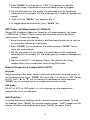
To enter SETUP mode, hold down “SET”key >1 second while in normal
measurement mode. Press “p“or “q” to select parameters and press
“ENTER”for parameter settings. To exit any setting, press “Esc” key.
Note: P1.0 memory transmitting function is not available in this model.
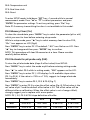
P2.0 Memory Clear (CLr)
To clear the stored data, press “MODE” key to select the parameter (pH or mV)
which you want to clear before entering setup mode.
While in setup mode, press “p“ key to select memory clear function P2.0,
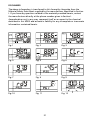
“CLr” icon appears on LCD (Fig.6)
Press “ENTER” key to enter P2.1.The default “ NO” icon flashes on LCD. Press
“p“ key to change and then press “ENTER” key to confirm.
NOTE: This procedure will clear 99 memories at a time. Please consider
carefully before delete.
P3.0 Electrode-for pH probe only (ELE)
To view the pH electrode data (slope & offset value) from WT-80:
Press “MODE” key to select the mode as pH before entering setting mode.
Press “p“ to select P3.0 while in setting mode, “ELE“ appears on the LCD.
Press “ENTER” key to enter P3.1, LCD displays 1of 4 available slope values
(P3.1 to P3.4). If the value is <75% or >115%, suggest to change electrode
immediately.
Press “ENTER” key to review P3.2, P3.3 & P3.4 (Fig. 7)
Press “ENTER” to enter P3.5 to view the offset value.(Fig. 8) Offset value is the
mV value of pH 7 and the default offset value is 0.0. The offset value will be
different after re-calibration. When the offset value is out of range +60mV,
strongly suggest you to replace with a new probe.
NOTE: P3.1, 3.2, P3.3 & P3.4 slope definition of buffer:
P3.1
P3.2
P3.3
P3.4
NIST
0.00~4.01
4.01~6.86
6.86~9.18
9.18~14.00
NON-NIST
0.00~4.50
4.50~7.00
7.00~9.50
9.50~14.00
6