1
ADJUSTING FOR RIGHT OR LEFT LEG
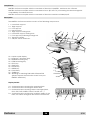
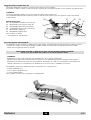
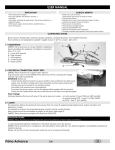
The KINETEC Performa is designed anatomically. Because of this the thigh
slide (29) should always be placed on the same side as the leg to
be mobilised.
2
5
29
To change legs, proceed as follows:
- Withdraw the hip bar (29) from thigh support bar (B). (2).
- Slide the hip bar into the thigh support bar on the other side of the
exerciser and attach the hip bar on the thigh support.
(a index confirms the good position)).
IMPORTANT: if the knobs (5) are not tighten the device stops and the display
reads SERVICE D2.
Therefore it is possible to move MANUALLY the machine by depressing the key
- or + , for more than 3 seconds.
Setting up the patient
Place the KINETEC Performa machine in a position that will be comfortable for the patient.
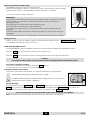
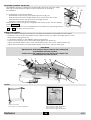
- Measure in cm or inches the length of the patient’s femur (L); adjust the thigh support to this
measurement using knobs (5).
- To install the patient on the KINETEC Performa machine.
- Push the foot plate (3) up to the patient and tighten the knobs (6).
- Adjust the plantar flexion (40°) or the dorsal flexion (30°) of the foot, with the knobs (7).
- Adjust the internal (30°) or external (30°) flexion of the foot, with the knob (30).
IMPORTANT
Adjust the axis of the patient’s hip (31) with the axis rotation (32)
of the KINETEC Performa machine,
and the axis of the patient’s knee (33) with the axis rotation (34)
of the KINETEC Performa machine.
3
7
6
33
34
L
30
31
5
32
Options
Trolley for all CPM
Part number to order: 4655001053
Performa
Cart for bed use
Part number to order: 4665003297
Performa adaptation plate
Part number to order: 4665003560
EN
6/10